How to Automate Chasing Clients for Tax Documents (Without the Nagging)
Hello, and welcome to the part of tax season nobody puts on the brochure.
Picture a February where nobody on your team has to type just following up on your W-2
ever again.
In most small firms, chasing missing tax documents is a person with a spreadsheet, an inbox and a lot of patience.
The client means well, of course, and the 1099 really is somewhere in the kitchen drawer, next to the shoebox of receipts.
Short answer: To automate chasing clients for tax documents, build a personal checklist for each client from last year’s return, send it as a no-login link or text, and let software remind them on a schedule until each item arrives. AI then checks every upload for blur, missing pages and the right tax year, and pre-sorts the lines for staff review.
What does it mean to automate chasing clients for tax documents?
Automating the tax document chase means software does the asking, the reminding and the first look, while your staff only handle the exceptions.
Today someone compares each client’s folder with last year’s return, writes a follow-up, waits, and opens whatever comes back. The automated version runs that same loop for every client at once, every day, without anyone opening a spreadsheet.
It has three parts, and most firms only have the first one today.
- The chase: a checklist per client and reminders that stop on their own once every item is in.
- The check: every upload is looked at the moment it arrives, so a blurry photo is re-requested that day, not three weeks later.
- The sort: receipts and statements are read, and their lines are pre-categorized before an accountant opens them.
How much time does chasing tax documents cost a firm?
Chasing tax documents usually costs a firm dozens of staff hours per season, because each follow-up is only a few minutes and nobody adds them up.
| Clients | Follow-ups per client | Minutes per follow-up | Hours per season | Cost at $35 an hour |
|---|---|---|---|---|
| 100 | 3 | 4 | 20 | $700 |
| 300 | 3 | 4 | 60 | $2,100 |
| 300 | 5 | 4 | 100 | $3,500 |
| 600 | 3 | 4 | 120 | $4,200 |
Assumptions, compiled by Accounting Firm Automation on November 26, 2026: 4 minutes covers opening the client’s folder, working out what is missing, writing the message and noting it. Three follow-ups is a modest season; $35 an hour is a rough loaded cost for a staff accountant or admin. Swap in your own numbers.
Here’s the catch: the table leaves out the second round. A blurry statement found in March means a new request, a new wait, and a return that slides toward an extension.
How does an automated tax document chase work, step by step?
An automated tax document chase follows the same six steps a careful staff member follows, only for every client at the same time.
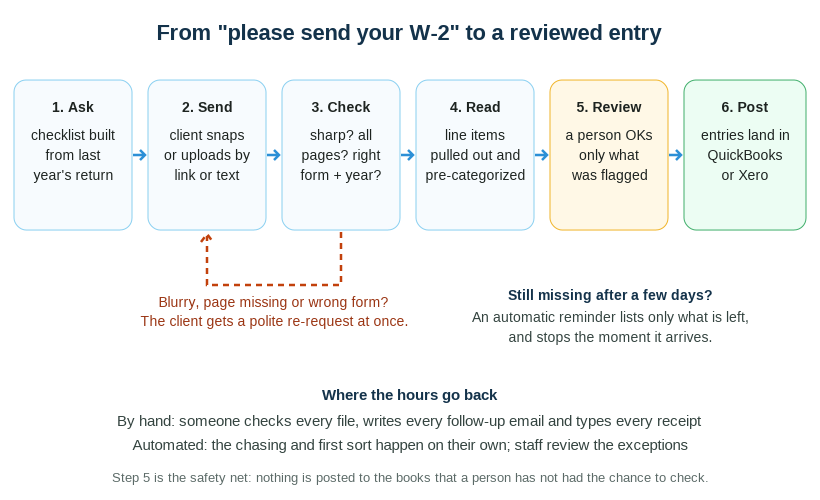
- Ask. A checklist is built per client from last year’s return: two W-2s last year means two W-2s asked for this year, plus the brokerage 1099 and the mortgage interest statement.
- Send. The client gets one link by email or text. They snap a photo or upload a PDF, with no password to remember.
- Check. Software looks at each file at once: sharp enough to read, all pages present, the right form, the right tax year, the right person’s name.
- Read. Amounts and line items are pulled out, and receipts and bank lines get a suggested category.
- Review. Staff see the original next to the extracted values and approve, fix or reject. Anything unusual waits here.
- Post. Approved bookkeeping entries go to QuickBooks Online or Xero with the source document attached; tax forms go to the client’s file for the preparer.
Whatever is still missing loops back into the reminder schedule. The client is only ever asked for what is left, which is the polite part.
How often should automated document reminders go out?
Automated document reminders work best on a short, rising schedule that lists only the missing items and stops the moment the checklist is complete.
TaxDome’s own blog gives a simple example: a client who doesn’t respond to an upload request within four days gets a short reminder. Karbon’s workflow page says reminders go out on the dates you set
. A reasonable starting cadence looks like this.
- Day 0: the personal checklist goes out, with a one-line reason for each item.
- Day 4: a friendly reminder listing only what is still missing.
- Day 10: the same list by text message, since an email may simply be buried.
- Day 18: a firmer note naming the deadline and what happens after it, such as an extension.
- After that: a task for a person to call. Some clients just need to hear a voice.
Time the first message to when documents actually exist. For tax year 2026, the IRS says employers must furnish W-2 copies to employees by February 1, 2027, so a W-2 reminder in mid-January only teaches clients to ignore you.
Can software tell if an uploaded PDF is blurry or missing pages?
Yes, software can flag most blurry, cut-off or incomplete uploads the moment they arrive, which is the step most document portals skip.
A portal usually only knows that a file landed. Karbon’s client portal page says it plainly about its uploads: It doesn’t read or classify the file itself.
The check is the part you add on top.
| Problem | How software spots it | What the client hears |
|---|---|---|
| Blurry or dark photo | Text too small or unreadable for OCR, low confidence scores on the key fields | Could you retake this in better light? |
| Missing pages | Page 2 of 5printed on the page, but only 2 pages uploaded; statement balances that don’t carry over | We got pages 1 and 2 of your Chase statement. |
| Wrong document | A paystub uploaded where a W-2 was asked for; a 2025 form instead of 2026 | This looks like last year’s form. |
| Wrong person | The name or last four digits don’t match the client or spouse on file | A staff member takes a look first |
| Password-locked PDF | The file cannot be opened for reading | Please send it without the password. |
The thresholds are documented. Azure AI Document Intelligence lists a minimum text height of 12 pixels for a 1024 x 768 image, about 8-point text at 150 dots per inch, and asks for password locks to be removed first. A vision-capable AI model can also be asked directly whether a page is legible and complete.
Which tools already chase clients for tax documents, and which ones read them?
Practice management tools such as Karbon and TaxDome already chase clients for documents, while capture tools such as Dext and Hubdoc read receipts; few firms connect the two.
Honestly, the kindest thing a reminder system does is take the awkwardness out of it. Your team stops being the people who nag, and the client simply sees a short list that gets shorter.
| Tool | Chases clients | Reads the document | Posts to the books |
|---|---|---|---|
| Karbon | Yes, scheduled client reminders (Business and Enterprise plans) | No, tracks uploads against the checklist | No |
| TaxDome | Yes, client requests with reminders, no client login needed | Its help center mentions document checklists; confirm what your plan checks | No |
| Dext | No | Yes, receipts and invoices by phone, email, WhatsApp or upload | Yes, publishes to Xero, QuickBooks and others |
| Hubdoc (Xero) | No | Yes, contact, date, total and invoice number | Yes, to Xero |
| QuickBooks Online receipts | No | Yes, from the mobile app or a forwarding email | Yes, to QuickBooks Online for review |
The gap sits in the middle column. Chasing tools know a file arrived; capture tools read bookkeeping paper but don’t chase anyone. A custom layer joins them: it reads every upload, re-requests the bad ones, and hands clean files to whichever capture tool you already use.
For price, Karbon’s public pricing page lists its Business plan, the one with automatic client reminders, at $89 per user per month billed annually.
How do client receipts become categorized entries in QuickBooks or Xero?
Client receipts become categorized entries when a capture step reads each line, suggests a category from the client’s history, and posts it to QuickBooks or Xero after review.
Dext says it extracts supplier, date, totals, line detail, tax, currency and invoice number, and can publish straight into the accounting software. Hubdoc imports the client’s chart of accounts from Xero, and supplier rules decide how documents are coded.
In QuickBooks Online, an administrator can create a forwarding email address for receipts, and the mobile app has a Snap receipt option. Captured receipts wait for review before they become transactions.
The messy part is the bank statement with 400 lines and three mystery transfers. Rules handle the repeat vendors; an AI suggestion handles the rest, marked as a suggestion; a person decides on Venmo, $640, no memo
.
Do clients really need a portal login to send tax documents?
No, clients don’t need a portal login to send tax documents; a secure one-time link or a text message reply gets far more of them to do it.
The forgotten password is where many uploads die. Karbon says clients can finish requests without creating an account or password
, using a link sent by email.
Text works too. With an SMS service such as Twilio, a client’s photo reply reaches your system as a media link (Twilio’s NumMedia and MediaUrl0 fields), so reply to this text with a photo of your 1098
becomes an upload.
One honest limit: phone photos of a 12-page brokerage statement are painful for everyone. Offer the link for long PDFs and the text for single receipts and forms.
Is it safe to collect tax documents by text and web link?
Collecting tax documents by text and web link can be safe, provided files land in encrypted storage you control and your written security plan covers the new step.
The IRS reminds tax professionals that Federal Trade Commission rules require professional tax preparers to create and enact security plans
. Its Protect your clients, protect yourself page points to Publication 4557 and Publication 5709 on writing that plan.
For the AI step, pick a provider whose business terms say your documents are not used for training, and keep the originals in your own storage. That is the same care you already give the file cabinet.
How do you set up automated document chasing before tax season?
Set up automated document chasing in December, so the checklists and reminders are tested before the first W-2 arrives.
- Pull last year’s document list per client from your tax software or practice management tool.
- Write the messages once in plain words: the checklist, three reminders and the deadline note.
- Pick the channels: link by email for everyone, text for clients who opted in.
- Decide the upload checks: legibility, page count, tax year, name match.
- Choose where clean files go: the client folder, Dext, Hubdoc or QuickBooks receipts.
- Run it on 10 friendly clients first and read every message they get.
If the pilot doesn’t save your team real hours in its first two weeks, change the schedule or stop it. A tool that creates more calls than it saves isn’t worth keeping.
Done well, the chase becomes background noise, and your February goes to the returns instead of the reminders.
Give your team one season where the chasing runs itself, and see what they do with the hours they get back.
Sources and further reading
- Karbon: client portal and client requests
- Karbon: workflow automation and scheduled client reminders
- Karbon: pricing (Business plan includes automatic client reminders)
- TaxDome: client requests
- TaxDome blog: ways to get documents from clients
- Dext: data capture for accounting practices
- Xero App Store: Hubdoc
- Intuit: how to capture and manage receipts in QuickBooks Online
- Microsoft: Azure AI Document Intelligence receipt model and input requirements
- Twilio: incoming message webhook parameters (NumMedia, MediaUrl)
- IRS: General Instructions for Forms W-2 and W-3 (furnishing deadline)
- IRS: Protect your clients, protect yourself (security plans, Publications 4557 and 5709)
Questions and answers
Can I use AI to chase clients for missing tax documents automatically?
Yes. Software can send each client a personal checklist, remind them on a schedule, and stop when everything is in, while AI checks each upload for blur, missing pages and the right tax year. A person should still review flagged files and anything unusual before it reaches a return or the books.
How many reminders should I send a client for tax documents?
Three to four automated reminders over two to three weeks is a common starting point, each listing only the missing items, followed by a call from a person. Change the cadence after the first season based on who actually responded.
Will clients be annoyed by automatic reminders?
Fewer than you might expect, as long as each reminder names exactly what is still missing and stops on its own once the checklist is complete. Vague please send your documents
emails are what annoy people.
Does this work with QuickBooks Online and Xero?
Yes. Receipts and statements can be passed to the capture tools those platforms already support, such as QuickBooks Online receipt capture, Hubdoc for Xero or Dext for both, where categorized entries are reviewed and published.
Can clients send tax documents by text message?
Yes. An SMS service such as Twilio delivers a client’s photo reply to your system as a media link, so a text can become an upload. Keep sensitive numbers out of the message itself and use a web link for long PDFs.