
Auto Repair Shop Automated Text Updates: End the "Is It Ready?" Calls
Hello, and here’s to a quieter front counter.
If your front counter phone rings every time a customer wonders about their car, this guide is for you.
Most shops already know the status of every repair order, because it sits right there in the shop management system.
The trouble is that the customer can’t see it, so they call, and your service advisor stops writing an estimate to walk back and ask the tech.
Short answer: Auto repair shop automated text updates are short SMS messages your shop system sends on its own when a repair order changes status: checked in, inspection done with a photo approval link, work started, delayed, and ready for pickup. The texts go only to customers who agreed to them, prices come from the shop system, and an advisor reviews the inspection wording.
What are automated text updates for an auto repair shop?
They are status messages that leave the moment something changes on the repair order, without anyone typing them.
- Trigger: a status change in Tekmetric, Shopmonkey, Mitchell 1 Manager SE or CCC ONE, such as “inspection complete” or “invoice closed”.
- Message: a short text with the car, the news and the next time the owner will hear from you.
- Reply path: answers land in the shop’s text inbox, where an advisor sees them.
- Opt-out: the customer can reply STOP at any time.
Customers want this. In a consumer survey, the dealer marketing company Affinitiv found that 64% of customers expect their service advisor to respond to them on the status of their vehicle within 15 minutes
(Affinitiv).
Fifteen minutes is shorter than most diagnoses. A text that says we have your car, first update by 11
answers that expectation before the customer has time to pick up the phone.
How much time do status calls cost a service advisor?
Usually 45 minutes to 3 hours a day, depending on car count, because every call also means a trip to the bay.
A status call is rarely just the call. The advisor puts the customer on hold, finds the tech, waits for the tech to come out from under the car, comes back, and then tries to remember where the estimate stood.
| Cars a day | Status calls per car | Advisor minutes a day | Hours a month (21 workdays) | Monthly cost at $25 an hour |
|---|---|---|---|---|
| 10 | 1.5 | 45 | 15.8 | $394 |
| 20 | 1.5 | 90 | 31.5 | $788 |
| 40 | 1.5 | 180 | 63.0 | $1,575 |
| 40 | 2 | 240 | 84.0 | $2,100 |
Assumptions: 3 minutes per call including the walk to the bay, 21 working days a month, and $25 an hour as a rough loaded cost for advisor time. These are our round numbers, not a survey; count your own calls for one day and swap them in.
The bigger cost doesn’t show in the table. An estimate interrupted four times goes out later, and a car waiting for approval is a bay that isn’t billing.
Which status texts should every repair order send?
Five, one for each moment a customer would otherwise call.
| Moment | Trigger in the shop system | Example text | Human check? |
|---|---|---|---|
| Checked in | Repair order opened or vehicle arrived | Hi Dana, we have your 2017 Civic. First update by 11 a.m. | No |
| Inspection done | Inspection marked complete with photos | Your brakes and tires are checked. 2 items need your OK: [link] | Yes, the advisor reviews the wording |
| Work started | Jobs approved and moved to in progress | Thanks for approving. Work has started; we expect it ready about 4 p.m. | No |
| Delay | Promised time changed or part on back order | The part arrives tomorrow morning. New time: noon. Sorry for the wait. | Light, the advisor confirms the new time |
| Ready | Invoice closed | Your Civic is ready. Total $412.80. We’re open until 6. Pay here: [link] | No, the total comes from the invoice |
The delay text matters most. Bad news sent early feels like service; the same news discovered at 5 p.m. feels like a broken promise.
How does a status change turn into a text automatically?
A small service watches the shop system, picks the right message, fills in the facts and sends it through a registered texting number.
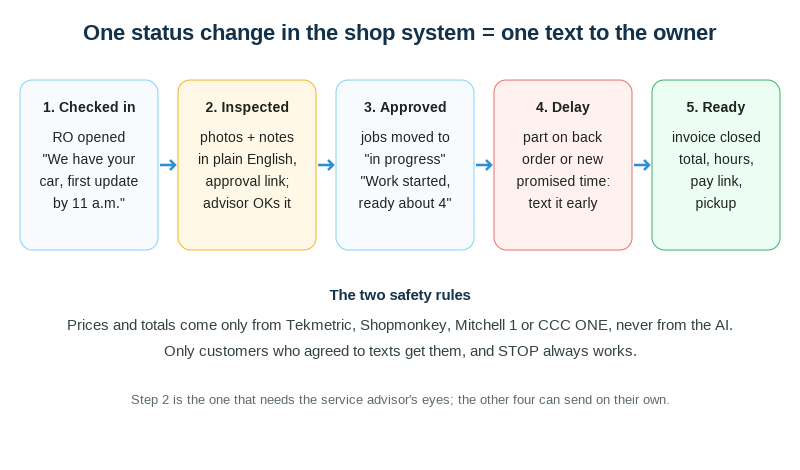
The diagram, as text:
- Checked in: the repair order opens and a
we have your car
text goes out. - Inspected: photos, plain-English notes and an approval link, sent after the advisor’s OK.
- Approved: “work started” with a ready time.
- Delay: the new time, sent early.
- Ready: the total, shop hours, a pay link and pickup.
Prices always come from the shop system, never from the AI, and only customers who agreed to texts receive them.
- Watch. The service listens for repair order changes. Shopmonkey, for example, documents webhooks that report changes to its records through its developer API, and its orders carry a workflow status.
- Decide. A rule maps the change to one of the five messages and checks that the customer opted in to texts.
- Fill in. The customer’s first name, the vehicle, the promised time and the total are pulled from the repair order itself.
- Send. The message goes out through a texting provider from a number registered for business texting.
- Log. The text is saved on the repair order, and any reply lands in the advisor’s inbox.
If your shop system already sends some of these texts, the service only fills the gaps, such as the delay message or the plain-English inspection summary.
How do you explain a technician’s notes to a customer in plain English?
An AI model can rewrite the tech’s shorthand into two calm sentences, with the advisor approving the wording before it is sent.
A tech writes LF lower control arm bushing torn, recommend replace w/ align.
The customer reads The rubber cushion that holds your front left wheel steady is torn. Replacing it keeps the steering tight, and we’ll realign the wheels afterward.
- What the AI reads: the tech’s note, the inspection photo labels and the job name.
- What the AI writes: a short explanation and why it matters, in everyday words.
- What the AI never writes: prices, labor hours, part numbers or safety promises. Those come from the estimate.
- Who approves: the service advisor, with one tap, before the link goes out.
Tekmetric describes the same idea for inspections: techs attach photos or videos to the estimate so the customer can see the problem before approving, in its digital vehicle inspection guide. The plain-English layer simply makes the note under the photo readable.
Can Tekmetric, Shopmonkey, Mitchell 1 or CCC ONE send these texts?
Yes, all four have texting built in, but each one automates a different part of the job.
There’s something kind about a text that arrives before the worry does. The customer at work gets their answer, and the tech under the car gets to stay there.
| Software | Texting the maker describes | Outside access for custom texts |
|---|---|---|
| Tekmetric | Two-way texting from one shop number, photos, videos and repair progress, approvals by text | A REST API for shop data, through Tekmetric’s API access |
| Shopmonkey | Text or email estimates and inspections; customers approve or decline each service | A documented public API with webhooks at shopmonkey.dev |
| Mitchell 1 Manager SE | MessageCenter two-way texting from the work-in-progress, order and appointment screens, with templates; SocialCRM sends automated appointment reminders and thank-you texts | Ask Mitchell 1 which integrations your version supports |
| CCC ONE | Update Plus sends repair status updates by text or email once a repair order or arrival is entered, and again when the estimated completion date changes or the repair is complete | Built into CCC ONE workflow; ask CCC about add-ons |
For a collision center, CCC’s Update Plus help page also ties what is shared to the payer on the workfile, which matters when an insurer is paying.
Is the built-in texting enough, or do you need a custom automation?
Start with what your shop system already sends; add a custom layer only for the gaps you can name.
Built-in texting is the right first step when the messages you want are templates: reminders, “ready for pickup”, review requests. It costs nothing extra on many plans and lives where your advisors already work.
A custom layer earns its keep when you want something the templates can’t do:
- plain-English rewrites of every inspection note before the approval link goes out;
- an automatic delay text when a part’s arrival date moves;
- one set of rules across two locations running different software;
- for collision work, status texts tied to insurance supplement steps.
Either way, the shop management system stays the source of truth. The automation reads it and writes notes back; it doesn’t replace it.
What texting rules must an auto shop follow?
Text only customers who agreed, register your business texting number, and honor STOP immediately.
- Register the number. Twilio’s documentation puts it plainly:
Anyone sending SMS/MMS messages over a 10DLC number from an application to the US must register for A2P 10DLC.
Most shop systems handle this for their built-in texting; a custom setup must do it itself (Twilio A2P 10DLC). - Get consent at check-in. Ask
May we text you updates about this repair?
and record the answer on the customer record. CCC ONE, for example, asks staff to confirm the customer’s consent before texts are switched on. - Keep status texts about the repair. Coupons and promotions are marketing, and they carry stricter consent rules than service updates.
- Make STOP and HELP work. The wireless industry’s CTIA Messaging Principles and Best Practices expect opt-out and help keywords to be honored.
- Name the shop in every text.
Main Street Auto: your Civic is ready
is clearer than a bare number.
What makes customers call even with automatic texts?
Vague texts, wrong times and silence after a delay, and each one has a simple guard.
- A text with no time in it.
Your car is being worked on
invites a call. Guard: every text says when the next update comes. - A promised time that is already stale. Guard: the delay text fires whenever the promised time moves, not only when someone remembers.
- An inspection text that sounds like the car is ready. Guard: start inspection texts with
Your inspection is done
and keep “ready” for the ready text. - A reply nobody sees. Guard: replies go to the shared inbox with an alert, and an unanswered reply after 15 minutes pings the advisor.
- Too many texts. Guard: one text per real change; no hourly “still working” messages.
Keep a phone number in the ready text anyway. Some customers will always prefer to call, and that’s fine.
What does a sensible first week with automated updates look like?
Turn the texts on one at a time and count the calls each day.
- Day 1: tally inbound status calls by hand for one full day; that is your baseline.
- Day 2: switch on the “checked in” and “ready” texts, which need no human review.
- Day 3: add the delay text and make sure the promised time is updated in the shop system.
- Days 4 and 5: add inspection texts with plain-English notes; the advisor approves each one.
- End of week: compare status calls with Day 1 and read every customer reply.
If the counter phone isn’t quieter by Friday, look at the replies first. They usually tell you exactly which text was missing a time or a reason.
The goal isn’t more texts. It is fewer interruptions for the advisor, and fewer surprises for the person waiting on their car.
Give your advisors one week of updates that send themselves, and see how much of the day comes back.
Sources and further reading
- Affinitiv: Text, Please — your vehicle service customers want status updates (consumer survey)
- Tekmetric: customer communication and two-way texting
- Tekmetric: digital vehicle inspection guide
- Tekmetric API
- Shopmonkey: auto repair estimate software (text-to-approve)
- Shopmonkey Developer: webhook resource
- Mitchell 1: MessageCenter texting in Manager SE
- Mitchell 1: SocialCRM automated text messaging
- CCC: consumer engagement for collision repairers
- CCC ONE Help: Update Plus overview
- Twilio: A2P 10DLC registration
- CTIA: Messaging Principles and Best Practices
Questions and answers
Can I use AI to send automated text updates from my auto repair shop?
Yes. AI helps most with the inspection text, rewriting a technician’s notes into plain English before the approval link goes out. The status triggers, prices and totals should come straight from your shop management system, and a service advisor should approve the AI’s wording.
Do I need customer permission to text repair updates?
Yes. Ask at check-in whether the customer wants text updates about the repair and record the answer. Texting providers also require a registered business number (A2P 10DLC in the US), and every customer must be able to reply STOP.
Which status texts reduce phone calls the most?
The check-in text with a first-update time, the delay text when the promised time moves, and the ready text with the total. Each answers the question a customer would otherwise phone in to ask.
Can customers approve repairs by text?
Yes. Tekmetric and Shopmonkey both let a shop text an estimate with inspection photos so the customer can approve or decline each job from a link. The approval is recorded on the repair order.
Will automated texts replace my service advisor?
No. The texts take over the repeated status updates, so the advisor has more time for estimates, explaining bigger repairs and the calls that need a person. The advisor still reviews inspection wording and answers replies.