HVAC Answering Service That Books Appointments (Not Just Messages)
Good evening to every shop whose phone rings right as dinner hits the table.
Picture your phone lighting up at 9 p.m. on the hottest night of June, and a job landing on tomorrow’s board without anyone in your shop picking up.
Most HVAC shops still send that call to voicemail or to an operator who takes a message, and the caller rarely waits for the callback.
A booking answering service closes that gap, because it finishes the conversation the way your best dispatcher would.
Short answer: An HVAC answering service that books appointments answers your overflow and after-hours calls, sorts emergencies from routine work, offers the caller a real open slot from your schedule, and writes the job straight into ServiceTitan, Jobber or Housecall Pro. It texts the customer a confirmation and alerts the on-call technician. No voicemail, no callback tag.
What is an HVAC answering service that books appointments?
It is an answering line, staffed by people or run by an AI voice agent, that is allowed to put jobs on your schedule instead of only writing down names.
A classic answering service takes a message and emails it to you. A booking answering service reads your live availability, picks a slot with the caller, and creates the job with the right job type, address and notes.
The difference shows up the next morning. Your dispatcher opens a board with jobs on it, not a stack of “please call back” notes to work through before the phones heat up again.
How is booking different from voicemail or message-taking?
Booking ends the call with a promise on the calendar; the other options end it with a promise to call back.
| Option | What the caller gets | What lands in your software | Who works it next |
|---|---|---|---|
| Voicemail | A beep | Nothing, until someone listens | Your office, the next morning |
| Live message-taking service | A friendly person and someone will call you | An email or text with the message | Your office, which still has to call and book |
| Live booking service | A person who picks a time with them | A job, if the operators have seats in your software | Your dispatcher, to review |
| Built-in AI receptionist | A voice agent that books from your own booking rules | A job or request in ServiceTitan, Jobber or Housecall Pro | Your dispatcher, to review flagged calls |
| Custom AI pipeline | A voice agent with your own triage script | A job through the software’s API, plus texts | Your dispatcher, with a daily summary |
The last three rows are what people mean when they search for an HVAC answering service that books appointments. The rest of this guide is about how those three really work.
How many HVAC calls come in after hours?
For residential HVAC on ServiceTitan, between about 1 in 10 and 1 in 7 inbound calls arrive outside business hours, depending on the month.
ServiceTitan’s State of the Trades after-hours data, published June 3, 2026, counts off-hours as weekdays before 8 a.m. or after 5 p.m., plus weekends, across 2025 call records from its customers.
| Measure | Low month | High month | Relative rise |
|---|---|---|---|
| All off-hours calls | 9.8% (October) | 14.1% (June) | about 45% |
| Weekday evenings and early mornings | 6.8% (October) | 9.3% (June) | about 37% |
| Weekend calls | 2.95% (October) | 4.9% (August) | about 67% |
The busiest off-hours window in that data is 5 p.m. to 9 p.m. local time. ServiceTitan’s own summary puts it plainly: Air conditioners rarely fail at convenient times.
ServiceTitan notes the figures are not nationally representative and cover residential calls. Commercial service lines follow their own rhythm, so count your own after-hours calls for one month before you size anything.
What does a missed after-hours HVAC call cost?
It depends on your call volume and ticket size, but a small calculation shows why June evenings matter most.
| Inbound calls a month | After-hours calls at 9.8% (October) | After-hours calls at 14.1% (June) | June job value if 1 in 4 becomes a $500 job |
|---|---|---|---|
| 300 | 29 | 42 | about $5,300 |
| 600 | 59 | 85 | about $10,600 |
| 1,000 | 98 | 141 | about $17,600 |
Assumptions: the after-hours shares come from ServiceTitan’s 2025 residential data above. One in four after-hours calls turning into a job and $500 a job are round numbers we chose for the example, not measured results. Swap in your own booking rate and average ticket.
The table shows the value at stake, not the value lost. Some voicemail callers do wait for you. The ones who don’t are the people with a dead system and a phone full of other contractors’ numbers.
How does an AI answering service actually book the appointment?
It follows the same six steps a good night dispatcher follows, with your rules written down so it never improvises.
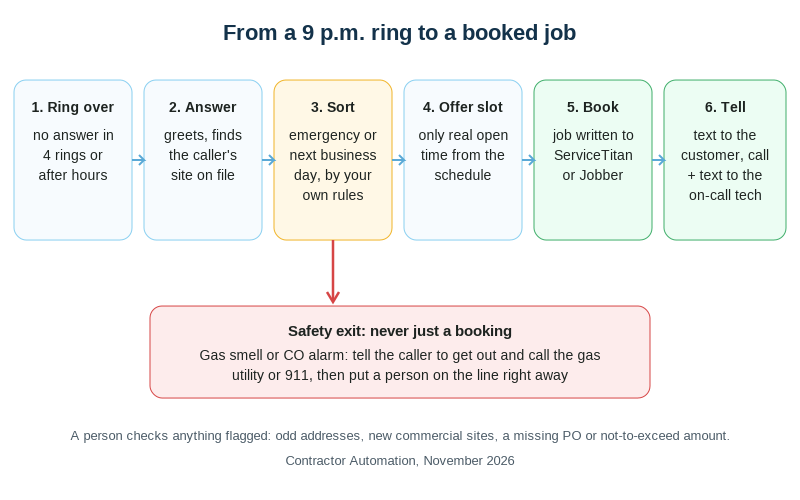
- Ring over. Your main number forwards to the answering line when nobody picks up within a few rings, or every call after closing time.
- Answer. The agent greets the caller in your company’s name, says it is an automated assistant if you choose that, and looks the phone number up in your customer list.
- Sort. It asks what is wrong and matches the answer against your emergency rules (the checklist in the next section).
- Offer a slot. It reads open time from your schedule and offers only slots that exist, such as
tomorrow between 8 and 10.
- Book. It writes the job, with job type, address, equipment notes and the caller’s words, into your field service software.
- Tell. It texts the customer a confirmation and, for an emergency, calls and texts the on-call technician.
Steps 4 and 5 are what separate booking from message-taking. If the agent can’t see real availability, it can only promise a callback, which is voicemail with better manners.
Which after-hours calls should wake the on-call technician?
Only the calls your own rules call emergencies, written as a short list the answering service follows word for word.
Answering services that handle HVAC sort calls this way already; the list below is a starting point to edit with your service manager, not a rule book.
- Safety first, a person on the line now: gas smell, CO alarm sounding, burning smell or smoke from equipment.
- Wake the on-call tech: no heat in freezing weather, no cooling in extreme heat with elderly people, infants or medical needs in the home, water pouring from an air handler.
- Wake the on-call tech (commercial): a walk-in cooler or freezer warming up, a server room losing cooling, a restaurant or store whose only rooftop unit is down.
- Book the first slot tomorrow: system running but weak, a strange noise, a thermostat question, a filter or maintenance visit.
- Book a sales visit: replacement quotes and new equipment questions.
Write your after-hours dispatch fee into the script too. A caller who hears the fee before the tech is woken has made an informed choice, and the tech doesn’t have to collect a surprise at the door.
Can an answering service book straight into ServiceTitan, Jobber or Housecall Pro?
Yes. All three now sell their own AI receptionist that books into their own calendar, and outside services can connect too.
Here’s the quiet truth about after-hours calls: the person on the other end isn’t being difficult, they’re hot, cold or worried, and they just want to hear a time. Give them that time, and most of them are happy to wait for it.
| Platform | Built-in agent | What it books | Who it’s for, per the maker | Published price |
|---|---|---|---|---|
| ServiceTitan | AI Voice Agent | New jobs, including after hours; confirms and reschedules | Residential home service companies in the US and Canada on The Essentials or The Works, with Basic Phones or Phones Pro | Usage-based; every call billed |
| Jobber | Receptionist | Jobs and requests by call or text; reschedules and cancels | Paid Jobber accounts in the US, Canada and the UK | Included on Plus; $99 a month add-on on other plans with 100 conversations, then $0.79 each |
| Housecall Pro | CSR AI | Answers calls and books jobs 24/7 | Housecall Pro accounts | Call answering is a paid feature; price not listed on the page |
ServiceTitan’s AI Voice Agent also calls and texts the assigned technician when Dispatch Pro puts them on an after-hours job, with the date, time, address and job type, and retries once if the tech doesn’t answer. So much for my phone never rang.
Every one of these agents books only from the availability you set up. ServiceTitan’s help center says that without technician shifts, arrival windows and capacity settings, the agent cannot offer appointments or book jobs.
Live answering services can book too. The good ones get user seats in your software and follow your dispatch rules, which you should ask any provider to show you on a real call.
What changes for commercial HVAC, plumbing and electrical calls?
A commercial caller needs different questions, and the built-in agents are mostly written for homeowners.
ServiceTitan lists residential companies as the AI Voice Agent’s audience. A facility manager calling about a rooftop unit at one of six stores needs the agent to ask things a homeowner script never does.
- Which site, and is there a service agreement for it?
- The purchase order number, and any not-to-exceed amount on the work.
- Who can let the tech in, roof access, and any badge or escort rule.
- Whether the contract sets an after-hours response time or rate.
That is why commercial shops often pair their software’s agent with custom rules, or build a line of their own that knows their contract customers by phone number.
What does a custom AI answering line look like?
A custom line is a cloud phone number, a speech layer, an AI model with your script, and a connection to your scheduling software.
- Phone and speech: Twilio ConversationRelay connects a live call to your program over a WebSocket, turns the caller’s speech into text and speaks your program’s text replies back.
- The brain: an AI model reads the transcript, follows your triage rules and decides what to ask next.
- The schedule: the program reads availability and writes the job through your software’s API, such as the ServiceTitan developer platform or Jobber’s GraphQL API.
- The texts: the same Twilio account sends confirmations to the customer and alerts to the on-call tech.
- The morning report: a summary of every call, what was booked and what needs a person.
ServiceTitan’s own Scheduling Pro can drop online bookings either onto the Dispatch Board or into Calls > Bookings. That second inbox is a good landing spot for a new custom line, because a CSR confirms each booking before it becomes a job.
What does an AI answering line cost to run?
The phone and speech minutes are cheap; the build, the AI model and the upkeep are where the real cost sits.
| After-hours calls a month | Minutes at 4 minutes a call | Inbound local minutes at $0.0085 | ConversationRelay at $0.07 a minute | Total with one $1.15 local number |
|---|---|---|---|---|
| 30 | 120 | $1.02 | $8.40 | about $10.57 |
| 85 | 340 | $2.89 | $23.80 | about $27.84 |
| 140 | 560 | $4.76 | $39.20 | about $45.11 |
Prices are from Twilio’s US voice pricing page. Four minutes a call is our assumption. The table leaves out the AI model’s usage, text message fees, any call forwarding charge from your current carrier, and the work to build and maintain the line.
For comparison, Jobber’s Receptionist add-on handling 140 conversations a month would come to $99 plus 40 extra conversations at $0.79, about $130.60, with the build already done for you.
Should you choose a live answering service or an AI one?
Choose by the calls you get, not by the technology: many shops end up with AI first and a person behind it.
- AI fits: high call volume, simple residential bookings, many calls at once on a heat wave night, callers who just want a time slot.
- A person fits: upset callers, complicated commercial accounts, anyone who asks for a human, and every safety call.
- Both fit: the agent books what it can and hands the rest to a live operator or the on-call phone.
ServiceTitan’s AI Voice Agent, for example, transfers to a live agent when the caller asks, when frustration is detected, or when a keyword you chose comes up.
What can go wrong with an answering service that books?
Four things cause most bad first weekends, and each has a plain guard.
- No real availability. If after-hours shifts and arrival windows aren’t set up, the agent can’t book. Guard: build the on-call shift in your software before you switch it on.
- Wrong job type. A maintenance visit booked as an emergency wakes a tech for nothing. Guard: limit which job types the agent may book.
- Texts that never arrive. Twilio says anyone texting US numbers from a 10-digit local number
must register for A2P 10DLC.
Guard: register the brand and campaign before launch (Twilio’s A2P 10DLC guide). - Quiet failures. Forwarding breaks and nobody notices until Monday. Guard: a morning count of calls answered versus jobs booked.
How do you start without risking a busy weekend?
Start with overflow only, review every booking for a week, then widen what the line may do.
- Day 1: write the emergency rules, the fee wording and the job types the line may book, with your service manager.
- Days 2 and 3: send only after-hours calls to the line, with bookings landing where a CSR confirms them.
- Days 4 to 6: read every call summary each morning and fix the script wherever it asked the wrong question.
- Day 7: count calls answered, jobs booked and techs woken, and decide whether daytime overflow goes to the line too.
The aim is simple. Every caller who reaches you at 9 p.m. hangs up with a time on the calendar, and your team starts the morning with jobs instead of callbacks.
Let the line take the 9 p.m. calls for one week, and see how different the morning board looks.
Sources and further reading
- ServiceTitan State of the Trades: HVAC off-hours summer call spike (June 3, 2026)
- ServiceTitan Help: AI Voice Agent for Basic Phones and Phones Pro FAQ
- ServiceTitan Help: virtual agents in ServiceTitan Max (shifts, arrival windows, capacity)
- ServiceTitan: Introducing Scheduling Pro (Dispatch Board or Calls > Bookings)
- ServiceTitan developer platform
- Jobber Help: Receptionist powered by Jobber AI
- Jobber Developer Center (GraphQL API)
- Housecall Pro: AI Team and CSR AI
- Twilio Docs: ConversationRelay
- Twilio: US voice pricing
- Twilio Docs: A2P 10DLC registration
Questions and answers
Can I use AI to answer HVAC calls and book appointments after hours?
Yes. ServiceTitan, Jobber and Housecall Pro all sell AI receptionists that answer calls and book jobs into their own calendars, and a custom voice agent can do the same through their APIs. Keep a person on safety calls, upset callers and complex commercial accounts.
How much does an HVAC answering service that books appointments cost?
Jobber’s Receptionist is $99 a month on most plans with 100 conversations, then $0.79 each, and included on Plus. ServiceTitan’s AI Voice Agent is usage-based. A custom Twilio line costs cents a minute in phone and speech fees, plus the AI model and the build.
Will callers know they’re talking to an AI?
They can, and telling them is the honest choice. Most setups let you write the greeting, so one plain line such as ‘you have reached our automated assistant’ does it. Offering a person on request keeps the callers who prefer one.
Can an answering service book jobs directly into ServiceTitan?
Yes. ServiceTitan’s own AI Voice Agent books new jobs, including after hours, for residential companies with Basic Phones or Phones Pro. Live services and custom lines can book through user seats or ServiceTitan’s API, as long as shifts, arrival windows and capacity are set up.
What happens when a real emergency calls at 2 a.m.?
The answering service follows your emergency rules: it calls and texts the on-call technician, and for a gas smell or CO alarm it tells the caller to get out and call the gas utility or 911, then connects a person. Routine calls get tomorrow’s first open slot.