How to increase brightness to your video clip in DaVinci Resolve 18
Over the years DaVinci Resolve has become a crucial tool for professional video editing. But it's not always easy to transition from software like Premiere Pro for example.
Having said this, simple tutorials that cover fundamental features for video editing, such as adjusting the level of brightness or contrast are in high demand.
How to adjust brightness in DaVinci Resolve
To increase the brightness of a video in DaVinci Resolve 18, you can use the Brightness controls in the Color edit mode (click on Color tab at the bottom of your Resolve UI).
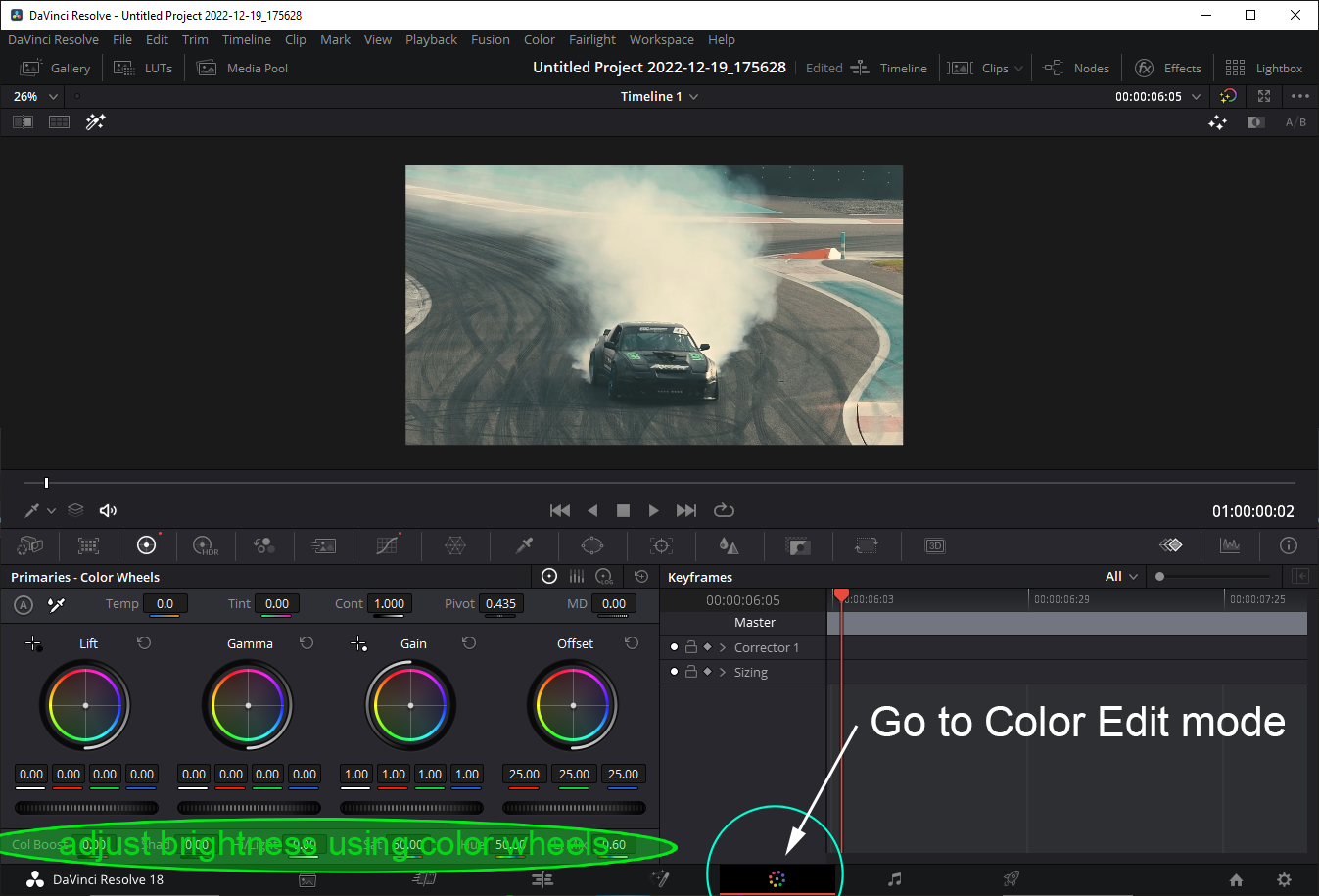
There are 4 color wheels: Lift, Gamma, Gain and Offset, and each produce a slightly different brightness effect. Usually, you'll only want to modify amount of brightness by just a small degree. Adjusting brightness to the lowest or highest level might make your video appear a bit "color washed".
And of course you have your standard color Curve Controls which you can also use to adjust level of brightness you want to have across RGB spectrum (or add or remove individual color levels.)
How to increase or decrease video clip brightness in DaVinci Resolve
Follow these steps to increase or decrease brightness of your video clip:
- Open the video you want to edit.
- Go to the Color edit mode.
- Make sure Color Wheels tab is selected. You will see 4 color wheels, with a horizontal brightness wheel at the bottom of each.
- Under any of the 4 color wheels, drag the brightness wheel to the right to increase the brightness of the video.
You might be typing this into search engine to find this tutorial:
Here are some of the keywords you might be typing into a search engine in order to find this tutorial. This helps this article to be found more frequently.
- how to adjust brightness in davinci resolve
- davinci resolve reduce brightness
- how to change brightness in davinci resolve
- change brightness davinci resolve
- adjust brightness davinci resolve
- davinci resolve change brightness
- davinci resolve brightness contrast
- davinci resolve brightness
- davinci resolve add brightness
- how to increase brightness davinci resolve
- davinci resolve adjust brightness
- davinci resolve brighter
- davinci resolve how to brighten video
- how to change brightness davinci resolve
- davinci resolve how to increase brightness
Please watch this video to support our content network 🙂
How To Merge Video Clips In DaVinci Resolve 17 or 18 DaVinci Resolve 18: How To Increase Brightness (Video Clip) How To Fade Out Video or Audio In DaVinci Resolve 18 (Quick Tutorial) DaVinci Resolve 18 How To Increase Video Clip Speed How To Download, Install & Activate Davinci Resolve Studio 18 or 18.5 (Upgrade From Free Version) How To Activate Davinci Resolve Studio 18 or 18.5 How To Move All Video Clips To The Right In DaVinci Resolve 18 (Quick Tutorial) How To Flip Video Clip Vertically and Horizontally in DaVinci Resolve 17 18 (How To Mirror Clip) How To Gradually Increase Video Clip Speed On A Curve In DaVinci Resolve 18 How To Fade Out Video In DaVinci Resolve 18 (Fade To Black Effect) How To Remove Watermark In Davinci Resolve 18 (Object Removal Tutorial) How To Speed Up Audio Track In DaVinci Resolve 18 (quick tutorial) How To Fade Audio In / Out In DaVinci Resolve (Gradually Change Volume Dynamically On A Curve) How To Crossfade Video In DaVinci Resolve 18 (2 different ways!) How To Split Video Clips In DaVinci Resolve 18 How To Fade In Video Clip In DaVinci Resolve 18 (Fade In From Black) How To Show, Transform and Move Anchor Point In DaVinci Resolve (It's off by default!) How To Crossfade Audio In DaVinci Resolve 18 How To Change Aspect Ratio In Davinci Resolve 18 To HD Square, Vertical Or 9:16 (Mobile) How To Add Watermark In DaVinci Resolve 18 (quick tutorial) How to Change Aspect Ratio in Davinci Resolve 18 Square And Portrait Mode Tutorial How To Increase Speed of a Video Clip Segment In DaVinci Resolve 18 Davinci Resolve 18 Waveform Is Not Showing Up On Audio Track (Quick Fix) How To Change Aspect Ratio In Davinci Resolve | Change Video Resolution Tutorial How To Use Green Screen In DaVinci Resolve 18 (Fastest Tutorial) How To Change Resolution In Davinci Resolve 18 To Vertical 9:16 Adjust Volume In Davinci Resolve 18 How To Track An Object In Davinci Resolve 18 (Quick Tutorial) DaVinci Resolve Rewind Effect (play video backwards) Davinci Resolve 18 Tutorial For Beginners 2024 How To Fix Waveform Not Showing Up In Davinci Resolve 18 How To Add Automatic Subtitles In Davinci Resolve 18 (Convert Audio To Text) How To Separate Audio Track From Video Track In DaVinci Resolve 18 How To Add Subtitles In Davinci Resolve 18 (Transcribe Closed Captions From Audio) Davinci Resolve 18 Dynamic Zoom Tutorial How To Track Object In Davinci Resolve 18 In 2 Minutes How To Open Project Settings In Davinci Resolve 18 How To Remove Green Screen In Davinci Resolve 18 or 18.5 DaVinci Resolve How To Zoom Out Davinci Resolve 18 How To Zoom In and Zoom Out Using Dynamic Zoom How To Remove Sound From Video In Davinci Resolve 18 How To Remove Sound From Video In Davinci Resolve 18 (Remove Music, Save Without Sound) DaVinci Resolve 18 - How To Zoom In And Out On Timeline (and resize track height) Complete Guide To Davinci Resolve 18 Timeline Zoom In and Out Feature