Welcome to this tutorial on how to copy a message ID on Discord. It's a straightforward process, but you'll need to enable Developer Mode first. If you don't, then Copy Message Id will not show up as one of the options when you right click on the message.
Here's the fastest way to get Message Id, just watch this video:
So why do we even need Discord Ids?
- By obtaining a message ID, a user can easily reference or link back to a specific message in a conversation. This is useful in group chats or server channels where important decisions or announcements may have been made. You can share the message ID to direct someone to that exact message without having to screenshot or manually scroll through chat history to find it.
- Server moderators or administrators might need to get message IDs for the purposes of reporting inappropriate behavior or content to Discord or for internal record-keeping. The message ID serves as an unequivocal identifier for each message, making it easier to track actions or violations.
- When developing Discord bots, message IDs can be used for various functionalities. For example, a bot might be programmed to delete a specific message after certain condition is met, or to react to particular message. Having message ID allows the bot to interact with the message in a targeted way.
Your Discord Message Id has the following format:
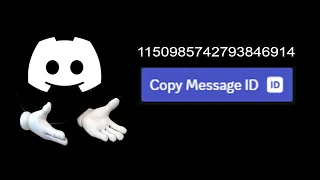
Discord Message Ids are represented by 19 numeric digits. Some may refer to this id as a 16-digit numeral, but that is not the case. It's nineteen characters in length. There are no special characters, alpha characters, underscores or dashes of any kind.
How To Get Message Id On Discord
To get message Id on Discord, follow these steps:
Step 1: Enable Developer Mode
Open Discord and navigate to Settings:
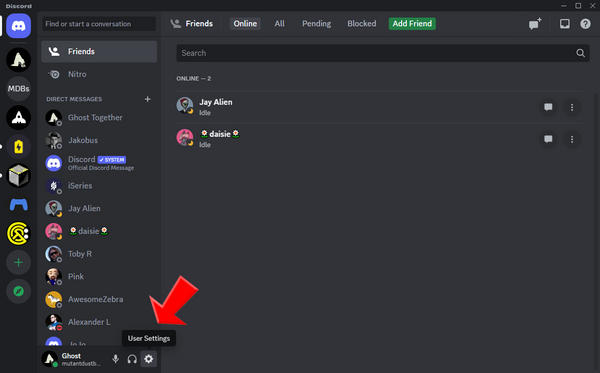
You'll find this option on the lower-left side of the screen, represented by a gear icon.
Once you're in Settings, scroll down until you find the Advanced tab and click on it:
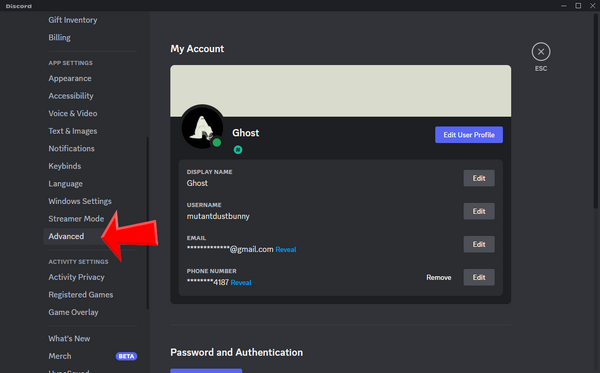
Inside the Advanced settings, you'll see a toggle switch for Developer Mode:
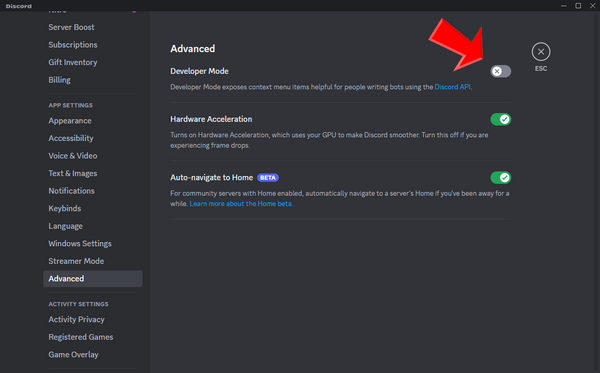
Click on this switch to enable it.
Great! You can now exit out of the Settings menu.
Step 2: Send a Message
In any Discord channel, type a message and send it. For demonstration purposes, I'll type "How to copy a message ID on Discord."
Step 3: Locate the Message Options
After you've sent your message, you'll notice three dots appear next to it. These dots are the "More Options" icon. Click on it to reveal a dropdown menu:
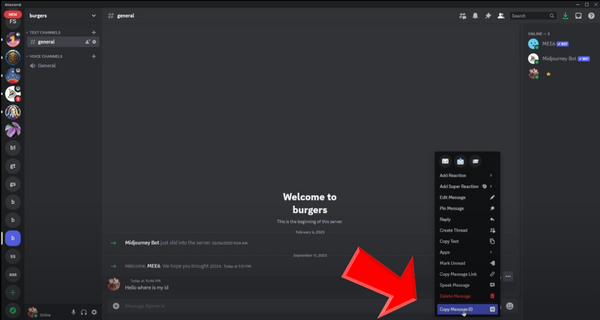
How to locate Message Id option on Discord
Step 4: Copy the Message ID
In the dropdown menu, you'll now see an option that says Copy Message ID. Click on this, and your message ID will be copied to your clipboard.
Step 5: Paste the Message ID
You can paste the copied message ID wherever you need to. Simply right-click in the desired location and choose the Paste option.
And there you have it! You've successfully copied a message ID on Discord. It's a unique identifier for each message, which can be useful for various tasks such as moderation, reporting, or bot development.
What Are Discord Message Ids And When To Use Them
Message IDs on Discord can serve various purposes for different users. Here are three reasons why someone might want to get a message ID:
Referencing a Specific Message
By obtaining a message ID, a user can easily reference or link back to a specific message in a conversation. This is useful in group chats or server channels where important decisions or announcements may have been made. You can share the message ID to direct someone to that exact message without having to screenshot or manually scroll through chat history to find it.
Moderation and Reporting
Server moderators or administrators might need to get message IDs for the purposes of reporting inappropriate behavior or content to Discord or for internal record-keeping. The message ID serves as an unequivocal identifier for each message, making it easier to track actions or violations.
Bot Development and Automation
When developing a bot for Discord, message IDs can be crucial for various functionalities. For example, a bot might be programmed to delete a specific message after a certain condition is met, or to react to a particular message. Having the message ID allows the bot to interact with the message in a targeted way.
Obtaining a message ID is generally straightforward but requires that the user has enabled Developer Mode in their Discord settings.
Here's a video tutorial showing visually, how to obtain Message Id:
How to Copy Message Id On Discord | Get Message Ids Tutorial 2024