How to Automate Phone and Text Orders in Wholesale (Voicemail to ERP)
Good morning, and here’s to every order desk that starts the day decoding last night’s texts.
Here’s to every order that arrives at 10:47 p.m. as a text that just says same as Tuesday plus lemons.
Most wholesale distributors still take a big share of their orders by phone, text, voicemail and emailed order sheet.
Someone in the office then plays back each message, works out what the customer meant, and types every line into the ERP before the pick lists can print.
Short answer: To automate phone and text orders in wholesale, give customers one number for texts and voicemails, let a cloud service transcribe the voicemails and read texts, photos and PDFs, match each line to an exact SKU using the customer’s order history, check quantities and cutoffs, then write a draft sales order into your ERP for a person to approve.
- Orders this covers
- Text messages, photos of order sheets, voicemails, emailed PDFs and spreadsheets
- What does the reading
- Speech-to-text for voicemails, OCR and AI vision for photos, scans and handwriting
- The hard part
- Matching a customer’s own words (“box of breast”, “lg tomatoes”) to one exact SKU and unit
- Where it ends
- A draft sales order in the ERP you already run, with the original message attached
- Who stays in charge
- Your order desk, which approves anything flagged as new, odd or unclear
What does it mean to automate phone and text orders in wholesale?
It means the computer does the listening, reading and typing, and your order desk does the judging.
Your customers keep ordering the way they like: a quick text from the walk-in, a voicemail on the drive home, a photo of the clipboard. Nobody has to download an app or learn a portal.
What changes is behind the scenes. Each message is turned into structured order lines and written into your ERP as a draft, so the person who used to type now only reviews.
Why do restaurants still order from distributors by voicemail and text?
Because it is the fastest thing for a busy chef at the end of a shift, and distributors have always accepted it.
When the food ordering company Pepper raised its Series A in 2021, its announcement said that when restaurants and grocery stores order from distributors, 80% of the time they leave that order on a voicemail
, with no paper trail or order history behind it (Pepper’s announcement as published by Perishable News).
That figure is Pepper’s own, from late 2021. Texting has grown since, but the habit is the same: the customer speaks or types in their own words, and the distributor translates.
Pushing every customer onto an ordering portal works for some accounts. The independent restaurant that has texted your rep for nine years is usually not one of them, and capturing their texts as they are is often the gentler road.
How much time does manual phone and text order entry cost a distributor?
Usually several hours of skilled office time every single morning, often the hours just before the order cutoff.
| Orders a day | Minutes per order | Hours a day | Hours a month (22 delivery days) | Monthly cost at $22 an hour |
|---|---|---|---|---|
| 40 | 5 | 3.3 | 73 | $1,613 |
| 80 | 5 | 6.7 | 147 | $3,227 |
| 150 | 5 | 12.5 | 275 | $6,050 |
| 150 (only reviewing drafts) | 1 | 2.5 | 55 | $1,210 |
Assumptions, all ours: 5 minutes covers playing a voicemail (often twice), finding the account, looking up each item and keying the lines; 22 delivery days a month; $22 an hour as a rough loaded cost for an order desk clerk.
The last row assumes a person spends about 1 minute checking a finished draft instead of typing it. Time your own desk with a stopwatch for one morning and swap in your numbers.
The cost that never shows in the table is the mistake. A text that says four cases
keyed as four eaches, or a misheard item on a voicemail, turns into a short delivery, a credit memo and a phone call nobody enjoys.
How does a text or voicemail turn into a sales order automatically?
It follows the same steps a good order desk follows, only it starts the second the message lands.
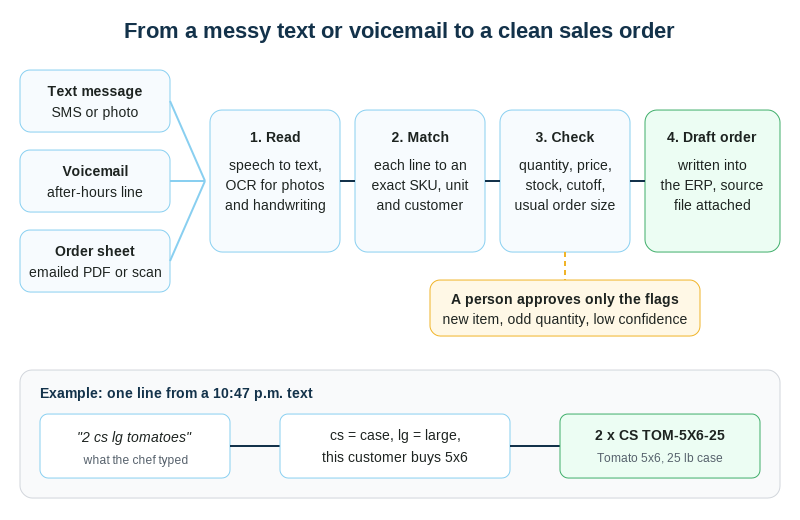
The diagram in words:
- Capture. Texts and voicemails go to one business number. With a provider such as Twilio Messaging, every incoming text is sent to your server as a web request carrying the sender’s number, the message body and links to any attached photos.
- Read. Voicemail recordings go to a speech-to-text service. Photos, scans and PDFs go to an OCR reader such as the Azure AI Document Intelligence Read model, which Microsoft says extracts print and handwritten text from PDFs and scanned images.
- Match. An AI model turns the words into order lines and matches each one to an exact SKU and unit, using that customer’s past orders and your item list.
- Check. Plain rules compare each line with stock, price, the customer’s usual quantities and the delivery cutoff.
- Approve. Clean, familiar orders can go straight to a draft. Anything flagged waits for a person, with the original text or audio right next to the extracted lines.
- Write and confirm. The draft sales order is created in the ERP with the source message attached, and the customer can get a short text back listing what was understood.
How are voicemail orders transcribed?
The phone system records the message, and a speech-to-text service turns the audio into text a few seconds later.
Twilio’s own Record verb has a built-in transcription option, but its documentation says it is off by default, supports only American English and only works on recordings between 2 and 120 seconds.
Many setups therefore send the recording file to a dedicated service such as Google Cloud Speech-to-Text. Its model adaptation lets you give it a phrase set, such as your item names, so it recognizes “burrata” or “Yukon Gold” more often.
How does an order agent know that 2 cases large tomatoes
means one exact SKU?
It looks at three things at once: the words, the item list, and what this particular customer usually buys.
A chef rarely writes your item description. They write what they call it in their kitchen, and your best order clerk knows the translation for every account by heart. The automation has to learn the same translation.
| What the customer sent | What has to be worked out | What decides it |
|---|---|---|
2 cs lg tomatoes | Which tomato, which pack size | This customer bought the 5x6 25 lb case on its last 8 orders |
| “box of breast” | Chicken breast, which cut and case weight | The account’s own alias list, built from past orders |
| “4 lemons” | 4 cases or 4 single lemons | Unit rules: this account never buys eaches, so flag it |
same as Tuesday plus cilantro | Copy an earlier order, then add a line | The order history in the ERP |
the good mozz, 3 | Brand and size of mozzarella | Usual brand for that customer; a new brand is always flagged |
| “10# shrimp 16/20” | 10 pounds of 16/20 count shrimp, by case or catch weight | The item’s selling unit in the ERP |
Each match comes with a confidence level. A high-confidence match on a customer’s regular item can pass straight through; a first-time item or a low-confidence guess goes to the order desk.
Every time a person corrects a match, the correction is saved as an alias for that customer. After a few weeks the list of flags gets noticeably shorter, because the agent has learned each account’s own vocabulary.
Can it create orders in entrée, Produce Pro, QuickBooks or another ERP?
Usually yes, but the route depends on what your ERP opens to outside programs.
The nicest thing about a setup like this is that your customers never notice it. They keep texting the way they always have; your team just stops typing it all twice.
- NECS entrée is an ERP built for food distributors since 1987, covering orders, customers, pricing and financials. Ask NECS which import or integration route your version supports for creating orders.
- Produce Pro Software is an ERP for the produce and perishables trade, now part of Aptean. Ask your account manager how outside orders can be brought into sales order entry.
- QuickBooks Online now has sales orders on Plus, Advanced and Intuit Enterprise Suite (Simple Start and Essentials need the Inventory add-on), and Intuit has announced a Sales Order API for outside programs.
The one question to ask any ERP vendor is plain: How can an outside program create a draft sales order for an existing customer and attach a file to it?
If the honest answer is “only by hand,” the agent can still prepare a finished order list sorted the way your entry screen expects. That alone removes most of the guessing and the typing.
What should a person still check before an automated order ships?
Only the lines that are new, unusual or unclear; everything routine can flow through once you trust it.
- A first order from a new customer or an unknown phone number.
- Any item the customer has never bought before.
- A quantity far above or below that account’s usual order, such as 40 cases where 4 is normal.
- Any line where the case-or-each question was not clear.
- Voicemails with low transcription confidence, such as a call from a loud kitchen.
- Orders that arrive after the delivery cutoff.
- Price questions and substitutions when an item is out of stock.
Keep the original text, photo or audio attached to every order. When there is a dispute about what was ordered, the source message settles it, not anyone’s memory.
What do you need to receive and answer text orders from a business number?
A business texting number and, in the United States, a completed A2P 10DLC registration.
Twilio’s A2P 10DLC documentation says US regulations require registration to send texts from a regular 10-digit business number to US recipients through an application. The steps cover a business profile, a brand and a campaign describing your use.
Plan a little lead time for it, because reviews can take several business days. Many distributors keep their existing order line and simply forward voicemails and texts to the new number while the registration finishes.
Should you buy a food ordering app or build a custom order agent?
Buy when your customers are willing to change how they order; build or customize when they are not.
Companies such as Pepper and Choco sell ordering platforms made for food distributors, and some include AI intake of texts and voicemails. They are a good fit when you want a full ordering app and a customer portal.
A custom order agent fits best when your item list, units and customer habits are unusual, or your ERP is older and needs a specific import. Either way, ask to see a week of your own real messages run through it before you sign anything.
| Question | Ordering app | Custom order agent |
|---|---|---|
| Do customers change habits? | Often yes, for the app or portal | No, they keep texting and calling |
| Fit with an older ERP | Depends on the vendor’s integrations | Built around your ERP’s import route |
| Your own item aliases | Within the product’s features | Shaped to each account’s words |
| Setup effort | Vendor onboarding | A few weeks of mapping and shadow testing |
What does a sensible first week of automated order capture look like?
Start in shadow mode: the agent drafts every order in the background while your desk keeps working exactly as it does today.
- Day 1: export your item list and a few months of order history, and forward a week of real texts, voicemails and order sheets.
- Days 2 and 3: the agent drafts each new order; your clerks compare its drafts with what they typed and correct the matches.
- Days 4 and 5: regular orders from familiar accounts go straight to drafts; everything else is approved with one click.
- End of the week: count the minutes saved and the mistakes caught, then decide whether to keep it.
If it does not save real time on your own customers’ messages in that week, it is not worth keeping. That is the honest test, and it is the one we’d use too.
Give your order desk one week of mornings with drafts already waiting, and see what they do with the time.
Sources and further reading
- Perishable News: Pepper raises $16M Series A (voicemail ordering figure, 2021)
- TechCrunch: Pepper and food distributor ordering by voicemail (Nov 30, 2021)
- Twilio: incoming message webhook request
- Twilio: TwiML Record verb and transcription limits
- Twilio: A2P 10DLC registration
- Google Cloud Speech-to-Text: model adaptation and phrase sets
- Microsoft: Azure AI Document Intelligence Read model (print and handwriting)
- Intuit: create and manage sales orders in QuickBooks Online
- Intuit Developer: Sales Order API announcement
- NECS: entrée food distribution ERP
- Produce Pro Software: ERP for produce and perishables
Questions and answers
Can I use AI to automate phone and text orders for my wholesale business?
Yes. AI can transcribe order voicemails, read texts, photos and PDFs, match each line to an exact SKU from the customer’s history, and create a draft sales order in your ERP. Keep a person approving new items, odd quantities and unclear lines, especially in the first weeks.
Will my customers have to change how they order?
No. Customers keep texting, calling and sending photos of order sheets the way they do now. The automation works behind the scenes, and many setups send a short confirmation text back so the customer sees what was understood.
How accurate is speech-to-text on voicemail orders?
It depends on the line quality and the noise in the kitchen. Giving the speech service your item names as a phrase set helps, and low-confidence transcriptions should always go to a person. Measure it on a week of your own voicemails before trusting it.
Can it read handwritten order sheets?
Often, yes. OCR services such as Azure AI Document Intelligence read handwritten text from photos and scans. Clear photos work best; smudged or cut-off sheets get flagged for a person to check.
Do I need a new ERP to automate text and voicemail orders?
No. The order agent sits in front of the ERP you already use, such as entrée, Produce Pro or QuickBooks Online, and writes draft orders through its API or import tool. If neither exists, it can prepare a ready-to-enter order list.