
How Do You Edit a Video With Claude Code in CapCut or DaVinci Resolve?
Disclosure: this page contains Amazon affiliate links. As an Amazon Associate we earn from qualifying purchases, at no extra cost to you.
Oh, this one makes me giddy, timeline tamer! Say you’ve got a 40-minute recording and one free evening. Claude Code can take the slow part off your plate: reading every word, spotting the dead air and proposing the cuts. It needs a safe place to work, so before anything else, put a copy of your footage on a fast NVMe drive (Amazon search) and leave the original alone.
Short answer: Claude Code edits video by running tools on your computer, not by working inside the timeline by hand. It reads a transcript, writes an edit list, then cuts with FFmpeg or builds a timeline through DaVinci Resolve Studio’s scripting. CapCut documents no scripting route, so you import Claude’s finished cut and captions.
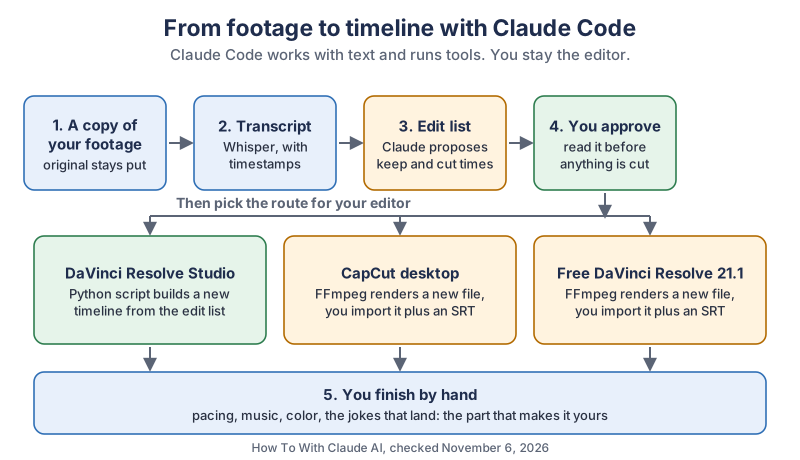
The same five steps in plain text:
- A copy of your footage. The original stays where it is.
- A transcript. Whisper turns speech into text with timestamps.
- An edit list. Claude Code proposes what to keep and what to cut.
- Your approval. You read the list before anything is cut. Then the route depends on your editor: DaVinci Resolve Studio gets a new timeline built by a Python script, while CapCut and free DaVinci Resolve 21.1 get a new file rendered by FFmpeg, plus an SRT caption file.
- Your finish. Pacing, music, color and the jokes that land are still your job.
What can Claude Code actually do to a video?
Claude Code can read text, write files and run programs on your computer, so it edits video by driving other tools. It doesn’t have a timeline of its own. Anthropic’s docs call it an agentic assistant that runs in your terminal
, and list its tools as file work, search, the web and the ability to Run shell commands, start servers, run tests, use git.
For a video project, that adds up to these jobs:
- Reading a full transcript and finding retakes, tangents and long pauses.
- Writing an edit list, a subtitle file or a script.
- Running FFmpeg to render a new cut of your video.
- Driving DaVinci Resolve Studio through Blackmagic Design’s scripting API.
Can Claude Code watch or hear your video?
Plan on Claude Code judging your video from words, not from watching it. The Claude Code pages we read say you can hand Claude an image, but none of them says it can play a video file. It doesn’t hear that your voice cracked on the funny line, or see that you looked away from the lens. A transcript tells it what was said. Pacing, feeling and timing stay with you, and that’s the part viewers notice anyway.
Can Claude Code click around inside an editing app?
Claude Code has a computer use feature that can operate apps on your screen, though this guide doesn’t rely on it. Anthropic’s computer use page says it is a research preview on macOS that requires a Pro, Max, or Ultra plan
in the command-line version, and that it runs on your actual desktop with the apps you approve. For editing, a written edit list is easier to check than a stream of clicks, and you can run it again tomorrow.
Which video editors can Claude Code work with?
Claude Code works best with editors that publish a scripting API or a readable project format. DaVinci Resolve Studio, Premiere and Final Cut Pro all have one, and CapCut’s public pages don’t. We pulled this comparison together from each maker’s own pages.
| Editor | Official way in | What that means for Claude Code |
|---|---|---|
| DaVinci Resolve Studio 21 | Python and Lua scripting, per Blackmagic’s Studio page | Claude Code can write a script that builds a timeline. The README lists imports for AAF, EDL, XML, FCPXML, DRT, ADL and OTIO. |
| DaVinci Resolve free 21.1 | Python scripting moved to Studio in the 21.1 release notes | Plan on no script control. Use FFmpeg, then import the file and captions. |
| CapCut desktop | None documented on the pages we read. CapCut Help says it doesn’t import or export third-party project files. | Use FFmpeg, then import the file and an SRT. |
| Adobe Premiere | UXP, Adobe’s plugin framework with a JavaScript engine | Claude Code can help write a plugin against Adobe’s Premiere API. |
| Final Cut Pro | FCPXML, through File > Import > XML and File > Export XML, per Apple’s guide | Claude Code can read or write an XML timeline file for you to import. |
| Kdenlive | .kdenlive project files, XML based on MLT’s format | Claude Code can read the project as text. Work on a copy of the file. |
| Shotcut | MLT XML, with annotations Shotcut documents | Claude Code can read the file as text. Work on a copy of the file. |
Moving a timeline between tools? OpenTimelineIO, hosted by the Academy Software Foundation, is an open interchange format for editorial timelines, and DaVinci Resolve’s scripting API can export and import it.
What do you need before you start?
You need a Claude plan that includes Claude Code, FFmpeg, a transcription tool and a project folder. All of it runs on your own computer, apart from the Claude conversation itself.
- Claude Code. Anthropic’s quickstart lists a Pro, Max, Ultra, Team or Enterprise subscription, a Claude Console account, or a supported cloud provider. None of the pages we read lists the Free plan.
- FFmpeg. This free command-line tool does the real cutting. FFmpeg’s download page listed version 9.0.2 as the latest stable release, dated September 18, 2026.
- Whisper or whisper.cpp. OpenAI Whisper is an MIT-licensed speech recognition model that runs locally, with a table listing about 6 GB of video memory for its turbo model. whisper.cpp is a C/C++ port that runs through Metal on Apple Silicon.
Install Claude Code with the command for your system, then start it inside your project folder:
# macOS, Linux or WSL
curl -fsSL https://claude.ai/install.sh | bash

# Windows PowerShell
irm https://claude.ai/install.ps1 | iex

# then, in your project folder
claude
Claude Code asks you to log in the first time. Set up three folders: footage for the copy, transcript for the text and renders for every new file.
How do you keep your footage safe when Claude Code edits video?
Keep your original footage out of the project folder, on another drive if you can, and give Claude Code only a copy. This isn’t just good manners. Claude Code’s undo doesn’t cover most of what happens to a video file, because FFmpeg runs as a shell command. Here’s how Anthropic’s checkpointing docs put it:
A file that only Bash commands changed isn’t tracked and stays as it is.
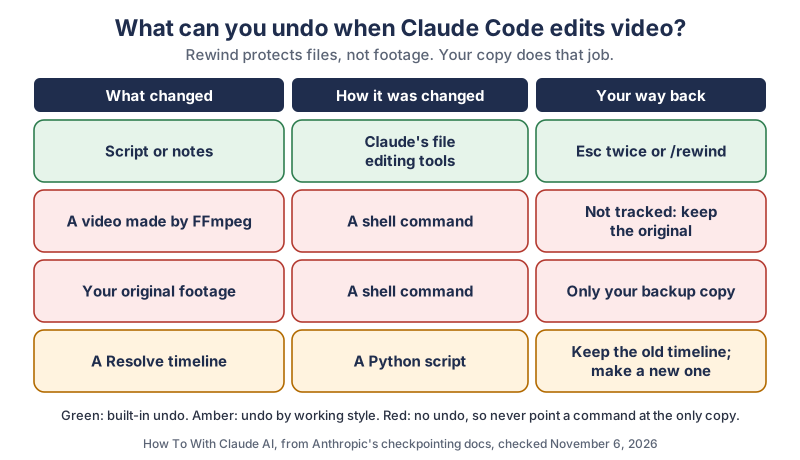
The same map in plain text:
| What changed | How it was changed | Your way back |
|---|---|---|
| Script or notes | Claude’s file editing tools | Press Esc twice, or run /rewind |
| A video made by FFmpeg | A shell command | Not tracked, so keep the original |
| Your original footage | A shell command | Only your backup copy |
| A Resolve timeline | A Python script | Have the script make a new timeline and keep the old one |
Two more habits help. First, choose your permission mode on purpose. Anthropic’s permission modes page says auto is the starting mode in interactive sessions on v2.1.283 or later, and that it does not guarantee safety.
Press Shift+Tab until you reach Manual, so Claude Code asks before it runs commands. Second, put your house rules in a CLAUDE.md file in the project folder, which Claude Code reads at the start of every session:
# Video project rules
- Never change, rename, move or delete anything in footage/.
- Every render goes in renders/ with a new file name.
- Show me every command before it runs.
A CLAUDE.md file guides Claude Code but doesn’t lock anything, so the separate copy is still your real protection.
How do you make a rough cut from a transcript?
You make a rough cut by getting a timestamped transcript, asking Claude Code for an edit list, approving that list, and rendering it to a new file. Doing the thinking in a text file is the whole trick here: you can read a list in ten minutes and fix any line of it.
How do you get a transcript with timestamps?
Whisper’s command-line tool writes a transcript with timings. Its --word_timestamps option, which the Whisper code labels experimental, adds timing for each word, and --output_format takes txt, vtt, srt, tsv, json or jsonl:
whisper footage/talk.mp4 --model turbo --word_timestamps True --output_format json --output_dir transcriptHow do you ask Claude Code for an edit list?
Ask for a list and tell Claude Code not to cut anything yet. In Manual mode it asks before it writes the file, so nothing happens behind your back. Be specific about your video:
Read transcript/talk.json. I want a 10-minute version of this talk for YouTube.
Do not cut anything yet. Write edit-list.csv with these columns:
keep_start, keep_end, first_words, reason. Times are in seconds.
Keep the story about my first client.
When I repeat a sentence, keep the last take.
Tell me what you left out and why.
Now do the part only you can do. Read the list, check what it dropped, and change any line you disagree with.
How do you turn the edit list into a video?
Ask Claude Code to render a new file with FFmpeg and to re-encode it. FFmpeg’s documentation explains why: in most formats it is not possible to seek exactly
, so a fast stream copy starts from the closest seek point before your cut, not from the cut itself.
Using edit-list.csv and footage/talk.mp4, write a script that renders
renders/rough-cut-v1.mp4 with FFmpeg. Re-encode so each cut lands at the
listed time. Never write into footage/. Show me the command before it runs.
How do you remove silences and filler words with Claude Code?
You remove silences by having FFmpeg’s silencedetect filter log the quiet parts, then having Claude Code turn that log into cuts. The silencedetect filter only reports silence and doesn’t remove anything. Its defaults are a noise tolerance of -60 dB and a minimum of 2 seconds, which will miss shorter pauses, so ask for a shorter duration:
ffmpeg -i renders/rough-cut-v1.mp4 -af silencedetect=n=-50dB:d=0.5 -f null -Those -50 dB and 0.5 second values are our starting suggestion and not a rule. A noisy room needs a different number. Ask Claude Code to leave a little breathing room around each word, because a cut right at the edge of a word sounds clipped, and to save the result as a new file, renders/rough-cut-v2.mp4.
Filler words work through the transcript, so Claude Code can only find an “um” that Whisper wrote down. Listen to the result. If you’d rather do this inside an editor, Adobe’s help page covers detecting and bulk deleting filler words and pauses in Premiere’s Transcript panel, and CapCut Help describes Auto Cut as trimming clips to music beats, speech pauses or text prompts.
How do you add captions with Claude Code?
You add captions by transcribing the finished cut into an SRT file, having Claude Code clean it up, and importing it into your editor. Transcribe the cut and not the original, because every cut shifts the timing of what comes after it.
Honestly, my favorite thing about this whole setup is that the hero of a high-tech video edit turns out to be a humble text file. All that footage, and the star of the show is a list.
whisper renders/rough-cut-v2.mp4 --model turbo --output_format srt --output_dir transcriptRead the SRT in transcript/. Fix spelling and punctuation only.
Do not change any timestamps or reword what I said.
Names to spell correctly: [your names here]. Save a new file ending in -clean.srt.Speech tools trip over names and brands, so read the captions through once. CapCut’s subtitle help page says to save the file as UTF-8, and Blackmagic’s Edit page lists SRT among the timed text formats Resolve imports.
How does Claude Code work with DaVinci Resolve?
Claude Code works with DaVinci Resolve Studio by writing Python scripts against Blackmagic’s scripting API, which can create timelines, import media and start renders. The README we read, dated 7 May 2025, lists CreateTimelineFromClips, AppendToTimeline with start and end frames, CreateSubtitlesFromAudio, DetectSceneCuts and AddRenderJob. Your own copy ships with Resolve, and that’s the one to trust, because it matches your version.
Does the free version of DaVinci Resolve support scripting?
Plan on needing DaVinci Resolve Studio. Blackmagic’s 21.1 release notes, updated September 8, 2026, say Advanced scripting now requires DaVinci Resolve Studio
and We have moved the ability to script in Python to the Studio version.
Matt Bach at Puget Systems goes further and writes that scripting support was entirely removed
from the free edition. Free users still have the FFmpeg route from this guide, and it works well: render the cut, then import the file and the SRT. Blackmagic’s overview page also lists text-based editing under Studio.
How do you connect Claude Code to DaVinci Resolve Studio?
You connect them by allowing local scripting in Resolve, setting three environment variables, and letting Claude Code write a script that makes a new timeline.
- Allow local scripts. In Resolve, open Preferences, then System, then General, and set External scripting using to Local. Stay away from the network option unless you need it. The README asks you to be aware of
the security implications when allowing scripting access from outside of the Resolve application.
- Keep Resolve open. The README says
DaVinci Resolve needs to be running for a script to be invoked.
- Set the paths. These are the macOS paths from the README. Windows and Linux paths are in the same file.
RESOLVE_SCRIPT_API="/Library/Application Support/Blackmagic Design/DaVinci Resolve/Developer/Scripting"
RESOLVE_SCRIPT_LIB="/Applications/DaVinci Resolve/DaVinci Resolve.app/Contents/Libraries/Fusion/fusionscript.so"
PYTHONPATH="$PYTHONPATH:$RESOLVE_SCRIPT_API/Modules/"
Then give Claude Code a tightly scoped job:
Read the README in the RESOLVE_SCRIPT_API folder first.
Write a Python script that creates a NEW timeline called "Claude rough cut v1"
from edit-list.csv, using the clip already in my Media Pool.
Do not change or delete any existing timeline or clip.
Read the clip's real frame rate and convert seconds to frames with it.
Show me the script before it runs.
That frame rate line matters. The API’s clip entries use startFrame and endFrame, while your edit list uses seconds, so a wrong frame rate makes every cut drift a bit further as the timeline goes on.
Should you use a DaVinci Resolve MCP server?
Only if you trust who made it, because a community MCP server isn’t a Blackmagic product. MCP is an open standard that gives Claude Code access to outside tools, and Anthropic’s advice is plain: Verify you trust each server before connecting it.
A short script that you’ve read yourself is a fine place to start. Steer clear of anything that promises Studio features in the free edition, since those belong to Blackmagic’s paid version.
How does Claude Code work with CapCut?
Claude Code works with CapCut from the outside: it prepares a finished cut and a caption file, and you import both as normal media. We read CapCut’s public pages on November 6, 2026 and found no documented API or scripting for desktop projects, and no mention of Claude. The CapCut × ChatGPT page describes a CapCut MCP connection, but only for ChatGPT.
Can Claude Code edit CapCut draft files directly?
Community tools do edit CapCut’s local draft files, but we don’t recommend it and this guide won’t walk through it. CapCut’s US Terms of Service, last updated April 15, 2026, say you may not copy, decipher, modify, adapt, translate, reverse engineer, disassemble, decompile
the Services, or use automated scripts or other technologies to collect information from or otherwise interact with the Services.
We’re not lawyers, but we read that as reaching tools that reverse engineer CapCut’s draft format and screen automation aimed at CapCut, and it isn’t worth the risk to your account when a clean route exists.
What is the clean way to use Claude Code with CapCut?
The clean way is to do the heavy cutting first, then open CapCut for the fun part.
- Follow this guide’s steps to make
renders/rough-cut-v2.mp4and a clean SRT file. - Open CapCut Desktop and start a project with that video as a normal media file.
- Import the captions. CapCut’s help page gives the desktop path as Captions > Add Captions, then choose your .srt file. If your version’s menu differs, check that page.
- Add your music, effects, titles and transitions by hand in CapCut.
Your CapCut project stays an ordinary one that you can keep changing.
Do you have to label a video edited with Claude Code on YouTube?
Usually not, if you only trimmed and captioned your own real footage. YouTube Help says We require creators to disclose AI-generated or altered content that seems realistic
, and it lists caption creation and production assistance as things that don’t need disclosure.
Be careful with one thing. YouTube also says you must disclose content that Makes a real person appear to say or do something they didn’t do.
A cut can do that without any AI footage at all. If you’re editing someone else’s words, keep their meaning, and have their permission.
What gear makes Claude Code video editing faster?
The fastest upgrades are a quick drive for your working copy, enough memory for transcription and rendering, and an editing keyboard for the hand-finishing stage. Blackmagic’s 21.1 notes give a minimum of macOS 15 Sequoia and 8 GB of system memory, or 16 GB when using Fusion. Treat that as a floor, not a target.
- An editing keyboard. The DaVinci Resolve Speed Editor on Amazon has a search dial and dedicated edit keys, and connects by USB-C or Bluetooth. Blackmagic’s tech specs list a DaVinci Resolve Studio activation key in the box, which is handy for anyone who wants the scripting route. Check that a listing is new and from an authorized seller.
- A serious desktop. Apple’s Mac Studio specs list M5 Max and M5 Ultra chips, up to 512 GB of unified memory on the top M5 Ultra and Thunderbolt 5 ports. Browse Mac Studio models on Amazon if you render long videos all day.
- Fast storage, more than once. Keep a Thunderbolt NVMe drive for working copies and a separate backup drive for originals.
- A trustworthy screen. Claude Code can’t judge color for you, so finishing work deserves a color-accurate reference monitor.
What should you try first?
Start with a two-minute clip, not your best video. Copy it into a new folder, get the transcript, ask for an edit list and read what comes back. You’ll learn how Claude Code thinks about your talking in one small sitting, and nothing you care about is on the line. Once that feels easy, try a full rough cut. We add new Claude tutorials regularly, and the newsletter box below is the easiest way to catch them.
Go cut something small tonight and enjoy watching the boring hours shrink. Your scrolling finger will send a thank-you card.
Sources and further reading
- How Claude Code works (Anthropic) — built-in tools, checked Nov 6, 2026
- Claude Code quickstart (Anthropic) — install commands and accounts
- Claude Code checkpointing (Anthropic) — what /rewind covers and doesn’t
- Claude Code permission modes (Anthropic) — Manual, plan and auto
- Claude Code computer use (Anthropic) — research preview details
- Claude Code and MCP (Anthropic) — connecting outside tools
- Claude Code data usage (Anthropic) — what is sent, and model training settings
- DaVinci Resolve 21.1 release notes (Blackmagic Design) — updated Sep 8, 2026; scripting and minimum requirements
- DaVinci Resolve Studio (Blackmagic Design) — Python and Lua scripting
- DaVinci Resolve overview (Blackmagic Design) — free and Studio versions
- DaVinci Resolve Edit page (Blackmagic Design) — subtitle import formats
- DaVinci Resolve keyboards (Blackmagic Design) — Speed Editor controls and connections
- DaVinci Resolve tech specs (Blackmagic Design) — Speed Editor contents
- Blackmagic Forum thread on external scripting — the Preferences setting, from an older version
- How DaVinci Resolve Free v21.1 scripting changes affect Puget Bench (Puget Systems) — Sep 10, 2026
- CapCut Terms of Service (US) — last updated Apr 15, 2026, section 5
- CapCut Help Center — project file exchange and Auto Cut
- How do I import subtitles? (CapCut Help) — desktop steps, dated Jan 30, 2026
- CapCut × ChatGPT (CapCut) — the official MCP connection
- FFmpeg filters documentation — silencedetect
- FFmpeg command documentation — seeking and stream copy
- Download FFmpeg — version 9.0.2 listed
- OpenAI Whisper on GitHub — license, models and memory
- whisper.cpp on GitHub — Apple Silicon support
- Premiere UXP documentation (Adobe) — plugin framework
- Detect and delete pauses in transcripts in Premiere (Adobe) — filler words and pauses
- Use XML to transfer projects (Apple) — Final Cut Pro menus
- Kdenlive project files — XML based on MLT
- MLT XML annotations (Shotcut) — what Shotcut adds to MLT XML
- OpenTimelineIO (Academy Software Foundation) — timeline interchange
- Disclosing altered or synthetic content (YouTube Help) — what needs a label
- Mac Studio tech specs (Apple) — chips, memory and ports
Questions and answers
Can Claude edit videos?
Yes, through Claude Code, though not by working in a timeline itself. Claude Code reads a transcript, writes an edit list, and runs tools such as FFmpeg or a DaVinci Resolve Studio script to make the cuts. You still make the creative calls.
Is Claude Code free to use for video editing?
Anthropic’s quickstart lists Pro, Max, Ultra, Team and Enterprise subscriptions, a Claude Console account, or a supported cloud provider, and the pages we read on November 6, 2026 don’t list the Free plan. FFmpeg, Whisper and whisper.cpp are free to download.
Can Claude connect to CapCut?
We found no official CapCut connection for Claude on CapCut’s pages on November 6, 2026. CapCut documents an MCP connection for ChatGPT only. The clean route is to have Claude Code prepare a cut and an SRT file, then import both into CapCut.
Does DaVinci Resolve free have scripting?
Plan on no. Blackmagic’s 21.1 release notes say advanced scripting now requires DaVinci Resolve Studio and that Python scripting moved to the Studio version. Free users can still import a cut and captions made with FFmpeg and Whisper.
Can Claude Code remove silence from a video?
Yes. Claude Code can run FFmpeg’s silencedetect filter, read the log of quiet parts, and render a new file without them. Work on a copy, and listen to the result, because a cut right at the edge of a word sounds clipped.