Automated Insurance Policy Comparison Tool: How It Finds Coverage Gaps
Good afternoon, keeper of the three open PDFs.
If you have three carrier quotes open in three windows and a client waiting for a recommendation, this guide is for you.
Most independent agencies still compare commercial quotes by reading every page and copying limits, forms and endorsements into a spreadsheet or a proposal template.
It works, but it takes the best hours of the week, and the endorsement that quietly disappeared on page 31 is exactly the one nobody had time to look for.
Short answer: An automated insurance policy comparison tool reads each carrier’s quote or policy PDF with AI vision, pulls the limits, deductibles, forms, endorsements and exclusions into structured fields with their page numbers, lines them up side by side, flags anything missing or changed, and syncs the approved data into your agency management system. A licensed person reviews every flag.
- What goes in
- Carrier quote and policy PDFs, the expiring policy, scanned ACORD applications
- What comes out
- A side-by-side coverage chart, a list of gaps with page references, a draft proposal
- Who decides
- The licensed broker or account manager, on every flagged line
- Where the data lands
- Your AMS (Applied Epic, AMS360, HawkSoft, EZLynx) through its API or an import
- Typical model cost
- About $1.04 to $1.49 for three 50-page quotes (our calculation below)
What is an automated insurance policy comparison tool?
An automated insurance policy comparison tool is software that reads insurance documents for you and puts the coverage terms of several policies into one chart.
It does the part of the job that is pure reading: finding the each-occurrence limit, the deductible, the list of forms and every endorsement in a long PDF. Your team keeps the part that needs a license: deciding what the differences mean for this client.
The same tool can compare three new-business quotes, a renewal against the expiring policy, or an issued policy against the quote you bound. That last job is what agencies call policy checking.
Is a policy comparison tool the same as a comparative rater?
No. A comparative rater asks carriers for prices, while a policy comparison tool reads what each carrier actually offered.
A rater such as EZLynx takes the risk details once and returns quotes from appointed carriers. EZLynx describes an embedded personal lines rater and a commercial submission tool inside its management system.
Price is only half the answer on a commercial account. Two general liability quotes at a similar premium can carry different additional insured wording, a different waiver of subrogation, or an exclusion that one carrier added and the other did not. The comparison tool is built for that second question.
How much time does comparing policies by hand really cost?
Usually several hours per account, because commercial policies are long and the important details sit deep inside them.
A common commercial insurance policy can easily be 50 pages long, andit is not unusual for a large commercial policy to run to 500 or 1,000 pages.
Vendors who sell AI proposal tools claim big savings. CopyCat AI, for example, says its tool saves 7 to 10 hours per broker per week. That is the vendor’s own claim, so time your own team for one week before you trust any number.
| Comparisons a week | Policies per comparison | Minutes per policy | Hours a month | Cost a month at $35 an hour |
|---|---|---|---|---|
| 5 | 3 | 30 | 32.5 | $1,137 |
| 10 | 3 | 30 | 65.0 | $2,273 |
| 10 | 3 | 45 | 97.4 | $3,410 |
| 20 | 3 | 30 | 129.9 | $4,547 |
Assumptions: 30 to 45 minutes to read a 50-page commercial quote and copy its key terms, 4.33 weeks a month, and $35 an hour as a rough loaded cost for an experienced account manager. These are our working assumptions, not a survey. Replace them with your own stopwatch numbers.
How does an automated policy comparison work, step by step?
An automated policy comparison follows the same five steps a careful account manager follows, with the reading done by software.
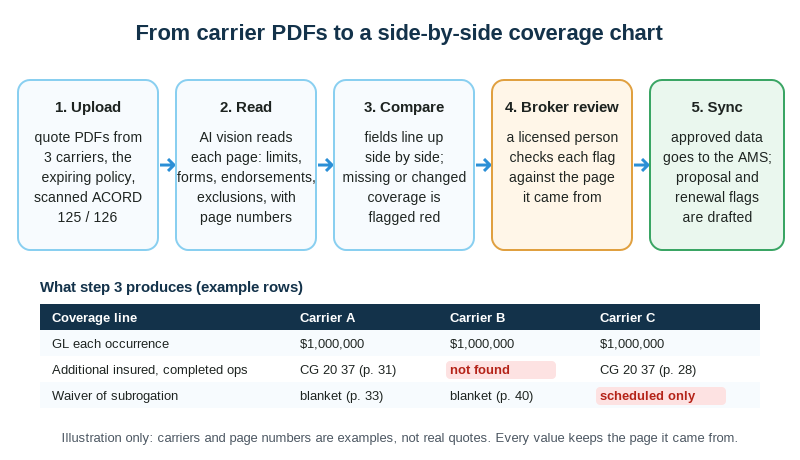
The diagram in text, step by step:
- Upload: quote PDFs from three carriers, the expiring policy and any scanned ACORD 125 or 126
- Read: AI vision turns every page into fields (limits, forms, endorsements, exclusions) with page numbers
- Compare: the fields line up side by side, and missing or changed coverage is flagged red
- Broker review: a licensed person checks each flag against the page it came from
- Sync: approved data goes to the AMS, and the proposal and renewal flags are drafted
The example rows in the chart: a completed operations additional insured endorsement (CG 20 37) found on carriers A and C but not on B, and a waiver of subrogation that is blanket on A and B but scheduled only on C.
- Upload. Carrier PDFs arrive by email, from carrier portals or through Ivans Download. A small service on your own server watches a shared folder or inbox and picks up each new file.
- Read. Each PDF goes to a vision-capable AI model. Anthropic’s PDF support for Claude, for example, turns every page into an image plus its extracted text, so tables, schedules and scanned pages can all be read.
- Compare. The extracted fields go into one grid: one row per coverage line, one column per carrier. Simple rules flag a missing endorsement, a lower limit, a higher deductible or a new exclusion.
- Review. A licensed account manager opens each flag next to the page it came from and marks it confirmed, explained or wrong.
- Sync. The approved values are written into the client and policy records in your AMS, and a draft proposal or renewal letter is prepared in your template.
Here’s the part owners like most: every value in the grid keeps its page number. When a client asks why you recommended carrier B, the answer is one click away in the carrier’s own words.
What should an automated tool compare on every commercial policy?
An automated policy comparison should line up the terms that change the client’s protection, not only the premium.
| Group | What to pull from each policy | Why it matters |
|---|---|---|
| Basics | Named insured, mailing and location addresses, policy period, carrier and admitted or surplus lines status | A wrong named insured or address can leave a location uncovered |
| Limits | Each occurrence, general aggregate, products and completed operations aggregate, per-location aggregate | The headline numbers the client’s contracts ask for |
| Money | Premium, taxes and fees, deductibles or self-insured retentions, minimum earned premium | Two similar premiums can hide very different out-of-pocket costs |
| Forms | Base coverage form and edition, for example ISO CG 00 01, occurrence or claims-made, retroactive date | The base form sets what the policy covers before any endorsement |
| Endorsements | Additional insured (ongoing CG 20 10, completed operations CG 20 37), primary and noncontributory, waiver of subrogation, blanket or scheduled | The usual source of contract gaps on construction and service accounts |
| Exclusions | Any exclusion added by endorsement, such as a designated work or professional services exclusion | An added exclusion often matters more than a small premium difference |
| Conditions | Cancellation terms, audit basis, subjectivities that must be met before binding | Missed subjectivities can delay or void a binder |
The forms and endorsements rows are where the tool earns its keep. A proposal line that says Additional insured: Included
does not tell you which endorsement form applies or whether it reaches completed operations, a point Vantage Point Risk makes in its guide to AI quote comparison.
What does an automated policy comparison cost to run?
The AI reading itself costs roughly a dollar or two per three-carrier comparison at public API prices, which is small next to the staff time.
Honestly, the nicest thing about a well-built comparison grid is how calm it makes renewal season. The reading still happens; it just stops happening at 7 p.m. on your account managers’ screens.
Anthropic’s documentation says each PDF page uses 1,500 to 3,000 text tokens plus at most 1,568 image tokens. Anthropic’s pricing page lists Claude Sonnet 5.5 at $2 per million input tokens and $10 per million output tokens.
| Job | Pages | Input tokens | Input cost | Output cost | Total |
|---|---|---|---|---|---|
| One policy read | 50 | 153,400 to 228,400 | $0.31 to $0.46 | $0.04 | $0.35 to $0.50 |
| Renewal vs expiring | 100 | 306,800 to 456,800 | $0.61 to $0.91 | $0.08 | $0.69 to $0.99 |
| Three carrier quotes | 150 | 460,200 to 685,200 | $0.92 to $1.37 | $0.12 | $1.04 to $1.49 |
| Five carrier quotes | 250 | 767,000 to 1,142,000 | $1.53 to $2.28 | $0.20 | $1.73 to $2.48 |
Assumptions: 3,068 to 4,568 tokens per page (text plus image), each policy read in its own request, and about 4,000 output tokens of structured fields per policy. The side-by-side step works on those small field lists and adds only cents. Anthropic’s Batch API halves these prices for comparisons that can wait an hour.
Reading each policy in its own request also keeps you inside the limits. Anthropic allows 600 pages per request (100 when the context window is under 1 million tokens), so a 500-page program policy may need to be split into sections.
Can a policy comparison tool sync with Applied Epic, AMS360, HawkSoft or EZLynx?
Yes, in most cases, but each agency management system opens its data to outside tools in a different way.
- Applied Epic: Applied says Epic has APIs that let other tools read and write client and policy data. Production access goes through Applied’s developer program and your agency’s license.
- AMS360: Vertafore lists an open API and third-party integrations, alongside its own connected products such as Proposal Builder.
- HawkSoft: HawkSoft runs a Partner API for vetted, approved vendors, and agencies switch integrations on from HawkSoft Marketplace.
- EZLynx: EZLynx is an Applied Systems product; ask your rep which integration route your plan includes.
Ask your AMS rep one plain question: How can an outside program update a policy record and attach a PDF?
If the honest answer is “only by hand,” the tool can still produce a finished summary your team pastes in once.
Can it read scanned ACORD forms and pre-fill the next submission?
Yes. AI vision reads a scanned or signed ACORD application the same way it reads a policy, and the extracted answers can pre-fill the next carrier’s intake form.
The ACORD Forms Index lists the ACORD 125 (Commercial Insurance Application, Applicant Information Section) and the ACORD 126 (Commercial General Liability Section), both in 2025/03 editions. Because the layout is standard, the field positions are predictable even on a faxed copy.
That matters because re-keying the same client data into several carrier portals is half of the pain. Once the tool holds the applicant’s name, FEIN, locations, payroll and loss history as clean fields, each new submission starts pre-filled. Your team checks it instead of retyping it.
Can it compare a renewal against the expiring policy and flag risk?
Yes. A renewal comparison is the same job with two documents, and it is often the most valuable one.
The tool reads the renewal offer and the expiring policy, lists every changed limit, deductible, form edition and endorsement, and sends the account manager a short report well before the renewal date. A renewal risk-flagging workflow simply runs this check on a schedule, for example 90, 60 and 30 days out.
Edition changes deserve a flag of their own. When ISO revised many additional insured endorsements in its 04 13 editions, the wording narrowed, and an account that quietly moved to a newer edition at renewal could end up with less coverage than its contracts expect.
What does an automated comparison miss, and where must a licensed broker decide?
An automated comparison misses context that is not in the documents, so a licensed person still makes every recommendation.
Side by side comparison of proposals is tedious, and tedium is where human attention fails.
The same article points out that AI cannot tell you which carriers were never approached. The tool compares what you gave it; it does not know the market you did not reach.
The Kansas Association of Insurance Agents notes that an E&O claim handler will likely recommend a workflow for reviewing policies against applications and exposure reviews.
Automation makes that workflow faster; it does not replace the person signing off.
A checklist for every automated comparison:
- Every flagged line opened next to its source page before the proposal goes out
- Endorsement form numbers and editions confirmed, not just the word “included”
- Client contracts (leases, subcontracts) checked against the additional insured and waiver rows
- Subjectivities listed and assigned to a person with a due date
- The original carrier PDFs attached to the client record in the AMS
What does a sensible first month with automated comparisons look like?
A sensible first month runs the tool in shadow mode, where it drafts comparisons while your team keeps working as usual.
- Week 1: pick ten recent commercial accounts you already compared by hand and run the tool on the same PDFs.
- Week 2: compare its grid with your own spreadsheets, line by line, and note every miss and every catch.
- Week 3: turn on renewal flags for the accounts renewing in the next 90 days.
- Week 4: count the hours saved and the gaps caught, then decide whether the tool stays.
If an automated insurance policy comparison tool does not save real time on your own policies in that month, it is not worth keeping. That is the honest test, and it costs very little to run.
Give your team one month of comparisons that arrive already lined up, and see which gaps they finally have time to talk to clients about.
Sources and further reading
- Anthropic: PDF support (pages as images plus text, tokens per page, page limits)
- Anthropic: API pricing (Claude Sonnet 5.5, Batch API)
- Applied Systems: Applied Epic agency management system
- Vertafore: AMS360
- HawkSoft: API partners and Partner API
- EZLynx: management system, rater and commercial submissions
- Ivans: Ivans Download for agents
- ACORD: Forms Index (ACORD 125 and 126)
- Insurance Thought Leadership: How to Avoid Major E&O Claims (Dan Narayan, 2021)
- Kansas Association of Insurance Agents: Mitigating E&O Risks, Policy Checking
- Vantage Point Risk: Can AI Compare Your Insurance Quotes? (Richard Sweet, 2026)
- CopyCat AI: hours saved per broker (vendor claim)
Questions and answers
Can I use AI as an automated insurance policy comparison tool?
Yes. A vision-capable AI model can read each carrier’s quote or policy PDF, pull limits, forms, endorsements and exclusions into fields with page numbers, and line them up side by side. A licensed broker should still review every flagged difference before a recommendation goes to the client.
Does an automated policy comparison work on scanned or faxed documents?
Mostly. AI vision reads each page as an image, so scans and faxed ACORD forms can be read. Blurry or skewed pages are where misreads happen, so low-confidence values should go to a person instead of straight into the AMS.
Do I need to replace my agency management system?
No. The comparison tool sits next to the AMS you already use, such as Applied Epic, AMS360, HawkSoft or EZLynx, and writes into it through an API, an approved partner integration or an import. If none exists, it produces a ready-to-paste summary.
How much does an AI policy comparison cost per account?
At Anthropic’s public price for Claude Sonnet 5.5, reading three 50-page carrier quotes costs roughly $1.04 to $1.49 in model fees by our calculation. Hosting, setup and your team’s review time come on top of that.
Is a policy comparison tool the same as policy checking?
They use the same engine. Policy comparison lines up several quotes or a renewal against the expiring policy; policy checking compares the issued policy with the quote or binder you sold. One tool can do both jobs.