Automated CNC Quoting Software: Draft Quotes From RFQs in Minutes
Good morning, and welcome to everyone with a stack of prints waiting to be quoted.
Picture Monday morning with five RFQs in the inbox, each one a zip of PDF prints and STEP files, and a customer who wants numbers by Wednesday.
Most job shops still quote those by hand, reading every title block and note and pricing material, setups and run time in a spreadsheet or the ERP.
The work is skilled, but much of it is reading and typing, and the shop that answers first often gets the purchase order.
Short answer: Automated CNC quoting software reads the RFQ email, the PDF drawings and the CAD files, pulls out material, tolerances, finishes and quantities, and applies your shop’s own rates for material, setups, run time and outside processes to draft a priced quote sheet in minutes. An estimator reviews the flagged items and signs off before anything is sent.
- Typical manual quoting time
- About 15 to 20 minutes of hands-on time per simple part (vendor claim, Uptool), and days for complex jobs
- Win rate, quotes back within a day
- 51% on new business, against 41% for slower shops (Modern Machine Shop, 2026 Top Shops benchmark)
- Print-reading accuracy reported by one vendor
- 88% of callouts identified, 83% extracted correctly (Paperless Parts, Wingman 2.0)
- What still needs a person
- Flagged callouts, new materials, outside-process prices and the final number
What is automated CNC quoting software?
Automated CNC quoting software is a tool that turns an incoming request for quote into a priced draft without an estimator retyping the drawing.
It comes in three flavours. Geometry tools analyse the 3D CAD model for setups, holes, pockets and removed volume. Print readers use AI vision to read PDF drawings and RFQ emails. ERP quote modules price a routing that a person types in.
The strongest setups combine the first two and hand the result to the third. The CAD model says how big and how complex the part is; the PDF print says what material, tolerance, finish and spec the customer actually requires.
Why does manual CNC quoting take so long?
Manual CNC quoting is slow because every RFQ arrives in a different format and every print has to be read line by line before a single number is safe to send.
On the Practical Machinist forum, shop owners describe the range plainly: a familiar part can be priced from a similar old job in minutes, a complex mold in about an hour, and an exotic alloy job at volume can take days or weeks of tooling and material research.
One owner’s tongue-in-cheek method sums up the pressure: hold the print at arm’s length, call it a two-day job, next. It works until the one note about a heat-treat spec or a 0.0005 inch bore is missed.
The hidden cost is that the estimator is often also the programmer, the setup guy or the owner. Every hour of quoting is an hour away from the machines.
| RFQs a week | Parts per RFQ | Hours a month by hand (20 min a part) | Cost a month at $45 an hour | Hours a month reviewing drafts (5 min a part) |
|---|---|---|---|---|
| 10 | 3 | 43 | $1,950 | 11 |
| 20 | 3 | 87 | $3,900 | 22 |
| 20 | 5 | 144 | $6,500 | 36 |
| 40 | 5 | 289 | $13,000 | 72 |
Assumptions: 20 minutes a part is the top of Uptool’s vendor claim of roughly 15 to 20 minutes of hands-on time per part; 5 minutes is our assumed review time for a drafted part; 4.33 weeks a month; $45 an hour is a rough loaded cost for an estimator. Put your own numbers in and the pattern stays the same.
Does quoting faster actually win more CNC jobs?
Yes, in the best public benchmark we found, machine shops that return quotes within a day win noticeably more new business.
Modern Machine Shop’s 2026 Top Shops benchmark reports a 51% win rate on new business for shops that turn quotes around within a day, against 41% for shops that take longer. That is a survey correlation, not proof that speed alone causes the wins.
Here is what the gap means in plain numbers. A shop sending 20 new-part quotes a month would land about 10 orders at 51% and about 8 at 41%. Two extra jobs a month, from the same customers, without a single new sales call.
Buyers notice the other side too. In one Practical Machinist thread about cutting quote time from five days to one or two, an owner replied that a five-day turnaround would mean almost no work at all.
How does automated RFQ parsing work, step by step?
Automated RFQ parsing follows the same five steps a careful estimator follows, only the reading and the arithmetic happen in minutes.
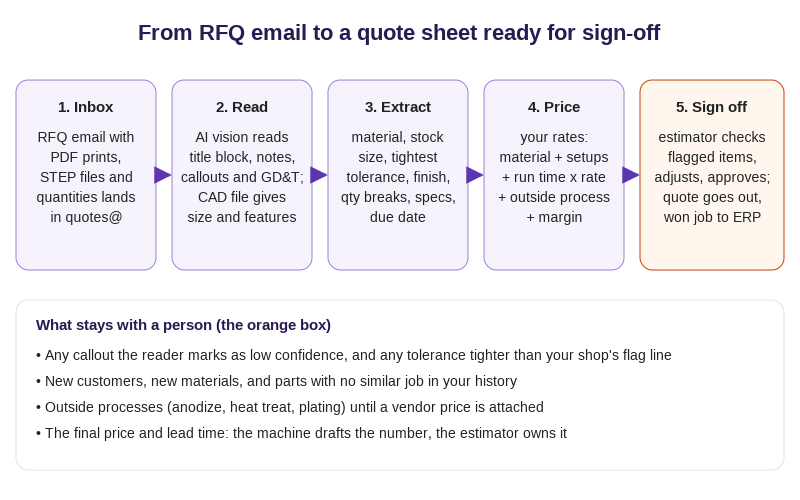
- Inbox. RFQs go to one address, such as quotes@yourshop.com. Your web server watches it through Gmail API push notifications or Microsoft Graph change notifications for Outlook, and unpacks every attachment, zips included.
- Read. Each PDF print goes to a vision-capable AI model. Anthropic’s Claude PDF support, for example, turns every page into an image plus its text, so title blocks, notes and dimension callouts can be read as a drawing, not just as words.
- Extract. The model returns fixed fields: part and revision number, material, stock size, quantities, tightest tolerance, finish, specs, due date. The STEP file adds bounding box, volume and feature counts.
- Price. Your own rules, not the AI, turn those fields into money: material cost, setup count times setup rate, run time times machine rate, outside processes, margin.
- Sign off. The estimator sees the print, the extracted fields and the draft price side by side, fixes anything flagged, and approves. The quote goes out, and a won job is pushed to the ERP.
Anthropic’s documentation describes why step 2 can handle drawings: Because Claude receives an image of each page, you can ask for insights on visual elements of a PDF, such as charts, diagrams, and other non-textual content.
What does the AI pull off a drawing and an RFQ email?
The AI pulls the fields your estimator retypes today, plus the notes that quietly change the price.
| Source | Fields | Why it changes the quote |
|---|---|---|
| RFQ email | Customer, part numbers, revisions, quantities and quantity breaks, due date | Sets the batch sizes and whether the lead time is possible |
| Title block | Material, general tolerances, finish, drawing revision, units | Material is often the biggest single cost; general tolerances decide the default machining approach |
| Dimension callouts | Tightest tolerances, GD&T frames, thread callouts, surface finish | A tight bore or true-position callout can add a setup, a finishing pass or inspection time |
| Notes | Heat treat, anodize, plating, passivation, ASTM, AMS or MIL specs, certifications | Outside processes and certs add vendor cost and days |
| 3D model | Bounding box, volume removed, setups, holes, pockets | Drives stock size, cycle time and fixturing |
Geometric tolerancing on US prints follows the ASME Y14.5 standard, which is why a well-built extractor reads a feature control frame as a structured field, not loose text.
Which automated CNC quoting software can machine shops use?
The main choices are a quoting platform built around CAD and print reading, the quote module of your shop ERP, or a custom inbox reader that feeds either one.
The nicest thing about a good quoting draft is that it gives your best estimator their judgment back. They stop being a typist for the title block and go back to deciding how the part should really be made.
| Option | What its maker says it does | Reads PDF prints with AI? |
|---|---|---|
| Paperless Parts | Detects setups, holes, pockets and 3D features from the CAD file, prices with your shop’s rules, and moves won quotes into ERPs including M1, JobBOSS², E2, Epicor, Infor VISUAL, Global Shop Solutions and ProShop | Yes, its Wingman assistant extracts GD&T, specs, processes, materials and finishes for review |
| ProShop ERP | Quotes from templates loaded with your real labor, material and vendor costs, flags estimates below target margin, converts won quotes to work orders | Not described on its estimating page |
| JobBOSS² (ECI) | Builds quotes from materials, labor, overhead and past jobs, converts estimates into orders and jobs | Not described on the pages we read |
| E2 MFG (ECI) | Shop management with estimating, purchasing, scheduling and shipping | Not described on its product page |
| Custom inbox reader | Watches your quotes inbox, reads prints with a vision AI model, fills a quote sheet in your format or your ERP’s import | Yes, built around your own prints and rules |
None of these four makers lists a public price on the pages we read; all quote by request. Ask each one to run three of your own recent RFQs, including your ugliest scanned print, before you sign anything.
Paperless Parts is the most specific about print reading. Its pricing page says Wingman recognizes over 10,000 ASTM, AMS, MIL-SPEC, NADCAP, GD&T, and OEM-specific process/material specifications
.
How do the extracted specs become a quote price?
The extracted specs become a price through your shop’s own cost formula, the same one your estimator already carries in a spreadsheet or in their head.
- Material: stock size from the bounding box plus saw and facing allowance, times your current price per pound or per bar.
- Setups: setup count times setup time times machine rate, spread over the quantity.
- Run time: estimated cycle time times quantity times machine rate, with a bump for tight-tolerance features.
- Outside processes: anodize, heat treat or plating from your vendor price list, plus their lead time in days.
- Inspection and margin: first-article or CMM time when the print asks for it, then your target margin per customer or material.
Cycle time is the soft spot. Geometry tools estimate it from features and removed volume; a custom setup can also look up your actual times on similar past jobs. Either way, the estimator’s experience is what turns a rough cycle time into a safe one.
What should still need a human estimator?
A human estimator should still own every judgment call: workholding, risk, the customer relationship and the final price.
- Any callout the reader marks as low confidence.
- Tolerances tighter than your shop’s own flag line, for example under 0.001 inch.
- New customers, new materials, and parts with no similar job in your history.
- Outside processes until a vendor price is attached.
- The final number and lead time: the software drafts it, the estimator signs it.
Paperless Parts frames its own assistant the same way, describing Wingman as presenting findings for you to validate until they are trustworthy enough to automate.
What can go wrong with automated CNC quoting?
Three things go wrong most often with automated CNC quoting, and each has a simple guard.
- A misread callout. Paperless Parts reports its Wingman 2.0 identifies 88% of callouts and extracts the details correctly on 83%. Guard: every extracted tolerance is shown next to the print, and anything uncertain is flagged.
- The wrong revision. Customers resend a print with one changed note. Guard: compare the revision letter in the email, the title block and the file name, and stop the draft if they disagree.
- Export-controlled drawings. ITAR, EAR or CUI prints may not be allowed on just any cloud service. Guard: detect those markings first and route them to an approved system; the State Department’s DDTC administers ITAR.
What does a sensible first two weeks look like?
A sensible start is shadow quoting, where the automation drafts every quote in the background while your estimator keeps quoting as usual.
- Days 1 and 2: collect 20 recent RFQs, won and lost, and write down your cost formula and flag rules.
- Days 3 to 7: every new RFQ is drafted automatically; the estimator compares the draft with their own quote.
- Days 8 to 10: repeat customers and familiar materials go out from the draft after review; everything else stays manual.
- End of week 2: count the hours saved, the misreads caught and the quotes that went out within a day.
If the drafts do not save real estimating hours on your own prints in those two weeks, the tool is not right for your shop yet. That is the honest test.
Try it on next week’s RFQs in the background, and see how many quotes could have gone out the same day.
Sources and further reading
- Paperless Parts: automated CNC machining quoting software
- Paperless Parts: pricing and costing automation (Wingman specifications claim)
- Paperless Parts: Wingman 2.0 product update (callout accuracy figures)
- ProShop ERP: estimating and quoting
- ECI: JobBOSS² job shop ERP
- ECI: E2 MFG shop management
- Anthropic: Claude PDF support
- Gmail API: push notifications
- Microsoft Graph: change notifications overview
- ASME Y14.5: dimensioning and tolerancing
- U.S. State Department: Directorate of Defense Trade Controls (ITAR)
- Modern Machine Shop: 2026 Top Shops roster and benchmark findings
- Practical Machinist forum: methods to expedite quoting (owner discussion)
- Uptool on G2: vendor claim of minutes per part (vendor claim)
Questions and answers
Can I use AI to automate CNC quoting?
Yes. A vision-capable AI model can read RFQ emails and PDF drawings, extract material, tolerances, finishes and quantities, and feed your shop’s own cost formula to draft a quote sheet in minutes. Keep an estimator’s sign-off on every quote, especially for flagged callouts, new materials and outside processes.
How long does it take to quote a CNC part by hand?
It ranges from a few minutes for a repeat part to days for complex or exotic jobs. One quoting vendor, Uptool, puts typical hands-on time at about 15 to 20 minutes per simple part, which adds up quickly across multi-part RFQs.
Do I have to replace my ERP to use automated quoting?
No. Quoting tools and custom inbox readers sit in front of the ERP you already run. Paperless Parts, for example, says won quotes move into ERPs including JobBOSS², E2, Epicor, Infor VISUAL, Global Shop Solutions and ProShop.
Can automated quoting read scanned or old PDF drawings?
Usually, because vision models read each page as an image, but faded scans and hand-marked prints cause most misreads. Show each extracted value next to the print and send anything uncertain to the estimator.
Is it safe to send customer drawings to an AI service?
It can be, with care. Check customer agreements and any ITAR, EAR or CUI markings first, route controlled drawings to an approved system, and use a provider whose terms say your files are not used for training.