
How Do You Pack a TV Without the Original Box? Blankets, Cardboard and TV Boxes (2026)
Disclosure: this page contains Amazon affiliate links. As an Amazon Associate we earn from qualifying purchases, at no extra cost to you.
Hello there, screen guardian.
Picture the first movie night in the new place, on a TV that rode across town wrapped up like a burrito and arrived without a single crack.
Your TV can make it to the new place without a scratch, even though its original box went out with the recycling years ago.
You don’t need that box.
A soft cover, two moving blankets and some flat cardboard will do, or grab one of the adjustable TV moving boxes on Amazon if you want a ready-made kit.
Short answer: To pack a TV without the original box, unplug it and take the stand off, cover the screen, wrap the whole TV in two moving blankets, add foam corners, and sandwich it between two sheets of cardboard held with stretch wrap. Never tape the screen. Then carry and transport it upright, never lying flat.
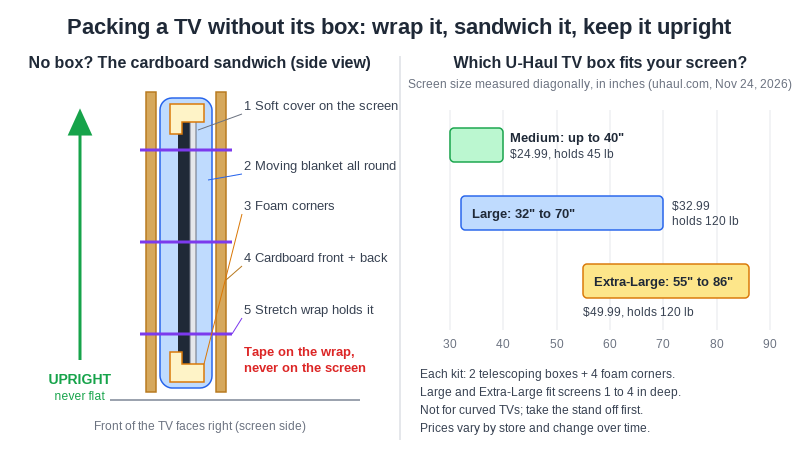
What the diagram shows, as text:
- Soft cover over the screen (U-Haul’s Flat Screen TV Cover fits TVs up to 65 inches).
- Moving blanket wrapped around the whole TV.
- Foam corners on all four corners.
- Cardboard sheet on the front and the back.
- Stretch wrap holding it together. Tape goes on the wrap, never on the screen. The packed TV stands upright, never flat.
The U-Haul boxes in the chart, from uhaul.com on November 24, 2026: Medium up to 40 inches, $24.99, holds 45 lb; Large 32 to 70 inches, $32.99, holds up to 120 lb; Extra-Large 55 to 86 inches, $49.99, holds up to 120 lb.
How do you pack a TV for moving without the original box?
You pack a TV without its original box by building padding around it in layers, then keeping it upright from the wall to the new living room. In order:
- Unplug and photograph the cables, then take off the stand or wall bracket.
- Cover the screen with a soft TV cover, a clean sheet or a thin foam sheet.
- Wrap the TV in a moving blanket, or two for a big screen.
- Add foam corners, cut from foam or bought, on all four corners.
- Sandwich it between two flat pieces of cardboard, front and back.
- Stretch-wrap the bundle tight, and label it FRAGILE, THIS SIDE UP.
U-Haul’s own guide sets the bar for a TV with no box at all: it recommends wrapping your TV in at least three inches of
bubble cushioning, followed by a quilted blanket.
Can you lay a flat-screen TV down to move it?
No, a flat-screen TV should be moved standing upright, not lying flat. LG’s TV owner’s manual says: When transporting the TV, keep the TV upright, never turn the TV on its side or tilt towards the left or right.
U-Haul’s TV packing guide agrees: Keep your TV Moving Box upright at all times
, and you should refrain from laying your TV down flat when you transport it.
Here’s the reason. Lying flat, a thin panel can bend under its own weight, and every bump on the road presses on the glass. HireAHelper’s guide puts it simply: laying a TV flat puts too much pressure on the screen.
The only time a TV lies down is briefly, to take the stand off. LG’s manual has you lay it screen-down on a cushioned surface for that, then stand it back up.
What should you do before you pack a TV?
Before you pack a TV, unplug it, photograph the back, bag the cables and remote, and remove the stand. That way setup at the new place takes minutes, not an evening.
- Photo first: snap the back of the TV before you unplug, so you know which cable went where. PODS also suggests colored tape on the cords as a reminder of what plugs in where.
- Cables and remote: U-Haul says to
roll them up neatly
and keep them with the remote in a clear plastic bag. - Stand and screws: take the stand off (U-Haul’s TV boxes need it removed) and keep the screws in the same labeled bag.
- Wall mount: unscrew the bracket from the TV and tape the bolts into that bag too.
How do you pack a TV with moving blankets and cardboard?
You pack a TV with blankets and cardboard by wrapping it soft first, then hard: a screen cover and one or two moving blankets, foam on the corners, then a flat sheet of cardboard on each side, all held tight with stretch wrap.
The soft layer. U-Haul’s Flat Screen TV Cover ($9.95 on Nov 24, 2026) slips over TVs up to 65 inches and protects against dust and scratches. A clean bedsheet does the same job for free.
The blanket layer. Wrap the covered TV in a moving blanket so the edges are padded too. U-Haul’s Furniture Pad is 68 x 85 inches, big enough to fold around most screens. You can also buy moving blankets on Amazon.
The corners. Corners take the hits when a TV is set down. Use foam corner pieces, or cut thick foam into L shapes. HireAHelper’s guide puts edge protectors on all four corners to absorb unexpected impacts.
The cardboard sandwich. Flatten two large boxes, such as a wardrobe box, and cut one sheet a little bigger than the TV for each side. Free ones turn up in U-Haul’s swap bins (see where to get free moving boxes).
The wrap. Stretch wrap holds the cardboard and blankets tight. Go around the bundle top to bottom, then side to side, so nothing can slide off on the stairs.
Where can you put tape when packing a TV?
Put tape only on the stretch wrap, the blanket or the cardboard, never on the TV itself. HireAHelper’s TV guide warns: Never put packing tape directly on the glass or the painted edges.
Packing tape can leave sticky residue on a screen and pull off paint or film when it comes off. If something must hold to the TV’s plastic frame, HireAHelper’s method uses painter’s tape there, and only there.
Which TV moving box fits your TV?
The TV moving box that fits is the one whose stated screen range includes your TV’s diagonal size. U-Haul sells three sizes of expandable TV box, and each kit has two telescoping boxes and four foam corners:
| U-Haul box | Price (Nov 24, 2026) | Fits screens | Size | Holds up to | Notes |
|---|---|---|---|---|---|
| Medium (TVKITM) | $24.99 | Up to 40 in | Each box about 24 1/2 x 5 3/8 x 25 1/4 in; 48 3/4 in long fully telescoped | 45 lb per box | 2 boxes, 4 foam corners |
| Large (TVKIT) | $32.99 | 32 to 70 in | Each box 36.5 x 6 x 40 in; 73 x 6 x 40 in expanded | 120 lb | ECT 48, double-wall; screens 1 to 4 in deep |
| Extra-Large (TVKITXL) | $49.99 | 55 to 86 in | Each box 48 x 6 5/16 x 48 in; 88 in long expanded | 120 lb | Double-wall; screens 1 to 4 in deep; in-store pickup |
U-Haul says its large TV boxes are not compatible with curved TVs and not made for shipping, and it recommends an overlap of 4 to 5 inches where the two boxes slide together.
Home Depot sells adjustable TV and picture boxes made by Pratt Retail Specialties. MoveBuddha listed them on Home Depot’s site in October 2026 at $26.98 for the medium and $41.98 for the large; the large fits TVs up to 70 inches, by Home Depot’s listing.
Other stores, per HireAHelper’s comparison last updated August 7, 2026: Walmart about $23.45 per box for TVs up to 55 inches, Home Depot $26.48 to $39.98, and U-Haul $20.25 to $39.95. Prices move, so check your store.
How do you measure a TV for a moving box?
Measure a TV’s screen diagonally, corner to corner, not including the frame. That diagonal is the size the box ranges use. U-Haul’s guide also says to check the TV’s depth, and its Large and Extra-Large boxes fit screens 1 to 4 inches deep.
Want to know the TV’s width and height? For a standard 16:9 screen, width is about 0.87 times the diagonal and height about 0.49 times. We ran the numbers:
| TV size (diagonal) | Screen width | Screen height | U-Haul box by its stated range |
|---|---|---|---|
| 32 in | 27.9 in | 15.7 in | Medium or Large |
| 40 in | 34.9 in | 19.6 in | Medium or Large |
| 43 in | 37.5 in | 21.1 in | Large |
| 50 in | 43.6 in | 24.5 in | Large |
| 55 in | 47.9 in | 27.0 in | Large or Extra-Large |
| 65 in | 56.7 in | 31.9 in | Large or Extra-Large |
| 70 in | 61.0 in | 34.3 in | Large or Extra-Large |
| 75 in | 65.4 in | 36.8 in | Extra-Large |
| 85 in | 74.1 in | 41.7 in | Extra-Large |
The frame adds a little. Samsung’s manual lists its 65-inch The Frame (UN65LS03N, a 64.5-inch screen) at 57.2 x 32.7 x 1.7 inches without the stand, about an inch more each way than the screen alone.
How much does it cost to pack a TV for a move?
Packing a TV costs about $28 to $38 with blankets, stretch wrap and free cardboard, about $43 with U-Haul’s Large TV box and a screen cover, or $77.08 for U-Haul’s Ultimate TV Packing Kit, at uhaul.com prices checked November 24, 2026.
Here’s the part I find oddly satisfying: the safest TV box you’ll ever make is just a blanket, two flat pieces of cardboard and a roll of stretch wrap. A sandwich, basically. A very important sandwich.
| Way to pack it | What you buy | Cost |
|---|---|---|
| Blanket and cardboard sandwich | 2 Furniture Pads ($8.95 each) + Plastic Stretch Wrap 5 in x 1,000 ft ($9.99); cardboard free, a bedsheet as the cover | $27.89 |
| Sandwich with a TV cover | The above + Flat Screen TV Cover ($9.95) | $37.84 |
| TV box with a cover | Large expandable TV box ($32.99) + Flat Screen TV Cover ($9.95) | $42.94 |
| U-Haul Ultimate TV Packing Kit | Large TV box, TV cover, anti-static TV cover ($7.95), paper packing tape ($7.25), stretch wrap, 1 Furniture Pad | $77.08 |
Already own moving blankets or a roll of stretch wrap? The sandwich can cost nothing at all. And if you only need one or two plain boxes for the cables and stand, you can buy a few single boxes for about $2 each.
How do you load a TV in a moving truck or a car?
Load a TV standing upright, wedged between two flat, sturdy things so it can’t slide or tip, and never put anything on top of it.
In a moving truck: U-Haul says to Position your TV Moving Box in between two flat, sturdy objects while moving
, such as a mattress or a flat stack of boxes, and to tie it to the truck’s rub rails with rope.
PODS adds a plain rule for containers: mark the TV so nobody places anything on top of it while loading.
In a car: a smaller wrapped TV can ride upright in the back seat. HireAHelper says to place it on the floorboards or secure it with seatbelts so it does not tip over during the drive.
Don’t lay it flat in the trunk.
Face the screen toward the softest thing next to it, like the mattress or the seat back, so a sudden stop pushes the back of the TV, not the glass.
Can a TV be damaged moving in cold weather?
A TV can handle a cold move if you let it warm up before you switch it on. Samsung’s manual for The Frame lists a storage temperature of -4°F to 113°F, but an operating temperature of 50°F to 104°F.
Samsung’s manual also lists operating humidity as non-condensing
. When a cold TV comes into a warm room, moisture can form on it the way it does on a cold glass of water.
So for a winter move: plug it in only once the TV is at room temperature and dry to the touch, leave the wrapping on while it warms so moisture settles on the blanket, and don’t leave it overnight in a truck in freezing weather.
How heavy is a TV to carry?
A big flat-screen is heavier than it looks. Samsung’s manual lists its 43-inch The Frame at 24.7 lb, the 55-inch at 41.0 lb and the 65-inch at 56.0 lb, all without the stand, and the wrapping adds more.
LG’s manual says a large TV should be carried by at least 2 people, held by the frame, with the screen facing away from you and no pressure that bends the frame. U-Haul’s large TV boxes are rated to hold up to 120 lb, but that’s the box’s limit, not yours.
Will movers pay if your TV breaks?
Interstate movers pay for a broken TV only up to the liability level you chose, and the free level pays very little. The FMCSA says movers must offer Full Value Protection and Released Value.
Released Value is free but pays no more than 60 cents per pound per article. Our arithmetic: for a 56-pound 65-inch TV like Samsung’s The Frame, that’s at most $33.60, however much the TV cost.
If movers will carry your TV, ask how they pack TVs, choose the protection level on purpose, and photograph the screen working before it’s packed. The same rules apply to your china, as our guide to packing dishes so they don’t break explains.
Cover it, blanket it, corner it, sandwich it, keep it standing. Five small steps, and the big screen is ready for that first movie night.
Sources and further reading
- U-Haul: Heavy-Duty Expandable TV Moving Box — Medium — $24.99 on Nov 24, 2026; up to 40 in; 45 lb per box; 2 boxes + 4 foam corners
- U-Haul: Heavy-Duty Expandable TV Moving Box — Large (32-70 in) — $32.99; 73 x 6 x 40 in expanded; holds up to 120 lb; ECT 48; not for curved TVs or shipping
- U-Haul: Heavy-Duty Expandable TV Moving Box — Extra-Large (55-86 in) — $49.99; 88 x 6 5/16 x 48 in expanded; holds up to 120 lb
- U-Haul: Ultimate TV Packing Kit — $77.08: Large TV box, TV cover, anti-static cover, tape, stretch wrap $9.99, Furniture Pad
- U-Haul: Flat Screen TV Cover — $9.95; fits flat screens up to 65 in; dust, dirt and debris
- U-Haul: Furniture Pad (Moving Blanket) — $8.95; 68 x 85 in
- U-Haul: How to Pack and Move a Flat Screen TV (June 28, 2022) — measure diagonally, keep upright, never flat; three inches of cushioning without a box; load between flat sturdy objects
- LG OLED TV Owner’s Manual: Lifting and moving the TV — keep the TV upright, never on its side; original packing recommended; at least 2 people for a large TV
- Samsung: The Frame (LS03) User Manual — operating 50-104°F, storage -4 to 113°F, non-condensing; 43/55/65-inch sizes and weights
- HireAHelper: How to Pack a TV for Moving (June 2026) — always upright; no tape on glass or painted edges; corner protectors; seatbelts in a car
- HireAHelper: Moving Boxes Price Comparison (updated Aug 7, 2026) — TV boxes: Walmart $23.45, Home Depot $26.48-$39.98, U-Haul $20.25-$39.95
- MoveBuddha: Home Depot Moving Boxes review (Nov 4, 2026) — Home Depot TV and picture boxes $26.98 medium, $41.98 large, as of Oct 2026
- Home Depot: Large Heavy Duty Adjustable TV and Picture Moving Box (1001018) — fits up to 70 in TVs; foam bag and corners
- PODS: Packing Hacks — photo the cables, wrap the screen, mark it so nothing goes on top
- FMCSA: Liability and Protection (Protect Your Move) — Released Value at 60 cents per pound per article
Questions and answers
Can you transport a TV lying down?
No, a flat-screen TV should travel upright. LG’s owner’s manual says to keep the TV upright and never turn it on its side, and U-Haul says not to lay a TV down flat when you transport it, because a flat panel can flex and the screen takes the pressure.
How do you move a TV without a box in a car?
Wrap the TV in a cover and a moving blanket, add cardboard front and back, and stand it upright in the back seat or on the floorboards. HireAHelper says to secure it with seatbelts so it can’t tip; never lay it flat in the trunk.
Can I use a moving blanket to move a TV?
Yes. Cover the screen, wrap the TV in one or two moving blankets, add foam corners and a sheet of cardboard on each side, then hold it with stretch wrap. U-Haul’s Furniture Pad is 68 x 85 inches and was $8.95 on Nov 24, 2026.
Does U-Haul sell TV boxes?
Yes. On Nov 24, 2026 uhaul.com listed three expandable TV boxes: Medium for screens up to 40 inches ($24.99), Large for 32 to 70 inches ($32.99) and Extra-Large for 55 to 86 inches ($49.99). Each kit has two telescoping boxes and four foam corners.
How long should a TV warm up after moving in the cold?
Wait until the TV is at room temperature and dry before you plug it in. Samsung lists an operating range of 50°F to 104°F with non-condensing humidity, so a TV that rode in a freezing truck needs time to warm up first, still wrapped.