Automated Tenant Maintenance Triage Software (Fewer 10 p.m. Texts)
Hello, and welcome to everyone whose phone buzzes with a sink photo right after dinner.
Picture a Tuesday where the tenant texts arrive sorted, answered and booked before you finish your coffee.
Most residential property managers still read every repair text by eye, ask the same five questions, and decide alone whether a drip needs a plumber tonight or a reminder tomorrow.
Then comes the vendor phone tag, which somehow always lands on the one plumber who only answers between 6:40 and 6:45 a.m.
Short answer: Automated tenant maintenance triage software reads a tenant’s text, photo or video, works out what broke and how urgent it is, and sends safe troubleshooting steps first. If the problem remains, it applies your emergency rules, texts the right approved vendor, offers the tenant repair windows and writes the work order.
What is automated tenant maintenance triage software?
Automated tenant maintenance triage software is a program that does the first ten minutes of every repair request for you: intake, sorting and booking.
A tenant reaches it by text, portal, chat or phone. The software asks follow-up questions, looks at the photo, and decides one of three things for each request.
- Self-fix: the tenant gets clear steps by text, such as resetting a tripped GFCI outlet, and the request closes if that works.
- Emergency: the tenant gets safety steps now, and your on-call vendor or staff member is reached at once.
- Routine repair: an approved vendor gets the photo and details, the tenant picks a window, and the work order is written in your property management software.
The point is not to remove your maintenance coordinator. It is to stop that coordinator from spending the day as a human switchboard.
How much time does manual maintenance triage cost a property manager?
Hand triage usually costs more hours than anyone has measured, because the minutes are scattered across texts, calls and voicemails all day.
Here is a simple calculation for the 100 to 1,000 unit companies we write for. It uses our own stated assumptions, not a survey, so swap in your own numbers from last month’s work orders.
| Units managed | Requests a month (at 0.5 per unit) | Hours a month at 12 minutes each | Requests that might close at intake (at Latchel’s claimed 23%) |
|---|---|---|---|
| 100 | 50 | 10 | about 12 |
| 300 | 150 | 30 | about 35 |
| 600 | 300 | 60 | about 69 |
| 1,000 | 500 | 100 | 115 |
Assumptions: 0.5 requests per unit per month and 12 minutes of texting, questions and vendor calls per request are our round working numbers. The 23% is Latchel’s own claim for requests resolved at intake, not a figure we measured.
At 1,000 units, 100 hours is more than half of one full-time coordinator’s month. That is the time automated triage software tries to hand back.
How does automated triage turn a tenant’s photo text into a fix or a booked repair?
Automated triage follows the same four steps a good maintenance coordinator follows, only it answers at 10 p.m. without sighing.
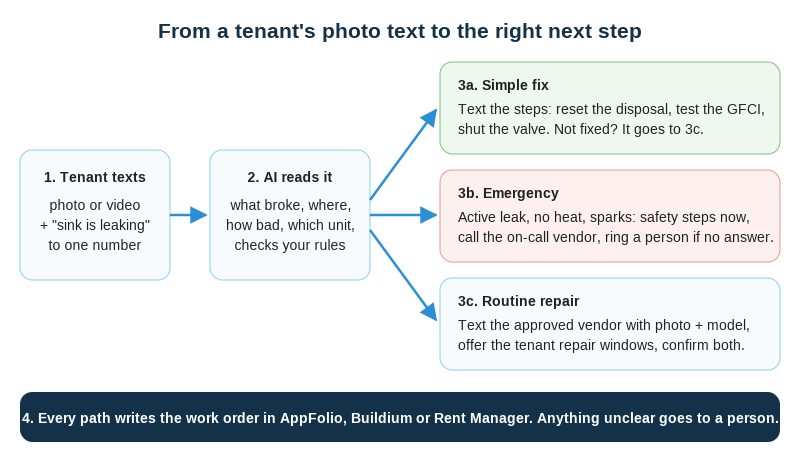
The diagram in words:
- Tenant texts. A photo or short video plus a line like “sink is leaking” goes to one number or the resident portal.
- AI reads it. A vision model looks at the picture and the words: what broke, where, how bad, which unit, and often the appliance make or model from its label.
- One of three paths. (a) Simple fix: steps go back by text, and if they fail the request moves to (c). (b) Emergency: safety steps now, the on-call vendor is called, and a person is rung if nobody answers. (c) Routine repair: the approved vendor gets the photo and model, and the tenant is offered repair windows.
- Work order written. Every path is logged in AppFolio, Buildium or Rent Manager, and anything unclear goes to a person.
Photos matter more than anything else in this chain. Property Meld’s intake checklist puts it plainly: Require residents to upload photos or videos to improve diagnostic accuracy.
Which simple fixes can tenants safely handle from a text?
Tenants can safely handle the small resets that need no tools beyond a finger or a flashlight, and those are a large share of after-hours texts.
| What the tenant reports | Steps the text can send | Dispatch a vendor when |
|---|---|---|
| Kitchen or bathroom outlet dead | Press the reset button on the nearest GFCI outlet; check for a tripped breaker | It trips again at once, or there is heat, scorching or a burning smell |
| Garbage disposal hums or won’t start | Switch it off, press the red reset button underneath, try again | It still hums, leaks, or something is stuck inside |
| Smoke alarm chirping | Replace the battery, then press the test button | It is hard-wired and still chirps, or it is over its replacement date |
| No heat or no cooling | Check thermostat batteries and mode, the breaker, and the air filter | Nothing changes, or it is freezing or dangerously hot outside |
| Toilet running or overflowing | Turn the shut-off valve behind the toilet clockwise | Water keeps coming, or it is leaking through to a unit below |
Both big platforms already do this. AppFolio says its Maintenance Performer gives residents step-by-step guidance by text and chat for issues such as shutting off water, resetting a smoke detector or fixing a garbage disposal, according to its Summer 2026 product update.
How does triage software decide what counts as an emergency?
Triage software decides what counts as an emergency from rules your company writes, not from its own opinion, and that is how it should be.
AppFolio describes it this way on its Realm-X Performers tour: Issues are classified as emergencies based on the rules your team sets.
You set the issue types, the severity thresholds, the time-of-day logic and the on-call assignments.
Water deserves the strictest rule. The U.S. EPA’s mold guide says it is important to dry water-damaged areas and items within 24 to 48 hours to prevent mold growth, so an active leak should never wait for Monday.
- Emergency (now, any hour)
- Active water leak or flooding, no heat in freezing weather, gas smell, sparks or burning smell, sewage backup, a door that won’t lock, fire or smoke alarm failure.
- Urgent (within about a day)
- One toilet out when there are two, fridge not cooling, no hot water, a slow leak under control after the shut-off.
- Routine (scheduled)
- Dripping faucet, loose cabinet door, a burner out, a blind that won’t close.
Your lease and your local code decide the final list. Write it once, and the software applies the same list to every tenant at every hour.
Which automated tenant maintenance triage software is available?
Three names come up most for residential managers of 100 to 1,000 units: AppFolio’s built-in Maintenance Performer, Property Meld with its MAX assistant, and Latchel.
The quiet win here is small: fewer can you send a picture?
texts, and more requests that arrive already sorted and ready to act on.
| Tool | How tenants reach it | Troubleshooting before dispatch | Vendor dispatch | Works with |
|---|---|---|---|---|
| AppFolio Realm-X Maintenance Performer | Text and chat inside AppFolio | Reviews photos, walks residents through simple fixes | Routes by issue type, severity and time of day, texts vendors from the work order | AppFolio only (it is part of AppFolio) |
| Property Meld with MAX | Guided questions with photo or video prompts | Coaches residents through simple issues; flags true emergencies | Property Meld’s maintenance platform assigns and tracks vendors | Integrates with AppFolio, Buildium, Rent Manager, Propertyware, Yardi and Rentvine |
| Latchel | Call, text or portal | Step by step before a work order opens; claims 23% resolved at intake | Your preferred vendors and in-house techs first, in the order your rules set | AppFolio, Buildium, Rentvine, Propertyware, Rent Manager, Yardi and others |
Property Meld bought the company behind MAX, Mezo, in January 2025, and says in its acquisition announcement that MAX collects information, resolves issues and helps with emergencies.
If you run Buildium or Rent Manager, the honest first question for any vendor is the same: show me one of my real tenant texts going in, and the finished work order coming out.
How does automatic vendor dispatch work without endless phone tag?
Automatic vendor dispatch works from a vendor list and a few rules you write once: who handles which trade, at which properties, in what order, and up to what dollar amount.
- Pick the vendor. The software matches the trade (plumbing, HVAC, appliance) and property to your approved vendor list.
- Send the job. The vendor gets one text with the unit, the photo, the model number, the troubleshooting already tried and your not-to-exceed amount.
- Offer windows. The tenant picks from the times the vendor accepts, so nobody plays phone tag in the middle.
- Roll over. If the vendor does not accept within your window, the job goes to the next vendor on the list. Latchel describes this on its dispatch page.
- Close the loop. Reminders go out the day before, and the work order closes when the vendor marks it done and uploads a photo.
Your plumber still gets your jobs. The difference is that the plumber gets a complete job with a photo, instead of unit 4B, something with the sink, call her.
Can you build automated maintenance triage yourself?
Yes, a custom triage setup can be built from standard parts, and it can fit odd rules that boxed products don’t handle.
The texting side usually runs on a service like Twilio. When a tenant sends a photo, Twilio passes it to your program through its incoming message webhook, with a NumMedia count and a MediaUrl0 link to the first picture.
A vision-capable AI model then reads the photo and the text and returns a short structured answer: trade, urgency, likely cause, next step. Plain code checks that answer against your emergency list before anything is sent.
Finally the work order is written into your property management software through its API or an integration. Buildium, for example, lets you assign work orders to staff or vendors, as its maintenance features page describes.
What still needs a person in automated maintenance triage?
A person still needs to own the rules, the money and the unusual cases, because automated triage software only follows what it is given.
- Unclear photos: low-confidence reads go to a coordinator, not straight to a vendor.
- Money over your limit: anything above the not-to-exceed amount waits for approval.
- Repeat problems: the third leak in the same unit this year is a question for a person, not another work order.
- Missed answers: if the on-call vendor does not answer an emergency, a human phone must ring.
- Daily count: texts received versus work orders created, so a stuck inbox shows up the same morning.
What does a sensible first month with automated triage look like?
A sensible first month starts in shadow mode, where the software suggests and your team still decides.
- Week 1: write the emergency list, the self-fix steps and the vendor order by trade and property.
- Week 2: the software triages every request in the background; your coordinator compares its call with their own.
- Week 3: self-fix texts and routine vendor booking go live; emergencies still ring a person as well.
- Week 4: count the hours saved, the dispatches avoided and any wrong calls, then decide what to keep.
If it does not save real time on your own tenants’ texts in that month, it is not worth keeping. That is the honest test.
If it does, your coordinator gets back the part of the job nobody misses: asking can you send a picture?
forty times a week.
Give your team one month of sorted, ready-to-book requests, and see how much calmer the evenings get.
Sources and further reading
- AppFolio: Realm-X Maintenance Performer tour
- AppFolio: Introducing Realm-X Performers
- AppFolio: What’s new, Summer 2026 (AI-guided self-help)
- Property Meld: Meet MAX
- Property Meld: Property Meld acquires Mezo (January 2025)
- Property Meld: maintenance intake and triage checklist
- Property Meld: integration partners
- Latchel: maintenance features (vendor claim of 23% resolved at intake)
- Latchel: maintenance dispatch and scheduling
- Buildium: property management maintenance software
- Twilio: the incoming message webhook request (NumMedia, MediaUrl0)
- U.S. EPA: A brief guide to mold, moisture and your home
- HUD: Fair housing rights and obligations
Questions and answers
Can I use AI to triage tenant maintenance requests automatically?
Yes. AI can read a tenant’s text and photo, sort the request into self-fix, emergency or routine, send safe steps and book an approved vendor. Keep your own written emergency rules in charge, send unclear photos to a person, and start in shadow mode for a few weeks.
Will tenants actually follow troubleshooting steps by text?
Many will, if the steps are short, one at a time and come within a minute. Latchel claims 23% of requests are resolved at intake. Measure your own rate during a shadow month rather than trusting any headline number.
Do I have to replace AppFolio, Buildium or Rent Manager?
No. AppFolio has its own Maintenance Performer built in, and tools such as Property Meld and Latchel connect to AppFolio, Buildium, Rent Manager and Yardi. A custom setup can also write work orders into the software you already run.
What happens if the AI misses a real emergency?
That is why emergency rules are written by you and checked in code, why anything about water, gas, heat or electricity is treated as urgent by default, and why an unanswered emergency always rings a human phone. Review every emergency call during the first month.
How much does automated maintenance triage cost?
It depends on the route. Property Meld says MAX comes at no extra charge on its current standard plans, while AppFolio and Latchel quote by portfolio. A custom setup costs texting fees, AI usage and the build. Ask each vendor for pricing on your unit count.