
How to Automate Rate Confirmation Data Entry (and Stop Retyping Loads)
Good morning, rate con wrangler.
If your morning starts with a pile of rate cons and a cold coffee, this guide is for you.
Most small brokerages still read every rate confirmation by eye and type it into the TMS field by field.
It works, but it eats the best hours of the day, and the one load where somebody types 2,150 instead of 2,510 is the one that costs you a week of back and forth with accounting.
Short answer: To automate rate confirmation data entry, you route rate con emails to one inbox, let an OCR and AI document reader pull the rate, stops, dates and reference numbers into structured fields, run simple checks against your rules, and write the result into your TMS through its API or import. A person only reviews what gets flagged.
What does it mean to automate rate confirmation data entry?
It means the computer does the typing and your people do the judging.
Today a coordinator opens the PDF, reads the shipper’s or carrier’s layout, and keys the same 10 to 30 values into the load screen. An automated version does the reading and keying the moment the email arrives, then shows your team a finished load with anything doubtful highlighted.
The rate con itself does not change. Shippers keep sending their own formats, and carriers keep signing yours. What changes is that nobody retypes it.
How much time does manual rate con entry really cost?
Usually more than anyone has written down, because it is spread across every coordinator’s day.
Vendors who sell this kind of tool put manual entry at roughly 6 to 12 minutes per rate confirmation. Those are their numbers, not ours, so test them against your own floor with a stopwatch for one morning.
| Loads a day | Minutes per rate con | Hours a day | Hours a month (21 workdays) | Monthly cost at $25 an hour |
|---|---|---|---|---|
| 10 | 8 | 1.3 | 28 | $700 |
| 20 | 8 | 2.7 | 56 | $1,400 |
| 40 | 8 | 5.3 | 112 | $2,800 |
| 40 | 12 | 8.0 | 168 | $4,200 |
Assumptions: 8 minutes is the middle of the vendor range above, 21 working days a month, and $25 an hour as a rough loaded cost for an entry level coordinator. Change the numbers to yours; the shape of the table stays the same.
The hidden cost is the error rate. One vendor estimates a few wrong fields slip in for every couple of dozen rate cons keyed by hand, and a wrong rate or a wrong delivery date tends to surface at the worst time, on the invoice or at the dock.
How does an emailed rate con turn into a load automatically?
It follows the same five steps a good coordinator follows, just faster.
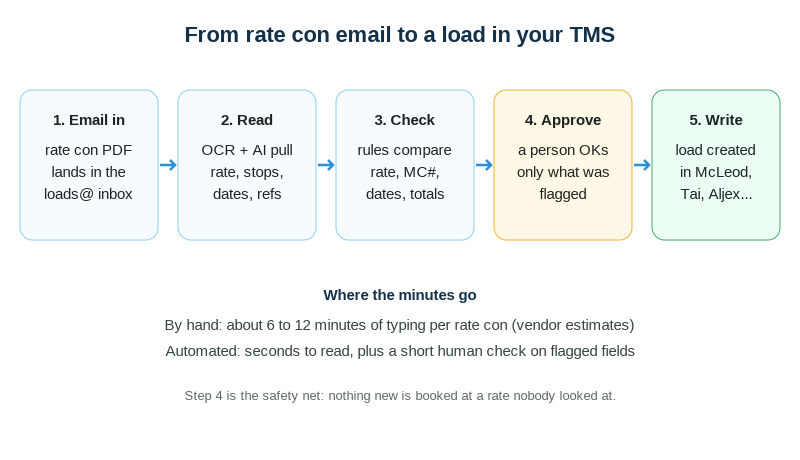
- Collect. Rate cons go to one address, such as loads@yourbrokerage.com. A small service watches that inbox; Gmail, for example, can notify a program the moment new mail arrives through the Gmail API push notifications.
- Read. The PDF or scan goes to a document reader. That can be a dedicated service such as Google Document AI, Azure AI Document Intelligence or Amazon Textract, or a vision-capable AI model asked to return the fields as structured data.
- Check. Plain rules catch the obvious: the line items add up to the total, the pickup date is before the delivery date, the MC number matches the carrier on file, the rate is within the range you expect for that lane.
- Approve. Clean loads can go straight in. Anything flagged waits for a person, with the PDF and the extracted values side by side.
- Write. The approved values are written into the TMS through its API or import tool, and the original PDF is attached to the load.
In practice step 4 is what makes owners comfortable. The machine never books a new load at a rate nobody looked at unless you decide it may.
Which fields should be pulled off every rate confirmation?
The ones you retype today, plus the ones that cause disputes later.
| Group | Fields | Why it matters |
|---|---|---|
| Parties | Shipper or broker name, carrier name, MC and DOT numbers, dispatcher contact | Matches the right customer and carrier record |
| Money | Line haul rate, fuel surcharge, accessorials (detention, lumper, layover, TONU), total | Drives the invoice and carrier pay |
| Stops | Pickup and delivery addresses, dates, appointment windows, extra stops | Drives dispatch and check calls |
| References | Load number, PO numbers, pickup and delivery numbers, BOL number | What the dock and the shipper will ask for |
| Freight | Commodity, weight, pallet or piece count, equipment type, temperature for reefer | Prevents wrong-equipment and overweight surprises |
| Terms | Payment terms, special instructions, signature and date | Settles arguments before they start |
MC and DOT numbers can also be checked against the carrier’s public registration through FMCSA registration records, which is a natural next automation once the numbers are already being read.
What tools do you need to automate rate con entry?
Four small building blocks, and you may already pay for some of them.
Honestly, the best part of watching this kind of setup work is how quiet it is. Nobody notices the typing that stopped happening; they just notice they got to the phones an hour earlier.
- An inbox trigger: a shared mailbox plus a program or workflow tool that reacts to new mail.
- A document reader: OCR for scans, plus an AI model or a trained document parser that knows what a rate con looks like.
- A rules layer: a short list of checks written in plain terms, like
flag any rate more than 20 percent above last month’s lane average.
- A TMS connection: the API, an import file or an integration your TMS already supports.
Off-the-shelf products bundle all four for freight specifically. A custom setup does the same with general cloud services and fits odd layouts better. Either way, ask to see your own rate cons run through it before you commit.
Can it put the data straight into McLeod, Tai, Aljex or another TMS?
Usually yes, but how depends on what your TMS opens to outside programs.
McLeod Software, Tai Software and Aljex all sell into brokerages that connect outside tools, but the exact route (an API, an approved integration partner, or an import file) depends on your version and contract.
Ask your TMS rep one plain question: How can an outside program create a load and attach a PDF?
If the answer is “only by hand,” the automation can still prepare a finished load sheet that a coordinator pastes in one go, which already removes most of the typing.
Doesn’t EDI already handle this?
For your biggest shippers it may, and that is the easy part.
Shippers with EDI send a structured load tender, the X12 204, that a TMS can read without any guessing.
The trouble is everyone else: the regional shipper who emails a PDF, the carrier who sends back a phone photo of the signed rate con, the customer whose rate lives in an email signature. Those are exactly the documents an AI reader is good at, so the two approaches sit side by side.
What can go wrong, and how do you guard against it?
Three things, and each has a simple guard.
- Misread numbers on bad scans. Guard: confidence scores, plus the totals check. Anything below the bar goes to a person.
- A new layout nobody has seen. Guard: unknown senders or layouts are always reviewed the first few times.
- Quiet failures. Guard: a daily count of emails received versus loads created, so a stuck inbox shows up the same morning.
Keep the original PDF attached to every load. When there is an argument about detention or a TONU, the source document wins, not the extracted copy.
What does a sensible first week look like?
Start in shadow mode, where the automation fills a draft and your team keeps working as usual.
- Day 1: forward a week of real rate cons (all layouts) and agree on the fields and rules.
- Days 2 and 3: the automation reads every new rate con in the background; coordinators compare drafts with what they typed.
- Days 4 and 5: clean, familiar layouts go straight in; everything else is approved with one click.
- End of week: count the minutes saved and the errors caught, then decide whether to keep it.
If it does not save real time on your own documents in that week, it is not worth keeping. That is the honest test.
Give your team one week of mornings without the retyping, and see what they do with the hour.
Sources and further reading
- Gmail API: push notifications
- Google Cloud: Document AI overview
- Microsoft: Azure AI Document Intelligence overview
- Amazon Textract: what it is
- X12: the EDI standards body (204 load tender)
- FMCSA: registration and USDOT/MC numbers
- FreightOptiq: vendor estimate of minutes per rate con (vendor claim)
- LaneProof: vendor estimate of manual entry time (vendor claim)
Questions and answers
Can I use AI to automate rate confirmation data entry?
Yes. A vision-capable AI model or document parser can read a rate confirmation PDF, return the rate, stops, dates and references as structured fields, and pass them to your TMS. Keep a human approval step for flagged or unfamiliar documents, at least at the start.
Does it work with scanned or photographed rate cons?
Mostly. OCR handles clean scans well; blurry phone photos are where misreads happen. Confidence scores and a totals check send those to a person instead of straight into the TMS.
Do I need to replace my TMS?
No. The automation sits in front of the TMS you already use and writes into it through its API, an approved integration or an import file. If none of those exist, it can still prepare a ready-to-paste load sheet.
How accurate is OCR on rate confirmations?
It depends on the scan quality and how varied your layouts are. Measure it on your own documents in shadow mode for a week rather than trusting a headline number, and keep anything below your confidence bar for human review.
Is it safe to send rate cons to an AI service?
Rate cons carry customer names, rates and addresses, so treat them like any business data. Use a provider whose terms say your documents are not used for training, limit who can see the inbox, and keep the originals in your own storage.