Don't get me wrong. VSCode is an amazing editor.
But it feels a bit all over the place, when it comes to finding settings files. So I created this page to show you how to open settings.json (the main settings file in VS Code) fast.
Visual Studio Code stores its editor settings in a JSON file. JSON is JavaScript Object Notation format. If you program in JavaScript you already know what it is.
How To Open settings.json file in VS Code?
This is the fastest way to open settings.json file in Visual Studio Code.
First, open User Settings page:
Press Ctrl + , (comma) on Windows, or...
Press ⌘ + , (comma) on Mac.
To open settings.json file from VSCode UI do the following:
- Go to File menu.
- Select Preferences.
- Then select Settings.
- Click on small settings.json file icon in upper right corner.
Next, on the User Settings screen, click on a small button that looks like a new file icon in upper right corner of the VSCode dashboard:
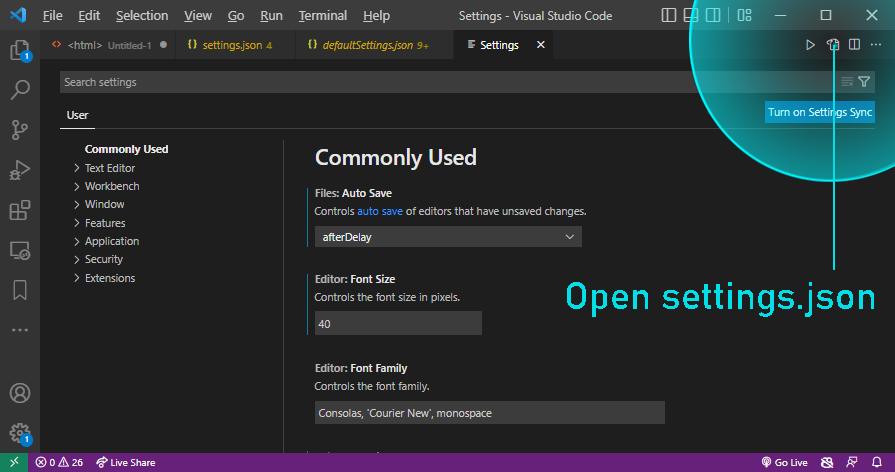
Image: fastest way to open settings.json is through this button.
There is another way to open settings.json file in VSCode. But it's not as intuitive, and you have to do a lot of typing and clicking. It's explained in next section:
Where is settings.json file in Visual Studio Code?
To open VSCode's settings.json file first open Command Palette:
Press Ctrl + Shift + P on Windows or...
Press ⌘ + shift + P on Mac
Type settings.json into command palette and press Enter.
This opens Command Palette in VSCode, which is an input box. Typing into it will cause a the menu show a list of drop down items relevant to your search query.
Type settings.json and click on one of the options on drop down.
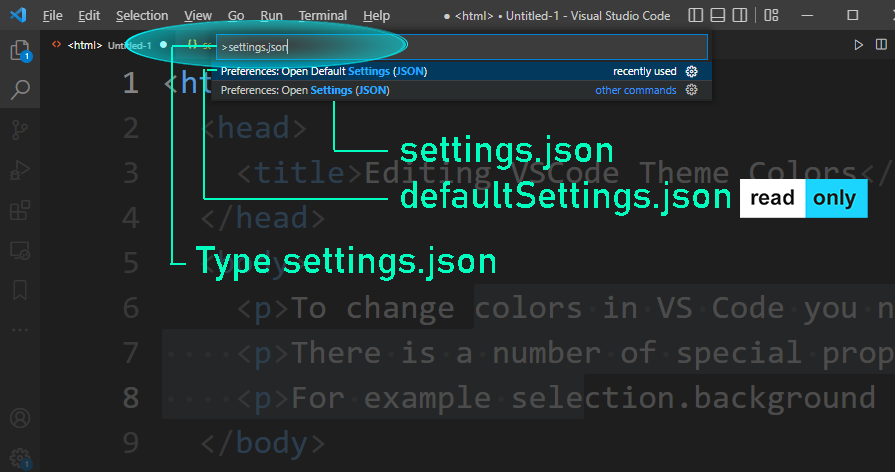
(You can also open defaultSettings.json file here.)
From now on, your settings.json file will be open in one of the tabs. You can right click on it and "pin" it to the tabs bar, to make sure it can be easily found during current session.
How to reset settings.json to default?
The defaultSettings.json file is read-only.
You can use it to reset your current VSCode settings.
Just copy and paste it into your settings.json
The end.
How To Open settings.json file in VS Code on Windows 7, 10 or 11?
If you're on Windows this video is for you.
How To Open settings.json file in VS Code on Mac?
Here's a brief video explaining how to open the settings file on a Mac.