How to Extract Data from Scanned Receipts and Bank Statements (No Retyping)
Hello, and welcome to anyone who has ever typed a bank statement into QuickBooks one line at a time.
Picture a catch-up client whose two years of scanned bank statements turn into clean, categorized lines before lunch.
In most small firms, that same job is a person, a second monitor and a very long afternoon of typing.
The client meant well, of course, and the statements really are all there, some of them photographed on the kitchen table at an angle.
Short answer: To extract data from scanned receipts and bank statements, run each file through an OCR model built for that document: an expense model for receipts, a bank statement model for statements. Check the scan first, prove each statement by matching its opening and closing balances, let rules and AI suggest categories, and have a person approve before posting.
What does it mean to extract data from scanned receipts and bank statements?
Extracting data from scanned receipts and bank statements means software reads the image, finds the fields an accountant needs, and returns them as structured data instead of a picture.
Plain OCR only turns pixels into text. Document models go one step further and say which text is the vendor, which is the total, and which line is a withdrawal. Receipts and bank statements need different models, because they hold different facts.
| Document | Fields the model returns | Example model |
|---|---|---|
| Receipt | Vendor name, date, receipt number, subtotal, tax, total, amount paid, and each line item with quantity and price | Amazon Textract AnalyzeExpense |
| Bank statement | Bank name, account number, statement start and end dates, beginning and ending balance, and each transaction’s date, description, check number, deposit or withdrawal | Azure prebuilt-bankStatement.us |
| Checks on a statement | Check number, date and amount | Azure prebuilt-bankStatement.us (v4.0 GA) |
Each value comes back with a confidence score. That score is what lets an automated workflow decide which lines go straight to review and which can be trusted.
How long does entering receipts and bank statements by hand take?
Entering receipts and bank statements by hand takes roughly half a minute per bank line and a minute per receipt, which adds up to whole days for a catch-up client.
| Job | Items | Seconds each | Hours | Cost at $35 an hour |
|---|---|---|---|---|
| One bank statement of 80 lines | 80 lines | 30 | 0.7 (40 minutes) | $23 |
| One client’s receipts for a month | 25 receipts | 60 | 0.4 (25 minutes) | $15 |
| Catch-up client: 24 months of statements | 1,920 lines | 30 | 16.0 | $560 |
| 40 monthly clients, one statement and 25 receipts each | 3,200 lines + 1,000 receipts | 30 / 60 | 43.3 a month | $1,517 a month |
Assumptions, compiled by Accounting Firm Automation on November 27, 2026: 30 seconds per bank line covers typing the date, description and amount and picking a category. 60 seconds per receipt adds opening the image and attaching it. $35 an hour is a rough loaded staff cost. Swap in your own numbers.
The machine side is small by comparison. Amazon’s pricing page lists Textract’s Analyze Expense API at $0.01 a page for the first million pages in US West (Oregon), so reading 1,000 receipts costs about $10.
How does automatic receipt and bank statement extraction work, step by step?
Automatic receipt and bank statement extraction follows six steps, and the two checks in the middle matter more than the reading itself.
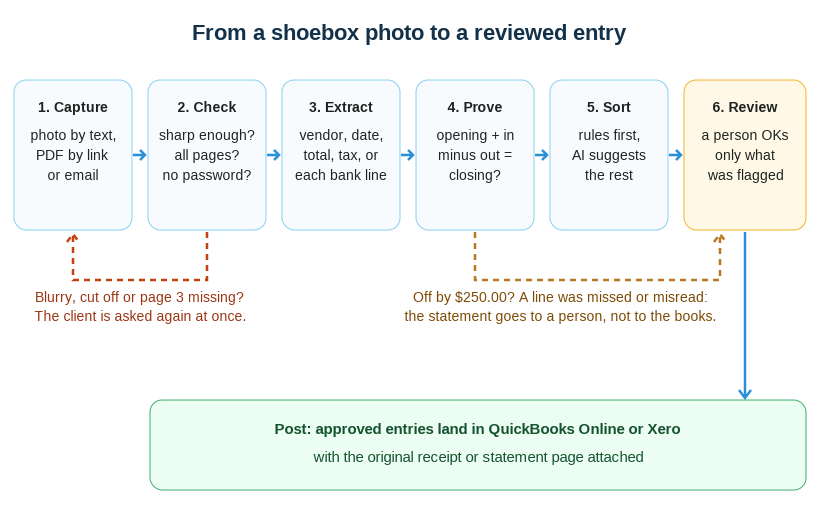
- Capture. The client texts a photo of a receipt or uploads a statement PDF through a link or email. No login needed.
- Check. Software looks at the file: sharp enough to read, every page present, not password-locked, one statement per file.
- Extract. An expense model reads the receipt’s vendor, date, total and tax; a bank statement model reads every transaction line.
- Prove. For statements, the opening balance plus deposits minus withdrawals must equal the closing balance. For receipts, the line items plus tax must equal the total.
- Sort. Your existing bank rules categorize repeat vendors; an AI model suggests a category for the rest, marked as a suggestion.
- Review. A person sees the original image beside the extracted values and approves, fixes or rejects only the flagged lines.
Approved entries then post to QuickBooks Online or Xero with the source image attached, so the audit trail is one click away.
How do you extract line items from a photo of a receipt?
You extract line items from a receipt photo with an expense-specific model, which finds the vendor, date, total, tax and each purchased item even when the layout is unfamiliar.
Amazon’s documentation for Textract invoice and receipt analysis says it can find the vendor name even if it’s only indicated within a logo at the top of the page
. It also maps different labels, such as bill number and receipt number, onto one standard field.
Every field comes with a confidence score and its position on the page. A workflow can highlight the exact spot on the image when a reviewer needs to check a smudged total.
If your clients already use a capture tool, the reading may be done for you. Dext reads receipts sent by phone, email or upload, and QuickBooks Online’s mobile app can snap receipts for review.
The faded thermal receipt from a gas station is the honest exception. If a person can’t read the total, no model will either, so the workflow should ask the client for a card statement line instead.
How do you turn a scanned bank statement into transaction lines?
You turn a scanned bank statement into transaction lines with a bank statement model, which returns each line’s date, description and amount, plus the balances needed to prove the result.
Microsoft’s Azure bank statement model (model ID prebuilt-bankStatement.us) reads printed US bank statements. It returns beginning and ending balances, transactions with deposit and withdrawal amounts, and a separate checks table.
Google Cloud Document AI has a Bank Statement Parser with similar fields: starting and ending balance, and deposit and withdrawal lines with their dates and descriptions. Its documentation says to split a file holding several statements before parsing it.
Dext’s own bank statement extraction takes scanned files too. Its product page says plainly: Downloaded or scanned. Dext reads both.
How do you know no transaction was missed?
You know no transaction was missed when the extracted lines rebuild the statement’s own closing balance to the cent. That one sum catches dropped lines, doubled lines and misread amounts.
| Step | Amount |
|---|---|
| Beginning balance printed on the statement | $4,210.55 |
| Plus extracted deposits | $18,940.00 |
| Minus extracted withdrawals | $19,377.32 |
| Expected ending balance | $3,773.23 |
| Ending balance printed on the statement | $3,523.23 |
| Difference to find | $250.00 |
A $250.00 gap usually means one withdrawal was skipped, often at a page break, or a 7 was read as a 1. The statement is held for a person instead of posting wrong numbers into the books.
What makes a scanned receipt or statement good enough to read?
A scanned receipt or statement is good enough to read when the smallest text is clear, every page is there, and the file isn’t locked. Makers publish the exact limits.
- Resolution: Dext asks for scanned statements at a minimum of 200 dpi.
- Text size: Azure needs text at least 12 pixels high on a 1024 x 768 image, about 8-point text at 150 dpi.
- One statement per file: Dext wants one statement for a single bank account in each file; Google says to split combined files first.
- File limits: Dext takes PDF or TIFF up to 50 MB and 300 pages; Azure’s paid tier takes up to 2,000 pages and 500 MB.
- No password: Azure asks for password locks to be removed before submission.
- Flat and whole: Azure recommends one clear photo or high-quality scan per document, so no folded corners or two receipts in one shot.
Which tools extract receipts and bank statements for QuickBooks and Xero?
Dext, Hubdoc and QuickBooks Online’s receipt capture handle receipts inside the bookkeeping world, while bank statements are covered by Dext and by cloud models from Microsoft, Amazon and Google.
Honestly, the balance check is the quiet hero here. It’s the same proof a careful bookkeeper does at the end of a reconciliation, only it runs before anything reaches the books, on every statement, every time.
| Tool | Receipts | Scanned bank statements | Gets data into the books |
|---|---|---|---|
| Dext | Yes | Yes, PDF or TIFF, 200 dpi or better, over 700 banks listed | Receipts publish to Xero and QuickBooks; statements come back as a CSV you import yourself |
| Hubdoc (Xero) | Yes | PDF statements from supported banks in the US and Canada | Receipts to Xero; statements as a pre-formatted CSV to upload |
| QuickBooks Online receipts | Yes, mobile app or forwarding email | No | Receipts wait for review in QuickBooks Online |
| Azure AI Document Intelligence | Yes, receipt model | Yes, US bank statement model | Returns JSON; a workflow writes it to your books |
| Amazon Textract | Yes, AnalyzeExpense | Reads text and tables with AnalyzeDocument; the balance match is up to your workflow | Returns JSON; a workflow writes it to your books |
| Google Cloud Document AI | Yes, expense parser | Yes, Bank Statement Parser | Returns JSON; a workflow writes it to your books |
Here’s the catch: none of the capture tools proves a scanned statement against its balances for you and then routes the failures to a person. That step, plus re-asking the client for a bad photo, is the custom layer firms add on top.
How do extracted transactions get into QuickBooks Online or Xero?
Extracted transactions get into QuickBooks Online or Xero as a formatted bank file you upload, or through the accounting software’s API when the workflow posts entries directly.
Intuit’s help article on manually uploading transactions into QuickBooks Online sets the format. Each file needs 3 columns (Date, Description, Amount) or 4 (Date, Description, Credit, Debit). It must be 350 KB or less, with up to 1,000 lines per upload.
So the 1,920-line catch-up client above goes in as two uploads, split by date range. A workflow can do that split for you.
Xero takes statement files through Import a Statement on the bank account. Its blog describes Hubdoc turning supported PDF statements into a pre-formatted CSV for that upload. Dext also lets you set a CSV layout to match Xero, QuickBooks or Sage.
Can AI categorize the extracted transactions too?
Yes, AI can suggest categories for extracted transactions, but the suggestion should stay a suggestion until a person or a proven rule approves it.
Repeat vendors are rule work. “ADOBE *CREATIVE CLD” is software every month, and your existing bank rules in QuickBooks Online or Xero already know that.
The rest is where an AI model helps. Given the client’s chart of accounts and last year’s coded lines, it can suggest “Meals” for a café or “Equipment” for a Home Depot charge, with a short reason a reviewer can read.
And then there’s Venmo, $640, no memo
. No model knows whether that was rent, a contractor or a birthday gift. The honest workflow flags it and asks the client one short question.
What still needs a person to check after extraction?
After extraction, a person still checks anything that failed a proof, anything with a low confidence score, and anything a rule can’t explain.
- Statements whose extracted lines don’t rebuild the closing balance.
- Receipts whose line items plus tax don’t add up to the total.
- Low-confidence fields, such as a smudged amount or a cut-off date.
- New vendors and transfers between the client’s own accounts.
- Possible duplicates: the same receipt sent by text and by email, or a receipt that already matches a bank line.
- Anything that touches a tax position, such as a mixed personal and business charge.
The point is not to remove the accountant. It’s to move the accountant from typing 1,920 lines to judging the 40 that need judgment.
Are scanned receipts and bank statements good enough for the IRS?
Scanned receipts and bank statements can serve as records, because the IRS applies the same recordkeeping rules to electronic records as to paper ones.
The IRS page What kind of records should I keep says supporting documents include sales slips, paid bills, invoices, receipts, deposit slips, and canceled checks
. It adds: All requirements that apply to hard copy books and records also apply to electronic records.
In practice, keep the original image next to the extracted entry, keep it readable, and keep it somewhere safe. A workflow that attaches the source file to every posted line does that by default.
Where should a small firm start with receipt and statement extraction?
Start with one catch-up client or one month of statements for five clients, and measure the hours against the table above.
- Pick documents you already have, so nobody has to chase anything for the test.
- Run statements through a bank statement model and receipts through an expense model.
- Turn on the balance proof for every statement and the total proof for every receipt.
- Have one staff member review every flagged line and note how long it took.
- Import the approved lines into QuickBooks Online or Xero within the 1,000-line limit.
- Compare the review time with the hand-typing estimate for the same documents.
Pair it with automated chasing for missing tax documents, and the shoebox gets checked the moment it arrives instead of in March.
Done well, your team stops typing what’s already printed on the paper, and spends that time on the lines that need an accountant.
Give one catch-up client to the machine this month, keep the review with your team, and see how much of the afternoon comes back.
Sources and further reading
- Amazon Textract: analyzing invoices and receipts (AnalyzeExpense fields)
- Amazon Textract pricing (Analyze Expense API per page)
- Microsoft: Azure Document Intelligence bank statement US model and input requirements
- Microsoft: bank statement model field schema (2024-11-30 GA)
- Google Cloud Document AI: processor list (Bank Statement Parser fields)
- Dext: bank statement extraction
- Dext Help Centre: how to upload bank statements in Dext
- Dext: data capture for accounting practices
- Xero blog: four ways to get your banking data into Xero (Hubdoc PDF statements)
- Intuit: manually upload transactions into QuickBooks Online
- Intuit: how to capture and manage receipts in QuickBooks Online
- IRS: What kind of records should I keep
Questions and answers
Can I use AI to extract data from scanned receipts and bank statements?
Yes. Document models from Microsoft, Amazon and Google, and tools such as Dext, read receipts and scanned statements into structured lines. Add a balance check for each statement, a total check for each receipt, and a person reviewing flagged lines before anything is posted to QuickBooks Online or Xero.
What resolution should a scanned bank statement be?
Dext asks for scanned bank statements at a minimum of 200 dpi. Microsoft’s Azure document models need text at least 12 pixels high on a 1024 x 768 image, about 8-point text at 150 dpi. A PDF downloaded from the bank is better than any scan.
Can QuickBooks Online read a PDF bank statement?
QuickBooks Online’s manual upload takes CSV, TXT, QBO or OFX files, not PDF statements. The file needs 3 or 4 columns, 350 KB or less, and up to 1,000 lines, so a scanned PDF is extracted first and then uploaded.
How do I check that OCR didn’t miss a transaction?
Add up the extracted lines: the statement’s beginning balance plus deposits minus withdrawals must equal its printed ending balance to the cent. Any difference means a line was missed, doubled or misread, and the statement should go to a person.
Does Xero extract data from PDF bank statements?
Through Hubdoc, Xero can turn PDF statements from supported US and Canadian banks into a pre-formatted CSV you upload with Import a Statement. For scanned or photographed statements, Dext and the cloud document models say they read scanned files.