
Mitchell 1 CRM Text Automation: What SocialCRM Sends and What It Skips
Hello, and welcome to every shop that runs on Manager SE and wishes it typed a little less.
If your shop runs Manager SE and you just searched for a way to make Mitchell 1 text customers on its own, you’re in the right place.
Mitchell 1 already automates some texts, and many shops don’t know exactly which ones.
The rest still wait for a service advisor to stop writing an estimate, open MessageCenter and type.
Short answer: Mitchell 1’s CRM, SocialCRM, texts on its own in two places: a reminder one day before a Manager SE appointment and a thank-you with a review link after a closed invoice. Repair status texts, such as checked in, delayed or ready, are typed by an advisor in MessageCenter unless an automation reads Manager SE and sends them.
What does Mitchell 1’s CRM text customers automatically?
Mitchell 1’s CRM sends marketing and appointment texts automatically; repair status texts are sent by a person.
| Text | Mitchell 1 product | What triggers it | Sends on its own? |
|---|---|---|---|
| Appointment reminder | SocialCRM | An appointment in the Manager SE Scheduler; sent one day before | Yes |
| Thank-you with review link | SocialCRM | A closed invoice in Manager SE | Yes |
| Texting consent request | SocialCRM | Sent by email, automatically or by hand | Yes, if set up |
| Promotion campaign | SocialCRM | A campaign scheduled up to one week ahead | Yes, once scheduled |
| Two-way text | MessageCenter in Manager SE | An advisor on the work-in-progress, order, revision or appointment screen | No, typed or picked from a template |
| Inspection report with approval link | OneFlow Inspections | The inspection is finished and the report is sent | No, the advisor sends it |
The reminder and thank-you rules come from Mitchell 1’s post on SocialCRM text messaging, which says the thank-you text goes out after a closed invoice is detected
in Manager SE. Campaign scheduling and consent emails are listed on the SocialCRM text messaging page.
Notice what’s missing from the table. None of Mitchell 1’s pages we read describes a text that fires on its own when a repair order moves from “waiting on parts” to “in progress”.
Are SocialCRM, MessageCenter and OneFlow the same thing?
No, they are three separate Mitchell 1 products, and each handles a different kind of text.
- SocialCRM
- Mitchell 1’s shop marketing service. It reads Manager SE and sends reminders, thank-you notes, review requests, emails and campaigns.
- MessageCenter
- Two-way texting built into Manager SE. Mitchell 1 says each shop gets a dedicated texting number, and advisors text
directly from Manager SE Work-In-Progress, Order, Revision or Appointment Editor screens
(Mitchell 1 MessageCenter). - OneFlow Inspections
- The digital inspection tool. Branded reports go out by text or email, and customers approve or decline each job in the Online Authorization Portal (OneFlow Inspections).
The two texting systems can work together. Mitchell 1’s “super-secret” texting feature post explains that a shop with both MessageCenter and SocialCRM can have customer replies show up on a phone, answered through a mobile window on M1SocialCRM.com.
That matters for owners who work the bays themselves. A reply to a reminder no longer waits until someone walks back to the counter computer.
Which texts does Mitchell 1 leave for your advisor to send?
The four repair status texts: checked in, work started, delayed and ready for pickup.
These are the texts that stop the is it ready yet?
calls, and in Manager SE they are typed by a person in MessageCenter. A template helps with the wording, but someone still has to remember to send it, look up the promised time and pick the right customer.
- Checked in:
Hi Dana, we have your 2017 Civic. First update by 11 a.m.
- Work started:
Thanks for approving. Work has started; ready about 4 p.m.
- Delay:
The part arrives tomorrow morning. New time: noon.
- Ready:
Your Civic is ready. Total $412.80. We’re open until 6.
The delay text is the one most often forgotten on a busy afternoon. It’s also the one customers remember, because news that arrives at 5:45 p.m. feels like a broken promise.
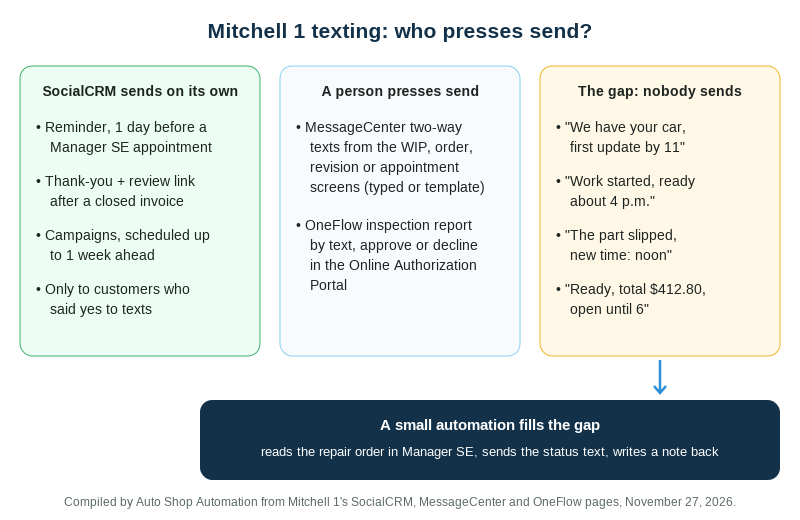
The diagram, as text:
- SocialCRM sends on its own: a reminder one day before a Manager SE appointment, a thank-you with a review link after a closed invoice, campaigns scheduled up to one week ahead, only to customers who said yes to texts.
- A person presses send: MessageCenter two-way texts from the work-in-progress, order, revision or appointment screens, and the OneFlow inspection report with its approval portal.
- The gap: checked in, work started, delay and ready texts, which an automation can send by reading the repair order in Manager SE and writing a note back.
How much time does typing status texts in Mitchell 1 cost?
About 4 advisor minutes per car, which adds up to 14 to 56 hours a month for a shop writing 10 to 40 repair orders a day.
| Cars a day | Typed by hand (minutes a day) | Automatic, advisor reviews (minutes a day) | Hours back a month (21 workdays) | Value at $25 an hour |
|---|---|---|---|---|
| 10 | 45 | 5 | 14.0 | $350 |
| 20 | 90 | 10 | 28.0 | $700 |
| 30 | 135 | 15 | 42.0 | $1,050 |
| 40 | 180 | 20 | 56.0 | $1,400 |
Assumptions: 3 status texts per car (checked in, work started, ready), 1.5 minutes each to open the repair order, find the promised time and send, and 30 seconds per car for an advisor to glance over the automatic texts. The $25 an hour is a rough loaded cost for advisor time. These are our round numbers, not a survey.
Time the next ten texts your advisor sends in MessageCenter and swap your own minutes in. The calls those texts prevent aren’t even counted here; our guide to automated text updates for auto repair shops works through that side.
How can you automate repair status texts on top of Manager SE?
A small service reads repair order changes from Manager SE, sends the matching status text through a registered number, and writes a note back to the repair order.
Mitchell 1 already does the remembering for reminders and thank-you notes. It feels good to hand it the status texts too, so the person at the counter can look up from the keyboard.
Manager SE is a desktop program with a cloud side. Mitchell 1 describes it as a hybrid system whose Manager SE Connection (MSEC) backs up shop data to a secure cloud location every day.
We found no public developer documentation for reading Manager SE data on Mitchell 1’s site on November 27, 2026, so the data route is the first thing to settle.
- Agree the data route. Ask your Mitchell 1 representative which integration your Manager SE version allows. Where none fits, a scheduled report from Manager SE’s more than 180 built-in reports can be read instead.
- Watch for changes. The service checks for new repair orders, approved jobs, changed promised times and closed invoices.
- Pick the text. A rule maps each change to one of the four status texts and checks that the customer agreed to texts.
- Fill in the facts. First name, vehicle, promised time and total come from the repair order, never from an AI.
- Send and log. The text leaves from a registered business number, and a note saying what was sent goes back on the repair order.
Keep SocialCRM doing what it already does well. The new layer only sends what Mitchell 1 leaves out, so a customer never gets two thank-you texts for one visit.
How do you turn a tech’s inspection notes into a plain-English text?
An AI model rewrites the tech’s shorthand into two calm sentences, and the advisor approves them before the OneFlow report goes out.
A tech writes RF strut leaking, mount cracked, rec replace pair + align.
The owner reads The shock absorber on your front right wheel is leaking oil, and its mount is cracked. Replacing both front ones together keeps the ride even, and we’ll realign the wheels afterward.
- What the AI reads: the tech’s note, the photo labels and the job name.
- What the AI writes: what is wrong and why it matters, in everyday words.
- What the AI never writes: prices, labor hours or safety promises. Those come from the OneFlow estimate.
- Who approves: the service advisor, before the report and its approval link are sent.
Mitchell 1’s September 8, 2025 inspections announcement says customers receive a branded report by text or email
and approve or decline each item in real time. The plain-English layer just makes the words under each photo easy to say yes to.
Does Mitchell 1’s CRM help a collision center with insurance supplements?
Not directly, because Mitchell 1 makes mechanical repair software, while collision estimating is mostly done in CCC ONE or in Mitchell Cloud Estimating from a separate company.
Mitchell 1 calls itself a member of the Snap-on Total Shop Solutions brand family. Mitchell Cloud Estimating comes from Mitchell, an Enlyte company, which serves insurers and collision repairers. The names are close enough to confuse a vendor on a sales call, so say which one you use.
For collision work, the status text that customers want most is about the insurance supplement. A tracker can log the date a supplement was sent, remind the advisor to follow up with the adjuster, and text the owner We’re waiting on your insurer’s approval for extra parts; we sent it Tuesday.
In a collision center on CCC ONE, its Update Plus feature already sends status texts, so a supplement tracker only adds the insurance step.
What consent rules apply to Mitchell 1 CRM texts?
Text only customers who agreed, keep marketing separate from repair updates, and make STOP work every time.
- Marketing needs written consent. Mitchell 1’s SocialCRM page states that
Text marketing requires documented prior consent by the recipient.
SocialCRM collects it with a consent email the customer clicks. - Status texts need a yes at check-in. Ask
May we text you updates about this repair?
and record the answer in Manager SE. - A custom sender registers its number. Twilio states that anyone texting US numbers from an application over a 10DLC number must register for A2P 10DLC.
- STOP and HELP always work. The CTIA Messaging Principles and Best Practices expect both keywords to be honored.
How do you check what Mitchell 1 is texting your customers right now?
Text yourself as a customer, open the SocialCRM dashboard, and ask Mitchell 1 for a list of every automatic message that is switched on.
Owners have asked for exactly this. A shop owner reviewing SocialCRM on the technicians’ network iATN wrote: There is no transparency as to what gets sent to clients or when.
(iATN review of SocialCRM). The review is old, but the check below works on any version.
- Add your own cell number to a test customer in Manager SE and book an appointment for tomorrow.
- Close a small test invoice and wait for the thank-you text.
- Open the SocialCRM dashboard and write down every active campaign and its schedule.
- In the dashboard’s SETUP menu, check which phone or email receives customer replies.
- Count the texts one real customer would get in a normal week.
When the list is on paper, the gap is easy to see. Usually it’s the four status texts, and those are the ones that bring the counter phone’s ringing down.
Mitchell 1 handles the reminders and the thank-you notes. Let a small, checked automation handle the we have your car
and “it’s ready” texts, and your advisor can get back to writing estimates.
Make the list of what your customers receive this week, and the next step will be clear.
Sources and further reading
- Mitchell 1: SocialCRM automated text message marketing
- Mitchell 1 ShopConnection: SocialCRM text messaging (reminders and thank-you texts)
- Mitchell 1 ShopConnection: MessageCenter texting in Manager SE
- Mitchell 1 ShopConnection: MessageCenter and SocialCRM replies on your phone
- Mitchell 1: OneFlow Inspections in Manager SE
- Mitchell 1 press release: Manager SE Inspections (September 8, 2025)
- Mitchell 1: Manager SE business management and Manager SE Connection
- iATN: owner review of SocialCRM by Mitchell 1
- Mitchell, an Enlyte company
- CCC ONE Help: Update Plus overview
- Twilio: A2P 10DLC registration
- CTIA: Messaging Principles and Best Practices
Questions and answers
Can I use AI to automate Mitchell 1 CRM text messages?
Yes, for the parts Mitchell 1 leaves to a person. AI can rewrite a technician’s inspection notes into plain English before the OneFlow report is sent, while repair status texts are filled from Manager SE data. SocialCRM already sends reminders and thank-you texts on its own, and an advisor should approve any AI wording.
Does Mitchell 1 SocialCRM send repair status texts automatically?
Not from what Mitchell 1 publishes. SocialCRM automatically sends an appointment reminder one day before a Manager SE appointment and a thank-you with a review link after a closed invoice. Checked in, delay and ready texts are sent by an advisor in MessageCenter.
How do customers opt in to Mitchell 1 texts?
For SocialCRM marketing texts, the customer receives a consent email, clicks its link and agrees to the texting terms, which adds them to the shop’s subscriber list. For repair status texts, ask at check-in and record the answer in Manager SE.
Can customers approve repairs by text in Mitchell 1?
Yes. OneFlow Inspections sends a branded inspection report by text or email, and the customer approves or declines each job in Mitchell 1’s Online Authorization Portal. Declined items are saved in Manager SE for a later reminder.
Is Mitchell 1 the same company as Mitchell Cloud Estimating?
No. Mitchell 1 is part of Snap-on’s Total Shop Solutions family and makes Manager SE, ProDemand and SocialCRM for repair shops. Mitchell Cloud Estimating comes from Mitchell, an Enlyte company focused on insurers and collision repair.