Dental Patient Reactivation Text Software for the List Nobody Calls
Hello, and a kind welcome to every front desk with an overdue list that only grows.
Picture the overdue list in your practice software, hundreds of names long, and a front desk that never gets a quiet hour to call it.
Most offices already know exactly who has not been back, because the practice software can build that list in a minute.
Dental patient reactivation text software is the tool that finally works that list every day, without taking a person off the phones.
Short answer: Dental patient reactivation text software pulls patients who have not been seen in a set time and have nothing booked from Open Dental, Dentrix or Eaglesoft, texts each one a short, plain reminder with a booking link, and writes the replies back as appointments, contact notes or opt-outs. Your front desk only handles replies that need a person.
- Who it texts
- Patients last seen before a chosen date, with no future appointment and no “do not contact” flag
- How often
- For automated health care texts under the FCC rule: at most 1 a day and 3 a week per patient, 160 characters each
- What a US text costs
- $0.04 per outgoing message on Open Dental Integrated Texting; incoming replies are free (Open Dental fee page, November 2026)
- What a plain reminder does
- In a dental field experiment, the share of patients booking a check-up within a month more than doubled (Altmann and Traxler, 2014)
What is dental patient reactivation text software?
Dental patient reactivation text software is a program that sends reminder texts to patients who have drifted away from the practice and books the ones who answer.
It reads the same list your team would call: patients last seen before a date, with no visit on the schedule. It sends each one a short text from the office number, with a link to book or a simple reply with a day that works.
Recall and reactivation are two ends of the same list. Recall reminds a patient whose cleaning is coming due; reactivation reaches a patient who is 6, 12 or 24 months past due and has stopped answering postcards.
The better tools also do the boring part people skip: they log every attempt, stop after a set number of tries, and never text someone who replied STOP.
Why does the dental overdue list keep growing?
A dental overdue list keeps growing because calling it is the one job a front desk can always postpone.
A ringing phone, a patient at the window and an insurance question all beat a cold recall call. The calls that do happen usually end in a voicemail, and the second try never comes.
The scale is not small. A Dentrix Magazine article by consultant Sandy Pardue says The average practice has 750 to 1000 patients overdue for their recall appointments.
It was first published in 2012 and updated in 2020, so read it as a long-running pattern, not a fresh count.
The same article suggests a yearly reactivation project: send the same card or email to the same group two to three months in a row. Texting software turns that one-time project into a steady routine that runs without anyone remembering it.
Here’s the catch: a list worked once, by hand, looks “dead” when it was only half worked. Most patients on it never got a second contact at all.
How much staff time does calling inactive patients cost compared with texting?
Calling inactive patients by hand takes about 16 times more staff time than texting them and answering the replies, in our example with stated assumptions.
| Patients on the list | Call attempts (3 each) | Staff hours calling | Staff cost calling at $22/hour | Text cost (3 each at $0.04) | Staff hours on replies |
|---|---|---|---|---|---|
| 300 | 900 | 60 | $1,320 | $36 | 3.75 |
| 800 | 2,400 | 160 | $3,520 | $96 | 10 |
| 1,500 | 4,500 | 300 | $6,600 | $180 | 18.75 |
Assumptions: 4 minutes per call attempt for dialing, ringing, a voicemail and the contact note; $22 an hour as a rough loaded front desk cost; Open Dental’s published $0.04 per outgoing US text; and 1 patient in 4 replying, at 3 minutes of staff time per reply without an assistant. Swap in your own numbers.
The 800-patient row is the middle of the Dentrix Magazine range. 160 hours is about a full month of one person’s working time, which is why that list rarely gets called at all.
Software fees sit on top of the text cost. Open Dental lists Web Sched Recall at $75 a month per location; most other vendors quote through sales.
How does dental reactivation texting work, step by step?
Dental reactivation texting follows five steps, from the overdue list to a booked visit, and each one writes back into the practice software.
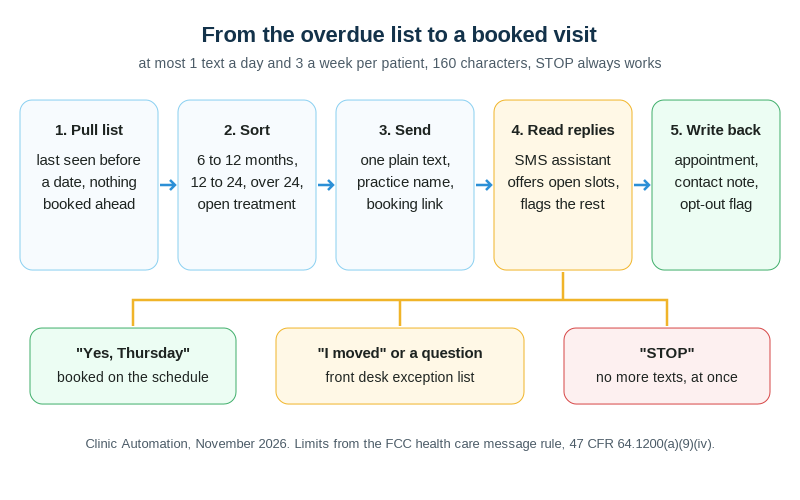
- Pull the list. The software reads patients last seen before a chosen date, with no future appointment and no “do not contact” flag. Open Dental’s Reactivation List uses exactly that rule: patients
last seen before the date entered and have not had a completed procedure since.
- Sort. Patients are grouped by time away (6 to 12 months, 12 to 24, over 24) and by open treatment, because each group gets a different message.
- Send. Each patient gets one short, plain text from the office number with the practice name, a booking link or
reply with a day,
and how to opt out. - Read replies. An SMS assistant answers the easy replies with open slots from the schedule and flags anything unusual for a person.
- Write back. A booking lands on the schedule, every attempt is logged as a contact note, and a STOP sets the patient’s no-text flag at once.
In words, the diagram shows: overdue list, sorted groups, one plain text, replies read by an assistant, then three paths. “Yes, Thursday” becomes an appointment, “I moved” or a question goes to the front desk exception list, and “STOP” ends all texts immediately.
Which dental reactivation text software works with Open Dental and Dentrix?
Open Dental and Dentrix both include recall texting tools of their own, and add-ons such as Weave sit on top of them.
| Tool | What it does for inactive patients | Texting | Published price |
|---|---|---|---|
| Open Dental Reactivation List | Tracks contact attempts for inactive patients, logs them with a REACT commlog, caps the number of attempts | Email, postcards and labels from the list; the manual page does not list texting | Included in Open Dental |
| Open Dental Web Sched Recall | Texts or emails recall reminders with a link where the patient books an open slot | Yes, through Integrated Texting | $75 a month per location, plus $5 a month for the number and $0.04 per outgoing US text |
| Dentrix with Patient Engage | Personalized Recall reminds patients who are due but have no recall appointment, per Dentrix Magazine | Text and email, plus two-way texting | Quoted by Henry Schein One sales |
| Weave Bulk Texting | Targeted texts to hundreds of patients at once, filtered by time since last appointmentand more | From the office’s 10-digit number, with scheduled sends and reply metrics | Quoted by Weave sales |
| Custom SMS assistant | Reads the list from the practice software, sends the sequence, answers replies with open slots | Through a messaging provider under a signed BAA, such as Twilio | Build time once, then per-message fees |
Read the table as a map, not a ranking. Features change by version and contract, so ask each maker to show you your own overdue list inside the tool before you pay.
The deciding question for most offices is simple: when a patient replies can I come next Tuesday after 4?
, does the tool book it, or does it just drop the reply into an inbox for your team?
What should a dental reactivation text say?
A dental reactivation text should be short, plain and neutral: the practice name, that a visit is due, one easy way to book, and how to opt out.
The patients on that list did not leave on purpose. Many of them simply never got a second reminder.
The research backs plain over clever. In the 2014 field experiment Nudges at the Dentist
in the European Economic Review, Steffen Altmann and Christian Traxler found that within one month of a reminder, the fraction of patients who make a check-up appointment more than doubles.
Adding information about the benefits of prevention did not significantly raise response over the neutral reminder. Their reminders were postcards at one practice in Germany, so treat the result as a direction, not a texting forecast.
| Group | Text | Characters |
|---|---|---|
| 6 to 12 months past due | Hi [FirstName], it’s [Practice]. Your checkup is past due. Pick a time here: [Link] or reply with a day that suits you. Reply STOP to opt out. | 142 |
| 12 to 24 months | Hi [FirstName], [Practice] here. We haven’t seen you in a while and would love to. Book online: [Link] or reply with a good day. Reply STOP to opt out. | 151 |
| Over 24 months | Hi [FirstName], it’s [Practice]. Are you still with us, or have you moved? Reply 1 to book, 2 if you moved. Reply STOP to opt out. | 130 |
Check the length after the name, practice and link are filled in. Open Dental notes that a text segment is 160 characters and each extra segment is charged again.
The “have you moved?” text earns its place: every “2” cleans a patient off a list that would otherwise be called for years.
What FCC and HIPAA rules apply to dental reactivation texts?
Dental reactivation texts sit under two separate rule books: the FCC’s Telephone Consumer Protection Act rules for automated texts, and HIPAA for patient privacy.
The FCC rule at 47 CFR 64.1200(a)(9)(iv) lets a health care provider send certain automated texts to the cell number a patient gave the office, when every condition is met:
- Sent only to the wireless number the patient provided, with the provider’s name and contact information.
- Limited to purposes such as appointment and exam confirmations and reminders and wellness checkups.
- No telemarketing, solicitation, advertising, billing or debt collection content.
- 160 characters or fewer for a text.
- No more than 1 message a day and 3 a week per patient.
- An easy opt-out, including replying STOP, honored immediately.
A separate rule, 64.1200(a)(10), lets a patient revoke consent by any reasonable method
, and the office must honor it within 10 business days at most. Reactivation software should treat “stop texting me” in plain words the same as STOP.
On the HIPAA side, the HHS FAQ for smaller providers says: Yes, appointment reminders are considered part of treatment of an individual and, therefore, can be made without an authorization.
The office’s notice of privacy practices should say it sends them.
Carriers add a third gate. US carriers require business texting from a 10-digit number to be registered under A2P 10DLC, and Twilio’s guide warns of extra carrier fees for unregistered traffic. Your texting vendor normally handles the registration with your practice details.
What does an AI SMS assistant add to reactivation texting?
An AI SMS assistant reads the free-text replies that a booking link cannot handle and answers them with real open slots from your schedule.
Patients rarely reply “1.” They write can I come Saturday?
, is Dr. Lee still there?
or I have new insurance now.
A plain texting tool drops those into an inbox; an assistant can offer three open times, book the one the patient picks and confirm it.
The assistant also sorts the replies that need a person: a moved patient, a cost question, a complaint, a dental pain mention. Those land on the front desk exception list with the conversation attached, so nobody asks the patient twice.
The same assistant can answer incoming scheduling texts all day, not just reactivation replies. That is the part that gives the front desk its mornings back.
Two guards keep it safe. Any message with health details goes only through services under a signed business associate agreement; Twilio, for example, signs one only for its Security or Enterprise Edition customers. And the assistant never gives clinical advice; it books, answers office questions and hands everything else to a person.
Why does reactivation matter more for an out-of-network or cash-pay clinic?
Reactivation matters more for an out-of-network or cash-pay clinic because no insurance network directory sends it new patients.
An in-network office gets a steady trickle of patients who search their plan’s provider list. A cash-pay or out-of-network office mostly grows from people who already know and trust it, so a patient who drifts away is harder to replace.
Many patients of out-of-network offices still carry a plan that reimburses part of the fee. On most calendar-year plans, unused annual maximums do not carry over, so a plain December reminder that a checkup is due helps them use what they have.
Keep that reminder about the visit, not a sales pitch. If the patient asks what the plan will send back, that is where automated insurance verification takes over and returns an estimate before the visit.
What should you check before the first reactivation batch goes out?
Check these eight things before the first reactivation batch, because a bad list or a missing agreement is far harder to fix after 800 texts have gone out.
- The cell numbers are marked as wireless, and patients flagged “do not text” or “do not contact” are excluded.
- Patients who are deceased, moved away or transferred their records are removed.
- Family members sharing one phone get one combined text, not four (Open Dental calls this aggregate mode).
- The texting vendor has signed a business associate agreement with the practice.
- The office number is registered for business texting (A2P 10DLC) through the vendor.
- No text has a discount, a price or treatment details.
- STOP and plain-word opt-outs set the no-text flag in the practice software, not only in the texting tool.
- One named person owns the exception list and checks it every day.
How do you run a first dental reactivation text campaign?
Run the first campaign over three weeks with the most recent group first, because patients 6 to 12 months past due are the likeliest to book.
- Days 1 and 2: pull the list, clean it with the checklist above, and count each group.
- Days 3 to 7: text the 6 to 12 month group in small daily batches, and answer every reply the same day.
- Days 8 to 14: send a second text to non-responders, then start the 12 to 24 month group.
- Days 15 to 21: send the “have you moved?” text to the over-24 group and clean the list with the answers.
- End of week three: count the appointments booked, the numbers cleaned and the staff hours spent, and decide whether to keep it running.
If the texts book visits and the replies take minutes instead of hours, set the sequence to run every month on its own. That is the whole point: a list that gets worked without anyone remembering to work it.
And the patients who come back find an office that reached out kindly, at the right time, with one easy way to say yes.
Start with the most recent group, answer every reply the same day, and let the list shrink a little each week.
Sources and further reading
- Open Dental manual: Recall List, Reactivations
- Open Dental manual: Web Sched Recall
- Open Dental manual: Setup Recall (text segments, reminder limits)
- Open Dental: published fees (Web Sched Recall, Integrated Texting)
- Dentrix: Patient engagement, automated reminders, two-way texting
- Dentrix Magazine: Communicate with your patients using email and text messages
- Dentrix Magazine: The Forgotten Patients (Sandy Pardue, 2012, updated 2020)
- Weave press release: Bulk Texting added to the product suite (March 29, 2023)
- 47 CFR 64.1200: FCC rules for automated calls and texts, health care messages and revocation
- HHS HIPAA FAQ: Smaller providers and businesses (appointment reminders)
- Twilio: HIPAA and the Business Associate Addendum
- Twilio docs: A2P 10DLC registration
- Altmann and Traxler: Nudges at the Dentist, European Economic Review 72 (2014), 19-38
Questions and answers
Can I use AI to send dental patient reactivation texts?
Yes. AI can pull the overdue list from your practice software, send short reminder texts within the FCC limits, read free-text replies and book open slots. Keep a person on the exception list for moved patients, cost questions and anything clinical, and use only services under a signed business associate agreement.
How often can a dental office text an inactive patient?
For automated health care texts under the FCC rule at 47 CFR 64.1200(a)(9)(iv), no more than one message a day and three a week per patient, each 160 characters or fewer, with an opt-out honored immediately. Most reactivation sequences use two to four texts spread over several weeks.
Do I need consent to text dormant dental patients?
Reminders about a due visit sent to the number a patient gave you can fit the FCC health care rule when every condition is met, and HHS treats appointment reminders as treatment under HIPAA. Promotional texts, such as a discount, need prior express written consent. Ask your counsel about your own messages.
Does reactivation texting work with Open Dental and Dentrix?
Yes. Open Dental has a Reactivation List and Web Sched Recall, which texts recall reminders with a booking link through Integrated Texting. Dentrix offers recall reminders by text and email through Patient Engage. Add-ons such as Weave Bulk Texting filter patients by time since their last appointment.
How far back should a dental reactivation list go?
Start with patients 6 to 12 months past due, who are the likeliest to book, then 12 to 24 months. For patients gone over 24 months, a short ‘have you moved?’ text cleans the list. Stop after a set number of attempts, as Open Dental’s Reactivation Settings allow.