ServiceTitan Missed Call Text Back: Setup, Traps and a 24/7 Option
Hello to every office where three lines ring at once and only two people sit at the desk.
Picture a missed call at 4:40 p.m. turning into a booked job by 4:45, because ServiceTitan texted the caller back before they found another number.
That is what people mean when they search for a ServiceTitan missed call text back.
The feature exists, but it lives in an add-on, it follows rules about what counts as “missed,” and it goes quiet at night.
Short answer: ServiceTitan texts back missed calls through a Marketing Pro “Missed Calls” SMS campaign. You give it a tracking number, write up to four texts and set a time delay. It only fires on calls logged as abandoned with no recording, and it sends only between 8:00 a.m. and 9:00 p.m. For 24/7 text back, add a custom line.
Does ServiceTitan have a missed call text back feature?
Yes. ServiceTitan’s missed call text back is a campaign type inside Marketing Pro, ServiceTitan’s paid marketing add-on, not a switch in the phone settings.
In Marketing Pro you build an SMS Text Message — Transactional
campaign and pick the goal “Missed Calls.” There is no audience to choose. ServiceTitan’s help center says Missed Calls campaigns send texts automatically whenever a call is missed.
- Where it lives
- Marketing > Pro Campaigns > Create Campaign > Start from scratch
- Campaign type
- SMS Text Message — Transactional Campaigns, goal “Missed Calls”
- Texts per campaign
- Up to 4
- Timing
- A Time Delay you set after the missed call ends
- Sending hours
- 8:00 a.m. to 9:00 p.m. only
- Earliest launch
- The day after you schedule it
The help article is written for Marketing Pro (v1). If your Analytics menu shows One-Time Campaigns and Automated Campaigns, ServiceTitan says you’re on Marketing Pro v2, so ask your ServiceTitan rep where the Missed Calls goal sits in your version.
What do you need before ServiceTitan can text back a missed call?
You need Marketing Pro, texting turned on and registered, a tracking number, and customers whose numbers can receive marketing texts.
- Marketing Pro. The Missed Calls campaign is a Marketing Pro campaign type.
- Chat activated. ServiceTitan’s help center says Chat must be on to create SMS transactional campaigns; without it, a pop-up sends you to Settings.
- Texting registration. ServiceTitan’s SMS campaign guide says your Marketing Registration must be approved by The Campaign Registry (TCR) before you can send.
- A tracking number. Generate a new local or toll-free number in the campaign, or assign one you already have.
- Marketing Updates on. Texts go to the customer’s newest contact number with Marketing Updates enabled.
- A mobile number. Landlines are skipped, so a caller from a store’s front desk line won’t get the text.
The registration step takes the longest, so start it first. Carriers filter texts from unregistered business numbers, and nobody wants a heat-wave week where the texts quietly vanish.
How do you set up a missed call text in ServiceTitan?
You build it once as a Missed Calls campaign, test it, and schedule it to start the next day.
- Go to Marketing > Pro Campaigns and click Create Campaign > Start from scratch.
- Choose SMS Text Message — Transactional Campaigns and click Next.
- Name the campaign (60 characters at most), add a description if you like, and click Start Building.
- Goal: select Missed Calls and save.
- Tracking number: generate a local or toll-free number, or assign an existing one, and set where its calls forward.
- Audience: skip it. Missed Calls campaigns send to every missed caller automatically.
- Message content: click Add Content, accept the Terms of Use, write each text, add merge tags and set the time delay.
- Review: use Send Test to text your own phone.
- Click Schedule Campaign and pick a launch date. The earliest is tomorrow.
A campaign can only be edited while it is a draft. To change a live one, clone it, fix the clone and archive the old one.
What should a ServiceTitan missed call text say?
A good missed call text apologizes in a few words, says who you are, and gives one easy next step.
ServiceTitan’s merge tags include Customer First Name, Company Name, Tracking Phone Number, a Schedule Appointment CP Link (a Customer Portal booking link) and an Unsold Estimates Link. First and last name stay blank when the caller has no customer record, so write texts that still read well without them.
| Text | Delay after the missed call | Example wording |
|---|---|---|
| 1 | 1 to 2 minutes | Hi, this is {Company Name}. Sorry we missed your call, we’re helping another customer. What’s going on? Reply here or pick a time: {Schedule Appointment CP Link} |
| 2 | About 2 hours | Still need a hand? Reply with your address and what’s happening, and we’ll find you a time today or tomorrow. {Company Name} |
| 3 | Next day | Checking in from {Company Name}. If you’re still without heat, cooling or water, call {Tracking Phone Number} and ask for the first open slot. |
Two texts are often enough. A fourth “just checking in” usually lands after the customer has hired someone, and a homeowner who gets four texts about one call starts to feel chased.
Why does ServiceTitan text customers whose calls were answered?
Because a call nobody clicked into looks like a missed call to Marketing Pro, even if a CSR talked to the customer for ten minutes.
ServiceTitan’s Marketing FAQ says it directly: Missed call campaigns send messages for Abandoned Calls that don’t have a record.
If office staff don’t click the green call bubble when they answer, Marketing Pro treats the call as abandoned and sends the follow-up text.
So the customer who just booked a tune-up gets Sorry we missed your call
two minutes later. It is harmless once. On a busy Monday it makes the office look like it isn’t listening.
- Make
click the green bubble first
part of every CSR’s answering habit, before the greeting. - Pull a weekly list of abandoned calls and spot-check a few against what the CSRs remember answering.
- Find abandoned calls under Dashboard > Agent Scorecards, or search by call type Abandoned, as the glossary describes.
What counts as a missed call in ServiceTitan?
For the text back campaign, a missed call is an abandoned call with no call recording attached. ServiceTitan’s other screens use the words a little differently.
| Term | Where it’s used | ServiceTitan’s definition |
|---|---|---|
| Missed call (campaign trigger) | Marketing Pro Missed Calls campaign | An Abandoned Call without a call recording attached |
| Missed call | Phones Pro call center reports | Inbound calls routed to available CSRs who did not answer |
| Abandoned call | Phones Pro glossary | A call where the customer hung up before reaching a CSR; it can’t be attached to a customer or job |
| Abandoned call | Contact Center Pro | An inbound queue call disconnected before an agent could answer |
| Unbooked call | Second Chance Leads | A call that was answered but did not become a job |
The Phones Pro glossary also notes abandoned calls don’t count toward CSR conversion metrics. That’s one more reason to keep the green bubble habit: real answered calls should count for the CSR who took them.
Can a ServiceTitan missed call text go out after 9 p.m.?
No. ServiceTitan’s help center says Missed Calls texts send only between 8:00 a.m. and 9:00 p.m., so a call missed late at night can’t get its text before 8:00 a.m.
Here’s the kind part of a text back: the caller who rang out isn’t annoyed with you yet, they just need to know someone noticed. A friendly text two minutes later tells them you did.
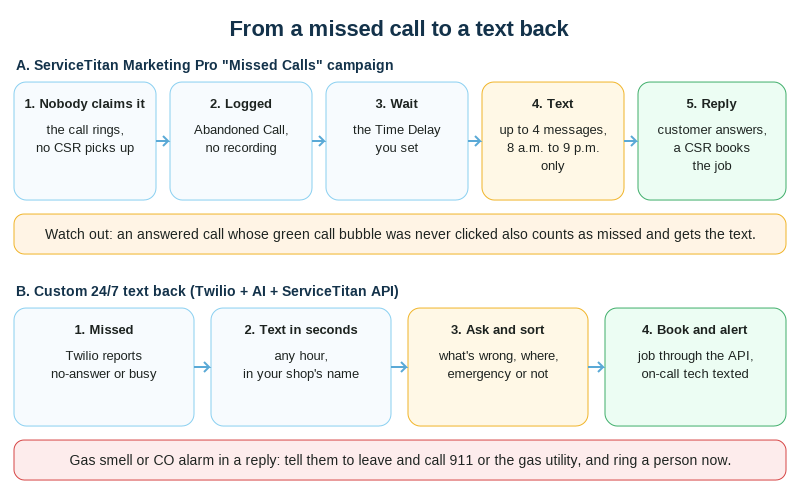
The diagram in text:
- Lane A, ServiceTitan Missed Calls campaign: nobody claims the call, it is logged as Abandoned with no recording, the Time Delay passes, up to 4 texts go out between 8 a.m. and 9 p.m., and a CSR books the reply.
- Lane B, custom 24/7 text back: Twilio reports no-answer or busy, a text goes out within seconds at any hour, the assistant asks and sorts, then books through the API and alerts the on-call tech.
| Call missed at | Earliest the text can arrive | Caller waits |
|---|---|---|
| 6:15 p.m. | 6:17 p.m. | 2 minutes |
| 8:59 p.m. | 8:00 a.m. next day | about 11 hours |
| 11:30 p.m. | 8:00 a.m. next day | 8.5 hours |
| 2:00 a.m. | 8:00 a.m. | 6 hours |
| 7:30 a.m. | 8:00 a.m. | 30 minutes |
The sending window covers 13 of the day’s 24 hours, about 54%. The other 11 hours, roughly 46% of the clock, are when ServiceTitan’s text back can’t reach anyone.
That window still catches a lot. ServiceTitan’s State of the Trades data names 5 p.m. to 9 p.m. as the busiest off-hours window for residential HVAC calls, and that sits inside it. The 2 a.m. frozen-pipe call does not.
What else in ServiceTitan helps recover missed calls?
ServiceTitan has three more tools that chase lost calls: Second Chance Leads, Abandoned Call Recovery and the AI Voice Agent.
| Tool | What it does | Who it’s for, per ServiceTitan |
|---|---|---|
| Marketing Pro Missed Calls campaign | Texts missed callers automatically, up to 4 texts | Marketing Pro accounts with Chat and texting registration |
| Second Chance Leads | Titan Intelligence reviews unbooked, excused and “not a lead” calls and flags the ones worth a callback | Phones Pro or Basic Phones (Basic Phones at extra cost) |
| Abandoned Call Recovery | A queue of abandoned calls for CSRs to call back, with Open, Cold and Done tabs | Contact Center Pro in ServiceTitan Max |
| AI Voice Agent | Answers calls and books new jobs, including after hours | Residential companies with Basic Phones or Phones Pro |
Second Chance Leads won’t create another lead for the same phone number for 14 days. In Abandoned Call Recovery, a caller who later talks to an agent for more than 30 seconds is resolved automatically, so nobody calls them back twice.
Jobber users have a cousin of this feature: Jobber’s Receptionist can text callers who hang up before the conversation starts, at most once per caller in 24 hours.
Is a missed call text enough for emergency calls?
No. A text back is a good net for routine calls, but an emergency caller needs a voice, a sorted priority and a woken technician.
Commercial contractors feel this most. A restaurant manager whose walk-in cooler is warming at 11 p.m. won’t wait for an 8 a.m. text, and a facility manager with a tripped main breaker wants a person, a PO number taken and an arrival time.
- Routine calls: tune-ups, quotes, a slow drain, a flickering fixture. A text back with a booking link works well.
- Urgent calls: no heat in freezing weather, water pouring from a unit, a dead rooftop unit at a store. These need the on-call tech within minutes.
- Safety calls: a gas smell, a CO alarm, burning smells from a panel. The caller must hear
leave the building and call 911 or the gas utility,
then reach a person.
That is why many shops pair the text back with an answering line that books after hours, like the one in our guide to an HVAC answering service that books appointments.
How does a custom 24/7 missed call text back work with ServiceTitan?
A custom text back watches your phone line in the cloud, texts within seconds at any hour, and writes the result into ServiceTitan through its API.
- Catch the miss. Calls ring through Twilio’s Dial, or your carrier forwards unanswered calls to a Twilio number. Twilio reports a status such as
no-answer(nobody picked up before the timeout, 30 seconds by default) orbusy. - Text right away. The program sends the first text in your company’s name within seconds, at any hour.
- Ask and sort. An AI assistant asks what’s wrong and where, then sorts the reply by your own emergency rules.
- Book. It creates a booking or job through the ServiceTitan developer platform, where a CSR can confirm it in the morning.
- Alert. Emergencies call and text the on-call tech. Safety words ring a person immediately.
- Report. A morning summary lists every missed call, every reply and every booking.
The custom line and Marketing Pro can live side by side. Keep the Missed Calls campaign for daytime calls on its tracking number, and point the custom line at the after-hours calls it can’t reach.
The texting rules still apply to a custom line. Twilio says anyone sending texts from a 10-digit number to the US must register for A2P 10DLC
(Twilio’s A2P 10DLC guide), and every text should honor STOP.
What does a missed call text back cost to run?
The texts themselves cost about a penny each on Twilio; the build, the AI model and the upkeep cost far more.
| Missed calls a month | Outbound texts at 3 a call | At $0.0133 a text | Total with one $1.15 local number |
|---|---|---|---|
| 40 | 120 | $1.60 | about $2.75 |
| 100 | 300 | $3.99 | about $5.14 |
| 200 | 600 | $7.98 | about $9.13 |
Assumptions: $0.0133 is Twilio’s $0.0083 long-code rate per segment plus the highest listed carrier fee, Verizon’s $0.005. Three texts a missed call is our guess at a short back-and-forth. The $1.15 number is from Twilio’s voice pricing page.
The table leaves out incoming replies, 10DLC registration fees, the AI model’s usage, voice minutes and the work to build and maintain the line. ServiceTitan’s Marketing Pro price isn’t published on its help pages, so ask your rep for a quote.
How do you roll out missed call text back without annoying customers?
Start with one tracking number, one short sequence and a week of reading every text that goes out.
- Day 1: submit texting registration and teach every CSR the green bubble click.
- Day 2: build the Missed Calls campaign with two texts, then Send Test to your own phone.
- Day 3: schedule it and call the tracking number from your cell, letting it ring out.
- Days 4 to 6: check each morning which calls got texts, and whether any answered calls did.
- Day 7: count missed calls, replies and booked jobs, then decide if the after-hours gap needs a custom line.
The goal is modest and very doable. Every caller who reaches a ringing phone with nobody free gets a friendly text, and the office starts tomorrow with replies instead of mysteries.
Turn it on, click that green bubble, and let tomorrow’s missed calls start answering themselves.
Sources and further reading
- ServiceTitan Help: Create Missed Calls campaigns using SMS
- ServiceTitan Help: Marketing FAQ (missed call texts and the green call bubble)
- ServiceTitan Help: Create marketing campaigns using SMS (TCR registration)
- ServiceTitan Help: Phones Pro glossary (missed and abandoned calls)
- ServiceTitan Help: Second Chance Leads
- ServiceTitan Help: Abandoned Call Recovery with Contact Center Pro
- ServiceTitan Help: AI Voice Agent for Basic Phones and Phones Pro FAQ
- ServiceTitan State of the Trades: HVAC off-hours summer call spike
- ServiceTitan developer platform
- Jobber Help: Receptionist powered by Jobber AI
- Twilio Docs: TwiML Dial (DialCallStatus, timeout)
- Twilio: US SMS pricing
- Twilio: US voice pricing
- Twilio Docs: A2P 10DLC registration
Questions and answers
Can I use AI to text back missed calls from ServiceTitan?
Yes. ServiceTitan’s Missed Calls campaign sends fixed texts you write, while a custom AI text back can reply at any hour, ask what’s wrong, sort emergencies and create a booking through ServiceTitan’s API. Keep a person on safety calls, upset customers and complex commercial accounts.
Does ServiceTitan have missed call text back built in?
Yes, through Marketing Pro. You create an SMS Text Message — Transactional campaign with the goal Missed Calls, add a tracking number, write up to four texts and set a time delay. Chat must be on and your texting registration approved by The Campaign Registry.
Why did ServiceTitan send a missed call text to a customer we talked to?
The CSR most likely didn’t click the green call bubble when answering. ServiceTitan’s Marketing FAQ says missed call campaigns text abandoned calls that have no record, so an unclaimed call looks missed. Make clicking the bubble the first step of every answered call.
Can a ServiceTitan missed call text go out at night?
No. ServiceTitan’s help center says Missed Calls texts send only between 8:00 a.m. and 9:00 p.m. A call missed at 11:30 p.m. can’t get its text before 8:00 a.m. For night calls, use an answering line or a custom text back that runs 24/7.
Who receives ServiceTitan missed call texts?
The text goes to the caller’s newest contact number with Marketing Updates turned on, and landlines are skipped. A customer who texts STOP to the tracking number stops getting all your SMS campaigns, and can opt back in by texting START.