How to Convert Emailed PDF Purchase Orders to QuickBooks (No Retyping)
Good morning, and here’s to every order desk with a stack of PDF purchase orders waiting before the first coffee.
Here’s to every buyer who emails a PDF purchase order at 4:55 p.m. and calls at 5:10 to ask if you got it.
For many wholesale distributors and food suppliers, that PDF is the order, and QuickBooks knows nothing about it until someone retypes it.
That someone opens the attachment, finds the customer, looks up every item, and keys each line into a sales order or invoice before the pick list can print.
Short answer: To convert emailed PDF purchase orders to QuickBooks, send them to one order inbox, let a document reader pull the PO number, ship-to, items, quantities and prices, match each line to your QuickBooks items using that customer’s history, then create a draft sales order or invoice through the QuickBooks API, with the PDF attached for a quick review.
- What comes in
- Customer purchase orders as PDF attachments, plus scans and phone photos of printed POs
- What QuickBooks does alone
- No automatic PO-to-sales-order import; Intuit Assist can draft an estimate or invoice from one forwarded email
- The hard part
- Turning the customer’s own item numbers and units into your QuickBooks items
- Where it ends
- A draft sales order, estimate or invoice in QuickBooks Online or Desktop, with the PO number and the PDF attached
- Who stays in charge
- Your order desk, which approves any PO flagged as new, odd or a possible duplicate
Can QuickBooks convert a PDF purchase order into a sales order by itself?
No, not as an automatic import. QuickBooks has no built-in feature that reads a customer’s PDF purchase order and creates the matching sales order.
When a QuickBooks Online user asked exactly this in the Intuit community on August 30, 2025, the Intuit moderator answered that QuickBooks Online doesn’t offer an automatic feature to generate invoices directly from customer purchase orders
, and suggested typing an estimate by hand and converting it (Intuit community thread).
The closest built-in help is Intuit Assist. Intuit’s November 20, 2024 announcement says that by forwarding an email from a customer, or uploading a photo of a handwritten note, Intuit Assist can draft an estimate or invoice for you to review.
That announcement limits it to QuickBooks Online customers in the U.S., not QuickBooks Solopreneur or Self-Employed. It drafts one email at a time, inside QuickBooks, and it does not create sales orders.
| QuickBooks feature | What it does with the PO | Where it stops |
|---|---|---|
| Intuit Assist (QuickBooks Online, U.S.) | Drafts an estimate or invoice from a forwarded customer email | One email at a time; no sales order; you check each line |
| Sales orders (QuickBooks Online Plus, Advanced, Intuit Enterprise Suite) | Holds the order until you ship, then converts to an invoice | Typed by hand or created by an outside app |
| Custom fields | Store the buyer’s PO number on sales forms | Someone still has to fill it in |
| Bill and receipt capture | Reads supplier bills and receipts | Built for what you buy, the wrong side of the ledger for what a customer orders |
That last row trips people up. A customer’s purchase order is a sale for you, so it belongs in a sales order, estimate or invoice, never in bills or expenses.
Why does entering emailed PDF purchase orders into QuickBooks take so long?
Because every customer’s purchase order looks different, and none of them uses your item names.
A grocery buyer’s PO lists their own item numbers. A restaurant group sends one PDF with four ship-to locations. A school district’s PO has two pages of terms before the first line item. Your clerk has to translate each one into your customer list and your item list.
The PO number matters too. Many buyers’ accounts payable teams match your invoice against their purchase order, so an invoice that is missing the PO number or shows a different price can sit unpaid.
| POs a day | Minutes per PO | Hours a day | Hours a month (22 delivery days) | Monthly cost at $22 an hour |
|---|---|---|---|---|
| 20 | 6 | 2.0 | 44 | $968 |
| 40 | 6 | 4.0 | 88 | $1,936 |
| 80 | 6 | 8.0 | 176 | $3,872 |
| 80 (only reviewing drafts) | 1.5 | 2.0 | 44 | $968 |
Assumptions, all ours: 2 minutes per PO to open the email, find the customer and ship-to, and copy the PO number and dates; 12 lines per PO at 20 seconds each; 22 delivery days a month; $22 an hour as a rough loaded cost for an order desk clerk.
The last row assumes a person spends about 90 seconds checking a finished draft instead of typing it. Time one real morning at your own desk and swap in your numbers.
How does an emailed PDF purchase order become a QuickBooks sales order automatically?
A small cloud service follows the same steps your best order clerk follows, starting the moment the email lands.
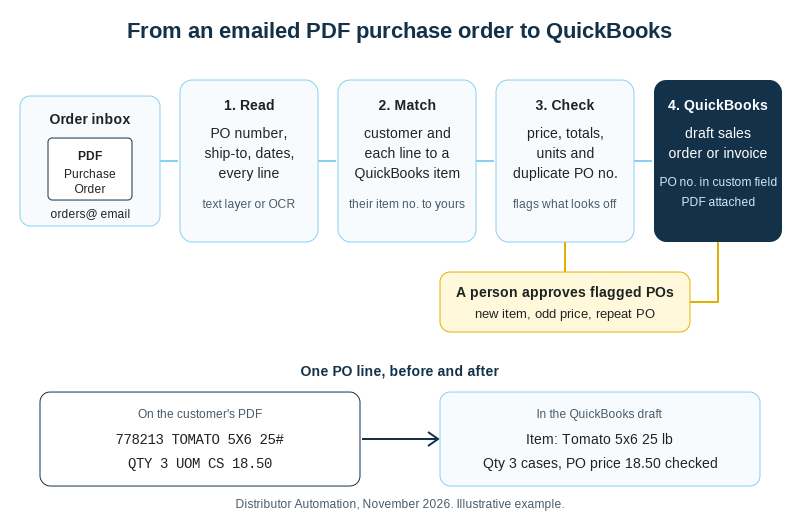
The diagram in words:
- Catch. Customers keep emailing POs as they do today, to one order address such as orders@ your domain. A mailbox rule or the mail provider’s API hands each new email and its PDF to the service.
- Read. Most PDF purchase orders already carry a text layer; scans and phone photos go through OCR. Microsoft’s Azure AI Document Intelligence invoice model lists purchase orders among its supported document types and returns the header fields and line items as structured data.
- Match. The buyer is matched to an existing QuickBooks customer by sender, bill-to and ship-to. Each line is matched to one of your items, using a cross-reference of the customer’s item numbers and their past orders.
- Check. Plain rules compare the PO price with your price for that customer, add up the lines against the PO total, look for the same PO number already in QuickBooks, and check the requested ship date.
- Create. Clean POs become a draft through the QuickBooks Online Sales Order API, or an estimate or invoice on plans without sales orders. The PO number goes into a custom field, and the PDF is attached through Intuit’s attachments upload.
- Tell. Flagged POs wait for your order desk with the reason shown. A short acknowledgment email can go back to the buyer with the lines as you understood them.
How does it work with QuickBooks Desktop?
QuickBooks Desktop has no web API like QuickBooks Online, so outside programs connect through Intuit’s free QuickBooks Web Connector.
Intuit’s Web Connector documentation describes it as a Windows application that lets web services exchange data with QuickBooks Desktop. It runs on the same computer as QuickBooks, or on the same local network.
In practice the order service queues each finished PO, and the Web Connector picks it up on its next scheduled run and writes the sales order. Sales orders exist in QuickBooks Desktop Premier and Enterprise; on Pro, the same route can create an estimate or invoice instead.
How does the automation match a customer’s item numbers to your QuickBooks items?
It keeps a cross-reference for each customer, built from their past POs and your corrections, and it flags anything it has not seen before.
Your experienced clerk already carries this cross-reference in their head. The automation writes it down, one customer at a time, so the knowledge stays with the company.
| On the customer’s PO | What has to be worked out | What decides it |
|---|---|---|
778213 TOMATO 5X6 25#, 3 CS | Which of your items is their 778213 | The customer’s cross-reference, learned from earlier POs |
UOM EA, qty 24 | 24 single units or 2 cases of 12 | The item’s selling unit in QuickBooks; a mismatch is flagged |
| “Unit price 18.50” | Their price versus your price for them | Your price level or price rule; a difference is flagged, never silently changed |
Ship to: Store 14, Store 22 | One order or one per location | How you deliver to that chain; often one sales order per ship-to |
| “PO 4471-88 (revised)” | A new order or a change to one already entered | The PO number already in QuickBooks; revisions go to a person |
Sub OK if out of stock | Whether a substitute may ship | A note on the draft for the order desk |
Each match carries a confidence level. A regular item from a regular customer can pass straight through, while a first-time item or a weak match waits for a person.
Every correction a person makes is saved for that customer. After a few weeks of real POs, the flags get noticeably fewer, because the system has learned each buyer’s numbering.
Should an emailed PO become a sales order, an estimate or an invoice in QuickBooks?
A sales order when your plan has them, because it holds the order until you ship and then converts to an invoice.
What we like about this kind of setup is how little changes for your buyers. They keep emailing the same POs; your team simply stops typing them twice.
Intuit’s sales orders help article says QuickBooks Online Plus, Advanced and Intuit Enterprise Suite have sales orders, Simple Start and Essentials need the Inventory add-on, and A single sales order can be linked to more than one invoice
, which suits partial shipments and backorders.
| QuickBooks version | Best landing spot for the PO | How the draft gets there |
|---|---|---|
| Online Plus, Advanced, Intuit Enterprise Suite | Sales order, converted to an invoice at shipping | QuickBooks Online API |
| Online Simple Start or Essentials, no Inventory add-on | Estimate, converted to an invoice | QuickBooks Online API |
| Desktop Premier or Enterprise | Sales order | QuickBooks Web Connector |
| Desktop Pro | Estimate or invoice | QuickBooks Web Connector |
If you ship and bill the same day for most customers, a draft invoice can be fine. Just keep it as a draft until the order desk has looked at anything flagged.
Where should the customer’s PO number go in QuickBooks?
Into a custom field on your sales forms, turned on to print, so the buyer’s PO number shows on every invoice you send.
Intuit’s custom fields article allows 1 custom field per transaction on Simple Start, 4 on Essentials and Plus, and 12 on Advanced. Its optional Print on form setting puts the field on printed and delivered forms.
QuickBooks Desktop sales orders already carry a P.O. No. box in the header. Either way, the automation fills the field exactly as printed on the PDF, so the buyer’s accounts payable team can match it without a phone call.
What should a person still check before an automated PO is confirmed?
Only the POs that are new, unusual or possibly repeated; routine POs from regular customers can flow through once you trust the drafts.
- A first PO from a new customer or an unknown email address.
- Any item the customer has never ordered, or a line with no match.
- A PO price that differs from your price for that customer.
- Line totals that don’t add up to the PO total.
- A PO number that already exists in QuickBooks, including “revised” POs.
- Units that could mean cases or eaches.
- Blurry scans or phone photos where the reader’s confidence is low.
- Requested ship dates you can’t meet, and substitution notes.
Duplicates deserve the strictest rule. Buyers resend POs when they don’t hear back, so the same PO number should never create a second sales order without a person saying yes.
Should you use Intuit Assist, an add-on app or a custom order agent?
Intuit Assist for the occasional PO, an add-on app when PDF POs are most of your orders, and a custom order agent when POs are only one of many ways customers order.
Ready-made add-ons are sold for exactly this job. LevelOps says it turns PDF, email, Excel and CSV purchase orders into QuickBooks Online sales orders or invoices as drafts for review. Logistify says it does the same for QuickBooks Desktop through the Web Connector, with a Starter plan listed at $99 a month per company.
A custom order agent fits when the same customers also text, call and leave voicemails, which is common in food distribution. Our guide on how to automate phone and text orders in wholesale covers those channels into the same QuickBooks drafts.
| Question | Intuit Assist | Add-on PO app | Custom order agent |
|---|---|---|---|
| Works without you forwarding each email | No | Yes | Yes |
| Creates sales orders | No, estimates and invoices | Depends on the app | Yes, where the plan has them |
| Texts, voicemails and photos too | Photos of notes | Usually email only | Shaped to your channels |
| Per-customer item cross-reference | No | Within the app’s features | Built from your own history |
For the reading step, Microsoft’s Document Intelligence pricing page lists a free tier of 500 pages a month, with paid use billed per 1,000 pages. Check the page for current rates before you budget.
What does a sensible first week of PDF purchase order automation look like?
Run it in shadow mode first: the system drafts every PO in the background while your desk keeps entering orders the usual way.
- Day 1: export your customer list, item list and a few months of sales orders or invoices, and gather a week of real PDF POs from your inbox.
- Days 2 and 3: the system drafts each new PO; your clerks compare its drafts with what they typed and correct the item matches.
- Days 4 and 5: clean POs from regular customers become QuickBooks drafts; everything flagged is approved by a person.
- End of the week: count the minutes saved, the price differences caught and the duplicates stopped.
The test is simple. If the drafts don’t save real time on your own customers’ POs in that week, it isn’t worth keeping.
If they do, your order desk gets its mornings back for the work only people can do: the buyer who needs a substitute, the chef who wants to talk, the customer who is about to grow.
Let one week of real POs draft themselves in the background, and see how much of the morning your desk gets back.
Sources and further reading
- Intuit community: automatically create an invoice from a customer’s purchase order (Aug 30, 2025)
- Intuit: Intuit Assist for QuickBooks launch (Nov 20, 2024)
- Intuit: create and manage sales orders in QuickBooks Online
- Intuit: add custom fields to sales forms and purchase orders in QuickBooks Online
- Intuit Developer: Sales Order API announcement
- Intuit Developer: attach images and notes (QuickBooks Online API)
- Intuit Developer: get started with QuickBooks Web Connector
- Microsoft: Azure AI Document Intelligence invoice model (supports purchase orders)
- Microsoft: Azure AI Document Intelligence pricing
- LevelOps: PDF to Order for QuickBooks Online
- Logistify: PDF purchase orders to sales orders in QuickBooks Desktop
Questions and answers
Can I use AI to convert emailed PDF purchase orders into QuickBooks?
Yes. AI document readers can pull the PO number, ship-to, items, quantities and prices from emailed PDFs, match each line to your QuickBooks items and create a draft sales order, estimate or invoice through the QuickBooks API. Keep a person approving new items, price differences and repeated PO numbers.
Does QuickBooks Online have a built-in purchase order to sales order import?
No. Intuit’s own community answer in August 2025 said QuickBooks Online has no automatic feature for invoices from customer purchase orders. Intuit Assist can draft an estimate or invoice from one forwarded customer email, but it does not create sales orders or run on its own.
Will it work with scanned or faxed purchase orders?
Usually, yes. OCR services such as Azure AI Document Intelligence read phone photos, scans and digital PDFs. Clear, straight images work best, and low-confidence reads should always go to a person before the order is confirmed.
What happens if a customer emails the same PO twice?
A good setup checks every PO number against the sales orders and invoices already in QuickBooks. A repeated or revised PO number is flagged for a person instead of creating a second order.
Do I need QuickBooks Online Plus for this?
No. Plus, Advanced and Intuit Enterprise Suite have sales orders, so the PO can land there. On Simple Start or Essentials without the Inventory add-on, the PO can become an estimate or invoice instead, and QuickBooks Desktop works through the Web Connector.