
YouTube Thumbnail Downloader: Get Any Video’s Thumbnail in Every Size
Hello, thumbnail detective, every size of that thumbnail is about to show up for you.
Ever wanted that perfect thumbnail from a video for a reaction post, a school project or just to study how big creators design theirs?
Paste a YouTube link below and every size shows up, ready to save.
Short answer: Every YouTube video has up to 5 thumbnail sizes on YouTube’s image server: 120 x 90, 320 x 180, 480 x 360, 640 x 480 and HD 1280 x 720. Paste any YouTube or Shorts link below to see them all and save the one you need. The HD size exists only for videos uploaded in HD.
- 5 sizes: default, mqdefault, hqdefault, sddefault, maxresdefault.
- Biggest: 1280 x 720 (16:9), only for HD uploads.
- Works with: watch, youtu.be, Shorts and live links.
What sizes are YouTube thumbnails?
YouTube keeps 5 sizes of every thumbnail, from a tiny 120 x 90 to an HD 1280 x 720. We measured each one on YouTube’s image server, i.ytimg.com, on November 19, 2026.
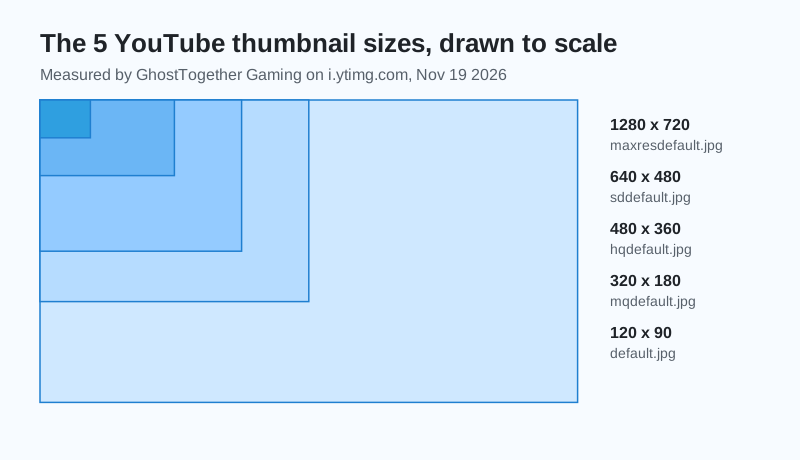
| File name | Size (pixels) | Shape |
|---|---|---|
| maxresdefault.jpg | 1280 x 720 | 16:9 |
| sddefault.jpg | 640 x 480 | 4:3 |
| hqdefault.jpg | 480 x 360 | 4:3 |
| mqdefault.jpg | 320 x 180 | 16:9 |
| default.jpg | 120 x 90 | 4:3 |
Measured by GhostTogether Gaming on i.ytimg.com, November 19, 2026. The 4:3 sizes add black bars above and below a 16:9 picture.
Why is there no HD thumbnail for some videos?
The 1280 x 720 maxresdefault thumbnail exists only when the video was uploaded in HD. When it is missing, YouTube answers with a small grey placeholder, and the downloader tells you to use the 640 x 480 size instead.
What size should my own YouTube thumbnail be?
YouTube Help now asks for custom video thumbnails of 3840 x 2160 pixels, at least 640 pixels wide, as JPG or PNG. The file can be up to 2 MB when you upload from a phone and up to 50 MB from a computer, and YouTube adds: For videos, try to upload a thumbnail with an aspect ratio of 16:9.
Studying how big creators lay out their thumbnails is honestly one of the sneakiest ways to get better at your own.
Can I use someone else’s thumbnail?
Thumbnails belong to the creator who made them, so use them for things like a school project, a reaction post that credits the creator, or studying design. Never re-upload them as your own.
- OK: studying, school work, a post that credits and links the creator.
- Not OK: re-uploading a thumbnail as your own video’s thumbnail.
- Your own thumbnails: 3840 x 2160 (at least 640 wide), 16:9, JPG or PNG.
Sharing videos with friends is better in your own server. Start one free on GhostTogether.
Happy saving, and remember to give the creator a shout-out when you share.
Sources and further reading
Questions and answers
How do I download a YouTube thumbnail?
Paste the video link into the free downloader on this page, then press Download under the size you want. It works for regular videos and Shorts.
What is the YouTube thumbnail size?
YouTube Help asks for 3840 x 2160 pixels for custom video thumbnails, at least 640 pixels wide, in a 16:9 shape. The copies YouTube serves for each video go from 1280 x 720 down to 120 x 90.
What is maxresdefault?
maxresdefault.jpg is the biggest YouTube thumbnail, 1280 x 720 pixels. It only exists for videos uploaded in HD.
Why does my thumbnail have black bars?
The 640 x 480, 480 x 360 and 120 x 90 sizes are 4:3, so YouTube adds black bars around the 16:9 picture. Use the 1280 x 720 or 320 x 180 sizes for no bars.
Can I download a YouTube Shorts thumbnail?
Yes. Paste the Shorts link and the downloader shows the same 5 sizes as for any video.