How to Extract Data from ACORD Forms Automatically (and Stop Re-Keying)
Hello to everyone who has typed the same FEIN into four screens before lunch.
If a signed ACORD packet just landed in your inbox and your CSR is about to type it in for the third time this week, this guide is for you.
The same applicant name, FEIN, addresses, class codes and payroll go into your agency management system first, then into every carrier portal you quote.
Nobody became an insurance professional to retype a form that is already filled in, and every retype is one more chance for a payroll figure to lose a zero.
Short answer: To extract data from ACORD forms automatically, a small service watches your inbox, reads fillable ACORD PDFs straight from their form fields, sends flattened or scanned pages to an AI vision model, returns each value with its page and a confidence level, checks it against simple rules, and syncs the approved fields into your AMS and carrier submissions.
- Forms it reads
- ACORD 125 (applicant), 126 (general liability), 127 (business auto), 130 (workers compensation), 140 (property), plus loss runs
- File types
- Fillable PDFs, flattened PDFs, scans, faxes and phone photos
- What comes out
- Structured fields, each with its page number and a confidence level
- Who checks
- A CSR or account manager, only on the fields that fail a rule or look doubtful
- Model cost
- About 11 to 15 cents for a 12-page packet on Claude Sonnet 5.5 (our calculation below)
What does it mean to extract data from ACORD forms automatically?
Extracting data from ACORD forms automatically means software reads the answers on a completed ACORD application and turns them into clean data fields, so nobody has to type them again.
The ACORD form is the paper or PDF layer that people fill in. The ACORD Forms Index lists the ACORD 125 as the Commercial Insurance Application, Applicant Information Section, and the ACORD 126 as the Commercial General Liability Section.
Extraction is the reverse of what most agency systems do. Your AMS is good at printing an ACORD form from data it already holds. An extraction tool reads a form someone else filled in, such as a new client, a prior agent or a wholesaler, and puts that data back into your system.
What kinds of ACORD files can be read automatically?
Three kinds of ACORD files arrive at an agency, and each one is read a different way.
| File | How to tell | How it is read | Model cost | Where misreads happen |
|---|---|---|---|---|
| Fillable PDF | You can click into the boxes and edit them | The values are read straight from the PDF’s form fields with a library such as pypdf | None | Rarely; only if someone typed in the wrong box |
| Flattened PDF | The text can be selected but not edited | The page text plus a page image go to an AI vision model | Cents per packet | Check boxes and values that sit far from their labels |
| Scan, fax or photo | The page is a picture; text cannot be selected | AI vision reads the page image | Cents per packet | Handwriting, skewed pages, faint fax lines, stamps over fields |
The fillable case is the quiet win. The pypdf forms documentation shows a single call, get_form_text_fields(), that returns every text field and its value. No AI is needed for that part, and the values are exactly what the client typed.
ACORD’s own eForms are built for this kind of reuse. ACORD describes them as fillable forms whose data can be extracted to populate other forms, offered in XFDL and PDF formats. A packet that has been printed, signed and scanned has lost those fields, so it goes the vision route.
Doesn’t my agency management system already handle ACORD forms?
Your AMS fills ACORD forms from data it already has, but it usually does not read a completed form back into the client record.
Vertafore’s help pages for AMS360 integrated ACORD applications explain that the ACORD 125 pre-fills from the policy’s locations, contacts, coinsureds, supplemental names, forms, additional interests and coverages. The same page is just as clear about the other direction:
The data is not saved in the policy database and does not flow back to the Policy data entry form.
Carrier downloads are a separate stream. Ivans Download brings policy data that carriers send into your AMS. A new client’s ACORD application never travels that road, which is why it still gets typed in by hand.
So the gap is narrow and specific. Extraction fills the one direction your AMS leaves open: from a completed ACORD form into the client and policy records.
How much time does re-keying ACORD applications cost an agency?
Re-keying is the biggest daily complaint independent agents report about carrier work, and on commercial accounts it can run to dozens of staff hours a month.
re-keying risk data into multiple carrier portals is the top pain point, cited by 74% of respondents
The same Applied Systems release says commercial lines-focused agencies re-key data at a rate of 70%, against 62% for personal lines-focused agencies. Commercial agencies also rely on email (49%) far more than on dedicated submission capture software (7%).
| Commercial submissions a month | Systems typed into | Minutes per system | Hours a month | Cost a month at $35 an hour |
|---|---|---|---|---|
| 20 | 4 | 20 | 26.7 | $933 |
| 40 | 4 | 20 | 53.3 | $1,867 |
| 60 | 4 | 20 | 80.0 | $2,800 |
| 100 | 4 | 20 | 133.3 | $4,667 |
Assumptions: each submission is typed into the AMS plus three carrier portals, 20 minutes per system, and $35 an hour as a rough loaded cost for an experienced CSR. These are our working assumptions, not a survey. Time one week of your own submissions and swap in your numbers.
For comparison, automation vendor NativeBase says CSRs often spend 20 to 30 minutes per carrier on a single quote. That is the vendor’s own claim, so trust your stopwatch first.
How do you extract data from ACORD forms automatically, step by step?
An automated ACORD reader follows five steps: catch the file, sort it, extract the fields, check them, and sync them.
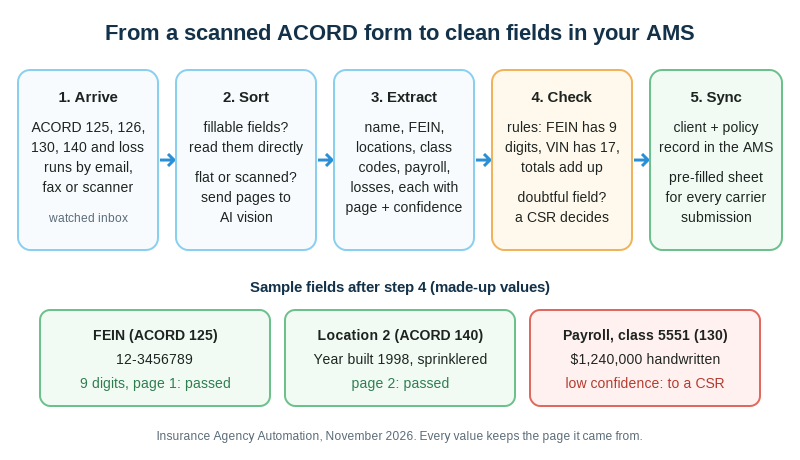
The diagram in text, step by step:
- Arrive: ACORD 125, 126, 130 and 140 forms and loss runs come in by email, fax or scanner to a watched inbox
- Sort: fillable fields are read directly; flattened or scanned pages go to AI vision
- Extract: name, FEIN, locations, class codes, payroll and losses, each with its page and a confidence level
- Check: rules such as a 9-digit FEIN, a 17-character VIN and totals that add up; a CSR decides any doubtful field
- Sync: the client and policy record in the AMS, plus a pre-filled sheet for every carrier submission
The three sample fields in the diagram, all made-up values: a FEIN of 12-3456789 on page 1 that passed, a location 2 built in 1998 with sprinklers on page 2 that passed, and a handwritten payroll of $1,240,000 for class 5551 on the ACORD 130, sent to a CSR for low confidence.
- Arrive. A small service on your own server watches one inbox or shared folder, such as submissions@ your agency domain, and picks up every PDF or image attachment.
- Sort. The service opens each PDF. If it has live form fields, it reads them directly. If not, it splits the file into pages and labels each page by form number, which is printed in the bottom corner of every ACORD page.
- Extract. Each page goes to a vision-capable model. Anthropic’s PDF support for Claude turns every page into an image plus its extracted text, so scans and tables can be read.
- Check. Rules test every field, and anything that fails or comes back with low confidence goes to a review screen that shows the value next to the page it came from.
- Sync. Approved fields are written to the client and policy records in your AMS, and a pre-filled sheet is prepared for each carrier you plan to quote.
For step 3, ask the model to answer in a fixed format. Anthropic’s structured outputs feature makes Claude’s reply follow a JSON schema you define, so every packet comes back with the same field names your AMS import expects.
Which fields should be pulled from an ACORD 125, 126, 130 and 140?
Pull the fields that get retyped into every carrier portal, because those are the hours you get back.
An ACORD form is already a tidy box of answers. It seems only fair that somebody else’s software should do the copying, while your team keeps the conversations that actually need a license.
| Form | Fields to extract | Why they matter |
|---|---|---|
| ACORD 125, applicant information | Named insured, mailing address, FEIN, business type, years in business, NAICS or SIC code, locations, prior carrier, loss history | Every carrier asks for these first; they are typed most often |
| ACORD 126, general liability | Classifications, class codes, premium basis and exposure (sales, payroll or area), hazard answers, limits requested | The exposure figures drive the rate, so a misread changes the quote |
| ACORD 127, business auto | Drivers, dates of birth, license numbers, vehicles, VINs, garaging addresses | Long schedules are where portal typing takes longest |
| ACORD 130, workers compensation | States, locations, class codes, number of employees, estimated annual payroll, owners included or excluded | Payroll by class code is the premium basis |
| ACORD 140, property | Location and building, construction, occupancy, year built, protection class, sprinklers, building and contents values | Values and building details are retyped per location |
Start with the ACORD 125 alone. It appears in nearly every commercial packet, and the applicant fields are the same for every carrier, so even one form read automatically saves typing on every submission.
How do you catch ACORD misreads before they reach the AMS?
Misreads are caught by simple rules on every field plus a person on the doubtful ones, never by trusting the model blindly.
Here’s the catch: an AI misread rarely looks wrong. A payroll of $124,000 read as $1,240,000 looks perfectly tidy on screen. That is why every value keeps its page number and why rules run before anything is saved.
A checklist the review step should run on every ACORD packet:
- FEIN has exactly 9 digits in the 12-3456789 pattern
- Each VIN has 17 characters and no letters I, O or Q
- Payroll and sales totals on the ACORD 126 and 130 add up to the totals printed on the form
- Dates are real dates, and the policy effective date is in the future
- Addresses match a real street and ZIP code
- Yes or no underwriting answers marked as checked or unchecked, never guessed
- Anything handwritten or below the confidence line goes to a person, shown next to its page
What does it cost to extract data from ACORD forms with AI?
At public API prices, reading a typical ACORD packet costs cents, and fillable PDFs cost nothing in model fees at all.
Anthropic’s documentation says each PDF page uses 1,500 to 3,000 text tokens plus at most 1,568 image tokens. Anthropic’s pricing page lists Claude Sonnet 5.5 at $2 per million input tokens and $10 per million output tokens, and Claude Haiku 5.5 at $0.10 and $0.50 for prompts up to 100,000 tokens.
| Packet | Pages | Input tokens | Claude Sonnet 5.5 | Claude Haiku 5.5 |
|---|---|---|---|---|
| ACORD 125 alone | 4 | 12,272 to 18,272 | $0.04 to $0.06 | under $0.01 |
| 125, 126, 130 and 140 | 12 | 36,816 to 54,816 | $0.11 to $0.15 | under $0.01 |
| Full packet with loss runs | 25 | 76,700 to 114,200 | $0.21 to $0.29 | $0.01 to $0.07 |
| Fillable PDF, any size | any | 0 | $0 | $0 |
Assumptions: 3,068 to 4,568 tokens per page (text plus image), and 2,000, 4,000 and 6,000 output tokens of structured fields for the three packet sizes. The 25-page packet can cross Haiku 5.5’s 100,000-token line, where its higher price applies. Page counts are our working examples; count your own packets.
At 60 packets a month of 12 pages each, Sonnet 5.5 comes to roughly $7 to $9 a month in model fees. Anthropic’s Batch API halves that for packets that can wait. Hosting, setup and review time come on top.
Can extracted ACORD data go straight into Applied Epic, AMS360, HawkSoft or carrier portals?
Extracted ACORD data can usually go into your AMS through its API or an approved integration, while carrier portals depend on what each carrier accepts.
- Applied Epic: Applied says Epic has APIs for reading and writing client and policy data; access runs through Applied’s developer program and your license.
- AMS360: Vertafore lists an open API and third-party integrations. Once the fields are in the policy record, AMS360 can print a clean integrated ACORD 125 for the next carrier.
- HawkSoft: HawkSoft runs a Partner API for vetted vendors that agencies switch on from HawkSoft Marketplace.
- EZLynx: an Applied Systems product with its own commercial submission tool; ask your rep which integration route your plan includes.
Carrier portals are less uniform. Some take an uploaded ACORD PDF, some take ACORD XML through an integration, and many still want their own online application filled in.
For those portals, the honest fix is a pre-filled sheet: every answer the portal asks for, in the portal’s order, ready to paste. Your CSR still clicks through the portal, but nobody reads a scan line by line any more.
What still needs a licensed person when ACORD extraction is automated?
A licensed person still owns the submission: the software reads the form, but it cannot vouch for what the applicant wrote.
Signatures, the applicant’s answers to underwriting questions and anything the client explained on a call are not something to accept on a model’s word. If the client marked “no” to subcontracted work and you know otherwise, only a person catches that.
Keep three jobs with your team:
- Reviewing every field the rules or the confidence level flagged
- Confirming the underwriting answers with the client before the submission goes out
- Deciding which carriers get the risk, and why
How do you start extracting ACORD data automatically this week?
Start small: one inbox, one form, and a week of side-by-side checking.
- Day 1: collect twenty ACORD 125s your team already typed in, a mix of fillable, flattened and scanned.
- Day 2: run the reader on all twenty and export its fields to a spreadsheet.
- Day 3: compare each field with what your CSRs entered in the AMS and note every miss.
- Day 4: tune the rules and the confidence line so the misses land on the review screen.
- Day 5: switch on the watched inbox for new submissions, with every field still reviewed.
If extracting data from ACORD forms automatically does not save real typing on your own packets within a few weeks, drop it. If it does, the same fields can feed an automated policy comparison once the carrier quotes come back.
Try one inbox and one form for a week, and see how much of your Monday it gives back.
Sources and further reading
- Applied Systems: 2026 Insurance Agency-Carrier Connectivity Trends survey (press release, August 26, 2026)
- Vertafore: AMS360 help, Applications (Integrated)
- ACORD: Forms Index (ACORD 125, 126, 127, 130, 140)
- ACORD: eForms
- pypdf: Interactions with PDF forms
- Anthropic: PDF support (pages as images plus text, tokens per page)
- Anthropic: Structured outputs
- Anthropic: API pricing (Claude Sonnet 5.5, Claude Haiku 5.5, Batch API)
- Applied Systems: Applied Epic agency management system
- Vertafore: AMS360
- HawkSoft: API partners and Partner API
- EZLynx: management system and commercial submissions
- Ivans: Ivans Download for agents
- NativeBase: Multi-Carrier Insurance Integration Guide (vendor claim on minutes per carrier)
Questions and answers
Can I use AI to extract data from ACORD forms automatically?
Yes. A vision-capable AI model can read flattened or scanned ACORD 125, 126, 130 and 140 pages and return each answer as a field with its page number. Fillable ACORD PDFs can be read straight from their form fields with no AI at all. A person should still review any field that fails a rule or comes back with low confidence.
Can AI read handwritten or faxed ACORD forms?
Often, but not perfectly. AI vision reads printed text on scans and faxes well, while handwriting, faint fax lines and stamps over boxes are where misreads happen. Send every handwritten or low-confidence value to a person, shown next to the page it came from.
Does my AMS read ACORD forms back into the client record?
Usually not. Systems such as AMS360 pre-fill ACORD forms from policy data, and Vertafore’s help pages say data typed on the form does not flow back to the policy record. Reading a completed form into the AMS needs an extraction step and an API or import.
How much does automated ACORD data extraction cost?
By our calculation at Anthropic’s public prices, a 12-page ACORD packet costs about 11 to 15 cents to read with Claude Sonnet 5.5 and under one cent with Claude Haiku 5.5. Fillable PDFs cost nothing in model fees. Hosting, setup and review time come on top.
What is the difference between ACORD forms and ACORD AL3 or XML?
ACORD forms are the standard applications and certificates people fill in. ACORD AL3 and ACORD XML are data standards that move the same kind of information between computer systems, for example carrier downloads into your AMS through Ivans. Extraction turns a filled-in form into that kind of structured data.