How to Automate Demand Letter Drafting (and Keep the Attorney in Charge)
Hello, and welcome to everyone who has typed the same crash date into a demand letter for the fortieth time.
If a finished case is waiting on your desk and the demand still starts from a blank Word page, this guide is for you.
In many small personal injury firms, a paralegal copies the crash facts, every provider’s dates and every bill total into the letter by hand.
It is the same letter, rebuilt case after case, and the adjuster will notice the one bill that did not make it in.
Short answer: To automate demand letter drafting, a system reads the case file (police report, medical chronology, itemized bills, wage proof), extracts each fact with its page citation, flags what is missing, and writes a first draft in your firm’s template. Tools include EvenUp, Filevine DemandsAI and Clio Draft templates. An attorney still sets the amount, checks every citation and signs.
What does it mean to automate demand letter drafting?
Automating demand letter drafting means the facts, dates and totals of a case are pulled from the file and written into a draft letter by software, not retyped by a person.
The letter is still yours. The firm’s tone, its structure and the number it asks for stay with the attorney. What goes away is the copying: the crash date from the police report, the eleven provider names, the bill total that never matches on the first try.
There are two levels of automation, and it helps to know which one you are buying.
- Template automation fills fixed fields (client name, date of loss, insurer, claim number) from your case management system. Clio Draft and similar tools do this well.
- AI drafting reads the documents themselves and writes the narrative sections: liability, treatment story, damages and the human impact of the injury.
Most firms end up wanting both: a fixed template for the parts that never change, and AI for the parts that are different in every case.
How long does a personal injury demand letter take to write by hand?
A personal injury demand letter usually takes three to five hours to write by hand once the records are in, and complex files take much longer.
Every published estimate comes from a company that sells demand software, so read them as rough ranges. Eve’s guide says a comprehensive demand letter typically requires four to five hours of attorney time.
LawPractice.ai puts preparation at three to five hours per letter.
LawPractice.ai adds that a paralegal working through records from several providers can spend two to three hours before writing a single sentence. That is the part automation removes first.
We turned those estimates into a monthly cost. The table below uses four hours per demand by hand and an assumed 1.5 hours to review and fix an automated draft.
| Demands a month | By hand at 4 hours each | Review at 1.5 hours each | Hours back | Wage value of hours back at $30.24 |
|---|---|---|---|---|
| 5 | 20 hours | 7.5 hours | 12.5 | $378 |
| 10 | 40 hours | 15 hours | 25 | $756 |
| 20 | 80 hours | 30 hours | 50 | $1,512 |
| 40 | 160 hours | 60 hours | 100 | $3,024 |
Assumptions: four hours is the midpoint of the vendor ranges above; 1.5 hours of review is our own conservative guess, not a vendor claim. The wage is the US median paralegal pay of $30.24 an hour from the Bureau of Labor Statistics (May 2025), without benefits or overhead.
If an attorney writes the demands instead of a paralegal, the same hours are worth several times more, and they come out of billable or case-signing time.
What goes into a personal injury demand letter?
A personal injury demand letter tells the insurer what happened, who is at fault, what the injuries cost and what the client will accept, with proof attached for each claim.
Each section is built from a different document in the file, which is exactly why automation works here: the software knows where to look.
| Section | What it says | Built from | Who decides |
|---|---|---|---|
| Header | Insurer, adjuster, claim number, insured, date of loss | Case management record, declarations page | Software |
| Facts of the incident | Where, when and how the crash or fall happened | Police or incident report, photos, client interview | Software drafts, attorney edits |
| Liability | Why the insured is at fault | Report citations, witness statements, statutes | Attorney |
| Injuries and treatment | Diagnoses and care in date order | Medical chronology | Software drafts, paralegal checks |
| Medical specials | Itemized past bills by provider | Itemized bills, lien letters | Software totals, paralegal checks |
| Future care | Treatment the doctors recommend next | Physician notes, life care plan | Attorney |
| Lost wages | Work missed and pay lost | Employer wage letter, pay stubs | Software drafts |
| Pain and suffering | How the injury changed daily life | Client interview, family statements | Software drafts, attorney edits |
| Demand and deadline | The amount, the time to respond, release terms | Policy limits, state rules | Attorney only |
The last row never belongs to software. The number and the deadline are legal judgments, and in some states the deadline and release terms are set by statute.
How do you automate demand letter drafting step by step?
An automated demand workflow starts when the last records arrive, builds a cited fact sheet from the file, drafts the letter in your template and stops for attorney review before anything is sent.
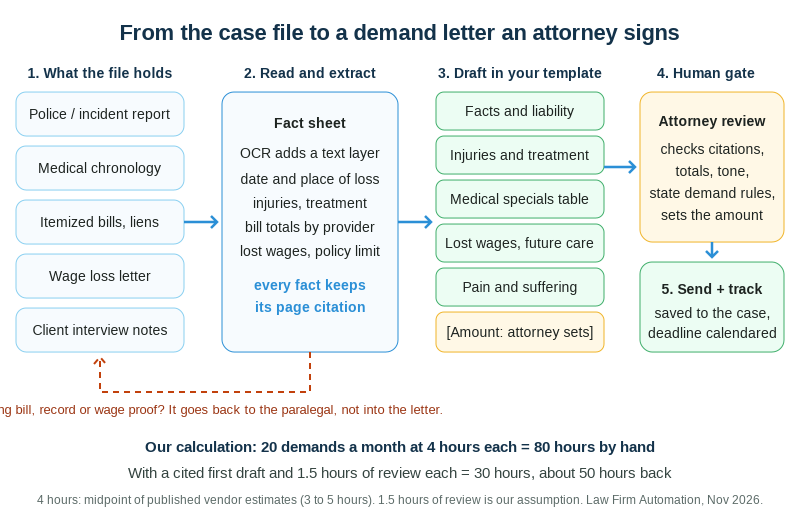
- Trigger. The case reaches “treatment complete” in Clio, Filevine, MyCase or your own system, or the paralegal clicks “Ready for demand”.
- Read. Scanned PDFs get a text layer with OCR, for example Amazon Textract. This matters: Anthropic’s Citations documentation says Claude cannot cite a scanned PDF that has no extractable text.
- Extract. The model writes a fact sheet: date and place of loss, injuries, providers, bill totals, wage loss and policy limit, each with its page number.
- Check. Anything missing (a provider with no bill, a bill with no record, no wage letter) becomes a task for the paralegal instead of a gap in the letter.
- Draft. The letter is written section by section in the firm’s template, with each sentence tied to its source page and the amount left blank.
- Review. An attorney reads the draft, clicks through the citations, checks the specials total and sets the amount and deadline.
- Send and track. The signed letter and exhibits are saved to the case, sent, and the response deadline goes on the calendar with a reminder.
The diagram as text: police report, medical chronology, itemized bills, wage loss letter and client interview notes feed a cited fact sheet; missing items go back to the paralegal; the draft is written in the firm template with the amount left for the attorney; attorney review; then save, send and calendar the deadline.
Our figure in the diagram: 20 demands at 4 hours is 80 hours by hand, or 30 hours at 1.5 hours of review.
Anthropic’s Citations feature returns the exact passages behind each claim, and for PDFs the citation includes the page number range. That is the piece that lets an attorney check a draft in minutes instead of rereading the file.
Which software can automate demand letter drafting?
The best-known tools for automating personal injury demand letters are EvenUp and Filevine DemandsAI; Clio Draft automates firm templates, and a custom pipeline is the fourth option.
| Option | What it does | Turnaround the maker states | Review | Public price |
|---|---|---|---|---|
| EvenUp Demands | Liability narrative, treatment timeline, damages, pain and suffering, comparable verdicts, exhibits | ”AI + You” in minutes; AI + Professional Reviewin 1 to 5 days | Your team, or EvenUp’s legal professionals | Not listed; case-based pricing by call |
| Filevine DemandsAI | Drafts from case data already in Filevine; extracts details from medical records and police reports | ”In seconds,” per Filevine | Your team, with unlimited live edits | Not listed |
| Clio Draft | Turns your own Word demand into a template whose fields fill from Clio Manage matters and contacts | As fast as the template runs | Your team writes the narrative | Per-seat subscription; see Clio Draft pricing |
| Custom pipeline | Secure upload portal, OCR, an AI model with citations, your template, writing back to your case system | Depends on file size | Your attorney, with every fact cited | Depends on page volume and build |
EvenUp is honest about where its fast tier fits. Its page marks “AI + You” as Suggested for straightforward liability cases
and steers complex liability to professional review.
If your firm already lives in Filevine, DemandsAI is the shortest path, because the records and bills are already in the case project. Filevine also says DemandsAI runs in an AWS SOC 2 Type II environment.
A custom pipeline fits firms on Clio, MyCase or Litify that want AI narrative drafting inside their own template, plus the same intake for new leads from a 24/7 phone line.
Should you start with a template or with AI?
Start with your firm’s best existing demand letter as the template, then let AI fill the narrative sections inside it.
The kindest part of a cited first draft is how quiet the review becomes. Nobody hunts through the file; they click the citation and see the page.
An AI tool with no template writes a generic letter. A template with no AI still leaves the treatment story and the damages to a person. Together they produce a draft that already sounds like your firm.
Clio’s help center describes how Clio Draft does the template half: a card is a set of fields, and those fields are placeholders that Clio Draft replaces with data from the Clio Manage matter or contact when the document is generated.
Two small habits save trouble later. Name every custom field exactly as the template expects, and keep one master template per case type: auto, premises, dog bite, trucking.
Do state rules change how a demand letter must be drafted?
Yes, some states set required terms for certain settlement demands, so the template for those cases has to follow the statute, not just the firm’s habit.
Georgia is the clearest example. Its offer-to-settle statute, O.C.G.A. § 9-11-67.1, was amended by Senate Bill 83, signed April 22, 2024, for motor vehicle injury claims.
According to a Georgia injury firm’s summary of the amended statute, the listed terms are the only material terms of such an offer.
- A date by which the offer must be accepted
- The amount of monetary payment
- The parties the claimant will release
- Whether the release is full or limited, and what each releasee receives
- The claims to be released
- A date by which payment must be delivered
- A sworn statement on insurance coverage, due at least 40 days after the offer is received (the offeror may waive it)
This is a good fit for automation, because a statute-specific template can refuse to produce a Georgia auto demand until every required term is filled. Have a Georgia attorney check the current statute text before building it.
What can go wrong with AI-drafted demand letters?
AI-drafted demand letters go wrong when nobody checks the totals, the citations and the parts that need legal judgment.
- Wrong totals. A bill counted twice or a write-off missed changes the specials. Recheck the total against the latest itemized bills.
- Unsupported facts. A sentence with no citation is a sentence to delete or prove. Click every citation in the injury section.
- Invented or stale verdicts. Any comparable verdict or settlement must be found in a real source and match your venue.
- Missing providers. Software only reads what it was given. Compare the provider list with the client’s intake notes.
- Generic pain and suffering. A draft that could fit any client is a draft that settles low. Add the detail only the client gave you.
ABA Formal Opinion 512 says lawyers stay responsible for checking what a generative AI tool produces; in its words, GAI tools cannot solely substitute for a lawyer’s competent legal work.
Is it safe to use AI to draft demand letters with client medical records?
Using AI to draft demand letters with client medical records can be safe when the vendor protects the data by contract, does not train on it, and the firm follows ABA guidance on client consent.
The American Bar Association’s Formal Opinion 512 (July 29, 2024) says informed client consent is needed before client information goes into a self-learning tool, and that boilerplate in an engagement letter is not enough. The NCBE’s Bar Examiner summary walks through it, and your state bar may add rules.
Ask every vendor in writing where the data is stored, who can see it, whether it trains models and whether it will sign a business associate agreement if one applies.
For a custom build, the pieces can be chosen for health data. AWS lists Amazon Textract as HIPAA eligible under a signed AWS business associate agreement, and records can stay in the firm’s own storage.
What does a sensible first month of automated demands look like?
A sensible first month runs automated drafts beside your normal process, then lets attorneys review only drafts that already proved themselves.
- Week 1: pick two closed cases with sent demands and let the system draft them. Compare the drafts with the letters you actually sent.
- Week 2: draft every new demand automatically in the background while the team writes as usual.
- Week 3: let the attorney start from the automated draft and log what they changed and how long it took.
- Week 4: compare review time with your old drafting time, and decide whether to keep it.
Quick checklist before the first live demand: the template matches your best old letter, every fact has a page citation, the specials total matches the bills, and the amount and deadline were set by an attorney.
If the drafts do not save real hours on your own cases in that month, they are not worth keeping. If they do, your team gets its afternoons back, and the coffee stays warm a little longer.
Let the file write the first draft, keep the judgment with your attorney, and see what your team does with the afternoons it gets back.
Sources and further reading
- EvenUp: Demands (AI + You and AI + Professional Review)
- Filevine: DemandsAI
- Clio: Clio Draft document automation
- Clio Help Center: Clio Draft cards and fields in the Template Builder
- Anthropic: Citations (page number ranges for PDFs)
- Anthropic: Claude PDF support
- AWS: Amazon Textract
- AWS: HIPAA eligible services reference
- NCBE Bar Examiner: ABA Formal Opinion 512 on generative AI tools
- Tobin Injury Law: what Georgia’s amended offer-to-settle statute requires
- BLS: paralegals and legal assistants, median pay
- Eve: demand letter attorney time (vendor estimate)
- LawPractice.ai: demand preparation time (vendor estimate)
Questions and answers
Can I use AI to automate demand letter drafting for personal injury cases?
Yes. AI can read the police report, medical chronology, bills and wage proof, extract each fact with its page citation, and write a first draft in your firm’s template. An attorney still has to check the citations and totals, set the amount and deadline, and sign the letter.
How much does demand letter automation software cost?
EvenUp and Filevine do not list demand prices on their product pages; EvenUp describes case-based pricing and Filevine takes sales calls. Clio Draft is a per-seat subscription with its own pricing page. Compare the price per demand with your own drafting hours, using a table like ours.
How long does an AI demand letter take?
EvenUp says its AI + You tier drafts in minutes and its professional review tier delivers in 1 to 5 days, and Filevine says DemandsAI drafts in seconds. The attorney’s review still takes time; plan for an hour or more per demand at first.
Is an AI-written demand letter as good as one written by an attorney?
An AI draft is a starting point, not a finished letter. It is strong on facts, dates and totals pulled from the file, and weak on liability judgment, venue knowledge and the client’s personal story. The best results come when an attorney edits those parts.
Can I automate demand letters without changing case management software?
Yes. Clio Draft fills templates from Clio Manage, Filevine DemandsAI works inside Filevine, and a custom pipeline can read uploaded PDFs and write drafts back into Clio, MyCase, Litify or another system you already use.