Machine Shop RFQ Automation: Every RFQ Logged, Quoted and Chased
Hello, and welcome to everyone whose estimating inbox fills up faster than anyone can read it.
Picture Friday afternoon, when a buyer calls to ask where the quote is, and nobody can find the RFQ they sent on Tuesday.
It came in as an email with a zip of prints, landed under three newsletters, and never made it onto the estimating list.
That is the gap machine shop RFQ automation closes, before a single price is worked out.
Short answer: Machine shop RFQ automation is a small service on your web server that watches the estimating inbox, logs every RFQ with its due date, unpacks the prints, checks bid or no-bid rules, uses AI vision to read tolerances, materials and quantities, drafts a priced quote sheet and a reply, and schedules the follow-up. An estimator signs off before anything goes out.
- Buyers who expect a quote within 24 hours
- 67%, up from 53% the year before (Paperless Parts, 2020 Part Buyer Survey)
- Win rate on new business, quotes back within a day
- 51%, against 41% for slower shops (Modern Machine Shop, 2026 Top Shops benchmark)
- Hands-on time per three-part RFQ, by hand
- About 85 minutes, of which about 25 are logging, filing, writing and chasing (our assumptions, table below)
- The same RFQ with drafts to review
- About 20 minutes of an estimator’s time
- What still needs a person
- Bid or no-bid on key customers, the price, the lead time and every flagged callout
What is machine shop RFQ automation?
Machine shop RFQ automation is software that carries a Request for Quote from the moment it arrives to the moment it is won or lost, so no RFQ depends on someone remembering it.
Quoting software prices a part. RFQ automation covers everything around that price: capturing the email, numbering it, filing the drawings, deciding whether to bid, sending the quote, chasing an answer and recording the result.
A shop RFQ moves through seven stages:
- Capture: the RFQ gets a number, a customer, a received date and a due date.
- Unpack: the PDFs and STEP files are matched to part numbers, revisions and quantity breaks.
- Triage: rules decide bid, no-bid or ask a question.
- Read and price: AI vision reads the prints and your rates draft the cost.
- Sign off and send: the estimator approves the price, lead time and reply.
- Follow up: a chase email is drafted when the buyer goes quiet.
- Won or lost: the result and its reason go back into the log.
Stage 4 has its own guide on automated CNC quoting software. This one is about the other six, which is where most RFQs quietly get lost.
Why do machine shops miss RFQs or answer them late?
Machine shops miss RFQs because the requests arrive faster than one person can log, read and answer them, and the inbox is the only list.
On the Practical Machinist forum, a shop owner opened a thread on quote tracking by saying they were overwhelmed by the volume of quotes and had started to miss some. In another thread, an owner summed up a busy year as twice the quotes coming in and half the parts going out.
Some of that volume is price-shopping. Owners in the same threads describe buyers who send RFQs only to have a number to wave at their regular shop. One reply suggested counting quotes sent against quotes won, and quoting high or declining more often to weed out the herd.
Buyers are not waiting either. Paperless Parts’ 2020 Part Buyer Survey found that 67% of buyers expect a quote in less than 24 hours. The company’s own blog puts it bluntly: if you can’t respond to an RFQ quickly (that is, within 24 hours), your buyer will go elsewhere.
That is a vendor speaking, but the shop-side numbers agree. Modern Machine Shop’s 2026 Top Shops benchmark reports a 51% new-business win rate for shops that quote within a day, against 41% for the rest.
How much estimator time goes into each RFQ?
A three-part RFQ takes about 85 hands-on minutes by hand in our worked example, and about a quarter of that is clerical work around the price.
| Task | By hand | With automation | Who does it after automation |
|---|---|---|---|
| Log the RFQ, customer and due date | 3 min | 0 min | The inbox watcher |
| Download, unzip, rename and file the prints | 5 min | 0 min | The inbox watcher |
| Check revisions and quantities against the email | 4 min | 1 min | Estimator, only on mismatches |
| Read the prints and price 3 parts | 60 min | 15 min | Estimator reviews the draft |
| Write the quote and the reply email | 8 min | 3 min | Estimator approves the draft |
| Set a reminder and chase the answer | 5 min | 1 min | Estimator sends the drafted chase |
| Total per RFQ | 85 min | 20 min |
Assumptions: 20 minutes a part to read and price by hand is the top of Uptool’s vendor claim of about 15 to 20 minutes per part; 5 minutes a part to review a draft is our assumption; the clerical minutes are our estimates. Swap in your own numbers.
| RFQs a week | Hours a month by hand | Cost a month by hand | Hours a month with drafts | Hours a month freed |
|---|---|---|---|---|
| 10 | 61 | $2,760 | 14 | 47 |
| 20 | 123 | $5,520 | 29 | 94 |
| 40 | 245 | $11,040 | 58 | 188 |
Here’s the number that explains the backlog. An estimator with 2 hours a day for quoting has 600 minutes a week, enough for about 7 RFQs at 85 minutes each, or 30 at 20 minutes each.
At 20 RFQs a week, the by-hand shop falls about 13 RFQs behind every week, and those are the ones that get found after the due date.
How does automated RFQ intake work, step by step?
Automated RFQ intake works by having your web server watch the estimating inbox and turn every new email into a numbered, filed and triaged RFQ within minutes.
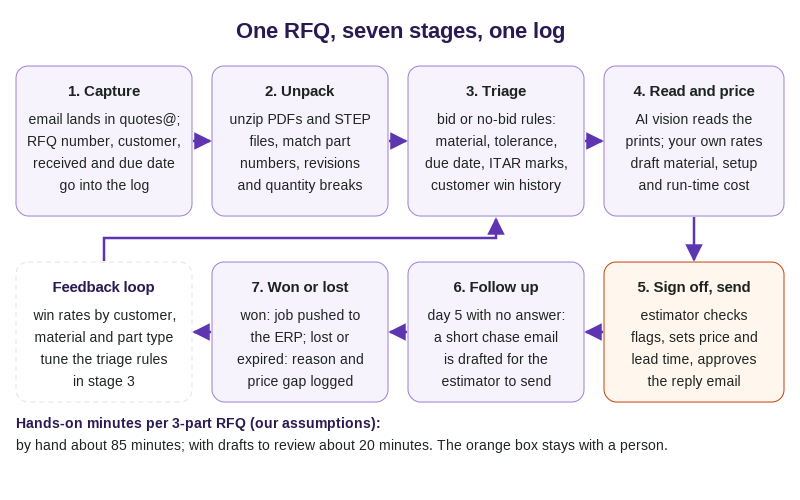
What the diagram shows, in text:
- Capture: the email lands in quotes@, and the RFQ number, customer, received date and due date go into the log.
- Unpack: PDFs and STEP files are unzipped and matched to part numbers, revisions and quantity breaks.
- Triage: bid or no-bid rules check material, tolerance, due date, ITAR markings and the customer’s win history.
- Read and price: AI vision reads the prints, and your own rates draft material, setup and run-time cost.
- Sign off and send (orange, a person): the estimator checks flags, sets price and lead time, and approves the reply.
- Follow up: on day 5 with no answer, a short chase email is drafted for the estimator to send.
- Won or lost: a won job goes to the ERP; a lost or expired one gets its reason logged, and those results tune the triage rules.
- Hands-on time per three-part RFQ: about 85 minutes by hand, about 20 with drafts (our assumptions).
The watching part is standard plumbing. Gmail API push notifications and Microsoft Graph change notifications for Outlook tell the server the moment a new message arrives, so nothing waits for someone to open the inbox.
The reading part uses a vision model. Anthropic’s Claude PDF support sends each page as an image plus its text, so a title block and its notes are read as a drawing. Our guide to extracting dimensions from engineering drawing PDFs covers the small-text tricks.
What should a machine shop RFQ log track?
A machine shop RFQ log should track who asked, for what, by when, what you answered and how it ended, in one row per RFQ.
A shop on Practical Machinist described a simple version: every request gets its own quote number, which follows the job to invoicing if it is won, with statuses of Draft, Sent, Expired and Invoiced. They also put that number on their own material RFQs, so the whole conversation is searchable by job.
| Column | Example | Filled by |
|---|---|---|
| RFQ number | Q-26-0418 | Inbox watcher |
| Customer and buyer | Company name, buyer’s email | Inbox watcher, from the sender |
| Received | Tue Nov 24, 10:12 | Inbox watcher |
| Quote due | Fri Nov 27 | AI, from the email text; person if missing |
| Parts and revisions | 3 parts, rev C, B, A | AI, from the email and title blocks |
| Quantity breaks | 10 / 50 / 250 | AI, from the email |
| Triage result | Bid, no-bid or question | Rules, estimator can override |
| Status | Draft, sent, won, lost, expired, no quote | Updated at each stage |
| Quoted total and lead time | $4,860, 3 weeks | Estimator at sign-off |
| Follow-up date | Thu Dec 3 | Set automatically on send |
| Result reason | Price, lead time, no answer | Estimator, from the buyer’s reply |
| Files folder | Link to the filed prints | Inbox watcher |
The result reason is the column most shops skip and later wish they had. Another reply in that thread made a fair point: an unanswered quote is not proven lost until you know someone else got the job, so “no answer” deserves its own status.
How can automation decide which RFQs to bid?
Automation can sort RFQs into bid, no-bid and question piles with a short rule sheet your estimator writes once, while the final call on a valued customer stays with a person.
The quiet win of a good RFQ log is that nothing depends on memory any more. Your estimator can take a day off, and every request is still numbered, dated and waiting in line.
Paperless Parts describes its power users doing this, using triage to prioritize who you get back to first
based on historical win rate, process and complexity. A custom reader can apply the same idea to your own log.
A practical rule sheet looks like this:
- Material: on your approved list, or flag it for a price check.
- Tightest tolerance: inside what your machines and inspection can hold, or route it to the owner.
- Size and quantity: within your envelope and the batch sizes you run well.
- Due date: the requested delivery is possible at current load, or ask about lead time first.
- Markings: ITAR, EAR or CUI text on the print sends it to the controlled path before any cloud step.
- Customer history: a sender with many quotes and no wins in a year gets quoted last, or quoted high.
Owners on Practical Machinist offer the human version of the same rule: bid mainly to core customers and core industries, and have the occasional plain talk with buyers who only use your number as leverage.
Which software automates RFQs for machine shops?
Machine shops can automate RFQs with a quoting platform that accepts forwarded emails, the AI assistant inside their ERP, or a custom inbox reader that feeds either one.
| Option | What its maker says about RFQs | Follow-up and win tracking |
|---|---|---|
| Paperless Parts | RFQs forwarded from email start a new quote with the files attached; estimators can automatically extract part numbers, revisions and quantities; attachments are virus-scanned and staged inside the quote | Its blog describes email templates, saved filters and seeing when a customer viewed a quote |
| JobBOSS² with ECI Ally | Ally, the AI built into JobBOSS², can turn an emailed RFQ into a quote and a customer reply | Compares estimated and actual cost on every job; follow-up not described on the page we read |
| ProShop ERP | Quotes from templates loaded with your real labor, material and vendor costs, flags estimates below target margin | Awarded quotes convert to purchase orders and work orders; RFQ intake not described |
| E2 MFG (ECI) | Shop management with estimating and quoting | A Practical Machinist user describes checking E2’s follow-up dates each day and emailing those customers |
| Custom inbox reader | Watches your own inbox, logs and files every RFQ, reads prints with a vision model, writes your quote sheet or your ERP’s import | Whatever your log needs: day-five chase drafts, reasons, win rates by customer |
ECI’s page sets the right expectation for any of these tools: Stay in control: You review Ally’s proposed changes, then decide what happens.
None of these makers shows a public price on the pages we read. Ask each to run a week of your real RFQs, including one with a zip inside a zip, before you decide.
How should a machine shop follow up on quotes?
A machine shop should follow up on every quote that gets no answer, on a fixed day, with a short email, and let the system remember the date instead of a person.
One owner on Practical Machinist follows up after 5 business days and keeps going until the RFQ reaches a conclusion. Another tells buyers the honest reason: they are planning the next few weeks of shop load and need to know.
A buyer in an older thread added the other side: follow-ups rarely reveal the real reason a quote was not ordered. So keep the chase short and make it easy to answer.
- Day 0: quote sent; follow-up date set automatically.
- Day 5, business days: chase email drafted with the RFQ number, part numbers and lead time; the estimator sends it with one click.
- Day 10: a second, shorter note offering a revised quantity break or lead time.
- Quote expiry date: status turns to expired, and the reason field asks for an answer.
What should still need a human in RFQ automation?
A human should still own every decision that commits the shop: the price, the lead time, the no-bid on a valued customer and any question back to the buyer.
- Every flagged callout, new material or tolerance tighter than your flag line.
- Lead times, because only a person knows what the floor really looks like next month.
- No-bids for regular customers, which deserve a call rather than a template.
- Clarifying questions about missing revisions, finishes or certifications.
- The final send: drafts go out only after the estimator approves them.
What can go wrong with RFQ automation?
Three things go wrong most often with RFQ automation, and each has a simple guard.
- Duplicate RFQs. A buyer resends the same request with one changed quantity. Guard: match on customer, part numbers and revision, and update the existing row instead of opening a new one.
- A changed revision. The email says rev C and the title block says rev B. Guard: stop the draft and ask the buyer before pricing either.
- Controlled drawings. ITAR, EAR or CUI prints may not be allowed on just any cloud service. Guard: detect the markings first and route those RFQs to an approved system; the State Department’s DDTC administers ITAR.
How do you start automating RFQs in a machine shop?
Start by letting the automation log and draft in the background for two weeks while your estimator keeps quoting the usual way.
Use this checklist before the trial begins:
- One estimating address, such as quotes@, that every RFQ goes to.
- Your RFQ log columns agreed, with the statuses won, lost, expired, no quote and no answer.
- A one-page triage sheet: materials, tolerance flag line, size envelope, marked prints.
- Your cost formula written down, so drafts price the way your estimator does.
- A follow-up rule: day 5, then day 10, from the estimator’s own address.
At the end of the two weeks, count three things: RFQs logged that nobody had noticed, quotes that could have gone out within 24 hours, and estimator hours spent per RFQ.
If those numbers don’t move on your own inbox, the setup isn’t right for your shop yet. If they do, let the drafts carry the next week, with every quote still signed by a person.
Let it log next week’s RFQs in the background, and count how many would otherwise have been found too late.
Sources and further reading
- Paperless Parts: new quote setup workflow (forwarded RFQ emails, extraction of part numbers, revisions and quantities)
- Paperless Parts blog: how power users triage RFQs and follow up (April 5, 2023)
- Paperless Parts blog: responding too slowly (2020 Part Buyer Survey, 67% expect a quote in under 24 hours)
- ECI: JobBOSS² with ECI Ally
- ProShop ERP: estimating and quoting
- ECI: E2 MFG shop management
- Anthropic: Claude PDF support
- Gmail API: push notifications
- Microsoft Graph: change notifications overview
- U.S. State Department: Directorate of Defense Trade Controls (ITAR)
- Modern Machine Shop: 2026 Top Shops roster and benchmark findings
- Practical Machinist forum: quote tracking (owner discussion)
- Practical Machinist forum: overwhelming RFQ backlog, being selective and bidding quickly (owner discussion)
- Practical Machinist forum: following up on quotes (owner discussion)
- Uptool on G2: vendor claim of minutes per part (vendor claim)
Questions and answers
Can I use AI to automate RFQs in my machine shop?
Yes. An AI service on your server can watch the estimating inbox, log each RFQ with its due date, read the prints for material, tolerances and quantities, draft a priced quote sheet and reply, and schedule the follow-up. Keep an estimator’s sign-off on every price, lead time and no-bid.
How fast should a machine shop respond to an RFQ?
Within 24 hours where possible. Paperless Parts’ 2020 Part Buyer Survey found 67% of buyers expect a quote in under 24 hours, and Modern Machine Shop’s 2026 Top Shops benchmark reports a 51% win rate for shops quoting within a day, against 41%.
What is the best way to track RFQs in a job shop?
One row per RFQ in a log or your ERP, with a quote number, customer, received and due dates, parts and revisions, quantity breaks, status, quoted total, follow-up date and result reason. Automation can fill most columns straight from the email.
When should I follow up on a machining quote?
A common rule among shop owners on Practical Machinist is about 5 business days after sending, then again until the RFQ reaches a result. Keep each follow-up short, from the estimator’s own address, and record the reason when the buyer answers.
Do I need new software to automate RFQs?
Not always. Paperless Parts accepts forwarded RFQ emails, JobBOSS² includes ECI Ally for drafting quotes from emailed RFQs, and a custom inbox reader can feed the ERP you already run, such as ProShop or E2.