AppFolio Maintenance Request Automation: What Runs Itself Now
Hello, and welcome to every AppFolio office that has typed a tenant’s leak text into a work order by hand tonight.
Picture opening AppFolio on Monday and finding the weekend’s repair requests already written, sorted and booked.
Most AppFolio offices are closer to that than they think, because the software now ships an AI agent built for exactly this job.
The trouble is that tenants still text your cell, email blurry photos and leave voicemails, and none of that reaches the agent on its own.
Short answer: AppFolio maintenance request automation runs through the Realm-X Maintenance Performer. It reads a tenant’s request and photos, walks them through simple fixes, writes and prioritizes the work order, applies your emergency rules, texts the right vendor, then follows up until the job closes. Your team sets the rules and still handles anything unclear.
What does AppFolio automate for maintenance requests today?
AppFolio automates intake, troubleshooting, work order writing, emergency sorting, vendor texts and vendor follow-up, mostly through one agent called the Realm-X Maintenance Performer.
AppFolio’s October 14, 2025 release says all customers have access to it. Here is what each piece does, in AppFolio’s own words where we could find them.
| Step | What AppFolio says it does | Since |
|---|---|---|
| Intake and photos | Talks with residents in real time, in several languages, analyzes photos and asks follow-up questions | October 2025 release |
| Simple fixes | Step-by-step help by text and chat, such as shutting off water or resetting a garbage disposal | Summer 2026 update |
| Work order | Writes, categorizes and prioritizes the work order with a summary for your team | October 2025 release |
| Emergencies | Classifies emergencies by the rules your team sets and escalates after hours | Performer tour page |
| Vendor dispatch | Routes by issue type, severity and time of day, texts the vendor from the work order, or dispatches the Lula Vendor Network | Performer tour page |
| Vendor follow-up | Contacts vendors about open work orders, confirms completion, flags delays | Spring 2026 update (March 31) |
| Technician follow-up | Texts in-house technicians for status and documents, closes the work order ready for billing | Fall 2026 update (October 30) |
The routing rule is the heart of it. AppFolio’s Maintenance Performer tour puts it this way: Vendors are routed based on issue type, severity, and time of day, and then texted directly from the work order.
Before the Performer, AppFolio sold Smart Maintenance, a rule-based service that took requests by phone, text or portal and auto-assigned pre-set vendors. Many offices still have it switched on, so check which one your account runs.
How does an AppFolio maintenance request move from tenant to closed work order?
An AppFolio maintenance request moves through four steps: the tenant asks, the Performer reads it, one of three paths is taken, and the job is followed up until it closes.
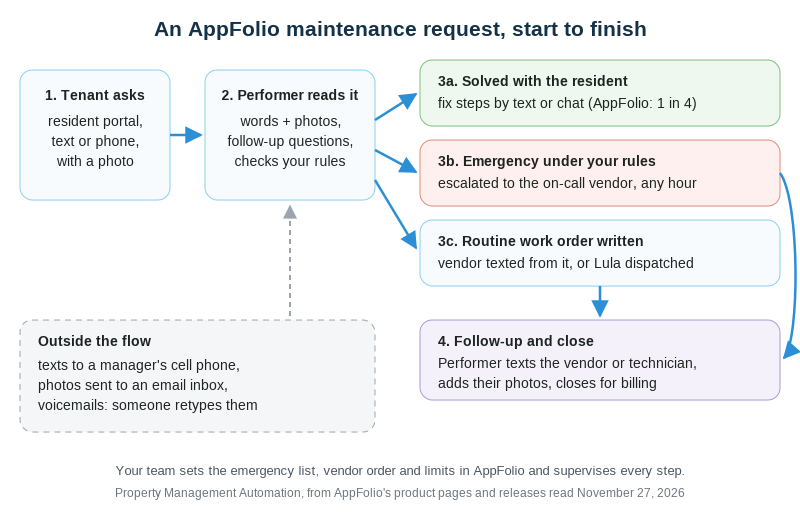
The diagram in words:
- Tenant asks. The request comes in through the AppFolio resident portal or app, by text or by phone, ideally with a photo.
- Performer reads it. The Maintenance Performer reads the words and photos, asks follow-up questions and checks your rules.
- One of three paths. (a) Solved with the resident by fix steps; AppFolio says this happens for one in four work orders. (b) An emergency under your rules goes to the on-call vendor at any hour. (c) A routine work order is written, and the vendor is texted or Lula is dispatched.
- Follow-up and close. The Performer texts the vendor or technician, adds their photos and documents, and closes the work order ready for billing.
The dashed box matters most. A text to a property manager’s personal cell, a photo sent to an office inbox or a voicemail never enters this flow until someone types it in.
How much coordinator time can AppFolio maintenance automation save?
AppFolio maintenance automation saves at least the time of every request the Performer solves with the resident, and AppFolio puts that at one in four work orders.
That figure comes from AppFolio’s September 29, 2026 press release: Maintenance Performer resolves one in four work orders directly with the resident.
The same release quotes one customer, Eucalyptus Real Estate, at 53% of requests resolved without a work order.
| Units managed | Requests a month (0.5 per unit) | Hand-handling hours (12 minutes each) | Solved with the resident (1 in 4) | Hours handed back, floor |
|---|---|---|---|---|
| 100 | 50 | 10 | about 13 | 2.5 |
| 300 | 150 | 30 | about 38 | 7.5 |
| 600 | 300 | 60 | 75 | 15 |
| 1,000 | 500 | 100 | 125 | 25 |
Assumptions: 0.5 requests per unit per month and 12 minutes of questions, typing and vendor calls per request are our round working numbers, not a survey. The one-in-four rate is AppFolio’s claim, not our measurement.
Here’s the catch: the floor counts only the solved requests. The other three in four also arrive written and texted to a vendor, so the real saving is larger. Measure it on your own work orders.
Which AppFolio plan do you need for maintenance automation?
Every AppFolio plan includes work order management and the Maintenance Performer. Plus and Max add maintenance scheduling, Realm-X Flows and API access, which matter once you automate beyond intake.
| Plan | Starts at | Maintenance and automation features listed | At 300 units, starting price a month |
|---|---|---|---|
| Core | $1.49 per unit a month, 50-unit minimum | Work Order Management, Inspections & Unit Turns, Purchase Orders & Inventory Tracking, Realm-X Assistant & Messages | $447 |
| Plus | $3.20 per unit a month | Core plus Maintenance Scheduling & Automated Billing, Realm-X Flows, AppFolio API (read only) | $960 |
| Max | $5.00 per unit a month | Plus plus AppFolio API (read/write) and a dedicated customer success manager | $1,500 |
The 300-unit column is our multiplication of the starting price, not a quote. These are full platform prices, and AppFolio quotes your real figure by portfolio.
The API line decides custom work. AppFolio’s API reference lists work order calls to Get, create or update work orders for a property, unit, or occupancy.
Writing work orders from outside needs the read/write access listed on Max.
How do you set up the Maintenance Performer’s emergency and vendor rules?
You set up the Maintenance Performer by writing your rules once in AppFolio: what counts as an emergency, which vendor handles which trade, and when a person must step in.
The best part is not the AI itself; it is a Monday inbox where the weekend’s requests already have a vendor and a time.
The Performer follows these rules, according to AppFolio, consistently, every time.
So the rules deserve one careful afternoon. Use this checklist.
- Emergency list: active leaks, no heat in freezing weather, gas smell, sparks, sewage backup, a door that won’t lock.
- Vendor order by trade and property: first choice, second choice and the after-hours on-call vendor for plumbing, HVAC, electrical and appliances.
- Not-to-exceed amounts: the dollar limit a vendor may spend before calling for approval.
- Time-of-day logic: what waits for business hours and what wakes someone up.
- Self-fix topics: the simple resets you are happy for tenants to try, such as a GFCI outlet or a disposal reset.
- Hand-off rule: which cases go straight to a coordinator, such as repeat leaks or anything near a gas line.
How do you get maintenance requests that arrive by text or email into AppFolio?
You get stray requests into AppFolio by giving tenants one front door and pointing every other channel at it, because the Performer only answers what reaches AppFolio.
This is where most offices lose time. Tenants use whatever channel feels fastest that evening, and a coordinator then retypes the same leak from three places into one work order.
- One number and one link. Put the AppFolio portal link and one maintenance number on the lease, the welcome email and a sticker under the kitchen sink.
- Auto-reply on personal channels. Staff cell phones and the office inbox answer repair messages with that link and number.
- Forwarding for the rest. A small custom step can read a repair email or text, pull out the unit, issue and photo, and create the AppFolio work order through the API.
- A daily count. Requests received across all channels against work orders created, so a lost request shows up the same day.
The texting part of a custom step usually runs on a service like Twilio. Its incoming message webhook passes each tenant photo to your program as a MediaUrl link, ready for an AI vision model to read.
Should you add Lula, Property Meld or a custom layer to AppFolio maintenance?
You should add something to AppFolio maintenance only when the built-in Performer leaves a specific gap, such as missing vendor coverage, deeper vendor management, or channels AppFolio does not read.
| Option | What it adds | Fits when |
|---|---|---|
| Lula Vendor Network | Vetted vendors that AppFolio can dispatch to, with job status inside AppFolio and no extra login | Your own vendor list has holes, at night or in some areas |
| Property Meld | A full maintenance platform; work orders and invoices sync to AppFolio in real time | You want deeper vendor scheduling and maintenance reporting |
| Custom layer (Twilio, an AI vision model, the AppFolio API) | Reads texts, emails and photos from any channel and writes AppFolio work orders | Requests keep arriving outside the portal, or your rules are unusual |
Lula, per AppFolio’s Lula page, can be switched on in under 24 hours and set as a preferred vendor with a budget. Property Meld has been an AppFolio partner since June 2022.
What still needs a person when AppFolio automates maintenance requests?
A person still needs to own the rules, the money and the unusual cases, because AppFolio’s own pages say the Performer works under human monitoring and supervision.
- Unclear photos: a dark picture of
the thing under the sink
goes to a coordinator, not a vendor. - Approvals over your limit: anything above the not-to-exceed amount waits for a person.
- Repeat problems: the third leak in one unit this year is a capital question, not another work order.
- Unanswered emergencies: if the on-call vendor does not answer, a human phone must ring.
- Owner calls: big repairs on owner-managed units still need the owner’s yes.
How do you roll out AppFolio maintenance automation without upsetting tenants?
You roll out AppFolio maintenance automation in four weeks, starting with rules and a quiet comparison, then switching on one path at a time.
- Week 1: write the six rules above and confirm which of Smart Maintenance or the Performer your account runs.
- Week 2: let the Performer draft work orders while your coordinator checks each call against their own.
- Week 3: switch on self-fix steps and routine vendor texts; emergencies still ring a person too.
- Week 4: count requests solved with residents, hours saved and any wrong calls, then keep what works.
- Built-in agent
- Realm-X Maintenance Performer, available to all AppFolio customers since October 14, 2025.
- AppFolio’s claim
- One in four work orders resolved directly with the resident (September 29, 2026).
- Newest step
- Text follow-up with in-house technicians and closing for billing (October 30, 2026).
- Custom writes
- Work order create and update through the AppFolio API, read/write listed on Max.
If the first month does not save real time on your own tenants’ requests, change the rules before adding anything new.
If it does, your coordinator gets back the part of the job nobody misses: typing a cell phone text into a work order for the fortieth time this week.
Write your rules once, give it four calm weeks, and let AppFolio do the retyping from here.
Sources and further reading
- AppFolio: Realm-X Maintenance Performer tour
- AppFolio: Real Estate Performance Management release (October 14, 2025)
- AppFolio press release: the new Realm-X (September 29, 2026)
- AppFolio: What’s new, Spring 2026 (vendor follow-up)
- AppFolio: What’s new, Summer 2026 (AI-guided self-help)
- AppFolio: What’s new, Fall 2026 (technician follow-up)
- AppFolio: pricing and plans
- AppFolio: API reference (work orders)
- AppFolio: Lula Vendor Network
- AppFolio: property management maintenance software
- Property Meld: Property Meld and AppFolio integration
- Twilio: the incoming message webhook request
- HUD: Fair housing rights and obligations
Questions and answers
Can I use AI to automate maintenance requests in AppFolio?
Yes. AppFolio’s Realm-X Maintenance Performer uses AI to read requests and photos, guide simple fixes, write work orders, apply your emergency rules and text vendors. Requests sent outside AppFolio, such as texts to a staff cell, need a custom step through the AppFolio API. Keep a person on unclear and costly cases.
Is the Realm-X Maintenance Performer included in my AppFolio plan?
AppFolio said on October 14, 2025 that all customers have access to the Maintenance Performer. Realm-X Flows, maintenance scheduling and API access depend on the plan: Flows and a read-only API come with Plus, and the read/write API with Max. Ask AppFolio which features your account has switched on.
What is the difference between AppFolio Smart Maintenance and the Maintenance Performer?
Smart Maintenance is AppFolio’s older, rule-based intake: it took requests by phone, text or portal and auto-assigned pre-set vendors. The Maintenance Performer is the newer AI agent: it also reads photos, troubleshoots with residents, writes summaries and follows up with vendors and technicians until the job closes.
Can the Maintenance Performer dispatch my own vendors?
Yes. AppFolio says vendors are routed by issue type, severity and time of day and texted directly from the work order, using the vendors and rules you set. When your own vendors cannot cover a job, it can dispatch the Lula Vendor Network instead.
Can I build my own automation on top of AppFolio?
Yes, if your plan includes API access. AppFolio’s API reference lists calls to get, create or update work orders, and its pricing page lists read/write API access on Max. A custom layer can read tenant texts and emails, use an AI vision model on the photos and write the work order.