Freight Broker TMS Email Integration: Turn Inbox Mail Into Loads
Hello, and welcome to everyone who has ever had the load in one window and the email about it in another.
Picture a morning where the inbox and the TMS finally agree on every load, without anyone copying a single line between them.
In most small brokerages, the inbox is where the work really happens.
Quote requests, rate cons, carrier replies, tracking notes and PODs all arrive as email, and the TMS only knows about them once a person retypes or drags them over.
Short answer: Freight broker TMS email integration means a program watches your Outlook or Gmail inbox, sorts each new email, reads it and its attachments with AI, matches it to the right load, and writes the data into your TMS through its API. Rate cons become loads, quote requests become quotes, PODs land on the load, and a person reviews anything doubtful.
What is freight broker TMS email integration?
Freight broker TMS email integration is a connection that moves the useful parts of broker email into the TMS automatically.
Without it, the TMS is a filing cabinet that only fills when someone has time. With it, the email is read the minute it lands and the load record updates itself.
There are two levels. A basic integration lets you send and log email from inside the TMS. A full email-to-TMS integration reads incoming mail and creates or updates records on its own, which is where the hours come back.
Which broker emails should flow into the TMS?
Six kinds of email carry nearly all the data a freight broker’s TMS needs.
| Email type | What it carries | What it becomes in the TMS |
|---|---|---|
| Quote request (RFQ) | Lane, dates, equipment, weight | A quote record and a drafted price reply |
| Load tender or shipper rate con | Stops, rate, references, instructions | A new load |
| Carrier reply to a posted load | MC number, offered rate, truck location | A carrier offer on the load |
| Signed carrier rate con | Signature, date, agreed rate | Document attached, load marked covered |
| Tracking or check-call note | Location, ETA, delays, detention | A status update on the load |
| POD or BOL | Signed delivery receipt, exceptions | Document attached, load ready to bill |
Everything else, from newsletters to load board alerts, is sorted aside so nobody’s inbox is flooded with system noise.
How much time does broker email cost without a TMS integration?
For a small brokerage, unconnected email easily costs one to five working hours a day.
The scale is real even at the top of the industry. C.H. Robinson said on May 7, 2024 that it receives “over 11,000 emails” on an average business day from customers and carriers asking for truckload pricing.
Its Vice President for Artificial Intelligence, Mark Albrecht, put the old problem plainly: Before generative AI, replying to that email request defied automation.
| Loads a day | Emails a day (8 per load) | Minutes per email | Hours a day | Hours a month (21 workdays) |
|---|---|---|---|---|
| 10 | 80 | 1 | 1.3 | 28 |
| 20 | 160 | 1 | 2.7 | 56 |
| 40 | 320 | 1 | 5.3 | 112 |
| 40 | 320 | 1.5 | 8.0 | 168 |
Assumptions: 8 emails per load is our own count of a plain load’s life (quote request, quote, carrier reply, rate con out, signed rate con back, dispatch note, one tracking update, POD). One minute is the time to open an email, find the load and copy or attach its content. Swap in your own numbers.
The cost that hurts most is the slow one. Freight Caviar describes the POD that sits unnoticed in someone’s mail: AR doesn’t invoice because the POD isn’t in the TMS.
How does an email-to-TMS integration work, step by step?
An email-to-TMS integration follows six steps, the same ones a careful coordinator follows, only in seconds.
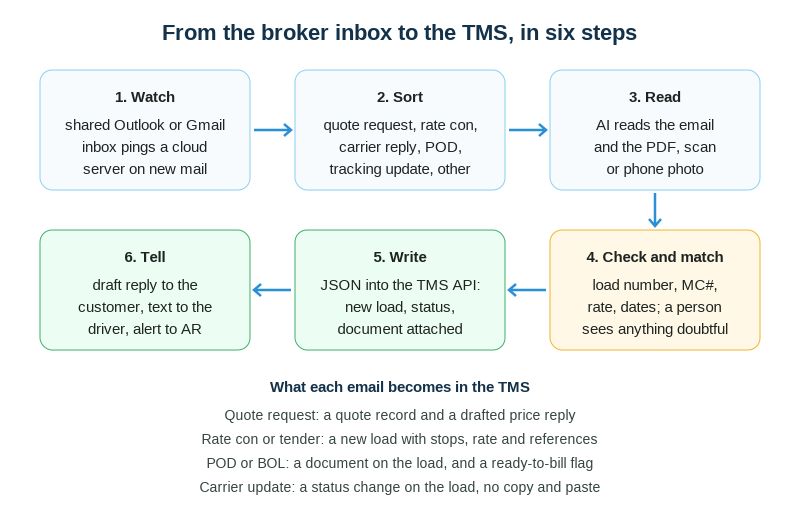
- Watch. A cloud server subscribes to the shared inbox, such as dispatch@ or loads@, so the mail provider tells it the moment a new message arrives.
- Sort. An AI model labels each email: quote request, tender, carrier reply, signed rate con, tracking note, POD, or other.
- Read. The model pulls the fields from the email body and from attachments, including scanned PDFs and phone photos of a signed POD.
- Check and match. Rules find the load by its number, PO or reference, compare the MC number and the rate with what is on file, and flag anything unusual for a person.
- Write. The clean result goes into the TMS as JSON through its API: a new load, a status change, an attached document.
- Tell. The system drafts the reply, texts the driver, or alerts accounting that a load is ready to bill.
The data in the diagram, as text: watch, sort, read, check and match, write, tell. Quote requests become quote records, rate cons become loads, PODs and BOLs become documents with a ready-to-bill flag, and carrier updates become status changes.
Does TMS email integration work with Outlook and Gmail?
Yes, both Microsoft Outlook and Gmail let an outside program watch a mailbox, but each has its own rules.
- Microsoft 365 / Outlook
- A program creates a Microsoft Graph subscription on the inbox. Microsoft lists a maximum lifetime of 10,080 minutes (under seven days) for Outlook message subscriptions, and an average notification delay of under 1 minute (3 minutes at most).
- Gmail / Google Workspace
- Gmail API push notifications arrive through Cloud Pub/Sub. Google says the watch call must be renewed at least once every 7 days and recommends once a day; each mailbox gets at most one notification per second.
Both limits matter for the same reason: a subscription that quietly expires means the TMS stops hearing about new mail. A well-built integration renews it on a schedule and alerts someone if it fails.
What do McLeod, Tai, Aljex and Rose Rocket offer for email today?
Each of the four main small-broker TMS platforms opens a different door for email data, so the route depends on which one you run.
Here’s the quiet win in all of this: once the inbox feeds the TMS, the 2 a.m. “where’s my truck” question already has its answer sitting on the load.
| TMS | What the maker says | What it means for email |
|---|---|---|
| McLeod PowerBroker | An AI Order Creation Interface (announced November 21, 2024) lets customers convert unstructured email data and attachments into order entries; Vooma, Everest and Drumkit were the first partners. | An approved AI partner or your own service can create orders from email through those endpoints. |
| Tai TMS | Built-in email integration that reads the inbox and records quote request details in the TMS; Tai claims a 97% automation rate for quote extraction. | Start with Tai’s own feature; add custom steps only where it stops. |
| Descartes Aljex | Connected with 40+ leading SaaS providers,including Vooma, Fleetworks and Parade Co-Driver, plus EDI, API and CSV export. | Ask which partner or API route your plan includes. |
| Rose Rocket | A public, documented API with OAuth app credentials created in Account Settings. | A custom integration can create orders and attach documents directly. |
The 97% figure is Tai’s own marketing claim, not an independent test. Measure any tool on a week of your own email before you rely on it.
Should you use a built-in feature, an add-on, or a custom integration?
Use what your TMS already includes first, then fill the gaps with an add-on or a small custom service.
- Built-in TMS email: least setup, fits the TMS screens, but covers only the email types the maker chose.
- Add-on AI partner: freight-trained and quick to start, priced per seat or per load, and limited to what it supports.
- Custom cloud integration: reads your odd layouts and your rules, and can also send texts and calls to drivers, but it needs someone to build and watch it.
Many brokerages end up with a mix. The TMS handles EDI tenders, an add-on handles quotes, and a small custom bot catches the PODs and tracking emails nothing else reads.
Can the same email integration chase PODs and check calls?
Yes, once the integration knows each load’s status, it can ask for what is missing instead of waiting for it.
When a load shows delivered with no POD attached, the system can text the driver a short request. With a messaging service such as Twilio, a photo texted back reaches your server as a media link, so AI vision can read the signature, date and any exceptions, then attach it to the load.
Check calls work the same way. At set times the system texts or calls the driver for location and ETA, writes the answer into the TMS, and tells a dispatcher only when the answer means a delay.
What can go wrong with a TMS email integration?
Four quiet failures cause most of the trouble, and each one has a simple guard.
- Wrong load match. Two loads share a PO or a lane. Guard: match on two references, never one, and send ties to a person.
- Expired subscription. The inbox watch lapses and nothing new arrives. Guard: a daily count of emails received against records created.
- Long reply-all threads. The rate changes in message nine. Guard: read the newest message first and flag any rate that differs from the load.
- Too much access. The integration can read every mailbox. Guard: one shared mailbox, the narrowest permission, and a provider whose terms keep your data out of model training.
What should you ask your TMS rep before setting up email integration?
Seven plain questions will tell you in one call which route fits your brokerage.
- Can an outside program create a load and attach a PDF through your API?
- Which email features are built in, and on which plan?
- Which AI email partners are already approved for our version?
- Does it work with Microsoft 365, Google Workspace, or both?
- Can it update an existing load’s status, not only create new ones?
- Where are the emails and documents stored, and who can see them?
- What does it cost per seat, per load, or per API call?
Write the answers down next to your own email counts from the table above. Together they show whether the built-in feature is enough or a custom piece is worth it.
Start small, with the one email type that costs your team the most time, and let the inbox feed the TMS one kind of message at a time.
Pick the one email type that eats the most of your team’s day, connect that first, and let the rest follow when you’re ready.
Sources and further reading
- McLeod Software: AI-Powered Order Creation Interface for LoadMaster and PowerBroker (Nov 21, 2024)
- Tai Software: Email Integration
- Descartes Aljex: plans and integrations
- Rose Rocket: Getting Started with the Rose Rocket API
- Microsoft Graph: subscription resource type (lifetime and latency)
- Gmail API: push notifications
- Twilio: incoming message webhook request (media URLs)
- C.H. Robinson: technology breaks a decades-old barrier to automation (May 7, 2024)
- Freight Caviar: 800 Freight Emails a Day? You’re Counting Your Inbox Wrong (June 25, 2026)
Questions and answers
Can I use AI to connect my freight broker email to my TMS?
Yes. An AI model can sort broker emails, read the body and attachments, and return the fields as JSON that a program writes into your TMS through its API. Keep a person approving rates and anything flagged until it has proven itself on your own email.
Does McLeod PowerBroker read emails into orders?
McLeod announced an AI Order Creation Interface on November 21, 2024 that lets customers convert unstructured email data and attachments into order entries in LoadMaster and PowerBroker, through approved AI partners such as Vooma, Everest and Drumkit.
Do I need Microsoft 365 or Gmail for a TMS email integration?
Either works. Microsoft 365 mailboxes are watched through Microsoft Graph subscriptions, and Gmail or Google Workspace mailboxes through Gmail API push notifications. Both need their watch renewed within 7 days, so the integration must renew it on a schedule.
Will email integration replace EDI with my big shippers?
No. EDI tenders from large shippers are already structured and go straight into the TMS. Email integration covers everyone else: the PDF rate cons, carrier replies, phone photos of PODs and tracking notes that never come through EDI.
How long does it take to set up a TMS email integration?
A built-in feature can be switched on quickly once your TMS rep confirms your plan includes it. A custom integration usually starts with a week of shadow mode on your own email before anything writes into the TMS without review.