
Free Website Templates: Where to Get Them and What "Free" Really Means (2026)
Disclosure: this page may contain affiliate links. We may earn from qualifying purchases, at no extra cost to you.
Picture downloading a beautiful free template at midnight, bargain hunter, and knowing exactly what the license lets you do with it by morning.
Free templates are real and many are excellent, but “free” comes in different shapes, and this guide shows where to find good ones and what each license asks in return.
If you will be editing HTML yourself, a beginner-friendly HTML and CSS book from Amazon next to the keyboard makes the first evening much easier.
Short answer: The best free website templates come from the WordPress.org theme directory, Start Bootstrap (MIT license, no credit needed), HTML5 UP (Creative Commons, credit required) and the free plans of builders like Wix. Free means free to use under a license, so read it: some ask for a footer credit, and builder templates stay on that builder.
- Over 15,000 free themes are in the WordPress.org directory by its own count; a September 2026 scan by wp.md found 15,161, with 8,604 still visible in browse and search.
- Start Bootstrap moved all its free templates to the MIT license, which allows commercial use.
- HTML5 UP templates use Creative Commons Attribution 3.0: free for personal and commercial use if you credit HTML5 UP.
- Builder templates (Wix, Squarespace, Webflow) can only be used on that builder’s platform.
Are free website templates really free?
Free website templates are really free to download and use, but each one comes with a license that sets the rules. The common catches are a required credit link, a ban on reselling the template itself, or a template that only works on one platform.
Three costs can still appear later: a domain name, hosting, and your own time. A template is the design; it is not the website address or the server.
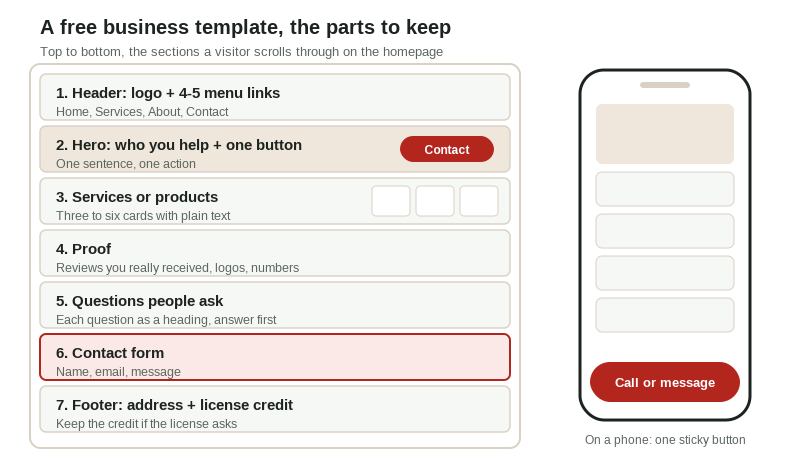
The sections in the drawing, as text: (1) header with logo and four or five menu links; (2) a hero that says who you help, with one button; (3) services or products as cards; (4) proof such as reviews you really received.
The rest of the drawing: (5) common questions as headings with direct answers; (6) a contact form; (7) a footer with your address and, if the license asks, the template credit.
What licenses do free website templates use?
Free website templates mostly use three kinds of license: MIT (use for anything, keep the copyright notice in the code), Creative Commons Attribution (use for anything, credit the author where people can see it) and the GNU GPL (used by WordPress themes, which keeps the code free for everyone).
| Source | License | Commercial use | Visible credit needed |
|---|---|---|---|
| Start Bootstrap | MIT | Yes | No (keep the notice in the files) |
| HTML5 UP | CC BY 3.0 | Yes | Yes, credit HTML5 UP |
| WordPress.org themes | GPL-compatible | Yes | No legal requirement for the footer |
| Wix / Squarespace free templates | Platform terms | Yes, on that platform | Platform branding on free plans |
HTML5 UP says it in its own words: you can use its templates for personal and commercial projects
as long as you give credit, and it offers attribution-free use through its paid sister site, Pixelarity (HTML5 UP license). Start Bootstrap’s post explains its move to the MIT License.
Where can you download the best free website templates?
You can download the best free website templates from a handful of long-running sources that publish their licenses clearly. Each fits a different kind of builder:
- WordPress.org theme directory: free themes reviewed by volunteers, installable from any WordPress dashboard.
- Start Bootstrap: HTML, CSS and JavaScript templates on Bootstrap, MIT licensed.
- HTML5 UP: responsive HTML5 templates under CC BY 3.0.
- GitHub: thousands of open-source templates; check each repository’s LICENSE file.
- Wix: free templates you edit in the Wix editor; they stay on Wix.
- Canva websites: simple one-page sites for events and portfolios.
- Marketplaces with free sections such as ThemeWagon and Colorlib, whose free downloads usually require keeping their footer credit.
How many free WordPress templates are there?
There are over 15,000 free WordPress themes in the official directory, but only part of them are easy to find. A September 1, 2026 scan by wp.md counted 15,161 themes, of which 8,604 (57%) still appear in browse and search, because WordPress.org hides themes with no update in two years.
The same scan counted 2,153 block themes and 13,008 classic themes. For a new site in 2026, a recently updated block theme is usually the easier choice, since you edit it visually with the Site Editor.
What is the catch with free builder templates?
The catch with free builder templates is that the design lives inside the builder: you cannot download a Wix template and move it to other hosting. Free plans also show the builder’s branding and use a builder subdomain until you upgrade to a paid plan.
How do you choose a safe free website template?
You choose a safe free website template by checking five things before you download: the license, the last update date, the demo on your phone, the source (an official directory or the author’s own site) and whether the files include anything you did not ask for.
Honestly, this is my favorite trick in the whole guide: one minute reading a LICENSE file saves you from the only real cost of a free template.
- License: open the LICENSE file or the license page and note any credit rule.
- Last updated: prefer templates updated within the last year or two.
- Phone test: open the demo on your phone; menus, text and buttons should fit without zooming.
- Source: download from the official directory or the author’s site, never from “nulled” copies of paid themes.
- Files: a plain HTML template should be HTML, CSS, images and a little JavaScript, nothing that installs software.
How do you make a free template look like your own site?
You make a free template your own by changing the words, photos, colors and fonts, then removing the demo sections you do not need. Most of what makes a site feel original is the content: your own photos, your own headings and your own answers to customers’ questions.
Change the color variables in the stylesheet, swap the font, replace every demo image and rewrite every line of demo text. Leave the license credit in place if the license asks for it.
Can a free website template rank on Google?
Yes, a free website template can rank on Google, because search engines judge the page’s content, speed and structure, not the template’s price. Google’s Core Web Vitals aim for the main content within 2.5 seconds, a response to taps within 200 milliseconds and a layout shift score of 0.1 or less, and light free HTML templates often meet those easily.
Write each heading as a question your customers ask and answer it in the first sentence. Answer-first sections are the easiest for Google and AI assistants to quote.
What should you remember about free website templates?
Remember that a free website template is a starting design with a license attached. The numbers and rules worth keeping, from the sources above (November 25, 2026):
- 15,161
- free WordPress.org themes counted by wp.md, September 2026
- 57%
- of them still visible in the directory’s browse and search
- MIT
- Start Bootstrap: commercial use, no visible credit needed
- CC BY 3.0
- HTML5 UP: commercial use with credit
- 2.5 s
- the Core Web Vitals target for the main content
Pick the source that matches how you want to edit: a builder for drag and drop, WordPress for a growing site, plain HTML for full control.
For niche-ready layouts, see our guides to a church website template, a restaurant website template and a construction company template.
So pick one source from the list, read its license once, keep the credit line if it asks for one, and pour your energy into the words. Free code plus your own content is a real website.
Sources and further reading
- WordPress.org Theme Directory — over 15,000 free themes
- wp.md: WordPress Theme Stats — scan of September 1, 2026: 15,161 themes, 8,604 visible, 2,153 block themes
- HTML5 UP: The Creative Commons Attribution 3.0 License — free for personal and commercial use with credit (quoted)
- Start Bootstrap: moves to MIT licensing — free templates under MIT
- Open Source Initiative: The MIT License — license text
- Creative Commons: Attribution 3.0 Unported — the attribution rule
- web.dev: Web Vitals — LCP 2.5 s, INP 200 ms, CLS 0.1
Questions and answers
Where can I get free website templates?
Good free sources are the WordPress.org theme directory, Start Bootstrap (MIT license), HTML5 UP (CC BY 3.0, credit required), open-source templates on GitHub and the free templates inside builders such as Wix and Canva. Always read the license first.
Can I use free website templates for commercial use?
Usually yes. MIT-licensed templates such as Start Bootstrap’s and CC BY templates such as HTML5 UP’s both allow commercial use; CC BY requires a visible credit. Builder templates can be used commercially but only on that builder.
Are free HTML and CSS website templates safe?
Free HTML and CSS templates from official sources are safe, since they are plain files you can read. Avoid “nulled” copies of paid themes, which are unlicensed and can contain hidden malicious code.
Do free website templates hurt SEO?
No. Search engines rank content, speed and structure, not the template’s price. A light free template with fast pages and question-and-answer headings can rank as well as a paid one.
Is WordPress free to use with free templates?
The WordPress software and the themes in the WordPress.org directory are free. You still need hosting and a domain name, which are paid services, unless you use a free hosted plan with a subdomain.