Accounting Client Onboarding Document Checklist (By Client Type)
Hello, and welcome to anyone who has ever typed just following up on the documents
to a client who signed only last week.
Picture a new client who signs on Monday and has every document in your hands, checked and filed, by Thursday.
In most small firms the same client takes three weeks, two phone calls and an email thread titled Re: Re: Fwd: documents
.
Nobody is being difficult, of course; the client simply doesn’t know that the EIN letter and last year’s return were the important ones.
Short answer: An accounting client onboarding document checklist covers a signed engagement letter, ID, IRS Form 8821 or 2848, the last two to three tax returns, entity and EIN papers, twelve months of bank and card statements, payroll and loan records, and logins to QuickBooks or Xero. Send only the items that client’s type needs, then check every upload.
What documents go on an accounting client onboarding document checklist?
An accounting client onboarding document checklist has 13 core items, grouped into four kinds: agreements, identity and authority, history, and access.
| # | Document | Why the firm needs it |
|---|---|---|
| 1 | Signed engagement letter | Sets the scope, fees and who provides what, before any work starts |
| 2 | Government photo ID of the signer | Confirms who you’re dealing with before you handle tax data |
| 3 | IRS Form 8821 or Form 2848 | Lets the firm see (8821) or represent the client on (2848) IRS records |
| 4 | Last 2 to 3 years of tax returns | Carryforwards, depreciation, estimates and the prior preparer’s choices |
| 5 | EIN notice (CP575 or Letter 147C) | The exact legal name the IRS holds for that number |
| 6 | Formation documents and operating or partnership agreement | Entity type, owners and ownership percentages |
| 7 | 12 months of bank and credit card statements | The starting point for reconciliation and the opening balances |
| 8 | Prior trial balance, general ledger and fixed asset schedule | Where the books stood on the day you take over |
| 9 | Loan statements and amortization schedules | Splits each payment into interest and principal |
| 10 | Payroll reports and Forms 941 | Wages, payroll taxes and filings already made |
| 11 | Contractor list with Forms W-9 | The names and taxpayer ID numbers needed for 1099s in January |
| 12 | Sales tax registrations and the last returns | Which states the client files in, and how often |
| 13 | Access to QuickBooks or Xero, the bank feed and the payroll provider | Lets the firm work in the live books instead of exports |
Nobody needs all 13. A W-2 employee with a rental doesn’t have a payroll provider, and a monthly bookkeeping client may never need a Form 2848.
How does the onboarding checklist change by client type?
The onboarding checklist changes a lot by client type, which is why one long generic list is the main reason clients skip it.
| Document | Individual tax | Business tax | Monthly bookkeeping | Payroll | Catch-up cleanup |
|---|---|---|---|---|---|
| Engagement letter | Yes | Yes | Yes | Yes | Yes |
| Photo ID | Yes | Yes | Yes | Yes | Yes |
| Form 8821 or 2848 | Yes | Yes | Optional | Yes | Yes |
| Prior tax returns | 2-3 years | 2-3 years | Last year | No | Every year behind |
| W-2, 1099, 1098 forms | Yes | No | No | No | No |
| EIN notice and formation papers | No | Yes | Yes | Yes | Yes |
| Bank and card statements | If any | 12 months | 12 months | No | Every month behind |
| Trial balance and fixed assets | No | Yes | Yes | No | If any |
| Loan statements | If any | If any | If any | No | If any |
| Payroll reports and 941s | No | If any | If any | Yes | If any |
| Contractor W-9s | No | If any | Yes | If any | Yes |
| Sales tax returns | No | If any | If any | No | If any |
| Software and bank access | No | Yes | Yes | Payroll only | Yes |
In this matrix, an individual tax client needs 5 required items and a monthly bookkeeping client up to 12. A three-question intake (entity type, employees, states) is enough to pick the right column automatically.
Practitioners on the TaxProTalk forum describe the same problem from the other side. Clients drop off paperwork without the organizer filled in, and a document checklist that isn’t required gets ignored by most people.
One preparer’s fix was to put the questionnaire inside the electronic engagement letter, so it gets done when the client signs. That’s the right instinct: tie the checklist to a step the client has to finish anyway.
Which IRS form should a new client sign, Form 8821 or Form 2848?
A new client signs IRS Form 8821 when the firm only needs to see tax records, and Form 2848 when the firm will also represent the client before the IRS.
The IRS describes Form 8821 as a tax information authorization for any person or firm the taxpayer designates. Form 2848 is the Power of Attorney and Declaration of Representative.
Both forms can be uploaded through the IRS page to submit Forms 2848 and 8821 online, as a PDF, JPG or GIF, one form at a time. Electronic signatures are accepted online; forms sent by fax or mail still need ink signatures.
For individual clients there’s a faster route. In Tax Pro Account, the IRS says: You can submit a request before the taxpayer creates an online account.
The client approves it in their own account, and it shows up for the firm right after.
Two details trip people up. The address you enter in Tax Pro Account must match IRS records, and only attorneys, CPAs, enrolled agents, enrolled actuaries and enrolled retirement plan agents can request a power of attorney there.
How do you get records from a new client’s previous accountant?
You get records from a new client’s previous accountant by having the client ask for them in writing, listing the specific items needed rather than “the whole file”.
For tax practitioners, Treasury’s Circular 230 section 10.28 says a practitioner must promptly return any and all records of the client
that the client needs to meet federal tax obligations, when the client asks.
The rule has limits. Records the client handed over are covered, but some of the old firm’s own work product can be held until fees for it are paid. So ask for the pieces that matter: depreciation schedules, basis records, carryforward details and adjusting entries.
An automated checklist treats “prior accountant records” as its own item with its own clock. It sends the client a ready-to-sign request letter on day one and a reminder at day 7 and day 14 if nothing has arrived.
How do you track QuickBooks, Xero, bank and payroll access during onboarding?
Track software access as checklist items just like documents: each invite is “sent”, “accepted” or “stuck”, and a stuck invite gets its own reminder.
- QuickBooks Online: Intuit’s Firm of the Future says Simple Start, Essentials and Plus can invite up to two accounting firms, and Advanced up to three. The client sends the invite from Manage users, under Accounting firms.
- Xero: the client invites the firm under Settings, then Users, with the Advisor role (spelled Adviser outside the US) and Manage users ticked.
- Bank feeds: the client connects the bank inside QuickBooks or Xero; the firm can’t do it for them.
- Payroll: the client adds the firm as an accountant user in the payroll provider, such as Gusto or ADP.
Here’s the catch: an invite sitting unaccepted in someone’s inbox looks exactly like done from the client’s side. Checking the status every day is a perfect job for software, not for a staff member’s memory.
How much time does onboarding one new accounting client by email take?
Onboarding one new business client by email takes about 101 minutes of staff time in our calculation, most of it in follow-ups and filing rather than real accounting.
Honestly, a short checklist is a kindness to the client too. Nobody enjoys guessing which of their papers matters, and a list made for their kind of business tells them in two minutes.
| Task | By email, minutes | Automated checklist, minutes |
|---|---|---|
| Write the first request for this client | 10 | 0 (built from the intake answers) |
| Three rounds of follow-up emails, 8 minutes each | 24 | 0 (automatic reminders) |
| Open, check, rename and file 18 uploads, 2 minutes each | 36 | 0 (checked and filed on arrival) |
| Re-request 4 wrong or blurry files, 4 minutes each | 16 | 0 (sent back automatically) |
| Chase QuickBooks or Xero, bank and payroll access | 15 | 0 (invite status tracked) |
| Review the flagged items, 3 minutes each | 0 | 12 |
| Approve the finished checklist and confirm the kickoff | 0 | 8 |
| Total per client | 101 | 20 |
| 25 new clients a year | 42.1 hours, about $1,473 | 8.3 hours, about $292 |
Assumptions, compiled by Accounting Firm Automation on November 27, 2026: 18 items for a typical small-business client, 4 of them arriving wrong the first time, and $35 an hour as a rough loaded staff cost. Swap in your own numbers.
The minutes matter less than the calendar. Every missing item delays the kickoff meeting, and the kickoff usually decides when the first invoice goes out.
How does an automated client onboarding checklist work, step by step?
An automated client onboarding checklist runs in seven steps, starting the moment the engagement letter is signed and ending when every item is green.
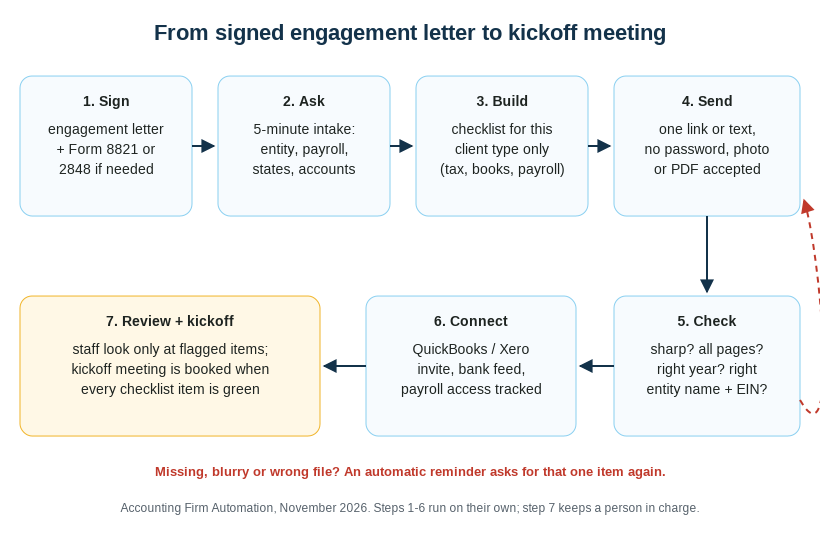
- Sign. The client signs the engagement letter and, where needed, Form 8821 or 2848 in the same session.
- Ask. A five-minute intake asks the entity type, employees, states, banks and software in use.
- Build. The system picks the column from the matrix above and builds this client’s own list, nothing extra.
- Send. The client gets one link or text message. A phone photo or a PDF both count, no password to set up.
- Check. Every upload is checked for blur, missing pages, the right year and the right entity name.
- Connect. QuickBooks Online or Xero invites, bank feeds and payroll access are tracked like documents.
- Review and kick off. Staff look only at flagged items, and the kickoff meeting is offered once every item is green.
Each missing or failed item gets its own short reminder, such as We still need page 3 of your March statement
, instead of the whole list again.
How can software check that an onboarding document is the right one?
Software checks an onboarding document by reading it and comparing what it finds with what the checklist expects: the type, the year, the name and the pages.
- Right document: a file sent as “last year’s return” should be a Form 1040, 1120-S or 1065, not the state return or the e-file receipt.
- Right year: the tax year printed on the return, or the statement period, matches what was asked for.
- Right entity: the legal name and EIN match the CP575 notice, so the owner’s personal statement doesn’t stand in for the business one.
- Every page:
Page 3 of 6
printed on the statement means pages 1 to 6 must all be there. - Readable: a blurry phone photo or a password-locked PDF goes back to the client at once, with a one-line reason.
- Signed: the engagement letter and Form 8821 or 2848 have their signature and date fields filled.
Once statements pass these checks, the next step is reading them. Our guide to extracting data from scanned receipts and bank statements shows the balance check that proves no line went missing.
Which tools already send onboarding checklists to accounting clients?
Practice management tools such as TaxDome and Karbon already send onboarding requests and reminders; what they don’t do on their own is read each upload and judge whether it’s the right document.
| Tool | What it does for onboarding | What it leaves to you |
|---|---|---|
| TaxDome pipelines | When a new client job starts, sends the engagement letter, creates an intake organizer, notifies the account manager, and reminds the client until documents arrive; organizer answers can add tags | Judging whether an uploaded file is the right year, entity and complete |
| Karbon client requests | Automatic client request emails for onboarding information with automatic reminders; a signed Ignition engagement letter can start the onboarding work | The same upload judgment; reminders stop at whatever the client marks as done |
| QuickBooks Online and Xero | Accept the firm’s accountant or advisor invite | Knowing whether the client ever sent it |
| IRS Tax Pro Account | Sends POA and TIA requests to an individual client’s IRS online account | Business clients still need Form 2848 or 8821 uploaded |
That gap is where a small custom layer earns its keep. It reads each upload, compares it with the checklist, and only then ticks the item in TaxDome or Karbon, so “done” really means done.
Once onboarding ends, the same reminder engine keeps going. Our guide to automating the chase for tax documents covers the yearly round of W-2s and 1099s.
How do you collect new client documents securely?
Collect new client documents through an encrypted upload link or portal, never as email attachments, and cover the process in your firm’s written information security plan.
Onboarding gathers the most sensitive file a firm ever holds on one person: a photo ID, tax returns, an EIN and full bank account numbers, all in the same week.
The FTC Safeguards Rule (16 CFR Part 314) treats tax preparers as financial institutions, and the IRS’s Publication 5708 gives small practices a sample written information security plan to start from.
How should a small firm set up its first automated onboarding checklist?
Start with one client type, usually monthly bookkeeping or business tax, and run the next three new clients of that type through an automated checklist.
- Copy that client type’s column from the matrix above and cut anything you never actually use.
- Write the three intake questions that decide which items appear.
- Put the checklist link into the engagement letter email, so it starts the moment the client signs.
- Set reminders at day 3, day 7 and day 14 for each open item, not for the whole list.
- Turn on the upload checks: right document, right year, right entity, every page, readable.
- Time your staff’s review minutes and compare them with the 101-minute estimate above.
Most firms find the hardest part isn’t the software. It’s agreeing, once, on what the checklist for each client type really is.
Done well, your new clients get a short list that shrinks on its own, and your team meets them for the first time with every file already checked.
Pick one client type, write its checklist once, and let the next new client find everything already lined up for them.
Sources and further reading
- IRS: About Form 8821, Tax Information Authorization
- IRS: About Form 2848, Power of Attorney and Declaration of Representative
- IRS: Submit Forms 2848 and 8821 online
- IRS: Tax Pro Account
- IRS: Understanding your CP575 notice
- eCFR: 31 CFR 10.28, Return of client’s records (Circular 230)
- eCFR: 16 CFR Part 314, FTC Standards for Safeguarding Customer Information
- IRS Publication 5708: Creating a Written Information Security Plan for your Tax & Accounting Practice
- Intuit Firm of the Future: enabling multiple users in QuickBooks Online
- TaxDome Help Center: Pipelines explained
- Karbon: Bookkeeping onboarding checklist
- TaxProTalk forum: Tax organizer questions (practitioner discussion)
Questions and answers
Can I use AI to build and run an accounting client onboarding document checklist?
Yes. AI can pick the right checklist from a short intake, send one link to the client, read each upload to confirm it is the right document, year and entity with every page, and send automatic reminders for missing items. A person should still review flagged files and approve the finished checklist before kickoff.
How many years of prior tax returns should a new accounting client provide?
Most firms ask a new tax client for the last two to three years of returns, to see carryforwards, depreciation and the prior preparer’s choices. A monthly bookkeeping client usually needs only the last filed return, and a catch-up client needs every year that is behind.
Should a new client sign Form 8821 or Form 2848?
Form 8821 lets the firm see the client’s IRS records; Form 2848 also lets an eligible practitioner represent the client before the IRS. Both can be uploaded online with electronic signatures, and individual clients can approve requests sent from IRS Tax Pro Account.
What if a new business client lost their EIN confirmation letter?
The IRS says the original CP575 notice cannot be duplicated. The client can get a digital CP575 through IRS Business Tax Account or ask the IRS for Letter 147C, which confirms the EIN and the legal name tied to it.
What should a bookkeeping client onboarding checklist include?
A bookkeeping client onboarding checklist includes the signed engagement letter, ID, EIN and formation papers, 12 months of bank and card statements, the prior trial balance and fixed asset schedule, loan statements, contractor W-9s, sales tax returns, and access to QuickBooks Online or Xero, the bank feed and payroll.