How to Automate HVAC Estimate Follow-Up (So Quotes Stop Going Cold)
Good evening to every HVAC tech still typing up estimates after the last call of the day.
Picture a Thursday evening, a system replacement estimate your tech sent from the driveway, and a homeowner who reads it, means to call back, and then gets busy.
Nobody at your shop is ignoring that customer on purpose.
The office is booking today’s no-cooling calls, the tech is on the next job, and the estimate quietly slides down the list.
Short answer: To automate HVAC estimate follow-up, turn on the follow-up tool your field software already has (ServiceTitan’s unsold estimates campaigns, Jobber’s quote follow-ups or Housecall Pro’s Pipeline), set three or four touches over about three weeks by text and email, and make every message stop the moment the customer approves, books or replies.
What does it mean to automate HVAC estimate follow-up?
It means a schedule of reminders that sends itself after an estimate goes out, so no open estimate depends on somebody remembering it.
A good sequence reads the estimate’s status in your software every day. It only writes to customers whose estimate is still open, and it hands every reply to a person.
- Trigger: an estimate is sent and not approved on the spot.
- Touches: a text, an email and a call task, spaced over about three weeks.
- Link: every message carries the approval link, so a yes takes one tap.
- Stop: approved, booked, replied or dismissed ends the sequence that day.
- Report: the office sees which estimates are open, contacted or lost.
Why do so many HVAC estimates go cold?
Because most customers don’t decide at the kitchen table, and most shops stop after one try.
ServiceTitan’s webinar recap Follow-Ups 101: Back 2 Basics (April 17, 2026) says ServiceTitan data shows only 37% of in-home sales convert immediately. The speaker, Brittany Burgess, puts the lesson plainly: One follow-up is just not enough.
The same recap cites an industry figure that 64% of customers say no
four times before saying “yes,” and her advice is to follow up at least four times.
Contractors on the Mike Holt forums describe the same thing from the truck. In one thread, a short did you get the estimate, any questions?
email was answered with when can you start?
Others in those threads say they follow up for weeks and still win only a slice of what they quote. Here’s the catch: the follow-up isn’t hard, it just has to happen every single time.
And the people who could send it are the same people writing estimates at 10 p.m. after a full day on rooftops. Asking them to also remember day 5 for twenty customers is how good estimates go cold.
How many hours does manual estimate follow-up take?
For a shop sending 60 estimates a month, four touches by hand on each open one takes about 12 to 13 office hours a month.
| Estimates sent a month | Still open after the visit (63%) | Touches at 4 each | Office time at 5 minutes a touch |
|---|---|---|---|
| 30 | about 19 | 76 | about 6.3 hours |
| 60 | about 38 | 152 | about 12.7 hours |
| 120 | about 76 | 304 | about 25.3 hours |
Assumptions: 37% of estimates close on the visit (ServiceTitan’s figure), so 63% need follow-up. Four touches follows Burgess’s advice. Five minutes a touch covers finding the estimate, writing or calling, and logging it; it is an example, not a measured average.
An automated sequence keeps the call touches for a person and sends the rest itself. On the 60-estimate row, that leaves about 38 calls a month instead of 152 touches, and none of them are forgotten.
What follow-up schedule works for HVAC estimates?
A simple starting schedule is the same evening, day 2, day 5, day 10 and day 21, then close the estimate out.
| When | Channel | What it says | Who sends it |
|---|---|---|---|
| Day 0, same evening | Email or text | The estimate, the options and a thank-you from the tech | Your software, automatically |
| Day 2 | Text | Any questions about the options?plus the approval link | The sequence |
| Day 5 | The options again, financing if you offer it, one-click approve | The sequence | |
| Day 10 | Phone | A real conversation with the estimate on screen | A person, from a call task |
| Day 21 | Text | Should we keep this open for you? | The sequence, then the estimate is closed |
Repair estimates move faster than replacements. A capacitor or blower motor quote can run day 1, day 3 and day 7, because the house is warm or cold right now.
A full system replacement usually takes longer, since homeowners often compare quotes and talk it over. Stretch the gaps, and keep the day-10 call with the comfort advisor who sat at that table.
What does an automated estimate follow-up do, step by step?
It runs a short loop every day: read the open estimates, send what is due, and stop the moment anything changes.
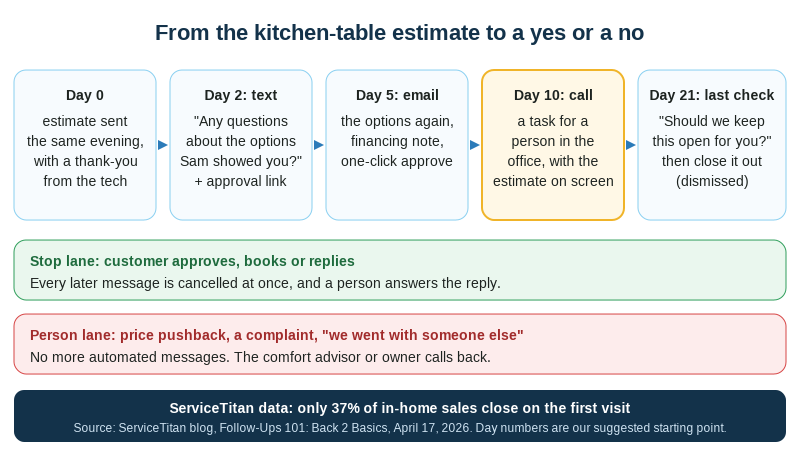
- Trigger. The tech completes the job with an unsold estimate, and the software marks it open (ServiceTitan calls this an open opportunity; Jobber calls it “awaiting response”).
- Check. Each morning the sequence reads every open estimate’s status, so a customer who approved last night drops off before 8 a.m.
- Send. It sends the text or email that is due, in your wording, with the customer’s own approval link.
- Task. On the call day, it puts a task on a person’s list with the estimate attached.
- Stop. An approval, a booked job, a reply or a dismissal ends the sequence, and a reply goes to the office inbox.
- Close. After the last touch, the estimate is marked lost or dismissed, so your open list stays honest.
The diagram’s data, in text: day 0 estimate sent the same evening; day 2 a short text; day 5 an email with the options; day 10 a call task for a person; day 21 a last check-in, then close out.
The green lane stops everything when the customer approves, books or replies. The red lane sends price pushback, complaints and we went with someone else
straight to a person, with no more automated messages.
Which HVAC software already automates estimate follow-up?
ServiceTitan, Jobber and Housecall Pro all have a built-in way to send follow-ups on open estimates, each with its own limits.
| Tool | What it sends | How it stops | Plan or price |
|---|---|---|---|
| ServiceTitan Follow Up screen | Nothing on its own: a list of open opportunities for your team to call and log | A person marks the opportunity won or dismissed | Part of ServiceTitan; account setup required |
| ServiceTitan Marketing Pro unsold estimates SMS | Up to four texts with an Unsold Estimates link to the latest open estimate | A stop condition you pick: Call Created or Job Booked; won and dismissed are left out | Marketing Pro, with Chat turned on; no list price |
| Jobber quote follow-ups | Up to two reminders, by the same method as the quote, up to 90 days after sending | Sent only while the quote is awaiting response | Connect plan and up; Connect lists at $139 a month for one user, billed monthly |
| Housecall Pro Pipeline | Resends the estimate at first, second and third follow-up, after the days you set | Status rules; after the third follow-up it can decline the estimate | Pipeline; no price on the help page |
| Custom sequence on Twilio SMS | Whatever you write: texts, emails, call tasks, any schedule | Your code reads the estimate status before each send | About $0.0083 a text segment plus carrier fees, plus the build |
Jobber’s two reminders are the easiest to switch on: Gear icon, Settings, Automations, then the follow-up cards under quotes. Its help article says they go out at the same local time of day as the original quote.
ServiceTitan’s Marketing Pro help article adds two details to plan around. Its campaigns launch the next day at the earliest, and once a campaign is scheduled to launch, you can’t make changes to it.
ServiceTitan’s AI agents page says Marketing Pro can also automatically reach out to bring old estimates back to life
, with the first message and follow-up timing customizable. See the AI-powered agents page.
What should an HVAC estimate follow-up text say?
It should sound like your office manager on a good day: short, named, specific, with the approval link and an easy way to say no.
Here’s the kind truth about a quiet customer: silence after an estimate is rarely a no, it’s usually a busy week. A friendly, well-timed reminder gives them the easy way back to you.
Example wording, with made-up names to swap for yours:
- Day 2:
Hi Dana, it’s Riverside Heating. Any questions about the three options Sam showed you Tuesday? You can approve here: [link]. Or just reply and we’ll call.
- Day 5:
Hi Dana, here are your options again, with the financing note you asked about. If the timing isn’t right, that’s fine too, just let us know.
- Day 10 call note:
Ask if anything changed since the visit, and whether they’re comparing quotes. Don’t drop the price unless the scope changed.
- Day 21:
Hi Dana, should we keep your estimate open, or close it for now? Either answer helps us.
The day-21 question works because it gives the customer permission to say no. A clear no closes the estimate cleanly, and it costs a lot less than a fifth unanswered text.
How is commercial HVAC proposal follow-up different?
A commercial proposal waits on a budget, a manager above the manager, and a purchase order, so the follow-up has to ask about those steps.
A homeowner script asks any questions?
A facility manager with a rooftop unit replacement quote needs the follow-up to move the paperwork forward.
- Who approves the spend, and when does that person meet?
- Does the proposal need a different format, a revised scope or a not-to-exceed amount?
- Is there a budget date or fiscal year the work must land in?
- Does purchasing need your W-9, insurance certificate or vendor setup?
- Is the unit limping along, so a repair quote should go out in the meantime?
Commercial follow-up is usually email first and a call second, spaced weekly or by the customer’s own meeting dates. A sequence that waits for next Tuesday’s budget meeting
is far kinder than one that texts a facility manager every 48 hours.
Can AI handle the replies to estimate follow-ups?
AI can draft the follow-ups and sort the replies, but price talks, complaints and anything about safety should go to a person.
The useful part of AI here is reading the estimate and writing a message that mentions the actual options, and reading a reply to decide where it goes.
- Safe for AI:
Can you come Monday instead?
,Send it to my wife’s email,
What was the warranty on option 2?
(if the warranty is on the estimate). - Straight to a person:
Can you do it cheaper?
,The other company said we don’t need a new coil,
The tech left a mess.
- Stop at once:
We went with someone else,
“STOP,” or any reply that sounds upset.
ServiceTitan’s Marketing Pro page says you can define handoffs from SMS to other channels, such as its AI Virtual Agent or manual tasks. On a custom build, write the same split as plain rules the AI must follow.
How does a custom estimate follow-up system connect to ServiceTitan or Jobber?
A custom sequence is a small program that reads estimate status through your software’s API, sends texts through Twilio and emails through your mail service, and logs every touch back.
- Read: the ServiceTitan developer platform exposes estimates through its sales and estimates API; Jobber uses its GraphQL API.
- Listen: Jobber webhooks tell your program when a quote changes, so an approval cancels the next text right away.
- Write: an AI model drafts each message from the estimate’s options and your tone rules; a person approves the templates once.
- Send: Twilio sends texts from your local number, and the same number can receive replies.
- Log: each touch is written back as a note or follow-up record, so the office sees the history.
Texts from a local 10-digit number need A2P 10DLC registration first; Twilio says anyone sending to US numbers that way must register for A2P 10DLC.
Register before launch (Twilio’s A2P 10DLC guide).
The text costs are small. At Twilio’s listed $0.0083 a segment plus a carrier fee of up to $0.005, three texts to 38 open estimates come to roughly $1.50 a month, plus $1.15 for the number. The build and upkeep are the real cost.
The same Twilio number can also text back missed calls; our guide to ServiceTitan missed call text back shows how those two jobs share one line.
What goes wrong with automated estimate follow-up?
The worst mistake is a reminder that reaches a customer who already said yes, so check these five before you switch anything on.
- [ ] A phone yes nobody logged. If the customer approves by phone and the estimate stays open, the sequence keeps texting. Mark it sold the same day.
- [ ] Calls that don’t update status. Housecall Pro’s Pipeline FAQ says follow-up calls made with its Voice feature don’t update Pipeline; update the status yourself.
- [ ] Old estimates left out. The same FAQ says a new rule only covers estimates inside its timeframe, so last month’s estimates need a manual resend.
- [ ] A campaign you can’t edit. ServiceTitan says an unsold estimates campaign can’t be changed after it is scheduled; read every message before launch.
- [ ] Opt-outs ignored. A customer who texts STOP must stop getting texts, and Jobber only sends to clients whose “outstanding quote follow-ups” setting is on.
For a shop that already answers its after-hours calls automatically, the same rule applies there: a person for safety, software for routine. Our guide to an HVAC answering service that books appointments lays out those emergency rules.
How do you switch on estimate follow-up automation this week?
Start with one channel and next week’s new estimates, read every reply for a week, then add the rest.
- Day 1: write your four messages and your stop rules, and decide who gets the day-10 call tasks.
- Day 2: turn on the built-in tool (Jobber’s quote follow-ups, Marketing Pro’s unsold estimates campaign or Housecall Pro’s Pipeline rules) for new estimates only.
- Days 3 to 6: read every reply each morning and check that approvals stopped their sequence.
- Day 7: count estimates sent, replies, approvals and opt-outs, then decide whether to add older estimates by hand.
The goal is simple. Every customer your tech sat with hears from you again, kindly and on time, until they give you a yes or a clear no.
Write your four messages tonight, switch on the follow-ups for next week’s estimates, and let the quiet ones hear from you again.
Sources and further reading
- ServiceTitan blog: Follow-Ups 101: Back 2 Basics (April 17, 2026)
- ServiceTitan Help: Understanding ServiceTitan vocabulary, Sales
- ServiceTitan Help: Create unsold estimates campaigns using SMS
- ServiceTitan: Marketing Pro AI-powered agents
- ServiceTitan developer platform
- Jobber Help: Automations (quote and invoice follow-ups)
- Jobber: pricing
- Jobber Developer Center (GraphQL API)
- Jobber Developer Center: Setting up webhooks
- Housecall Pro Help: Getting started with Pipeline
- Housecall Pro Help: Pipeline FAQs
- Twilio: US SMS pricing
- Twilio Docs: A2P 10DLC registration
- Mike Holt forums: Estimate follow-up (contractor thread)
Questions and answers
Can I use AI to automate HVAC estimate follow-up?
Yes. AI can write follow-up texts and emails from the estimate’s own options, send them on a schedule, and sort the replies. ServiceTitan’s Marketing Pro and custom builds on Twilio already do this. Keep price questions, complaints and safety issues with a person, and stop every sequence the moment the customer approves or replies.
How many times should you follow up on an HVAC estimate?
At least four times, spread over about three weeks, is the advice in ServiceTitan’s Follow-Ups 101 webinar recap, which says ServiceTitan data shows only 37% of in-home sales convert immediately. A simple schedule is day 2 text, day 5 email, day 10 phone call and day 21 last check-in.
Does ServiceTitan automatically follow up on unsold estimates?
The Follow Up screen lists open opportunities for your team to call. Automatic texts come from Marketing Pro’s unsold estimates SMS campaigns, which send up to four messages with a link to the customer’s latest open estimate, and stop on a condition you choose, such as Job Booked.
Does Jobber send automatic quote follow-ups?
Yes, on the Connect plan and up. Jobber can send up to two follow-up reminders for quotes awaiting response, by the same method as the original quote, at a number of days you choose up to 90. Set them under Settings, then Automations.
What should an HVAC estimate follow-up text say?
Keep it short and personal: the customer’s name, your company, the tech’s first name, a question such as ‘any questions about the options?’, the approval link, and an easy way to say no. The last message can simply ask whether to keep the estimate open or close it.