Automated Emergency Dispatch Call Routing: Wake the Right Tech Only
Hello to every on-call tech whose phone has rung at 2 a.m. for a thermostat battery, and to every owner who found the real emergency in the morning voicemail.
Every after-hours thread on the plumbing and electrical forums circles the same two failures: the real emergency that reached nobody, and the 2 a.m. call that should have waited until 8.
I spent November 28, 2026 reading the routing rules of the tools contractors actually use. That meant ServiceTitan’s help center, Twilio’s call docs and ServiceChannel’s partner guide, side by side with what owners write about their rotations.
Three dates stood out. On June 1, 2026, ServiceTitan documented outbound calls and texts that tell an on-call tech about a job its Voice Agent booked; the call retries once and is informational only.
On July 11, 2026, ServiceTitan let the Voice Agent quote an after-hours fee and assign the job to an on-call technician. Five days earlier, ServiceChannel modified a page that gives 30 minutes to accept an emergency, while its Trade Partner Guide still says 15.
None of them, on its own, makes sure a human actually says yes. That part you still have to design.
Short answer: Automated emergency dispatch call routing answers every after-hours or overflow call, checks it against your written emergency rules, picks the on-call technician for that trade and zone, rings them with a short summary, waits for a press-1 acceptance, moves to a backup if nobody accepts, then creates the job in ServiceTitan or Jobber and texts the caller.
- What it decides
- Emergency or not, which trade, which zone or account, and who is on call right now
- What it never accepts
- A voicemail pickup: only a person pressing 1 counts as yes
- Fastest documented commercial window
- 15 minutes to accept an emergency work order, per ServiceChannel’s Trade Partner Guide
- Our worst-case ladder
- About 4 minutes from first ring to the owner’s phone, with five rungs
- Run cost on Twilio
- About $0.32 per emergency call before AI model fees, by our calculation below
What is automated emergency dispatch call routing?
Automated emergency dispatch call routing is the set of rules, and the software that runs them, that takes an incoming emergency call and gets it to one specific person who accepts it, without a dispatcher awake to do it by hand.
An answering service or an AI receptionist answers the call. Routing is the part after that: deciding whether this call may wake anyone, and if so, whom.
It has four jobs. Sort the call against your emergency list. Pick the technician by trade, zone, skill and the on-call schedule. Get a real acceptance, or move on. Write the job into your field software so the morning crew sees what happened.
Our guide to stopping missed after-hours service calls covers the forwarding and Do Not Disturb leaks. This guide picks up where the call has been answered and now has to find the right truck.
Why does emergency call routing break at night?
Emergency call routing breaks at night because most shops route with a single forwarding number and a paper rotation, so the call reaches whoever’s phone was set, whether they are asleep, off this week, or the wrong trade.
ServiceTitan’s own after-hours forwarding workflow for Basic Phones shows the problem. In the manual version, someone must update the forward to number to the number of one of the on-call technicians
, every day, and it can only forward to one number.
Owners describe the same setups in trade forums. In a PlumbingZone thread on after-hours calls, one shop’s answering service screens each call and patches service calls through to the plumber on call.
Another shop in that PlumbingZone thread rotates a week at a time; a third moved to one day at a time across nine plumbers.
The human cost shows up too. In an ElectricianTalk thread on on-call shifts, an electrician who carried the emergency phone every other week said he simply stopped answering it at night until he found a new job.
Here’s the catch: both failures have the same root. When every call wakes someone, people stop picking up, and then the real emergency rings out too.
Which calls should count as emergencies?
A call should count as an emergency only when your written rule sheet says so: active danger, active damage, or a commercial account losing business, never the caller sounded upset.
| What the caller says | Emergency? | Routes to | What the line says first |
|---|---|---|---|
| Gas smell | Danger | Gas-qualified on-call tech, after safety | Leave the building and call 911 or the gas utility from outside |
| Burning smell, sparks, hot panel | Danger | On-call electrician, after safety | Get away from it and call 911 from a safe place |
| Water running, can’t shut it off | Yes | On-call plumber | Where the main shut-off usually is |
| Sewage backing up into a building | Yes | On-call plumber with a drain machine | Stop running water and flushing |
| No heat in freezing weather, or no cooling for a server room | Yes | On-call HVAC tech | The after-hours fee and an honest window |
| Walk-in cooler or freezer warming | Yes, commercial | HVAC/R tech with EPA 608 certification | Keep the door shut; account and site contact |
| Thermostat blank, filter, tune-up, quote | No | Nobody tonight | The first morning slot, booked and texted |
The fee line matters more than it looks. ServiceTitan’s July 2026 Voice Agent release note lets a shop configure per-job-type after-hours dispatch fees
, with a $150 fee in its example of an 11 p.m. burst pipe.
Quoting the fee honestly before routing lets callers with a dripping faucet choose the morning slot themselves. Nobody is refused; they just decide with the price in front of them.
How does the call find the right technician by trade, zone and skill?
The call finds the right technician through a routing table: one row per trade and zone, naming who is on call tonight, their backup, and any certification the work needs.
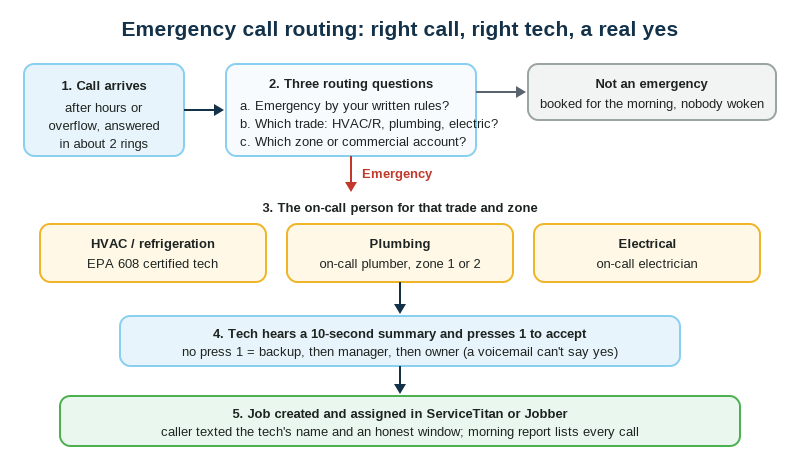
The diagram’s text, for anyone who can’t see it: a call is answered, then three questions ask whether it is an emergency, which trade it needs and which zone or account it belongs to. Non-emergencies are booked for the morning.
Emergencies in the diagram ring the on-call HVAC/R, plumbing or electrical person, who presses 1 to accept. Then the job is created and the caller is texted.
| Trade | Zone | On call | Backup | Skill rule |
|---|---|---|---|---|
| HVAC/R | North (ZIP list) | Tech A | Tech B | Refrigerant work only to an EPA 608 certified tech |
| HVAC/R | South (ZIP list) | Tech B | Tech A | Same |
| Plumbing | All zones | Plumber C | Plumber D | Main-line stoppages to the van with the drain machine |
| Electrical | All zones | Electrician E | Service manager | Commercial accounts first when two calls overlap |
The skill column is real, not decoration. The EPA’s Section 608 technician certification page says certification is required for technicians who maintain, service, repair, or dispose of equipment
that could release ozone depleting refrigerants into the atmosphere.
Keep the table in one place your office already edits, such as ServiceTitan’s on-call shifts or a shared sheet, and let the routing line read it every call. A rotation that lives on a whiteboard can’t be read by software at 2 a.m.
What happens when the on-call technician doesn’t answer?
When the on-call technician doesn’t answer, a good routing line waits a fixed number of seconds, then rings the same tech once more, then the backup, the manager and the owner, and it never treats a voicemail pickup as a yes.
The voicemail trap is the quiet killer. A phone’s voicemail answers the call, so the system thinks it connected. The fix is a whisper: the tech hears Emergency, no heat, 14 Main Street, press 1 to accept
before the caller is joined.
Twilio supports exactly that. Its Number documentation says the url attribute returns a TwiML response to be run on the called party’s end
before the parties connect, and adds: You could also provide a chance to decline the phone call using <Gather> and <Hangup>.
Each ring needs a limit. Twilio’s Dial verb says the default value is 30 seconds, the minimum allowed value is five seconds, and the maximum value is 600 seconds.
When nobody picks up, it reports no-answer and your program moves to the next rung.
Larger shops can use Twilio’s TaskRouter workflows, built for time-based rules for escalating the Task
.
One TaskRouter warning from that page: If a target expires and there are no further targets, the Task is considered timed out and will be canceled.
Always end the ladder on the owner, never on nothing.
How fast should an emergency call reach a person?
An emergency call should reach a person who says yes within a few minutes, and a five-rung ladder with 20-second rings finishes in about 4 minutes even if every rung fails, well inside a 15-minute commercial window.
| Step | Starts at | Ends at | What happens |
|---|---|---|---|
| Intake | 0:00 | 1:30 | Answered in about 2 rings; danger, trade, address and callback |
| Rung 1: on-call tech | 1:30 | 2:00 | 20-second ring plus 10 seconds to press 1 |
| Rung 2: same tech again | 2:00 | 2:30 | A second call, which can break through some Do Not Disturb settings |
| Rung 3: backup tech | 2:30 | 3:00 | Same whisper and press 1 |
| Rung 4: service manager | 3:00 | 3:30 | Same |
| Rung 5: owner | 3:30 | 4:00 | Last rung; if still nobody, the caller is told honestly and the alert stays open |
Assumptions: a 90-second emergency intake, a 20-second Dial timeout (inside Twilio’s 5 to 600 second range) and 10 seconds for the whisper and keypress. The caller stays on the line with the assistant, hearing honest updates, not hold music.
Against ServiceChannel’s 15-minute emergency acceptance window, the whole ladder uses about 27% of the time. Against ServiceTitan’s documented notification, which calls the assigned tech and retries the call once
, it adds three more people before anyone gives up.
Can ServiceTitan route emergency calls to the on-call tech by itself?
ServiceTitan can now book an after-hours emergency through its Voice Agent and assign it to an on-call technician, but its documented tech notification retries once and has no accept step or backup.
The July 11, 2026 release note says the Voice Agent used to treat all calls the same regardless of urgency or time of day.
Now it can assign to an on-call technician, or book unassigned to the Dispatch Board.
The ServiceTitan feature needs Voice Agent on Basic Phones, Phones Pro or Contact Center Pro.
Assignment runs through Dispatch Pro. The Dispatch Pro Voice Agent settings add a Use On Call Technician Shifts switch, which needs Dispatch Pro in Auto Mode with solving set to at least Light. With scope set to after-hours jobs only, jobs outside on-call coverage are left unassigned.
Then the tech is told. The outbound notification note says the Voice Agent immediately places an outbound call and sends an SMS to the assigned technician
. It also says The call is informational only
, and the page describes no follow-up after the single retry.
- Works well for: shops already on Voice Agent and Dispatch Pro that keep on-call shifts current in ServiceTitan.
- Add on top: a check that the tech actually saw it, and a backup rung if not.
- Check first: the notification note lists the Residential Service and Replacement industry, in the USA and Canada.
Where do the official sources disagree?
The official sources disagree in three places that change how you build emergency routing: the commercial acceptance clock, whether Dispatch Pro sees on-call shifts, and who ServiceTitan’s Voice Agent is for.
Here’s the kind truth about a night rotation: good techs don’t stop answering because they don’t care, they stop because too many calls weren’t worth the drive. Route fewer, better calls to them and they pick up again.
- 15 or 30 minutes? ServiceChannel’s Trade Partner Guide says
Accept or decline within 30 minutes (within 15 minutes for emergencies).
Its best-practices page, modified July 6, 2026, saysAccept within 30 minutes or less for emergencies
. Build for 15. - On-call shifts: the Dispatch Pro overview says it
ignores On-Call shifts
; the newer Voice Agent setting lets after-hours Voice Agent jobs use them. Both can be true, but only for Voice Agent jobs. - Residential or commercial: the July release note lists residential and commercial businesses and gives a commercial example. ServiceTitan’s AI Voice Agent FAQ says it is designed for residential home services companies. Ask your ServiceTitan rep before a commercial rollout.
Our reading: treat the shortest clock and the narrowest audience as the true limits until ServiceTitan or ServiceChannel tells you otherwise in writing.
Which tools can route emergency calls for contractors?
Four setups can route emergency calls for contractors: ServiceTitan’s Voice Agent with Dispatch Pro, Jobber’s Receptionist, a live answering service that patches calls, or a custom line on Twilio, and each leaves a different gap.
| Setup | Sorts emergencies | Picks the on-call tech | Confirms a person said yes | Writes the job |
|---|---|---|---|---|
| ServiceTitan Voice Agent + Dispatch Pro | Yes, emergency keywords and after-hours fees | Yes, from on-call shifts | No; informational call, one retry | Yes, in ServiceTitan |
| Jobber Receptionist | Yes, escalation words you choose | One escalation contact, by text or transfer | A live transfer is a yes; a text is not | Requests and appointments in Jobber |
| Live answering service with patch | Yes, by script | From the rotation list you send them | Depends on the service’s script | Usually an email; someone retypes it |
| Custom line on Twilio | Yes, your rule sheet | Yes, your routing table by trade, zone and skill | Yes, press 1, then backup | Through the ServiceTitan or Jobber API |
In short: the field-software options are the quickest start, and a custom line is for shops that need multi-trade, multi-zone routing with a real acceptance step. Jobber’s help article notes the escalation contact needs a number different from your business line.
How does a custom emergency routing line work, step by step?
A custom emergency routing line runs as a small cloud program: Twilio carries the calls, an AI model follows your rule sheet, and your field software’s API receives the job.
- Answer. Your carrier forwards after-hours and overflow calls to a Twilio number. A voice agent greets the caller, says it is an automated assistant, and asks the danger question first.
- Sort. The model fills fixed fields: emergency yes or no, trade, address, ZIP, account, callback. Danger calls hear the 911 or utility line before anything else.
- Look up. The program reads tonight’s routing table and picks the on-call person and backup for that trade and zone.
- Ring with a whisper. It dials the tech with a 20-second timeout and plays the summary; press 1 joins the caller, anything else moves down the ladder.
- Write the job. On a yes, it creates the job through ServiceTitan’s CRM API or the Jobber GraphQL API, with the accepting tech’s name in the notes.
- Text. The caller gets the tech’s first name and an honest window. Business texting from a local number needs A2P 10DLC registration first.
- Report. At 7 a.m. the office gets every call: lane, who accepted, minutes to a yes, and anything still open.
Plumbing shops get an extra step worth adding: the line can talk a caller to the main shut-off while the ladder runs, as our guide to 24/7 plumbing call answering software explains.
How much does automated emergency call routing cost?
A custom routing line costs about $0.32 per emergency call and $0.25 per routine call in Twilio charges, so 100 after-hours calls a month come to roughly $28 before AI model fees, the build and upkeep.
| After-hours calls a month | Emergencies (30%) | Routine calls | Twilio total with number |
|---|---|---|---|
| 50 | 15 | 35 | $14.67 |
| 100 | 30 | 70 | $28.20 |
| 200 | 60 | 140 | $55.25 |
Assumptions, from Twilio’s voice pricing: a 3-minute intake at $0.0085 a minute inbound plus $0.07 for ConversationRelay ($0.2355), and $1.15 a month for the number.
Each emergency also gets 3 minutes of outbound calling to the tech at $0.014 a minute, 2 more inbound minutes while bridged, and two texts. Each routine call gets one text.
Texts in this calculation use Twilio’s SMS price of $0.0083 a segment plus the highest carrier fee, about $0.0133 in all.
The 30% emergency share is a round example, not a measured figure; use your own call log. One emergency job of $500 or more covers years of these charges, so the real cost question is the build and who keeps the routing table current.
Which calls should still go to a person?
Danger calls, angry callers, commercial approvals over the not-to-exceed amount and anything the rule sheet doesn’t cover should still go straight to a person.
- Danger: the line gets the caller safe and connects a human; it never diagnoses.
- Unclear calls: if the caller’s answer fits no row, the line treats it as urgent and asks the on-call tech, rather than guessing “routine.”
- Commercial approvals: ServiceChannel work orders come with a
not-to-exceed (NTE) amount
, and approvals over it stay with your office. - Upset callers: ServiceTitan’s release note lists anger and competitor threats as escalation triggers to a live agent; copy that idea in any setup.
How do you test emergency call routing before a real emergency?
Test emergency call routing with five calls from your own cell on a quiet evening, one per rule, and check that each ends with the right person pressing 1 or the right morning booking.
- Gas smell: the line gives the safety words first, then rings the gas-qualified on-call tech.
- Walk-in cooler at a restaurant: it rings the HVAC/R tech in that zone and captures the account and site contact.
- Running water: the plumber rings while the caller hears where the shut-off usually is.
- Nobody answers: let the on-call tech ignore it and time how long until the backup rings.
- Thermostat battery: nobody is woken, and a morning slot is booked and texted.
Read the next morning’s report against what you said on each call. If one rung was wrong, fix the table, not the techs.
Electrical shops will find the call-sorting questions in our guide to an AI receptionist for electrical contractors. The aim is the one every rotation thread is really asking for: wake the right person for the real emergency, and let everyone else sleep.
How we researched this
- Read ServiceTitan’s Voice Agent emergency and after-hours release note (July 11, 2026), the outbound technician notification note (June 1, 2026), the Dispatch Pro overview, the Dispatch Pro Voice Agent settings, Technician Shifts and the Basic Phones after-hours forwarding workflow on November 28, 2026.
- Read ServiceChannel’s Trade Partner Guide and its best-practices page (modified July 6, 2026), and compared their emergency acceptance times.
- Read Twilio’s Dial, Number and TaskRouter workflow docs, and Twilio’s US voice and SMS pricing pages, the same day.
- Read the EPA’s Section 608 technician certification page for the skill-routing rule, and Jobber’s Receptionist help article for its escalation contact.
- Read the search summaries of a PlumbingZone and an ElectricianTalk thread on after-hours rotations; both forums blocked full reading by our tools, so we paraphrase and quote no posts. Reddit was not readable either.
- Calculated ladder timing and monthly Twilio cost from the stated assumptions. We did not install or test any of these setups in a live account.
Write your emergency rule sheet tonight, put tomorrow’s on-call names in one place, and make the five test calls before the next cold snap does it for you.
Sources and further reading
- ServiceTitan Release Hub: Handle emergency calls, configure escalation triggers, and charge after-hours dispatch fees with Voice Agent (July 11, 2026)
- ServiceTitan Release Hub: Notify technicians of Dispatch Pro job assignments with outbound Voice Agent calls
- ServiceTitan Help: Adjust Dispatch Pro Voice Agent settings
- ServiceTitan Help: Dispatch Pro overview
- ServiceTitan Help: Use Technician Shifts (on-call shifts)
- ServiceTitan Help: Forward after-hour calls to technicians with Basic Phones
- ServiceTitan developer docs: CRM API
- Jobber Help: Receptionist powered by Jobber AI
- Jobber Developer Center (GraphQL API)
- ServiceChannel: Trade Partner Guide (acceptance times, NTE, SLA goals)
- ServiceChannel: Best practices to earn and keep great scores (modified July 6, 2026)
- Twilio Docs: TwiML Dial verb (timeout, no-answer)
- Twilio Docs: TwiML Number noun (url whisper before connecting)
- Twilio Docs: TaskRouter workflows overview
- Twilio: US voice pricing
- Twilio: US SMS pricing
- Twilio Docs: A2P 10DLC registration
- US EPA: Section 608 technician certification
- PlumbingZone: How to handle calls after hours (contractor thread)
- ElectricianTalk: On-call shifts (contractor thread)
Questions and answers
Can I use AI to route emergency dispatch calls automatically?
Yes. An AI voice line can answer after-hours calls, sort them against your written emergency rules, ring the on-call technician for that trade and zone, wait for a press-1 acceptance, move to a backup if nobody accepts, and create the job in ServiceTitan or Jobber. Keep a person for danger calls, unclear calls and commercial approvals.
Can ServiceTitan assign after-hours emergency calls to the on-call technician?
Yes, with conditions. Since July 2026 ServiceTitan’s Voice Agent can assign after-hours jobs to an on-call technician through Dispatch Pro in Auto Mode, with Use On Call Technician Shifts turned on. The tech gets an informational call and text that retries once, with no accept step or backup documented.
What happens if the on-call technician doesn’t answer an emergency call?
A well-built routing line rings the same tech a second time, then the backup, the service manager and the owner, each with a short spoken summary and a press-1 acceptance so a voicemail can’t take the call. With 20-second rings, five rungs finish in about four minutes.
How do I stop non-emergency calls from waking my on-call tech?
Write a short emergency rule sheet: danger, active damage, or a commercial account losing business. Quote the after-hours fee before routing, and book everything else into the first morning slot with a text. Read a week of transcripts and tighten any rule that woke someone for nothing.
How much does automated emergency call routing cost?
On Twilio’s listed rates, a custom routing line costs about $0.32 per emergency call and $0.25 per routine call, or roughly $28 a month for 100 after-hours calls, before AI model fees, the build and upkeep. ServiceTitan bills its Voice Agent by usage and publishes no rate.