
How to Stop Missing After-Hours Service Calls: Close the 6 Leaks
Good morning to every shop that has opened the voicemail at 7 a.m. and wished the phone had rung a little louder last night.
Picture opening the voicemail at 7 a.m. and hearing a no-heat call from 11 p.m. that has already gone to another shop.
Almost nobody misses after-hours calls on purpose.
The calls slip through a forward that stopped working, an on-call phone on Do Not Disturb, or a holiday nobody set up.
The fix is a short chain of checks, and you can test every link in it from your own cell phone tonight.
Short answer: To stop missing after-hours service calls, send every call outside business hours to a line that always answers, a person or an AI voice agent, never voicemail. That line sorts emergencies, rings the on-call tech twice, then a backup, then a manager, books routine calls into ServiceTitan or Jobber, and logs every call for a morning check.
- Where most misses happen
- Between your main line and a person: forwarding, business hours, a silenced phone, a voicemail that answers first
- The one rule that fixes most of them
- No after-hours call ever ends at a beep; it ends with a live voice
- How fast a person can be reached
- About 3.5 minutes on the six-rung ladder below, with the caller talking to the line the whole time
- What to check each morning
- Calls received, calls answered live, voicemails left (target zero), tech acceptance time, text-backs sent
Why do after-hours service calls get missed?
After-hours calls get missed in the handoff between your main line and a person, far more often than because nobody is on call.
A retired contractor started a May 2008 thread on the Mike Holt electrical forums with an observation that still fits: many shops advertise 24-hour service, but few contractors have an actual system in place for a TRUE 24 hour emergency response.
The same contractor wrote that customers often told his shop it was the third or fourth electrical contractor they had called. That is what a miss looks like from the caller’s side. They don’t wait for a callback; they dial down the list.
Another shop in his area, he added, lettered its trucks 23-1/2 hours emergency service We have to sleep sometime
. Honest, at least. The rest of this guide is about the half hour.
Where exactly does an after-hours call die?
An after-hours call dies in one of six places, and each one has a quick test and a plain fix.
| Where the call dies | What the caller hears | How to spot it | The fix |
|---|---|---|---|
| 1. Forwarding set for daytime only, or switched off | Ringing, then voicemail | Call your main number at 9 p.m. | Forward around the clock after a set number of rings |
| 2. Business hours wrong for a holiday or a one-off change | The daytime greeting, then nobody | Check closed-hours routing before each holiday | Closed-hours routing to a live answer, plus a calendar reminder to revert |
| 3. On-call phone silenced by Do Not Disturb or a Sleep Focus | Endless ringing or the tech’s voicemail | A test call to the tech at 11 p.m. | Allow the dispatch number and redial inside the repeat-call window |
| 4. The tech’s voicemail picks up a forwarded call | A stranger’s voicemail greeting | Call log says answered, but no job exists | A press-1 check before the caller is connected |
| 5. One person on call, no backup | Ringing until they give up | Calls with no human answer in the log | A backup tech and a manager on the ladder |
| 6. A message is taken, nobody calls back | Someone will call you | Messages with no job attached the next morning | Book or escalate during the call; a text back as the safety net |
Leak 6 is the sneaky one, because the phone was technically answered. A message that sits until 8 a.m. is a voicemail with a nicer voice. For daytime calls that ring out, ServiceTitan’s missed call text back is a good second net.
How do you find out how many after-hours calls you miss?
Pull last month’s call log and count three numbers: calls outside business hours, calls a live voice answered, and calls that became a job.
Your phone system’s call history shows each call’s time and whether it was answered. That might be ServiceTitan Phones Pro, your VoIP portal or your carrier’s call detail. Then match the after-hours callers against the jobs created in ServiceTitan, Jobber or Housecall Pro the next day.
For a benchmark, ServiceTitan’s State of the Trades data found that 9.8% (October) to 14.1% (June) of residential HVAC inbound calls on its platform came outside business hours in 2025. Our guide to an HVAC answering service that books appointments turns those shares into job value.
The gap between “after-hours calls” and “answered live” is your leak. The gap between “answered live” and “became a job” is your script.
How should after-hours calls be routed so none go to voicemail?
Send every call outside business hours to a destination that answers live, and keep the forward switched on 24 hours a day.
- Forwarding lives at your phone provider. ServiceTitan’s help center says call forwarding
is controlled by your phone provider
and that lines should forward around the clock after a set number of rings, such as five. On an AT&T, Verizon or T-Mobile line, the carrier’s rep enters it; ask for daytime overflow and after hours together (ServiceTitan: fix call forwarding issues). - ServiceTitan Phones Pro. Phones Pro runs on Dialpad. You set open hours (up to four blocks a day) and closed hours, and closed-hours calls follow your Closed Hours routing: voicemail, a menu, an external number or answering service, or the AI Voice Agent’s forwarding number (ServiceTitan: set call center hours).
- Holidays. ServiceTitan’s steps for forwarding one day have you mark it closed, and warn:
You need to edit the business hours again the following week to revert to the original settings.
Put that reminder on a calendar, or the Tuesday after a holiday answers like a Sunday (ServiceTitan: temporarily forward calls). - Jobber Receptionist. Jobber says the Receptionist
answers every call to your dedicated phone number.
Forwarding from your main number is set at your carrier or Google Voice, and Jobber’s optional 10-second ring delay adds to the carrier’s (Jobber Help: Receptionist).
Why doesn’t the on-call tech’s phone ring at night?
The on-call phone usually does exactly what it was told: Do Not Disturb, a Sleep Focus or a silent ringer holds the call back.
Phones have two built-in exceptions that an after-hours line can use on purpose:
- iPhone: a Focus can allow calls from chosen people and can
allow repeated calls (two or more calls from the same person within 3 minutes)
(Apple Support). - Android: Google’s help page says,
To let a call through if the same person calls twice in 15 minutes, turn on Allow repeat callers.
(Android Help).
So the on-call checklist for every tech’s phone is short:
- Save the dispatch line’s number as a contact named so it can’t be mistaken for spam, such as “DISPATCH EMERGENCY”.
- Add that contact to the allowed people in every Focus or Do Not Disturb schedule the tech uses at night.
- Turn on repeated calls (iPhone) or repeat callers (Android).
- Give the dispatch contact a loud, distinct ringtone, and charge the phone where it can be heard.
Then the line does its part: it calls the same tech twice, about 20 seconds apart, from the same number. That second call lands inside both the 3-minute iPhone window and the 15-minute Android window.
What is an after-hours escalation ladder, and how fast should it run?
An after-hours escalation ladder is the fixed order of people the line calls until one accepts the job, with a set ring time for every rung.
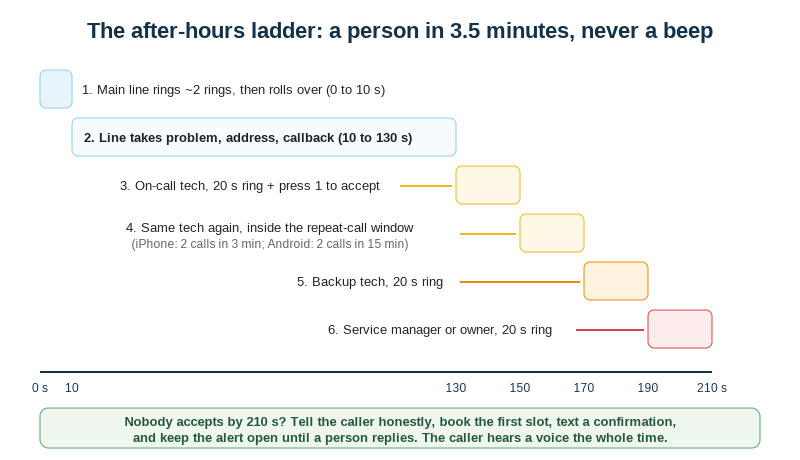
| Rung | Who the line reaches | Seconds | Clock at the end |
|---|---|---|---|
| 1 | Main line rings, then rolls over | 10 | 0:10 |
| 2 | Answering line takes what’s wrong, the address and a callback number | 120 | 2:10 |
| 3 | On-call tech, press 1 to accept | 20 | 2:30 |
| 4 | Same tech again, inside the repeat-call window | 20 | 2:50 |
| 5 | Backup tech | 20 | 3:10 |
| 6 | Service manager or owner | 20 | 3:30 |
Assumptions: a 10-second rollover is Jobber’s “about two rings”. Two minutes of intake and 20 seconds a rung are round numbers we chose; Twilio’s Dial timeout defaults to 30 seconds and can go as low as 5. These are not measured results.
For comparison, the forum contractor who sends callers to extension 19 wrote that his customers typically got a callback in 15 minutes. The ladder reaches the last rung in about a quarter of that time, and the caller is talking to a voice the whole way.
If nobody accepts by rung 6, the line tells the caller the truth, books the first open slot, texts a confirmation and keeps the alert open. Running the ladder again after 10 minutes is a sensible default.
How do you stop a tech’s voicemail from “answering” the call?
Ask whoever picks up to press 1 before the caller is connected; a voicemail greeting can’t press 1.
Here’s the reassuring part: a missed night call is almost never a lazy tech, it’s a setting nobody could see. Find the setting, test it once, and the same people who missed calls start catching them.
Twilio’s Number documentation describes the hook: a url on each number runs instructions on the called person’s end after they answer and before the call is connected. A <Gather> there lets the tech accept with a keypress or decline.
Twilio can ring up to ten numbers at once, and The first call to pick up is connected to the current call and the rest are hung up.
Twilio’s own hints warn that a phone in airplane mode or an office system can answer after one ring. That is why a ladder rings one person at a time.
When a rung ends, Twilio reports a DialCallStatus such as no-answer, busy or failed (Twilio Dial). The program reads it and moves to the next rung without anyone touching a thing.
Who should answer the after-hours call first: a person or an AI?
Either can answer first, as long as it answers every call and follows your emergency rules; the choice is mostly about volume and call type.
| Option | How it reaches the on-call person | Books into your software | Published price |
|---|---|---|---|
| ServiceTitan AI Voice Agent | Calls and texts the assigned tech when Dispatch Pro puts them on an after-hours job, and retries once | Yes, new jobs in ServiceTitan (residential companies) | Usage-based |
| Jobber Receptionist | Escalation policies on words you choose, such as “emergency”: a text with a transcript snippet, or an immediate transfer | Yes, jobs and requests in Jobber | Included on Plus; $99 a month add-on with 100 conversations, then $0.79 each |
| Housecall Pro CSR AI | Not described on the page | Answers calls and books jobs 24/7 | Paid feature; not listed on the page |
| Live answering service | An operator calls the on-call person | If operators get seats in your software | Varies by provider |
| Custom AI line (Twilio) | Your own ladder with the press-1 check | Through the ServiceTitan or Jobber API | Cents a minute plus the build |
Jobber notes one easy trap: the escalation contact’s number must be different from your business or dedicated number. Give the on-call phone its own number in that slot, not the main line.
An electrician in the Mike Holt thread described the live version working well: with an answering service on the front end, he was usually speaking with the customer within 5 minutes. Plumbers can see the night-shift version in our guide to 24/7 plumbing call answering software.
How does a 24/7 AI intake line stop missed calls for good?
A 24/7 AI intake line stops missed calls by putting answering, sorting, escalating, booking and reporting in one program, so no handoff is left to fail quietly.
- Trigger. Closed-hours routing, or a forward after a few rings, sends the call to a Twilio number.
- Answer. Twilio ConversationRelay turns the caller’s speech into text and speaks the program’s replies back.
- Sort. The AI model follows your written emergency rules: no heat in a freeze, a warming walk-in cooler, water pouring, power out to a whole building.
- Escalate. Emergencies run the ladder, one person at a time, with the press-1 check.
- Book. Routine calls get a real slot through the ServiceTitan API or Jobber’s GraphQL API, or land in ServiceTitan’s Calls > Bookings for a CSR to confirm.
- Text. The customer gets a confirmation and the tech gets the address and notes. Business texting from a local number needs A2P 10DLC registration first.
- Report. At 7 a.m., a summary of every call, who accepted and what still needs a person.
Do you have to pay technicians for on-call time?
Under federal law it depends on how free the technician is while waiting, according to the US Department of Labor.
The Department’s Fact Sheet 22 says an employee who is required to remain on call on the employer’s premises is working while “on call.”
An employee on call at home, or allowed to leave a message where they can be reached, is in most cases not working, the fact sheet says. It adds that Additional constraints on the employee’s freedom could require this time to be compensated.
State law and union agreements can add their own rules, so check yours. The practical link to missed calls is simple: a ladder that wakes a tech only for real emergencies keeps the rotation livable, and a livable rotation answers its phone.
How do you know the missed after-hours calls have stopped?
Check five numbers every morning for the first month, then once a week.
- After-hours calls received: the total from the phone log.
- Answered by a live voice: person or AI; the target is every call.
- Voicemails on the main line: the target is zero.
- Emergencies escalated: and the minutes until someone pressed 1.
- Early hang-ups texted back: callers who dropped before the line answered.
If voicemails show up, one of the six leaks is open again. The time of the call usually tells you which one: a holiday, a tech’s first night on rotation, a new phone.
What can you test tonight to stop missing after-hours calls?
Four test calls from your own cell phone will find most leaks in under 15 minutes.
- At 9 p.m., call your main number and listen for a live voice, not a beep.
- Ask tonight’s on-call tech to turn on their Sleep Focus or Do Not Disturb, then have the line call them twice.
- Let the tech ignore the call and check that the line moves to the backup instead of to the tech’s voicemail.
- Look at the business hours for the next holiday and set the reminder to revert them.
None of this needs new software to start. It needs one evening, a cell phone and a list of who is next on the ladder.
The goal is plain: every caller who reaches you after hours hears a voice, every real emergency reaches a person in minutes, and the morning starts with jobs instead of voicemails.
Make the four test calls tonight, write down who is next on the ladder, and let tomorrow’s voicemail box come up empty.
Sources and further reading
- Mike Holt forums: How you handle emergency calls (contractor thread, May 31, 2008)
- ServiceTitan State of the Trades: HVAC off-hours summer call spike
- ServiceTitan Help: Fix call forwarding issues
- ServiceTitan Help: Set call center hours (open, closed and split hours)
- ServiceTitan Help: Temporarily forward calls for a specific day in Phones Pro
- ServiceTitan Help: AI Voice Agent for Basic Phones and Phones Pro FAQ
- ServiceTitan: Introducing Scheduling Pro (Dispatch Board or Calls > Bookings)
- ServiceTitan developer platform
- Jobber Help: Receptionist powered by Jobber AI
- Jobber Developer Center (GraphQL API)
- Housecall Pro: AI Team and CSR AI
- Twilio Docs: TwiML Dial (timeout, DialCallStatus)
- Twilio Docs: TwiML Number (simultaneous dialing, url screening)
- Twilio Docs: ConversationRelay
- Twilio Docs: A2P 10DLC registration
- Apple Support: Allow or silence notifications for a Focus on iPhone (repeated calls)
- Android Help: Limit interruptions with Do Not Disturb (repeat callers)
- US Department of Labor: Fact Sheet 22, Hours Worked under the FLSA (on-call time)
Questions and answers
Can I use AI to stop missing after-hours service calls?
Yes. An AI voice agent can answer every call outside business hours, sort emergencies by your rules, call the on-call tech, a backup and a manager in order, and book routine calls into ServiceTitan or Jobber. Keep a person for safety calls, upset callers and complex commercial accounts.
Why do after-hours calls still go to voicemail when call forwarding is on?
Usually the forward only covers daytime overflow, the business hours are wrong for a holiday, or the forward reaches a cell phone whose own voicemail picks up first. ServiceTitan’s help center says forwarding is set at your phone provider and should run around the clock.
How do I make the on-call tech’s phone ring on Do Not Disturb?
Save the dispatch number as a contact, allow it in every Focus or Do Not Disturb schedule, and turn on repeated calls. An iPhone lets a second call from the same person ring within 3 minutes; Android lets one through within 15 minutes.
What should happen if the on-call technician doesn’t answer?
The line should move on by itself: call the same tech once more, then a backup tech, then the service manager, each for about 20 seconds with a press-1 check. If nobody accepts, the caller is told honestly, booked into the first slot and texted.
Is a missed call text back enough to stop missing after-hours calls?
No, a text back is a safety net, not an answer. It helps callers who hang up early, but a caller with no heat or water on the floor needs a live voice and a person on the way. Use it alongside a line that always answers.