Housecall Pro Automated SMS Booking: What Texts Itself, What Doesn’t
Hello to every owner who has stared at Housecall Pro’s settings and wondered which “automated text” actually books the job.
Every contractor forum thread about booking by text ends the same way: the software has a text feature, and nobody is sure which one books.
I spent an afternoon in Housecall Pro’s help center to sort that out, reading three separate features that all get called automated texts.
One was written on August 27, 2026, and is still labeled alpha. Another has a hard limit of 10 customers a day. The third sends one message.
Short answer: Housecall Pro automates booking by text in three ways. Voice sends one missed call text with an optional booking link. CSR AI text answering, in alpha, can check your calendar and book a new customer by text in under 30 seconds. Automated Texts only rebook past customers. Night emergencies still need a person.
Does Housecall Pro have automated SMS booking?
Yes, but “automated texts” in Housecall Pro means three separate features, and only CSR AI text answering can carry a conversation all the way to a booked job.
| Feature | Who it texts | Can it book? | Status or limit |
|---|---|---|---|
| Voice missed call automation | Callers you missed | No, it can include your online booking link | One text; replies go to your Inbox |
| CSR AI text answering | New customers after a qualifying call | Yes, if you permit it | Alpha; existing customers “coming soon” |
| Automated Texts | Past customers due to rebook | No, it invites a reply | 10 a day, 3-day review, Campaigns add-on |
In short: the first one nudges, the second one books, the third one reminds. Choosing between them starts with what you want to happen when the phone rings out.
What does the Housecall Pro missed call text do?
Housecall Pro’s Voice Settings Overview describes a missed call automation that texts the caller, which you switch on under Settings, then the Voice tab.
You can edit the message with the pencil icon. Under Customize message, the Add variable list lets you include your booking link if you have Online Booking, and the help article says you must add your company name so the customer knows who is texting.
Two caveats from our reading. A third-party comparison says the documented automation is meant for existing customers, and another says Voice is sold as an add-on rather than inside any plan as of July 2026. Check both in your own account, since neither is stated in the help article we read.
Can Housecall Pro’s CSR AI book a customer by text?
Yes, for new customers. Housecall Pro’s help center says CSR AI can hold a two-way text conversation after a qualifying call and is designed to respond in under 30 seconds.
It reuses what the caller already said, so the customer doesn’t repeat their address or problem. It texts from your existing business number.
- Triggers: booked calls, a booking started but not finished, pricing or availability questions, disconnected calls, reschedule or cancel requests, callback requests, quote follow-ups.
- Skipped: spam, wrong numbers and silent calls get no follow-up.
- Can do: answer service questions, share pricing, check calendar availability, offer times, create jobs and estimates, fix an address captured wrong on the call, send a booking link.
- Can do only if allowed: reschedule or cancel appointments.
- Honest by design: the help center says CSR AI
only confirms that an action was completed after the action succeeds.
If you schedule manually, it still collects information and answers questions, but it won’t offer specific appointment times unless your settings allow direct scheduling.
How do you turn on Housecall Pro AI text booking?
You switch on the Text toggle inside CSR AI’s settings, then choose what it may do in the Permissions tab.
- Go to Settings > Team & Permissions > Team.
- Scroll to AI Team and click CSR AI.
- Open the Integrations tab.
- Under SMS, turn on Text.
That toggle is the master switch, and a Permissions tab appears afterwards: book jobs and estimates, reschedule, cancel, send notifications and other supported requests. Conversations show under Inbox > CSR AI or in the Job Inbox.
Opening a conversation in the Job Inbox silences CSR AI automatically. After you leave, it waits 10 minutes before it may reply again, and there is no per-conversation toggle. A customer who replies STOP stops getting its texts.
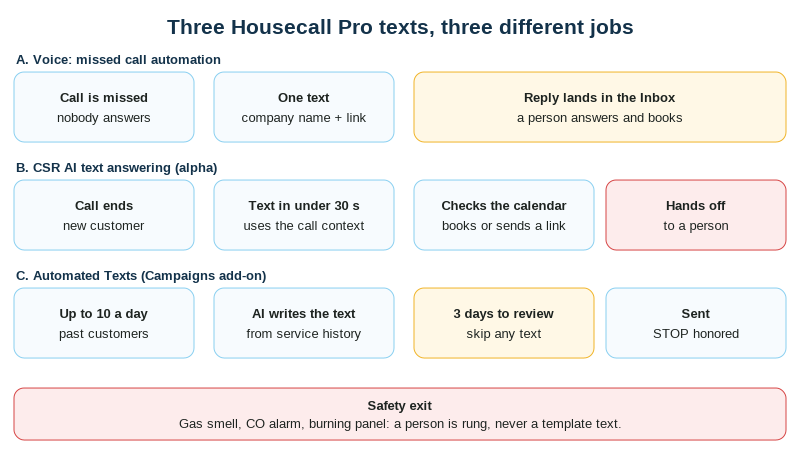
The diagram in text:
- A, Voice: call missed, one text with company name and optional booking link, the reply lands in the Inbox for a person.
- B, CSR AI (alpha): call ends, text in under 30 seconds, calendar checked, job booked or link sent, handoff to a person on request.
- C, Automated Texts: up to 10 past customers a day, an AI-written text, 3 days to skip it, then sent with STOP honored.
What are Housecall Pro Automated Texts for?
Automated Texts rebook past customers; they are not an intake line. The help center says it finds customers due to book again and writes each one a personal text from their service history.
- Volume
- Starts at 10 customers a day, most likely to rebook first
- Review window
- Each text waits 3 days before it sends; you can preview and skip any
- Skipped customers
- Opted out, no valid mobile number, “do not service,” or any Marketing SMS or email from you in the last 90 days
- Where it lives
- Marketing > Campaigns, part of the Campaigns add-on
Eligibility is checked at selection and again right before sending, so a customer who opts out mid-window is pulled. Replies appear in the customer’s conversation in your Inbox.
Housecall Pro’s Automated Marketing page also lists reminder emails before each job and thank-you emails after each job. It gives no booking confirmation details.
Which Housecall Pro text should a contractor use for a 9 p.m. call?
For a 9 p.m. call from a new customer, CSR AI text answering is the only one of the three that can book. Voice nudges, and Automated Texts never see the call.
Here’s the kind truth about a text that books: the customer doesn’t care which feature sent it, only that someone answered while the other shop was still asleep. Make that first reply fast and honest, and the rest follows.
| Situation | Voice missed call text | CSR AI text | Automated Texts |
|---|---|---|---|
| New customer, routine tune-up | Text with booking link, if online booking is on | Texts in under 30 seconds, offers times | Nothing |
| Existing customer calls | Documented for existing customers, per a third party | Not yet, “coming soon” | Nothing, unless they were due to rebook |
| Manual scheduler | Link only | Answers, no specific times | Nothing |
| Gas smell | Template text | Follows your escalation rules | Nothing |
In plain words: pair Voice for the first nudge with CSR AI for the conversation, and keep Automated Texts for the quiet weeks.
Why do emergency and commercial calls still slip through?
Because none of the three is a voice line, and a commercial emergency wants a voice, a priority and a woken technician.
- New customers only. CSR AI text answering does not yet cover existing customers, which is most of a commercial contractor’s service-agreement base.
- Alpha. Housecall Pro says features may change, so test every week.
- Not an on-call rotation. A text can say
we’ll call you.
It cannot ring your on-call tech by trade and zone. - Safety calls. A gas smell, a CO alarm or a burning panel needs
leave and call 911,
then a person.
That is where an answering line that books after hours helps; our guide to an HVAC answering service that books appointments covers it, and ServiceTitan’s missed call text back shows the same trade-offs on the other big platform.
Can you build your own 24/7 SMS booking next to Housecall Pro?
Yes. A cloud text line can answer at any hour, and booking is the part to check against Housecall Pro’s current developer options before promising it.
- Catch the call. Calls ring through Twilio’s Dial; a
no-answerorbusystatus triggers the first text within seconds. - Ask and sort. An AI assistant asks what is wrong and where, then sorts by your emergency rules.
- Book. It writes a job or lead to your calendar through whatever interface your platform allows, or hands a clean summary to the morning CSR.
- Alert. Emergencies ring the on-call tech; safety words ring a person at once.
- Report. A morning list shows every text, reply and booking.
Twilio says anyone sending texts from a 10-digit US number must register for A2P 10DLC
(Twilio’s guide), and every text should honor STOP.
| Missed calls a month | Texts at 3 a call | At $0.0133 a text |
|---|---|---|
| 40 | 120 | $1.60 |
| 100 | 300 | $3.99 |
| 200 | 600 | $7.98 |
Assumptions: $0.0133 is Twilio’s $0.0083 long-code rate plus the highest listed carrier fee, $0.005; three texts a call is our guess. Registration, replies, AI usage and upkeep are extra.
How do you roll out text booking without annoying customers?
Turn on one feature at a time, test from your own cell, and read every text for a week.
- Day 1: write your emergency words and your escalation rules on one page.
- Day 2: turn on the Voice missed call text and call your line from your cell, letting it ring out.
- Day 3: enable CSR AI Text, start with booking only, and leave cancel off.
- Days 4 to 6: read the Inbox > CSR AI conversations each morning.
- Day 7: count missed calls, replies and booked jobs, then decide whether nights need a voice line.
The goal is small and doable: every caller who reaches a ringing phone gets a text that moves them toward a calendar slot, and your office starts tomorrow with bookings instead of mysteries.
How we researched this
- Read Housecall Pro’s help articles on CSR AI Text Answering (dated August 27, 2026), Automated Texts and the Voice Settings Overview, plus its Automated Marketing page, on November 28, 2026.
- Compared the three features by who they text, whether they can book, and their stated limits.
- Read third-party summaries only for the Voice add-on and existing-customer points, and marked them as third-party.
- We did not install or test Housecall Pro, and could not read Reddit threads this time. Features, plans and prices change, so confirm in your account.
Pick one text feature tonight, test it from your own cell, and let the next 9 p.m. call end on your calendar instead of a voicemail.
Sources and further reading
- Housecall Pro Help: CSR AI Text Answering (In Alpha)
- Housecall Pro Help: Automated Texts, how AI rebooks your past customers
- Housecall Pro Help: Voice Settings Overview
- Housecall Pro Help: Voice FAQs
- Housecall Pro Help: CSR AI Overview
- Housecall Pro: Automated Marketing
- Twilio Docs: TwiML Dial
- Twilio: US SMS pricing
- Twilio Docs: A2P 10DLC registration
Questions and answers
Can I use AI to automate Housecall Pro SMS booking?
Yes, in part. Housecall Pro’s CSR AI text answering, in alpha, can text a new customer after a call, check your calendar and book or send a booking link. It does not yet cover existing customers, and emergencies still need a person.
Does Housecall Pro text customers automatically after a missed call?
Housecall Pro’s Voice settings include a missed call automation you switch on under Settings, then Voice. You can edit the message, add your company name and, with Online Booking, a booking link. Check your account for the Voice add-on.
How fast does Housecall Pro CSR AI reply by text?
Housecall Pro’s help center says CSR AI text answering is designed to respond in under 30 seconds. It uses the call’s context, so the customer doesn’t repeat themselves. The feature was in alpha as of August 27, 2026.
Can I stop Housecall Pro’s AI from texting a customer?
Yes. Opening the conversation in the Job Inbox silences CSR AI, and it waits 10 minutes after you leave. Customers can reply STOP, and you can turn the Text toggle off under CSR AI Integrations.
What are Housecall Pro Automated Texts?
They are AI-written rebooking texts for past customers in the Campaigns add-on. Housecall Pro starts at 10 customers a day, holds each text 3 days so you can skip it, and skips anyone contacted by marketing in the last 90 days.