Food Distributor Order Entry Automation: Clear the Night Orders by Cutoff
Good morning, and here’s to every order desk that meets the night’s orders at 3:30 a.m.
Picture walking into the order desk at 3:30 in the morning and finding every one of last night’s orders already typed, checked and waiting.
At most food distributors, that desk starts the day with the opposite: a phone full of texts, a voicemail box full of chefs, and a stack of emailed order sheets.
The trucks still leave on time, but only because a few people type very fast in the hour nobody else is awake.
Short answer: Food distributor order entry automation means a cloud service reads each text, voicemail or emailed PDF as it arrives, matches every line to your exact item, unit and pack size, checks it against the order guide, stock and cutoff, and writes a draft sales order into your ERP. Your desk reviews only flagged lines.
What is food distributor order entry automation?
Food distributor order entry automation is software that does the typing step of the order desk, so the people on the desk only do the judging step.
It does not ask restaurants to change anything. Chefs keep texting 2 cs romaine, 1 case lemons, same oil as last week,
and the automation turns that into the three lines your best clerk would have keyed.
The problem is old and well known. When TechCrunch covered the ordering platform Pepper in 2021, it reported that a majority of restaurants and grocery stores still order food from distributors via voicemail
, and Pepper’s chief executive put the number of U.S. food distributors at 25,000.
Five years later the order still arrives the same way. A Y Combinator startup working on this, Asakana, describes it plainly on its launch page:
Restaurants order by text, phone, WhatsApp, a photo of a handwritten note, often not in English.
Why is order entry harder for food distributors than for other wholesalers?
Food order entry is harder because a single line from a chef hides a unit, a pack size, a weight and a delivery day that the clerk has to work out from memory.
| Food-specific detail | Example on the order | What the clerk decides |
|---|---|---|
| Unit of measure | ”4 lemons” | 4 cases, or 4 single lemons from a broken case |
| Pack size and grade | 2 cs lg tomatoes | The 5x6 or the 4x5 tomato, 25 lb or 10 lb case |
| Catch weight | 2 boxes chicken breast | Ordered by the case, invoiced by the actual pound picked |
| Market price | halibut if it’s good | Today’s price, and whether the chef agreed to it |
| Substitution | romaine, or green leaf if out | Which sub the customer accepts, and noting it on the order |
| Delivery day and route | A Friday text for “Saturday” | Whether that stop has a Saturday route at all |
| Credit status | Any order from an account past terms | Hold it, or call the rep before it picks |
A hardware wholesaler rarely meets most of this. A food order desk meets all of it every night, which is why generic “order entry software” often stalls at the first catch-weight item.
How much time does manual order entry cost before the trucks leave?
Manual order entry costs the most in one short window: the minutes between when the desk opens and when the pick tickets must print.
Food Decision Software, a distribution software maker, wrote on November 17, 2026 that when reps take orders on paper notebooks and re-key them late at night, delivery cutoffs get missed
. The arithmetic below shows why.
| Overnight orders | Clerk-minutes by hand (5 min each) | Clerks needed by hand | Clerk-minutes reviewing drafts (1 min each) | Clerks needed for review |
|---|---|---|---|---|
| 40 | 200 | 3 | 40 | 1 |
| 80 | 400 | 5 | 80 | 1 |
| 150 | 750 | 9 | 150 | 2 |
| 250 | 1,250 | 14 | 250 | 3 |
Assumptions, all ours: the desk opens at 3:30 a.m. and pick tickets print at 5:00 a.m., a 90-minute window; keying one order by hand takes about 5 minutes; checking a finished draft takes about 1 minute; clerks are rounded up to whole people.
Here’s the catch: few distributors staff nine clerks at 3:30 a.m. So in real life the typing starts earlier, runs later, or spills past cutoff as hand-written adds that someone walks out to the night selector.
Swap in your own numbers. Time three orders with a stopwatch tomorrow morning, and the table will tell you how close your desk runs to the edge.
How does an automated order desk work overnight?
An automated order desk works by drafting each order the moment it arrives, so the queue is already empty when your people sit down.
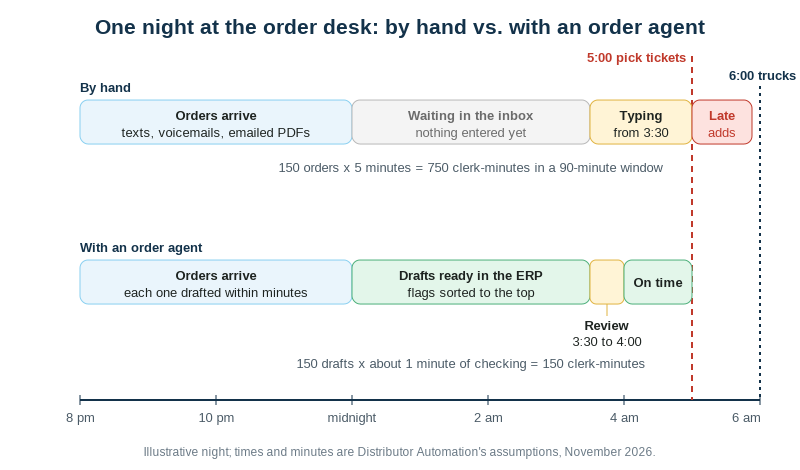
The timeline in text, by hand: orders arrive from 8 p.m. to midnight, wait in the inbox until 3:30 a.m., typing runs to 5:00 a.m. and late orders become hand-written adds.
The same night with an order agent: each order is a draft within minutes, review runs 3:30 to 4:00 a.m., pick tickets print at 5:00 a.m. and the trucks leave at 6:00 a.m.
- Catch. Texts, voicemails and emailed order sheets all land in one place: a business texting number, the after-hours voicemail line and a shared order inbox.
- Read. Voicemails are transcribed with a speech service such as Google Cloud Speech-to-Text, which can be given your item names so it hears “burrata” instead of “bureau.” Photos and PDFs go to a vision model or OCR reader.
- Match. Each line is matched to an exact item, unit and pack size, using the customer’s order guide and past orders first.
- Check. Rules compare the draft with stock, the delivery day for that route, credit status and normal quantities for the account.
- Write. A draft sales order is created in the ERP, with the original text, audio or PDF attached and every doubtful line flagged.
- Tell. The customer can get a short confirmation text, and the desk gets a morning list sorted with flagged orders on top.
Choco, one of the vendors selling this, describes splitting a voicemail into separate model calls for transcription, correction, and information extraction
in a February 6, 2025 engineering post. That split is a sensible pattern for any setup, bought or built.
How does automation handle cases, eaches and catch weight items?
Automation handles units by reading the selling unit from your item file, never by guessing from the chef’s words.
Your ERP already knows that chicken breast sells by the case and invoices by the pound, and that lemons sell by the case unless an account is allowed broken cases. The order agent copies that knowledge onto the draft line.
What does the draft order look like for a catch weight item?
For a catch weight item, the draft order carries the ordered quantity in cases, and the actual weight is filled in at picking, exactly as it is today.
NECS lists catch weight & lot tracking
among the inventory features of entrée V5, so the ERP still does the weighing step. The automation only has to put “2 cases” on the right item, not invent a weight.
The one rule worth adding: any line where the chef’s unit and your selling unit disagree (“4 lemons” on a case-only account) is always flagged. That single check catches the most common credit memo.
What happens when an ordered item is out of stock?
When an item is short, a good order agent flags the line and proposes the substitute that customer has accepted before, but a person decides.
Chefs often write the sub themselves (romaine, or green leaf if out
). The agent can store that instruction on the line, so the picker and the driver see it, instead of it living only in a text thread on a rep’s phone.
Can it use each customer’s order guide and standing orders?
Yes, and the order guide is the most useful thing it can use, because it lists what that customer actually buys.
Here’s what we like most about this one: the chefs never notice a thing. They keep texting after service, and your desk simply stops racing the pick tickets.
NECS describes entrée.EOP, its tablet order pad for sales reps, as able to build and maintain customers order guides.
A matching step that searches the guide first only has to choose among the 80 items a bistro buys, not the 8,000 in your catalog.
Standing orders work the same way. Same as Tuesday plus cilantro
becomes a copy of Tuesday’s order with one line added, flagged so a person glances at it.
Will it work with entrée, Produce Pro, Business Central or another food ERP?
It usually works with the ERP you have, through an order API, an import file, or the ERP’s own ordering channel.
- NECS entrée: the entrée Express API says external platforms submit orders directly to entrée for processing, fulfillment and invoicing.
- Microsoft Dynamics 365 Business Central: the sales order API creates orders whose status comes back as “Draft,” with a unit of measure code on every line.
- Produce Pro: Produce Pro, now part of Aptean, serves produce and perishables distributors; ask your rep which order import or EDI route your version supports.
- QuickBooks: smaller distributors on QuickBooks can follow our guide to convert emailed PDF purchase orders to QuickBooks.
Ask your ERP rep one plain question: How can an outside program create a draft sales order with a note and an attachment?
The answer decides the whole design.
What does food distributor order entry automation cost to run?
The transcription part is cheap; the real cost is setting up the matching and the ERP connection well.
Google Cloud’s pricing page listed standard Speech-to-Text recognition at $0.016 per minute for the first 500,000 minutes a month when we read it on November 27, 2026.
| Order voicemails a night | Average length | Minutes a month (26 delivery nights) | Transcription cost a month |
|---|---|---|---|
| 15 | 1.5 min | 585 | $9.36 |
| 40 | 1.5 min | 1,560 | $24.96 |
| 100 | 1.5 min | 3,900 | $62.40 |
Those figures cover listening only. Reading PDFs, the AI matching step, the texting number and the hosting add their own small monthly bills, and a custom setup adds the build work. Packaged products such as Choco quote their price on request.
Should you buy Choco, use your ERP’s ordering app, or build a custom order agent?
Choose by how your customers order today, not by which tool has the longest feature list.
| Route | Best when | What to check |
|---|---|---|
| Your ERP’s own ordering app (for example entrée.NET or entrée.EXPRESS) | Customers are willing to tap an app or website | How many of your chefs will actually stop texting |
| A packaged order agent such as Choco OrderAgent | Orders stay messy, and your ERP is on its supported list | Run a week of your own voicemails through it first |
| A custom order agent on cloud services | Odd channels, odd units, or an older ERP with only an import file | Who maintains it, and where the audio and texts are stored |
Choco says its OrderAgent captures orders from voicemail, WhatsApp, email, text, photos and more
, claims up to 97% accuracy, and says early adopters skip manual review for 50% of orders. Those are vendor claims, so test them on your own nights.
Apps and agents also sit side by side well: the accounts who like an app use it, and the agent catches everyone who keeps texting.
What should a person still check before the pick tickets print?
A person should still check every line the automation marks as doubtful, and a short list of lines it should never pass alone.
- Unit mismatches: the chef’s unit differs from the item’s selling unit.
- First-time items: anything the account has never ordered before.
- Market-price lines: fish, specialty produce and anything priced daily.
- Unusual quantities: 20 cases where the account usually takes 2.
- Credit holds: any order from an account past its terms.
- Wrong delivery day: an order for a day that stop has no route.
Keep the original text, audio or PDF attached to every order. When a chef says I said four cases,
the recording settles it in seconds.
Does order entry automation help with FSMA 204 traceability?
Order entry automation does not make a distributor compliant with the FDA’s Food Traceability Rule on its own, because traceability lot codes are recorded at receiving and shipping, not when the order is typed.
The FDA’s rule page says Congress directed the agency not to enforce the rule before July 20, 2028. Clean, correct customer and ship-to data on every order does make that shipping record easier to keep.
What does a sensible first week of automated order entry look like?
A sensible first week runs the automation in shadow mode, drafting orders in the background while your desk keeps working exactly as it does now.
- Day 1: collect a week of real orders, including the worst voicemails and the blurriest order sheet photos, and export your order guides.
- Days 2 and 3: the agent drafts every new order; clerks compare its drafts with what they typed and correct the matches.
- Days 4 and 5: drafts from regular accounts go into the ERP for one-click approval; new accounts stay manual.
- End of week: count the minutes saved at the desk and the unit errors caught, then decide.
If the review queue is not clearly shorter than the typing queue by Friday, the setup is not ready, and that is worth knowing before anyone relies on it at 3:30 a.m.
Let one week of night orders draft themselves in the background, and see how calm the 4 a.m. desk can be.
Sources and further reading
- TechCrunch: Pepper and food distributors still ordering by voicemail (November 30, 2021)
- Y Combinator: Asakana launch page (how restaurants order)
- Food Decision Software: 4 ways food distributors can cut order processing time (November 17, 2026)
- NECS: entrée.EOP order pad and customer order guides
- NECS: entrée Express API order integration
- NECS: entrée V5 food distribution ERP (catch weight and lot tracking)
- Microsoft Learn: Create salesOrders in Business Central
- Produce Pro Software
- Google Cloud: Speech-to-Text model adaptation
- Google Cloud: Speech-to-Text pricing (read November 27, 2026)
- Choco: OrderAgent (vendor claims)
- Choco engineering: scaling AI applications with LLMs (February 6, 2025)
- FDA: FSMA Food Traceability Rule
Questions and answers
Can I use AI to automate order entry at my food distribution business?
Yes. AI can transcribe order voicemails, read texts, photos and emailed PDFs, match each line to your item, unit and pack size using the customer’s order guide, and create a draft sales order in your ERP. Keep a person reviewing flagged lines, unit mismatches and market-price items before pick tickets print.
Will my restaurant customers have to order differently?
No. Customers keep texting, calling and emailing the way they do now. The automation reads those orders where they already arrive. Accounts that prefer an app or website can use your ERP’s ordering portal alongside it.
Can order entry automation handle catch weight items?
Yes, when it follows your ERP’s item setup. The draft line carries the ordered cases, and the actual weight is still captured at picking by the ERP, as food ERPs such as entrée already do. The automation should flag any line where the customer’s unit differs from the selling unit.
What happens to orders that arrive after the cutoff?
They are drafted the same way, but a cutoff rule marks them as late so the desk decides whether to add them to tomorrow’s route or the next delivery day. Nobody has to walk a hand-written add to the night selector.
How much does it cost to transcribe order voicemails?
Little. At Google Cloud’s listed standard Speech-to-Text rate of $0.016 per minute (November 27, 2026), 15 one-and-a-half-minute voicemails a night over 26 delivery nights cost about $9.36 a month. Matching, hosting and the ERP connection add their own costs.