Discord Avatar and Banner Cropper, With a Nitro Profile Preview
Hey there, pfp perfectionist, your profile glow-up starts right here.
Picture your new Discord profile looking exactly right on the very first try, with the banner lined up and the avatar sitting perfectly in its circle.
This free cropper does the fiddly part for you, and it shows the whole profile with Nitro colours before you spend a cent.
Short answer: A Discord avatar should be at least 200 x 200 pixels and is shown as a circle, and a Nitro profile banner is a 5:2 picture of at least 600 x 240 pixels. Both can be PNG, JPG or GIF under 10 MB. Use the free cropper below to frame both and save PNG files at the right shape.
- Avatar: at least 200 x 200 px, cropped to a circle, under 10 MB.
- Banner: 5:2 shape, at least 600 x 240 px, under 10 MB, needs Nitro.
- The cropper saves: a 512 x 512 avatar and a 1200 x 480 banner.
What size is a Discord avatar and banner?
A Discord avatar works best at 200 x 200 pixels or bigger, and a Discord profile banner at 600 x 240 pixels or bigger. Discord’s design team puts it simply: Use a JPG, PNG or GIF that’s around 200x200 pixels at minimum.
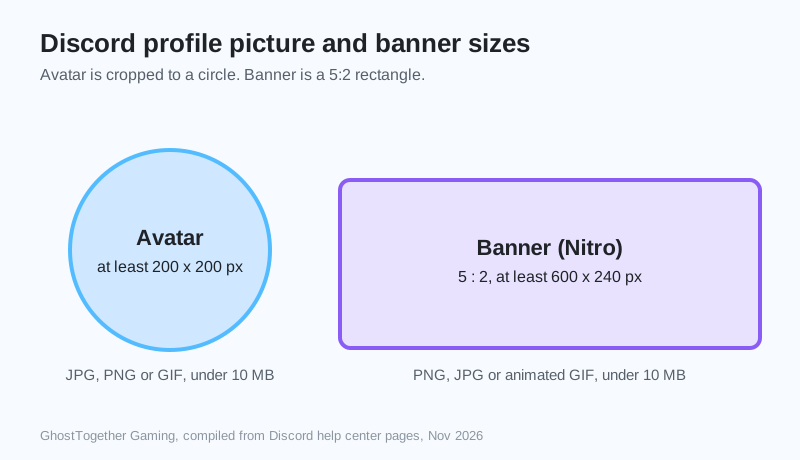
| Picture | Shape | Smallest size | Files | Needs Nitro? |
|---|---|---|---|---|
| Avatar | Square, shown as a circle | 200 x 200 px | JPG, PNG, GIF under 10 MB | No (animated GIF avatar: yes) |
| Profile banner | 5 : 2 rectangle | 600 x 240 px | PNG, JPG, animated GIF under 10 MB | Yes |
Compiled by GhostTogether Gaming from Discord’s Per-Server Profiles page and design blog, November 19, 2026. One older Discord page lists 680 x 240 for banners; the 5:2 shape at 600 x 240 or more works for both.
How do I crop a picture for Discord?
Choose a picture in the cropper, pick Avatar or Banner, drag the picture to frame it and use the slider to zoom. Then press Save, and upload the file in Discord under User Settings, then Profiles.
- Choose or drop a picture into the cropper.
- Pick the Avatar tab, frame your face or logo inside the circle.
- Pick the Banner tab, frame the wide part.
- Press Save for each, then upload them in Discord.
What does my profile look like with Nitro?
The preview shows your banner, your round avatar and two profile theme colours together, like a Nitro profile. Discord Nitro lets you pick a banner and two theme colours, so trying colour pairs here first saves a lot of guessing.
Fair warning: trying colour pairs in the preview is weirdly addictive, and just one more combo
turns into twenty.
Can I use an animated GIF avatar?
Animated avatars and animated banners on Discord need Nitro. The cropper plays your GIF in the preview, and saves a still PNG, so upload the original GIF to Discord if you want it to keep moving.
- Still picture: crop it here and save a PNG.
- Animated GIF: preview it here, then upload the original GIF to Discord.
- Under 10 MB is the limit for both.
Want a server that matches your new look? GhostTogether servers are free, and the Free Nitro program lives there too.
Now go make that profile look like the main character it deserves to be.
Sources and further reading
Questions and answers
What is the Discord banner size?
A Discord profile banner is a 5:2 picture of at least 600 x 240 pixels, as PNG, JPG or animated GIF under 10 MB. Profile banners need Discord Nitro.
What is the Discord pfp size?
A Discord profile picture (pfp) should be at least 200 x 200 pixels. Discord shows it as a circle and accepts JPG, PNG or GIF under 10 MB.
Why does my Discord banner look blurry?
Discord compresses banners, so a small or very detailed picture can look soft. Start from a picture at least 600 x 240 pixels and keep text large.
Can I see my profile with Nitro before buying?
Yes. The free preview on this page shows your banner, avatar and two theme colours together, the way a Nitro profile combines them.
Does the cropper upload my picture?
No. The cropper works inside your browser, so your picture never leaves your device.