Discord Emoji and Sticker Maker (Free, Right Sizes, Checked Limits)
Hey there, emoji artist, your server’s next favourite reaction starts with one picture.
Turn your cat, your character or your best meme face into a real server emoji in under a minute.
This free maker sizes it perfectly and checks it against Discord’s file limits before you upload.
Short answer: A Discord emoji can be up to 128 x 128 pixels and must be under 256 KB, and a Discord sticker should be exactly 320 x 320 pixels and under 512 KB. Choose a picture below and the maker saves both at those sizes with a transparent background, and tells you if a file is too big.
- Emoji: up to 128 x 128 px, under 256 KB, shown at 32 x 32.
- Sticker: exactly 320 x 320 px, under 512 KB, PNG or APNG.
- Both come out as PNG with a transparent background.
What size is a Discord emoji and sticker?
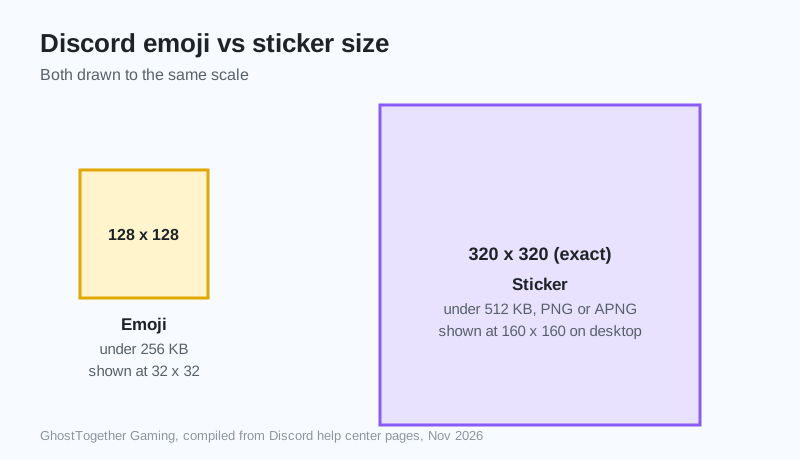
A Discord emoji uploads at up to 128 x 128 pixels and is shown much smaller, and a sticker is uploaded at exactly 320 x 320 pixels. Discord’s help center says emoji can be uploaded in sizes up to 128x128 pixels, but they will be resized to 32x32 pixels
.
| Item | Upload size | File limit | Files | Shown at |
|---|---|---|---|---|
| Emoji | up to 128 x 128 px | 256 KB | JPG, PNG, GIF, WEBP | 32 x 32 px |
| Sticker | exactly 320 x 320 px | 512 KB | PNG, APNG (GIF per Discord’s blog) | 160 x 160 on desktop |
Compiled by GhostTogether Gaming from Discord’s help center and blog, November 19, 2026.
How do I make a Discord emoji?
Pick a picture in the maker, choose Fit or Fill and a background, then press Save emoji. Simple, bold pictures with thick outlines read best, because Discord shows emoji tiny.
- Choose a picture with a clear subject.
- Pick Fill to crop tight, or Fit to keep the whole picture.
- Keep Transparent for a clean look, then save.
How do I add an emoji to my Discord server?
Open Server Settings, then Emoji, press Upload Emoji and pick the saved file. You need the Create Expressions or Manage Expressions permission in that server to add one.
The best server emoji are usually the silliest ones, and we fully support your cat becoming a legend.
Can I make an animated emoji?
Animated emoji are GIF files, and using them in messages needs Discord Nitro, though any server can upload them. The maker saves still pictures, so upload a small GIF directly to keep it moving.
- Animated emoji: a GIF under 256 KB.
- Animated sticker: an APNG at 320 x 320, under 512 KB.
- Still emoji or sticker: save it from the maker above.
Custom emoji make a server feel like home. Start your own free GhostTogether server and fill it with them.
Now go fill that emoji list. Every great server needs at least one ridiculous one.
Sources and further reading
Questions and answers
What size should a Discord emoji be?
Upload Discord emoji at up to 128 x 128 pixels, under 256 KB. Discord shows them at 32 x 32 pixels in chat.
What size is a Discord sticker?
A Discord sticker should be exactly 320 x 320 pixels and under 512 KB, as PNG or APNG, according to Discord’s Tips for Sticker Creators.
Why won’t Discord accept my emoji?
The usual reason is a file over 256 KB. The free maker on this page shows the file size and whether it fits Discord’s limit.
Can anyone use custom emoji?
Anyone can use a server’s emoji in that server. Using custom emoji in other servers, and animated emoji, needs Discord Nitro.
Does the emoji maker upload my picture?
No. The maker works inside your browser, so your picture stays on your own device.