
Discord Colored Text Generator: Paint Your Messages
Hey, rainbow scribe, your plain gray messages are about to get a glow up.
Make your server announcements pop with red warnings, green good news and blue links, all in a regular Discord message.
This free colored text generator writes the special code, so all you do is click colours.
Short answer: Discord shows colored text inside a code block that starts with three backticks and the word ansi. Type your message below, select some words, click a colour, then press Copy and paste it in Discord. It shows in colour in the desktop app and browser, while phones show the plain words.
- 8 text colours (codes 30 to 37) and 8 backgrounds (codes 40 to 47).
- Bold is code 1, underline is code 4, reset is code 0.
- Colours show on desktop and web; phones show plain text.
How do I type in color on Discord?
Put your words in an ansi code block with colour codes, and Discord’s desktop app draws them in colour. The generator above adds the codes for you: select words, click a colour, copy.
- Type or paste your message in the dark box.
- Select a word or line, and click a text colour or background.
- Press Copy for Discord, then paste in any channel.
What are the Discord ANSI color codes?
Discord’s ansi blocks understand 8 text colours, numbered 30 to 37, and 8 backgrounds, numbered 40 to 47. Each one starts with the escape character, then the numbers, then the letter m.
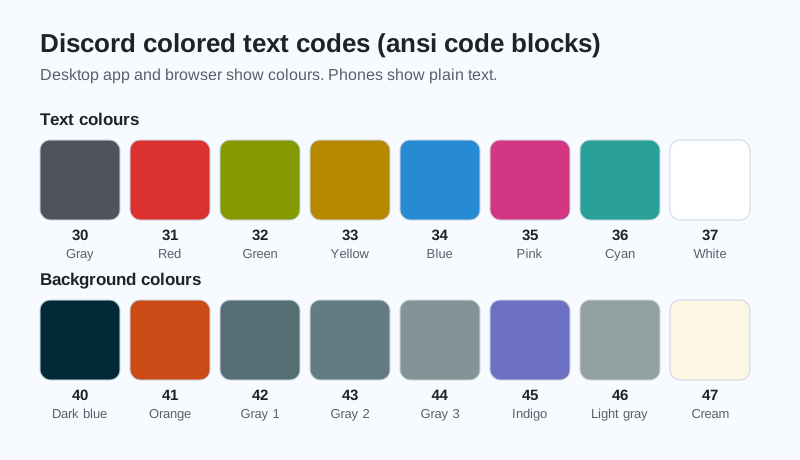
| Code | Text colour | Code | Background |
|---|---|---|---|
| 30 | Gray | 40 | Dark blue |
| 31 | Red | 41 | Orange |
| 32 | Green | 42 | Gray 1 |
| 33 | Yellow | 43 | Gray 2 |
| 34 | Blue | 44 | Gray 3 |
| 35 | Pink | 45 | Indigo |
| 36 | Cyan | 46 | Light gray |
| 37 | White | 47 | Cream |
Compiled by GhostTogether Gaming from community guides to Discord’s ansi code blocks, November 19, 2026. Discord’s own Markdown Text 101 page explains code blocks but does not list these colours.
Does colored text work on the Discord phone app?
Colored ansi text shows in colour in the Discord desktop app and in a web browser. The Discord phone apps show the same words in plain text, so the message still reads fine for everyone.
We’ll admit it: we spent far too long making the word “LEGENDARY” gold during testing.
Why is my Discord colored text not working?
Colored text usually fails because the code block is not labelled ansi exactly, or the invisible escape character got lost when someone retyped the code. Copying with the generator’s button keeps the escape character safe.
- The block must start with three backticks and ansi, all lowercase.
- The escape character is invisible; copy it, never retype it.
- Each code ends with the letter m.
Colourful rules channels look great in a brand-new server. Start yours free on GhostTogether.
Go paint your server, and maybe save the red for the really important rules.
Sources and further reading
Questions and answers
How do you make colored text in Discord?
Put your text in a code block labelled ansi with colour codes such as 31 for red. The free generator on this page adds the codes when you click a colour.
What colors can you use in Discord text?
Discord ansi blocks support 8 text colours (gray, red, green, yellow, blue, pink, cyan, white) and 8 background colours, plus bold and underline.
Does Discord colored text work on mobile?
The Discord phone apps show ansi messages as plain text. The colours show in the desktop app and in a browser.
What does ansi mean in Discord?
ANSI is an old standard for colour codes in text terminals. Discord reads those codes inside code blocks labelled ansi and paints the text.
Can I use any hex color in Discord text?
Discord’s ansi blocks are known for a fixed set of 16 colours. Use the closest of the 8 text and 8 background colours.