
Discord Timestamp Generator: Show Times in Everyone’s Time Zone
Greetings, keeper of the server clock, no more time zone chaos starts today.
Say goodbye to the classic 8 PM, but whose 8 PM?
mix-up in your server.
A Discord timestamp shows the right time to every single person, and this free generator writes the code for you.
Short answer: A Discord timestamp is a code like <t:1763571600:F> that Discord shows in each reader’s own time zone. Pick a date and time below, copy one of the 9 styles, and paste it into any message. The R style shows a live countdown such as “in 2 hours”.
- Format: <t:UNIX:STYLE>, where UNIX is seconds since January 1, 1970.
- 9 styles: t, T, d, D, f, F, s, S and R.
- Default: with no style letter, Discord uses f.
How do Discord timestamps work?
A Discord timestamp stores one exact moment as a Unix time number, and each reader’s Discord app turns that number into their own local time. So one message can say 8 PM in New York and 1 AM in London, both correct.
What are the Discord timestamp styles?
Discord has 9 timestamp styles, picked with the letter after the second colon. Discord’s developer docs list them like this.
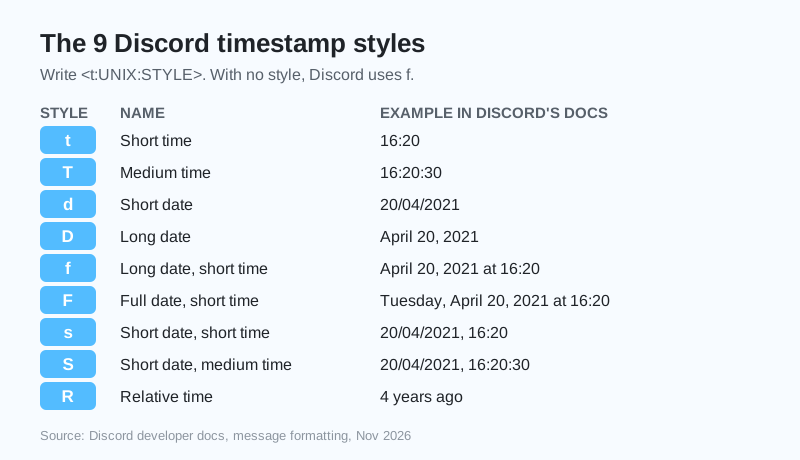
| Style | Name | Example from Discord’s docs |
|---|---|---|
| t | Short time | 16:20 |
| T | Medium time | 16:20:30 |
| d | Short date | 20/04/2021 |
| D | Long date | April 20, 2021 |
| f | Long date, short time | April 20, 2021 at 16:20 |
| F | Full date, short time | Tuesday, April 20, 2021 at 16:20 |
| s | Short date, short time | 20/04/2021, 16:20 |
| S | Short date, medium time | 20/04/2021, 16:20:30 |
| R | Relative time | 4 years ago |
Compiled by GhostTogether Gaming from Discord’s developer documentation, November 19, 2026. Your own Discord shows these in your language and clock style.
How do I make a countdown in Discord?
Use the R style, like <t:1763571600:R>, and Discord shows “in 3 hours” before the time and “3 hours ago” after it, updating by itself. It is the easiest countdown for a game night or a stream.
Is there anything more satisfying than a countdown that just quietly counts itself? We think not.
What is the best way to post an event time?
Pick the event time in the generator, copy the F code and the R code, and paste them on one line. Every member sees their own local day, time and countdown.
Game night: <t:…:F> (<t:…:R>)
covers everyone.- Edit the message later and the countdown keeps working.
- Timestamps work in messages, embeds and channel topics.
Planning game nights is easier in a server you run. Start one free on GhostTogether.
Now go schedule that game night, and watch everyone show up on time for once.
Sources and further reading
Questions and answers
How do I make a timestamp in Discord?
Type
What does <t:…:R> mean in Discord?
R is the relative style. Discord shows it as a live countdown or count-up, like “in 2 hours” or “3 days ago”.
Do Discord timestamps change with time zones?
Yes. Discord shows every timestamp in each reader’s own time zone, so one code is correct for everyone.
What is the default Discord timestamp style?
Without a style letter, Discord uses f, the long date with a short time, according to Discord’s developer docs.
What is Unix time?
Unix time is the number of seconds since January 1, 1970, at midnight UTC. Discord timestamps use it to store one exact moment.