
Free Soundboard and Voice Changer You Run in a Browser Tab
Hello, sound wizard, the air horn is loaded and waiting for you.
Get ready for an air horn, a sad trombone and a robot voice, all from one browser tab.
This free soundboard and voice changer makes every sound right inside your browser, so it starts in a second and nothing gets downloaded.
Short answer: This free tool has a 12-sound soundboard and a live voice changer with 7 voices, all made in your browser with no download or login. To use it in a Discord call, send your browser’s sound into Discord with a free virtual audio cable such as VB-CABLE, or use Discord’s own built-in soundboard.
- 12 sounds: air horn, ba-dum-tss, applause, boing, laser, sad trombone, victory, buzzer, ding, crickets, whoosh, heartbeat.
- 7 voices: robot, deep, chipmunk, alien, echo, radio, cave.
- Keys 1 to 0, minus and equals play the sounds.
How does a browser soundboard work?
A browser soundboard plays sounds with the Web Audio API, the sound engine built into Chrome, Edge, Firefox and Safari. Every sound here is built from tones and noise in real time, so there are no audio files to download.
What voices does the voice changer have?
The voice changer has 7 voices that change your microphone live: robot, deep, chipmunk, alien, echo, radio and cave. Press Start, allow the microphone, and switch voices while you talk.
| Voice | What it does to your voice |
|---|---|
| Robot | Mixes your voice with a 55 Hz tone for a metal buzz |
| Deep | Lowers your pitch to 0.7 times |
| Chipmunk | Raises your pitch to 1.7 times |
| Alien | Raises the pitch with a wobble and a short echo |
| Echo | Repeats you every 0.28 seconds |
| Radio | Cuts the lows and highs, adds crackle |
| Cave | Adds a 2.5 second reverb |
Settings of GhostTogether’s voice changer, November 19, 2026.
How do I use the voice changer in a Discord call?
Discord listens to your microphone, not to your browser, so the changed voice needs a virtual audio cable to get into the call. Install a free one, play the tool’s sound into the cable, and pick the cable as your input device in Discord.
Pro tip from the department of obvious: the sad trombone is funniest right after someone misses an easy shot.
- Install a virtual audio cable: VB-CABLE (Windows and macOS) or BlackHole (macOS).
- Set your browser’s sound output to the cable.
- In Discord, open User Settings, then Voice and Video, and pick the cable as the Input Device.
- Start the voice changer and talk.
What are Discord’s own soundboard limits?
Discord’s built-in soundboard plays short clips in voice channels, and every server starts with 8 sound slots. Server Boosts add more: Discord’s Boosting FAQ lists a total of 24 at Level 1, 36 at Level 2 and 48 at Level 3.
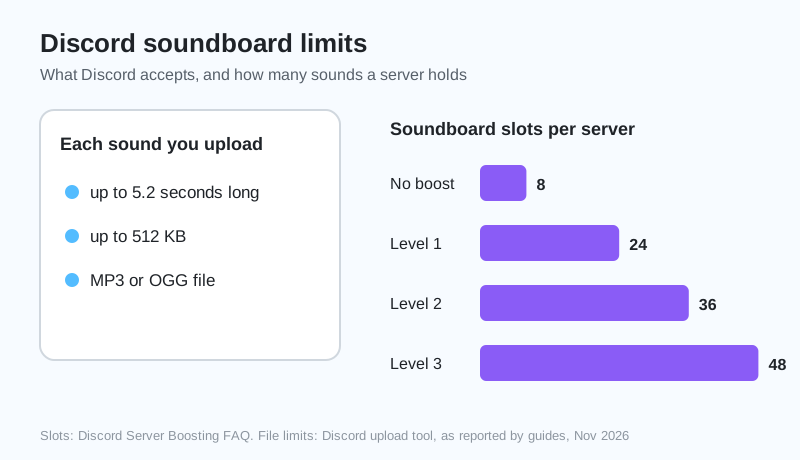
- Each sound: up to 5.2 seconds, up to 512 KB, MP3 or OGG.
- Slots: 8 with no boost, 24 at Level 1, 36 at Level 2, 48 at Level 3.
- The voice changer’s Record button saves short clips you can trim and convert for it.
Prank sounds land best with friends you already play with. Start a free GhostTogether server and bring them along.
Go forth and boing responsibly. Your squad’s ears will thank you. Mostly.
Sources and further reading
Questions and answers
Is there a free voice changer for Discord?
Yes. The voice changer on this page is free and runs in a browser tab. To hear it in a Discord call, route it into Discord with a free virtual audio cable such as VB-CABLE.
How long can a Discord soundboard sound be?
Discord soundboard uploads can be up to about 5.2 seconds long and 512 KB, as an MP3 or OGG file.
How many soundboard sounds can a Discord server have?
A Discord server starts with 8 soundboard slots. Server Boost levels raise it to 24, 36 and 48, according to Discord’s Server Boosting FAQ.
Why can’t my friends hear my soundboard?
Discord only sends your microphone. Sounds playing in a browser tab need a virtual audio cable set as your Discord input before friends can hear them.
Does the voice changer record me?
Only when you press Record a clip. The clip stays in your browser until you save it, and nothing is uploaded.