
How to Record and Stream GTA 6 on PS5 and Xbox: Capture Cards, Console Settings and Storage for Clips
Disclosure: this page contains Amazon affiliate links. As an Amazon Associate we earn from qualifying purchases, at no extra cost to you.
Lights, camera, Leonida — hello there, highlight-reel director! To record GTA 6, press the Create button on your PS5’s DualSense controller or the Share button on your Xbox Wireless Controller — both consoles save clips and go live on Twitch on their own, with nothing extra plugged in. For longer, higher-quality recordings on a computer, capture cards on Amazon sit between your console and your TV. GTA 6 comes out on .
Short answer: Press Create on a PS5 or Share on an Xbox to save GTA 6 clips: a PS5 keeps up to the last hour, an Xbox up to the last 2 minutes. Both consoles go live on Twitch, and the PS5 on YouTube too. A capture card adds longer PC or Mac recordings; on PS5, turn HDCP off first.
How do you record GTA 6 clips on PS5?
On a PS5 or PS5 Pro, press the Create button on the DualSense controller and choose Save Recent Gameplay or Start New Recording. Sony’s support page on capturing PS5 gameplay and screenshots says you can save the last 15 seconds up to 1 hour of gameplay
, and that a new recording can run up to 1 hour.
The PS5 keeps recording GTA 6 in the background, so Save Recent Gameplay is the button for surprises: the getaway that actually worked, the stunt jump you’ll never land twice. Saved clips go to the PS5’s Media Gallery, and Sony’s PS5 FAQ on the PlayStation Blog says you can copy screenshots and videos to an external USB drive. To change what a short press of Create does, go to Settings > Captures and Broadcasts > Captures > Shortcuts for Create Button and pick Standard, Easy Screenshots or Easy Video Clips.
How do you get 4K or HDR GTA 6 clips on PS5?
PS5 clips are saved at 1080p by default, and 4K is an option once the PS5 is connected to a 4K screen. Sony’s PS5 FAQ says recorded video is saved at 1080p and up to 60 frames per second
by default, with a choice of 1920×1080 or 3840×2160. Sony’s PS5 resolution guide sets the console to 2160p under Settings > Screen and Video > Video Output; then turn on 4K recording in the Create menu’s Capture Options, or under Settings > Captures and Broadcasts > Captures > Video Clip Format. Sony’s capture page adds that HDR screenshots work only while the PS5 is connected to a compatible HDR display.
One catch for phones: the PlayStation App’s automatic upload takes only video clips up to 1920×1080 and up to 3 minutes long, and keeps them for 14 days on Sony’s cloud servers, per Sony’s page on PS5 captures in the PS App. A 4K GTA 6 clip stays on the PS5 until you copy it to a USB drive.
How do you record GTA 6 clips on Xbox Series X|S?
On an Xbox Series X or Series S, press and hold the Share button on the Xbox Wireless Controller to record a clip of what just happened; a single press takes a screenshot. Microsoft’s Xbox support page on capturing game clips also lists the guide method: press the Xbox button, then X to grab the last 30 seconds, or the View button to choose a longer stretch, up to the last 2 minutes
.
For a planned GTA 6 recording on Xbox, open the guide and select Capture & share > Start recording. Xbox Support says those clips can last up to 10 minutes (capturing to internal storage) or 1 hour (capturing to external storage)
, depending on your clip resolution and free space. Clip resolution and capture location are set in Profile & system > Settings > Preferences > Capture & share, and what the Share button does can be changed in the console’s Accessories app.
Why are some Xbox clips only 30 seconds long?
Because 4K HDR clips are capped at 30 seconds on an Xbox’s internal storage. Microsoft’s page on game clips that can be captured only in 4K HDR says some games fix the clip resolution at 4K HDR even if you picked a lower one, and that at 4K HDR, game clips can be up to 30 seconds
when saved internally. The same page gives two fixes: turn off HDR10 (Profile & system > Settings > General > TV & display options > Video modes, then clear Allow HDR10), or set Capture location to an external drive, where external clips can be as long as 60 minutes
.
The trade-off of recording Xbox clips to an external drive: Microsoft’s page on capturing to external storage says those captures can’t be shared on the Xbox network, though you can move them to a Windows PC for editing. Whether GTA 6 is one of the fixed-4K-HDR games is something we’ll only know after November 19.
How do PS5 and Xbox built-in capture compare for GTA 6?
The PS5 saves longer clips out of the box, while the Xbox keeps uploaded clips in the cloud for longer. Here are both consoles’ built-in capture limits side by side:
| Feature | PS5 and PS5 Pro | Xbox Series X|S |
|---|---|---|
| Controller button | Create (DualSense) | Share (Xbox Wireless Controller) |
| Save what just happened | last 15 seconds up to 1 hour | last 30 seconds, up to the last 2 minutes |
| Start a new recording | up to 1 hour | up to 10 minutes on internal storage, up to 1 hour on external storage |
| Video resolution | 1080p up to 60 fps by default; 3840×2160 on a 4K screen | 4K options when the TV output is 4K; HDR when the TV has HDR on |
| 4K HDR clip length | no separate limit listed | up to 30 seconds on internal storage |
| Phone and cloud | PlayStation App: clips up to 3 minutes and 1920×1080, kept 14 days | Xbox network: up to 10 GB, may be deleted after 90 days; OneDrive: 5 GB free, no 90-day deletion |
| USB drive | copy from the Media Gallery | record straight to it, or Copy to external drive in the Captures app |
| Built-in live streaming | Broadcast to Twitch or YouTube from the Create menu | the provider’s app (such as Twitch), then Capture & share > Live streaming |
| With a capture card | turn HDCP off first | Elgato’s Xbox capture guide lists no extra console step |
Sony and Microsoft don’t publish the bitrate of console clips, so this table sticks to lengths and limits. GTA 6 clips also share the console’s drive with the game itself — see how to make room for GTA 6’s 212 GB on PS5 and Xbox, and how much room GTA 6 leaves on an Xbox Series S.
How do you stream GTA 6 to Twitch or YouTube from your console?
Both consoles stream GTA 6 without a PC: on PS5, press Create and choose Broadcast; on Xbox, install the Twitch app and go live from the guide. Sony’s PS5 broadcast guide says Broadcasting requires that you link accounts such as YouTube or Twitch
; pick the service, add your broadcast details, open Broadcast Options for camera or party audio, then select Go Live.
Every clipper knows the feeling: the wildest moment always seems to happen right after you stop recording. That’s exactly what the save-what-just-happened button is for.
PS5 stream quality for GTA 6 is set in Settings > Captures and Broadcasts > Broadcasts > Video Quality, and Sony notes that available resolutions vary by service. If a PS5 stream sits on “preparing”, Sony’s tip is that some streaming services require two-factor authentication (2FA) on the linked account. Sony also says only the game screen and game audio are shared, and that depending on the game, some scenes may not appear to viewers.
On Xbox, Microsoft’s live streaming guide says to download the provider’s app from Store > Apps, activate your account with a code the first time, then open the guide, go to Capture & share > Live streaming and select Go live now. One Xbox limit: Discord voice channels can’t be broadcast through Xbox live streaming, so a Discord chat with friends stays off the GTA 6 stream.
Streaming GTA 6 from a PC through a capture card opens Twitch’s newest options. Twitch’s June 17, 2026 announcement of 2K streaming says 1440p streaming is available to Partners and Affiliates through Enhanced Broadcasting, with bitrates up to 9 Mbps for 1440p and 7.5 Mbps for 1080p
. The announcement doesn’t say whether console broadcasts get 2K.
Can you add a camera and your voice to a GTA 6 stream?
Yes. On PS5, Sony’s broadcast guide says you can feature yourself with the PlayStation HD Camera (CFI-ZEY series) or the older PlayStation Camera (CUH-ZEY series), sold separately, and you choose whether your mic and party audio go out under Settings > Captures and Broadcasts > Broadcasts > Audio. Sony asks you to tell party members beforehand if their voices will be broadcast. On Xbox, Microsoft keeps a separate support page on live streaming with a webcam. If you’ll talk over your GTA 6 streams, a gaming headset with a microphone is the simplest upgrade.
Do you need a capture card for GTA 6?
No — a capture card is optional, for recordings longer than the console allows, higher bitrates, or a PC streaming setup with overlays. Built-in capture tops out at 1 hour per recording on PS5 and 10 minutes on an Xbox’s internal storage; with a capture card, the computer does the recording in software such as Elgato Studio or OBS Studio.
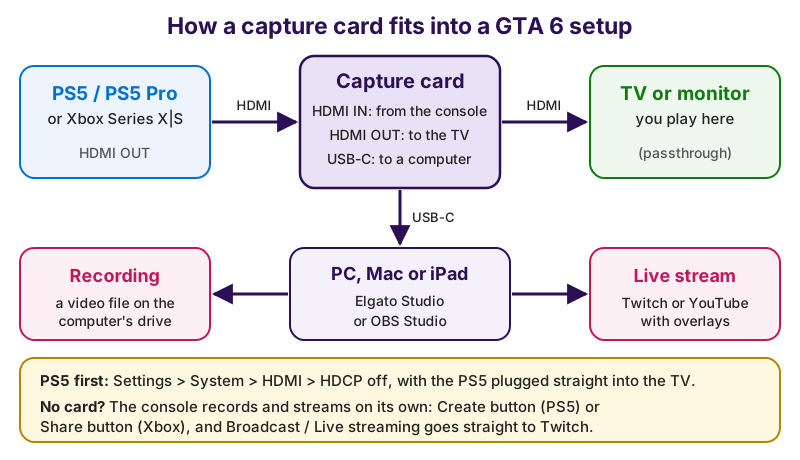
The picture, as text: console (PS5, PS5 Pro or Xbox Series X|S) HDMI OUT → HDMI cable → capture card HDMI IN. Capture card HDMI OUT → second HDMI cable → TV or monitor, where you play (passthrough). Capture card USB-C → PC, Mac or iPad running Elgato Studio or OBS Studio → a recording on the computer’s drive or a live stream on Twitch or YouTube. PS5 first: Settings > System > HDMI > HDCP off, with the PS5 plugged straight into the TV. No card? The console records and streams on its own with the Create button (PS5) or Share button (Xbox).
How do you connect a capture card to a PS5?
Turn off HDCP on the PS5 first, while the PS5 is plugged straight into your TV. Sony’s PS5 FAQ says PS5 will allow the use of external HDMI-based capture devices by disabling HDCP in the Settings menu
, and Elgato’s PS5 and PS5 Pro setup guide for the Game Capture 4K S gives the path and the order:
- On the PS5, go to Settings > System > HDMI and turn HDCP off — Elgato says the PS5 must be connected directly to a TV or monitor, not through a capture card, when you change it.
- Run an HDMI cable from the PS5’s HDMI OUT to the capture card’s HDMI IN.
- Run a second HDMI cable from the capture card’s HDMI OUT to your TV or monitor, so you keep playing GTA 6 on the TV through passthrough.
- Connect the capture card to your PC, Mac or iPad with USB-C.
- Open Elgato Studio to record, or add the card as a Video Capture Device source in OBS Studio to stream.
Xbox owners: Elgato’s guide to capture cards for Xbox Series X|S doesn’t list an HDCP step, and notes that the Xbox Series X|S supports up to 4K120 over HDMI 2.1 and outputs in HDR10. On the PlayStation side, AVerMedia’s own quick guide says its Live Gamer 4K 2.1 doesn’t view, record or stream HDCP-protected signals, which is why the PS5 setting comes first.
Which capture card fits GTA 6: 4K S, 4K X or 4K Pro?
For GTA 6 on a console, the numbers that decide it are passthrough (what reaches your TV) and HDR capture (what lands in the recording). Rockstar hasn’t published GTA 6’s frame rates; Video Games Chronicle reported on August 28, 2026 that Rockstar North’s Rob Nelson said the consoles were running the game at 30 frames per second in development. So a card with 4K60 passthrough already covers what’s been reported, and 4K144 passthrough matters mostly for other 120 Hz games.
| Capture card | Connects by | Passthrough to your TV | HDR capture | Good fit |
|---|---|---|---|---|
| Elgato Game Capture 4K S | USB-C 3.0 (5 Gbps); Windows, macOS, iPadOS | up to 4K60 HDR, with VRR | up to 1080p60 (SDR up to 4K60) | a first 4K60 card, Mac or iPad setups |
| Elgato Game Capture 4K X | USB 3.2 Gen 2 (10 Gbps); Windows, macOS, iPadOS | up to 4K144 HDR, with VRR | up to 4K30 (SDR up to 4K144) | laptops and 120 Hz TVs |
| Elgato Game Capture 4K Pro | PCIe, Windows desktops only | up to 8K60 and 4K240 | up to 4K60 | premium: 4K60 HDR recordings on a desktop PC |
| AVerMedia Live Gamer 4K 2.1 (GC575) | PCIe, desktop PCs | up to 4K144 HDR, with VRR | HDR10 capture; capture up to 4K60 | premium: a second PCIe option |
If you want the best-looking GTA 6 recordings — 4K60 in HDR — Elgato’s 4K X vs 4K Pro comparison puts that on the 4K Pro, a PCIe card that needs a free slot in a Windows desktop; browse 4K60 HDR capture cards on Amazon. Elgato also says HDR capture is Windows-only and needs an NVIDIA GeForce GTX 10-series graphics card or newer. The 4K S vs 4K X comparison puts the difference simply: the 4K S uses HDMI 2.0, the 4K X HDMI 2.1. For AVerMedia’s PCIe card, see the Live Gamer 4K 2.1 product page.
How much storage do GTA 6 recordings take?
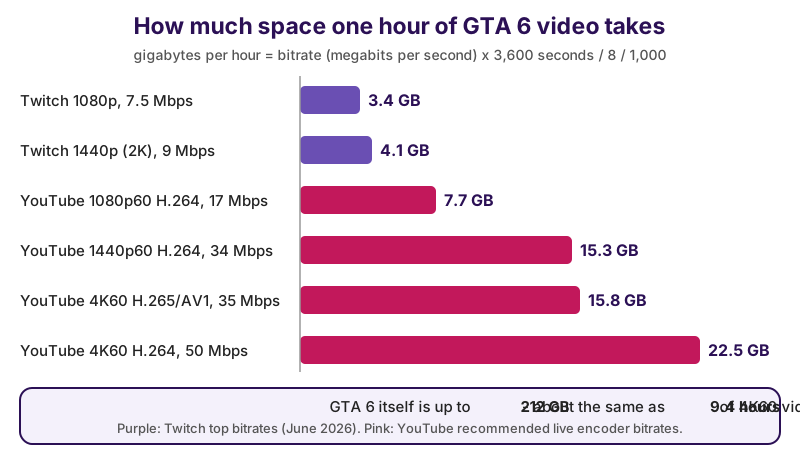
An hour of GTA 6 video takes about 3.4 GB at Twitch’s top 1080p bitrate and up to 22.5 GB at YouTube’s recommended 4K60 H.264 bitrate. We worked it out from the bitrates Twitch and YouTube publish: data per hour in gigabytes = bitrate in megabits per second × 3,600 seconds ÷ 8 bits per byte ÷ 1,000.
| Setting | Bitrate | Per hour | Hours per 1 TB |
|---|---|---|---|
| Twitch 1080p (top bitrate) | 7.5 Mbps | 3.4 GB | about 296 |
| Twitch 1440p 2K (top bitrate) | 9 Mbps | 4.1 GB | about 247 |
| YouTube 1080p60, H.264 (recommended) | 17 Mbps | 7.7 GB | about 131 |
| YouTube 1440p60, H.264 (recommended) | 34 Mbps | 15.3 GB | about 65 |
| YouTube 4K60, H.265 or AV1 (recommended) | 35 Mbps | 15.8 GB | about 63 |
| YouTube 4K60, H.264 (recommended) | 50 Mbps | 22.5 GB | about 44 |
The YouTube figures are the top of each range on YouTube Help’s live encoder settings page, which lists 14 to 50 Mbps for 4K60 in H.264 and 10 to 35 Mbps in H.265 or AV1. For scale: GTA 6 itself is up to 212 GB, per Rockstar’s preload announcement on its Newswire — about the same as 9.4 hours of 4K60 video at 50 Mbps. Long GTA 6 recordings belong on the computer’s drive or an external SSD, not the drive the game plays from.
Where should you keep your GTA 6 clips?
Keep GTA 6 clips on a USB drive or in the cloud, not only on the console. On PS5, copy clips from the Media Gallery to a USB drive. On Xbox, set Capture location to an external drive or use Copy to external drive in the Captures app, and back up anything uploaded to the Xbox network: Microsoft’s page on managing game clips and screenshots says uploaded captures might be deleted after 90 days
, lists a 10 GB upload limit on the Xbox network, and says captures uploaded to OneDrive don’t expire after 90 days, with 5 GB of OneDrive storage free. A portable USB-C SSD holds hours of footage and moves easily between a console and a computer.
What GTA 6 footage can you post online?
Rockstar’s video policy is fine with GTA 6 play-throughs, cutscenes included when they’re part of a longer video — but videos of the ending and isolated cutscenes can be taken down. TheGamer reported on November 4, 2026 that Rockstar’s policy on posting copyrighted Rockstar Games material lists spoilers — Posting video showing the ending of the game
— among the reasons for a takedown, and says isolated videos of the game’s cinematics will be removed
. The same policy draws the line for story scenes:
It’s ok to show cutscenes as part of a larger play-through (or in a narrated ‘Let’s Play’ type video).
Per TheGamer, the policy also lists pre-release footage, unauthorized mods and content that encourages cheating as grounds for removal, and says Take-Two reserves the right to have its copyrighted material taken down at any time
. For GTA 6 that means: no footage before the November 19 launch, and story scenes inside a longer play-through rather than on their own. A spoiler warning in the video title is kind to viewers, too. If you’re unsure about a specific video, the policy page itself lists who to ask.
Set up your clip button, clear a little space, and go catch that perfect sunset getaway — Leonida is ready for its close-up.
Sources and further reading
- PlayStation Support: how to capture gameplay and screenshots on PS5 consoles — Save Recent Gameplay from the last 15 seconds up to 1 hour, recordings up to 1 hour, Create button shortcuts, some scenes blocked
- PlayStation Support: how to stream gameplay with Broadcast on PS5 consoles — linking YouTube or Twitch, Go Live, Broadcast settings, HD Camera, 2FA, only game screen and audio shared
- PlayStation Support: how to access PS5 game captures on PS App — clips up to 1920x1080 and 3 minutes uploaded, kept 14 days
- PlayStation Blog: PS5 — the ultimate FAQ (November 9, 2020) — 1080p up to 60 fps by default, 3840x2160 option, copy to USB, capture devices with HDCP disabled
- PlayStation Support: how to change PS5 console resolution — setting 2160p under Screen and Video > Video Output
- PlayStation: HD Camera — the PS5 camera for broadcasts
- Xbox Support: capture game clips and screenshots — last 30 seconds / up to 2 minutes, Start recording up to 10 minutes internal or 1 hour external, Share button, Game Pass note on screenshots, 4K HDR captures
- Xbox Support: some game clips can be captured only in 4K HDR — 30 seconds at 4K HDR on internal storage, up to 60 minutes on external storage
- Xbox Support: capture Xbox game clips to external storage — external captures can’t be shared on the Xbox network
- Xbox Support: manage your game clips and screenshots — 10 GB Xbox network limit, 90-day deletion, 5 GB free OneDrive, Trim, Copy to external drive
- Xbox Support: how to live stream on Xbox — provider app from the Store, Capture & share > Live streaming > Go live now, Discord voice can’t be broadcast
- Elgato: how to set up Game Capture 4K S with PlayStation 5 and PS5 Pro (updated October 26, 2026) — HDCP off in Settings > System > HDMI, cable order, Elgato Studio and OBS Studio
- Elgato: the difference between Game Capture 4K S and 4K X (updated September 1, 2026) — USB speeds, SDR and HDR capture, passthrough, HDMI 2.0 vs 2.1
- Elgato: Game Capture 4K X vs 4K Pro (updated October 2, 2026) — 4K Pro: PCIe, 4K60 HDR capture, 8K60 / 4K240 passthrough; HDR capture Windows-only
- Elgato: best capture cards for Xbox Series X or S (updated August 7, 2026) — Xbox Series X|S up to 4K120 over HDMI 2.1, HDR10 output
- AVerMedia: Live Gamer 4K 2.1 (GC575) — PCIe, 4K144 HDR and VRR passthrough, HDR10 capture
- AVerMedia: Live Gamer 4K 2.1 quick start guide (PDF) — no viewing, recording or streaming of HDCP-protected signals
- Twitch Blog: introducing Dual Format and 2K streaming on Twitch (June 17, 2026) — up to 9 Mbps for 1440p and 7.5 Mbps for 1080p, Partners and Affiliates, HEVC
- YouTube Help: choose live encoder settings, bitrates and resolutions — recommended bitrates by resolution and codec
- Rockstar Games Support: policy on posting copyrighted Rockstar Games material — spoilers, cinematics, pre-release footage, takedowns
- TheGamer: GTA 6 videos featuring spoilers will be taken down, Rockstar confirms (James Lucas, November 4, 2026) — quotes from Rockstar’s policy
- Video Games Chronicle: GTA 6 is confirmed to run at 30 frames per second (Dave Aubrey, August 28, 2026) — Rob Nelson’s reported, machine-translated remark about development builds
- Rockstar Games Newswire: Grand Theft Auto VI pre-load begins on November 10 — the up-to-212 GB download
Questions and answers
How do you clip GTA 6 on PS5?
Press the Create button on the DualSense and choose Save Recent Gameplay, which saves anything from the last 15 seconds up to 1 hour, or Start New Recording, which runs up to 1 hour. Clips go to the PS5’s Media Gallery, and you can copy them to a USB drive.
How long can you record on Xbox Series X?
Holding the Share button or using the guide saves up to the last 2 minutes. Start recording runs up to 10 minutes on internal storage or up to 1 hour on an external drive, per Xbox Support, and 4K HDR clips saved internally are limited to 30 seconds.
Do you need a capture card to stream GTA 6?
No. A PS5 broadcasts to Twitch or YouTube from the Create menu, and an Xbox Series X|S streams through a provider’s app such as Twitch from Capture & share > Live streaming. A capture card helps for longer, higher-bitrate recordings or a PC stream with overlays.
Why does my capture card show a black screen on PS5?
Check HDCP first. Sony’s PS5 FAQ says external HDMI capture devices work once HDCP is disabled in Settings, and Elgato’s setup guide gives the path: Settings > System > HDMI, with the PS5 plugged straight into the TV while you change it.
Can you post GTA 6 videos on YouTube?
Yes, but Rockstar’s video policy says videos showing the ending and isolated cutscenes will be removed, as TheGamer reported on November 4, 2026. Cutscenes are fine inside a larger play-through or a narrated Let’s Play, and pre-release footage can be taken down.