How Do You Use ChatGPT if You Have Never Tried It Before?
Disclosure: this page contains Amazon affiliate links. As an Amazon Associate we earn from qualifying purchases, at no extra cost to you.
Oh, first-chat adventurer, welcome! This is the one I’d hand to anybody who’s been nodding along every time someone says just ask ChatGPT
. Everyone’s first ChatGPT chat starts the same way: a blinking box, a blank mind, and the feeling that you’re supposed to know some secret password. You don’t. You type the way you’d talk to a patient friend, and if you’d rather talk than type, a simple USB microphone on Amazon or your phone’s own microphone works just fine.
Short answer: To use ChatGPT, go to chatgpt.com or install the official app from OpenAI, select Sign up for free, and type a question in the message box. Start with something small, add a detail or two, and reply to steer the answer. Never paste passwords or bank details, and check anything important.
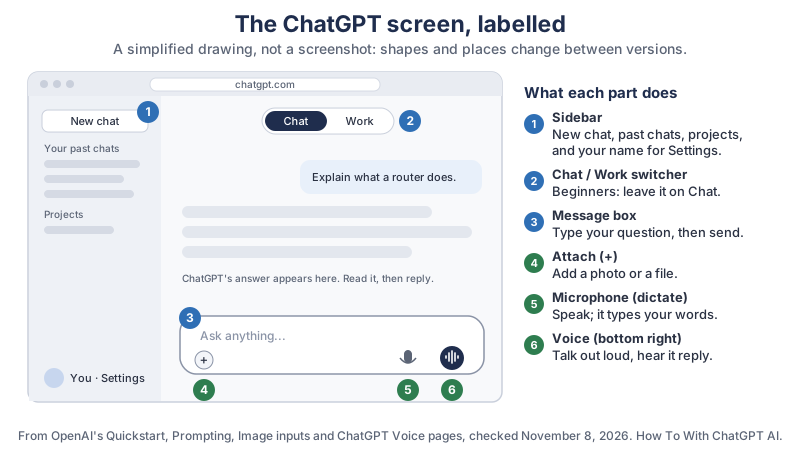
The same picture in plain text:
- Sidebar: New chat, your past chats, projects, and your name, which opens Settings.
- Chat / Work switcher: at the top of a new chat. Leave it on Chat while you learn.
- Message box: where you type your question, then send it.
- Attach (+): add a photo or a file.
- Microphone: speak, and your words are typed into the box.
- Voice button: at the bottom right; talk out loud and hear ChatGPT reply.
What is ChatGPT, in plain words?
ChatGPT is a program from OpenAI that you talk to in ordinary sentences, and it answers, explains, drafts and plans for you. OpenAI’s Use ChatGPT page describes it as an AI agent that you communicate with in natural language.
You can ask it to explain something, help write a message, compare options, or think through a plan.
ChatGPT doesn’t need special commands. The same OpenAI page says You don’t need a perfect first prompt or special commands.
A “prompt” is just the word for whatever you type to ChatGPT.
Should a beginner pick Chat or Work in ChatGPT?
Pick Chat. OpenAI’s Quickstart says to select Chat to ask questions, explore ideas, and work through a topic conversationally,
and Work for research, documents, presentations and spreadsheets that ChatGPT carries through to a finished result. On the Free plan, OpenAI’s pricing page lists ChatGPT Work as limited and in the desktop app only, so Chat is where most first questions belong anyway.
How do you sign up for ChatGPT safely?
Type chatgpt.com into your browser yourself, or install the official ChatGPT app from OpenAI, then select Sign up for free and follow the steps on screen. OpenAI’s Free plan page says There’s no set time limit. The Free plan is available to anyone who signs up for an account,
and Create a free account and start chatting on the web or in the mobile app.
ChatGPT also comes as a desktop app for macOS, Windows and Linux, which OpenAI’s Quickstart covers. You don’t need it to begin; the website and the phone app are enough.
How do you spot the real ChatGPT app?
Check the name under the app before you install it: on Apple’s App Store the real ChatGPT app is sold by OpenAI OpCo, LLC, and on Google Play its developer is OpenAI. Here’s what the two official listings showed when we checked:
- Apple App Store
- ChatGPT, seller OpenAI OpCo, LLC, free to download, rated 13+, needs iOS 18.0 or later.
- Google Play
- ChatGPT, developer OpenAI, more than 1 billion downloads (shown as 1B+), rated Teen.
Copycat apps are a real problem. In May 2023 the security company Sophos looked at five “fleeceware” apps that claimed to be based on ChatGPT and charged subscriptions for what OpenAI offered free. In Sophos’s press release, principal threat researcher Sean Gallagher put it plainly:
They’re specifically designed so that they may not get much use after the free trial ends, so users delete the app without realizing they’re still on the hook for a monthly or weekly payment.
The same release says that simply deleting such an app doesn’t cancel the subscription; you cancel it through the App Store’s or Google Play’s own subscription settings.
How old do you have to be to use ChatGPT?
You have to be at least 13, or older where your country requires it, and under-18s need a parent’s or guardian’s permission. That’s from OpenAI’s Terms of Use (read through search excerpts, since the page refused a direct read): You must be at least 13 years old or the minimum age required in your country to consent to use the Services.
The App Store lists the app as 13+, and Google Play rates it Teen.
What does the free ChatGPT plan include?
The free plan includes unlimited everyday text chats, web search, voice chats, Study mode and projects, plus limited photo uploads, image making, memory and deep research. OpenAI’s pricing page adds that unlimited text chats are subject to abuse guardrails.
Here is the whole comparison in one place, with plan names only:
| Feature | Free | Go | Plus | Pro |
|---|---|---|---|---|
| Everyday text chats | Unlimited* | Unlimited* | Unlimited* | Unlimited* |
| Web, iOS and Android apps | Yes | Yes | Yes | Yes |
| Models | GPT-6 Luna, GPT-5 Thinking Mini | GPT-6 Luna, GPT-5 Thinking Mini | Adds GPT-6 Astra, GPT-6.1 Sol, GPT-6 Sol and others | Expanded access, plus GPT-5.6 Sol Pro |
| Web search | Yes | Yes | Yes | Yes |
| File uploads | Limited | Yes | Yes | Yes |
| Reading photos (Vision) | Limited | Yes | Yes | Yes |
| Making images | Limited | Yes | Yes | Yes |
| Voice chats | Yes | Expanded | Expanded | Unlimited* |
| Voice with video | No | Yes | Yes | Yes |
| Study mode | Yes | Yes | Yes | Yes |
| Memory | Limited | Yes | Expanded | Expanded |
| Projects | Yes | Yes | Yes | Yes |
| Scheduled tasks | No | Yes | Yes | Yes |
| Deep research | Limited | Limited | Yes | Yes |
| Dots (always-on agent) | No | No | No | Yes |
| Your chats used to train models | Opt-out available | Opt-out available | Opt-out available | Opt-out available |
| Longest text you can paste in (GPT Instant) | About 12 pages | About 40 pages | About 40 pages | About 250 pages |
| Compared with Free (our division) | 1x | About 3.3x | About 3.3x | About 21x |
*OpenAI’s footnote: usage must be reasonable and follow its policies. OpenAI’s Go plan card also says This plan may include ads.
The “about 12 pages” figure is OpenAI’s own estimate of how much text one message can hold on the Free plan, and OpenAI says the real amount can change with the features in use.
Do beginners need a paid ChatGPT plan?
No, most beginners can learn everything in this guide on the Free plan. Free already has unlimited text chats, voice chats and web search. The first limits a newcomer usually bumps into are photo and file uploads and image making, which Free lists as limited, and long documents, since Free takes about 12 pages of text per message. If you keep hitting those, the table shows which plan lifts them.
What’s on the ChatGPT screen?
The ChatGPT screen has a message box at the bottom, your past chats in a sidebar, a Chat / Work switcher at the top, and buttons for attaching, dictating and voice. The labelled drawing at the top of this guide shows all six. OpenAI’s ChatGPT Voice page places the voice icon in the bottom right,
and OpenAI’s Quickstart places the Chat / Work switcher at the top of the new chat page, above the composer
(the composer is OpenAI’s word for the message box). Your settings sit behind your name or profile picture.
What should you ask ChatGPT first?
Ask something small and real from your own day, so you can judge the answer yourself. Here are three easy first questions; we wrote them in the style of the examples on OpenAI’s Prompting page:
- Explain something:
Explain what a Wi-Fi router does, as if I've never set one up. Use one everyday example. - Write something:
Help me write a short, friendly text to my sister saying I can't make Sunday lunch but would love to see her next week. - Plan something:
I have chicken, rice, an onion and frozen peas. Give me one simple dinner idea with steps, for two people.
After each answer, reply as you would to a person: “shorter, please”, what does that word mean?
, or give me two other ideas.
That back-and-forth is the whole trick.
How do you ask ChatGPT a good question?
Say what you want, add the details that change the answer, and say what shape you want it in. OpenAI’s Prompting page lists four parts for bigger or more important requests: Goal (what should ChatGPT do?), Context (what information will help?), Output (what format, length or detail?), and Boundaries (what should it avoid, or check with you first?). The same page adds Use only the parts that help.
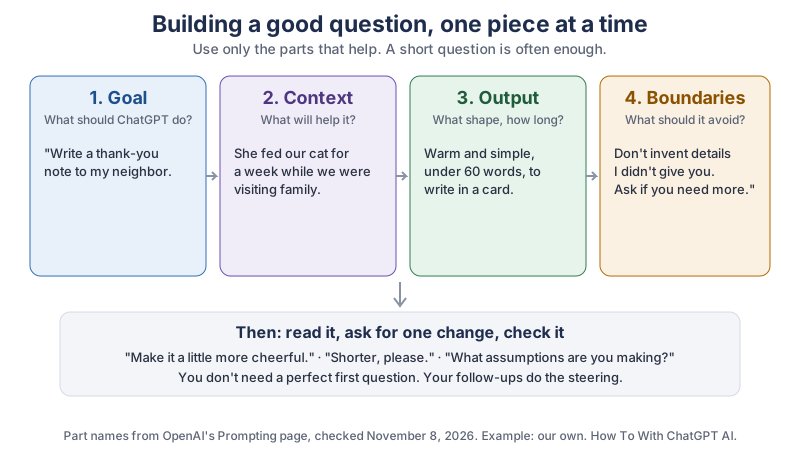
The same example in plain text:
- Goal: Write a thank-you note to my neighbor.
- Context: She fed our cat for a week while we were visiting family.
- Output: Warm and simple, under 60 words, to write in a card.
- Boundaries: Don’t invent details I didn’t give you. Ask if you need more.
- Then: read it, ask for one change (
a little more cheerful
, “shorter, please”), and check it.
OpenAI’s Use ChatGPT page shows the same idea growing in three steps: start simple, add context, then choose a format. You don’t have to get it right the first time.
What do you say when ChatGPT’s answer isn’t right?
Tell ChatGPT exactly what to change, in the same chat, instead of starting over. OpenAI’s Use ChatGPT page suggests simple follow-ups such as Make this shorter,
Give me three different approaches,
What assumptions are you making?
and Ask me questions before you continue.
If an answer misunderstood you, say so: No, I meant the bus timetable, not the train.
ChatGPT keeps the whole conversation in mind while you stay in that chat.
How do you show ChatGPT a photo or talk to it out loud?
Use the attach button to add a photo, and the voice button to talk. Both are on the Free plan: OpenAI’s pricing page lists voice chats for Free and reading photos as limited on Free.
Honestly, my favorite moment for any beginner is the first time they reply “no, shorter” and ChatGPT just… does it. No offence taken, no sighing. It’s the most patient helper you’ll ever boss around.
How do you ask ChatGPT about a photo?
Attach the photo, then say what to look at and what you want back. OpenAI’s Image inputs page says to Attach, paste, or drag an image
into the message box and advises don’t rely on the image alone to communicate the task.
The App Store listing gives two everyday ideas: snap a picture to transcribe a handwritten recipe or get info about a landmark.
So instead of sending a photo alone, try: This is my grandmother's handwritten recipe. Type it out clearly and list the ingredients first.
How do you talk to ChatGPT with your voice?
Open ChatGPT, tap the voice icon at the bottom right, pick a voice, and start talking. Those are the steps on OpenAI’s ChatGPT Voice page, which adds that You can interrupt anytime and ask ChatGPT to respond faster, slow down, add more detail, or keep it brief,
and that tapping the orb shows the full written transcript. You choose the voice the first time and can change it later in Voice settings.
If you’d rather see your words before sending them, use dictation instead of a voice chat. In the ChatGPT desktop app, OpenAI’s Prompting page says to select Dictate in the message box and start talking; ChatGPT types your speech so you can check it first.
What should you never type into ChatGPT?
Never type passwords, bank or card numbers, or other people’s private information into ChatGPT. Treat the chat like a helpful stranger at the library: you can describe your problem, but you don’t hand over your keys.
How do you keep a ChatGPT chat out of your history?
Start a Temporary Chat. OpenAI’s Help Center (read through search excerpts) says Temporary Chats won’t appear in your history unless you choose to save them, and won’t be used to improve OpenAI’s models while they stay temporary, though OpenAI may keep a copy for up to 30 days for safety purposes. In the ChatGPT desktop app, OpenAI’s desktop app commands page lists the shortcut for a new temporary chat as ⌘+⇧+N on a Mac and Ctrl+Shift+N on Windows and Linux.
How do you stop ChatGPT from training on your chats?
Turn off Improve the model for everyone in Data controls. According to OpenAI’s Help Center (search excerpts): on the web, open your account menu and select Settings > Data controls; on a phone, open the sidebar, tap your profile icon and go to Settings > Data controls. The Help Center says your new conversations then won’t be used to train OpenAI’s models, but they still stay in your history. Two exceptions it names: if you rate an answer with a thumbs up or down, that whole conversation may be used, and voice has its own separate setting.
How do you check if ChatGPT is right?
Treat every answer as a first draft and check the parts that matter against a real source. OpenAI says so itself on its Use ChatGPT page: A polished response can still be incomplete or wrong.
It suggests checking important numbers, names, dates, quotes and claims, and asking ChatGPT questions like What sources did you use for this?
and Cite the source for each major claim.
- Ask for sources, then open them. Web search is on every plan, and OpenAI’s Prompting page says to ask for sources when you need to check the result.
- Check the big stuff with a person. OpenAI’s page says
Legal, financial, medical, security, and other high-stakes decisions require appropriate expert review.
- Ask it to show its gaps.
What couldn’t you find?
gets you a more honest answer than a confident guess.
How can seniors, or anyone who finds typing hard, use ChatGPT?
Use your voice: a voice chat in the ChatGPT app lets you talk and listen without typing at all, and your phone’s own dictation types for you anywhere. ChatGPT’s voice chats are on the Free plan, and OpenAI’s Voice page even suggests asking it to slow down
or keep it brief.
- On an Android phone: Google’s Gboard Help says to tap an area where you can enter text, tap Microphone at the top of the keyboard, and when you see “Speak now,” say what you want written.
- On an iPhone: Apple’s iPhone User Guide has a page on how to dictate text on iPhone in any app.
- On a computer: a USB microphone for dictation and voice chats, or a large-print keyboard if small letters are hard to read (see the gear list below).
- Ask for easier answers:
Please use short sentences and big steps, one at a time
works in any chat. To make it stick, OpenAI’s Personalize page says to put preferences like that in Settings > Personalization as custom instructions.
How do you set ChatGPT up for a parent or grandparent?
Sit down together, install the official app, and practice one real question before you leave. Holiday visits are a lovely time for this. A simple checklist, built from the steps above:
- Install ChatGPT from the App Store (seller OpenAI OpCo, LLC) or Google Play (developer OpenAI), and remove any lookalike apps.
- Sign up for free together, and write down where the account details are kept, somewhere safe and offline.
- Show them the voice icon at the bottom right and try one spoken question about something they care about, like a recipe or the garden.
- Add
short sentences, one step at a time
in Settings > Personalization. - Agree on two house rules: never type passwords or bank details, and check money or health answers with a real person.
What gear makes ChatGPT easier to use?
None of this is required, since ChatGPT works on the phone or computer you already have, but a few things make long sessions more comfortable.
- A USB microphone. Clearer speech for dictation and voice chats at a desk. Browse USB microphones on Amazon.
- A large-print keyboard. Big, high-contrast letters help tired or low-vision eyes. Browse large-print keyboards on Amazon.
- A headset with a microphone. Handy for voice chats in a busy house. Browse headsets with a microphone on Amazon.
- A tablet stand. Keeps the phone or tablet upright at eye level for hands-free voice chats. Browse tablet stands on Amazon.
What should you do after your first chat?
Have three small chats this week: one to explain something, one to write something, and one to plan something, and reply at least twice in each. Then try one photo and one voice chat. Once that feels easy, pick a real project: our guide to speeding up an old PC with ChatGPT is a gentle next step, and if you’re curious where ChatGPT is heading, read what ChatGPT Dots does. The newsletter box below sends you each new tutorial as it comes out.
Go have your three little chats this week. Ask it something silly too, like what to name a houseplant. Once you’ve had a laugh with it, the useful stuff stops feeling scary, and you’ll be the one explaining it at the next family dinner.
Sources and further reading
- Quickstart (OpenAI) — web and desktop setup, Chat vs Work switcher, checked Nov 8, 2026
- Use ChatGPT (OpenAI) — what ChatGPT is, follow-up phrases, checking answers, expert review
- Prompting (OpenAI) — Goal, Context, Output, Boundaries; Dictate in the desktop app
- Image inputs (OpenAI) — attaching a photo and saying what to look at
- Personalize ChatGPT (OpenAI) — custom instructions in Settings > Personalization
- ChatGPT desktop app commands (OpenAI) — new temporary chat shortcut
- ChatGPT Pricing (OpenAI) — Compare features across plans table; prices deliberately not stated
- ChatGPT Free (OpenAI) — no set time limit, sign up on web or mobile
- ChatGPT Voice (OpenAI) — voice icon bottom right, choose a voice, interrupt anytime, transcript
- Temporary Chat FAQ (OpenAI Help Center) — read through search excerpts
- Data Controls FAQ (OpenAI Help Center) — Improve the model for everyone; read through search excerpts
- Terms of Use (OpenAI) — minimum age 13, parent or guardian permission under 18; read through search excerpts
- ChatGPT on the App Store (Apple) — seller OpenAI OpCo, LLC, 13+, iOS 18.0 or later
- ChatGPT on Google Play — developer OpenAI, 1B+ downloads, rated Teen
- Fake ChatGPT apps scam users (Sophos, May 2023) — fleeceware apps, deleting doesn’t cancel the subscription
- Type with your voice (Gboard Help) — Android voice typing steps
- Dictate text on iPhone (Apple) — iPhone dictation
Questions and answers
Is ChatGPT free to use?
Yes. OpenAI’s Free plan has no set time limit and includes unlimited everyday text chats, web search and voice chats, with limited uploads, image making and memory, as listed on chatgpt.com/pricing on November 8, 2026. Paid plans (Go, Plus and Pro) raise those limits and add more models.
How do I know I have the real ChatGPT app?
On Apple’s App Store the real ChatGPT app is sold by OpenAI OpCo, LLC, and on Google Play the developer is OpenAI. Avoid lookalike names such as “Chat GBT”. Deleting a copycat app doesn’t cancel its subscription; cancel it in your app store’s subscription settings.
How old do you have to be to use ChatGPT?
OpenAI’s Terms of Use say you must be at least 13, or the minimum age your country requires, and under-18s need a parent’s or legal guardian’s permission. The App Store lists the app as 13+ and Google Play rates it Teen.
Can I talk to ChatGPT instead of typing?
Yes. In the ChatGPT app, tap the voice icon at the bottom right, choose a voice and start talking; you can interrupt anytime and ask it to slow down. Voice chats are on the Free plan. Your phone’s own dictation also types your words into the message box.
Can ChatGPT give wrong answers?
Yes. OpenAI says a polished response can still be incomplete or wrong. Ask ChatGPT for its sources and open them, check important numbers, names and dates, and get expert help for legal, financial or medical decisions.