
How Do You Make a Video Game With ChatGPT in Unreal Engine or Blender?
Disclosure: this page contains Amazon affiliate links. As an Amazon Associate we earn from qualifying purchases, at no extra cost to you.
Oh, future game-maker, this is the one where the idea in your notebook finally gets a floor to stand on! Say you’ve had a game idea rattling around for years: a small island, a lighthouse, a puzzle that only works at night. ChatGPT can’t hand you a finished game, but it can turn that idea into a plan, write the Blender scripts for your 3D models and walk you through each Unreal Engine step until you’re walking around your own level. Unreal and Blender both ask a lot of a computer, so if you’re shopping, Epic’s recommended setup is a good yardstick for RTX workstation laptops on Amazon.
Short answer: To make a video game with ChatGPT, plan one small original level in a chat, start from an Unreal Engine template, and ask ChatGPT to explain each Blueprint step as you build. ChatGPT writes Python scripts that make simple 3D models in Blender, exported as .glb files. Codex can write C++ later, with your approval.
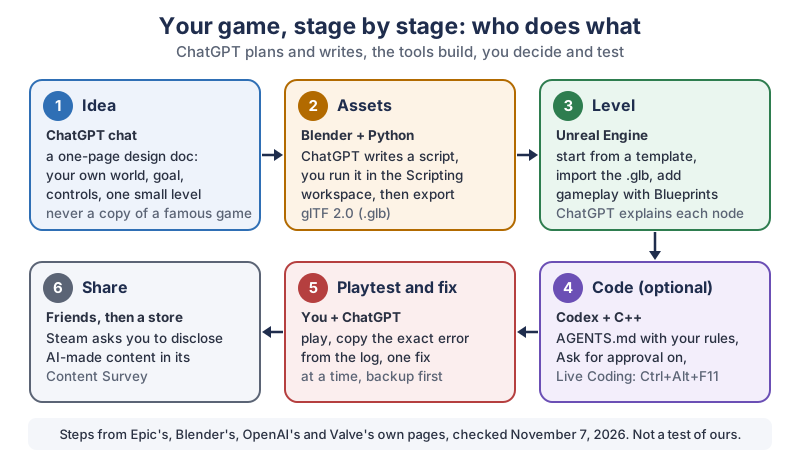
The same six stages in plain text:
- Idea. A ChatGPT chat helps you write a one-page design doc: your own world, the goal, the controls and one small level.
- Assets. ChatGPT writes a Python script, you run it in Blender’s Scripting workspace, and you export the model as glTF 2.0 (.glb).
- Level. In Unreal Engine you start from a template, import the .glb and add gameplay with Blueprints, with ChatGPT explaining each node.
- Code (optional). Codex writes C++ with your rules in an AGENTS.md file and Ask for approval switched on, and Unreal’s Live Coding rebuilds it with Ctrl+Alt+F11.
- Playtest and fix. You play, copy the exact error from the log, and fix one thing at a time, with a backup first.
- Share. Friends first, then a store. Steam asks you to disclose AI-made content in its Content Survey.
Can ChatGPT really make a video game for you?
ChatGPT can plan a game, write its scripts and code, and explain every step, but you still build the game in Unreal Engine and Blender yourself. A normal chat can’t click around inside those programs. You do the clicking, ChatGPT does the explaining, and that split works surprisingly well for a first game.
One thing worth knowing: we searched OpenAI’s full documentation export at learn.chatgpt.com on November 7, 2026, and it doesn’t mention Unreal Engine or Blender at all. So there’s no official ChatGPT button for either program. What ChatGPT does have is the ability to write the two languages those programs understand: Python for Blender, and C++ for Unreal Engine, plus clear step-by-step help with Unreal’s visual Blueprints.
Do you need GPT-6 Astra to make a game?
No, GPT-6 Astra isn’t required to make a first game, though it’s OpenAI’s strongest model for big projects. OpenAI’s Models page says Astra suits the most demanding workflows,
that GPT-6.1 Sol offers near-Astra performance at a lower cost than Astra,
and that Luna suits focused, repeatable tasks. The same page says those recommendations apply to ChatGPT Work and Codex, and that Astra is better at asking focused questions and incorporating your guidance while keeping the original goal and constraints in view.
Which plans include which model has changed since launch, so check the model picker in your own account. On the day we checked, OpenAI’s Codex pricing page listed GPT-6 Luna for Free and Go in the desktop app (subject to rollout), and GPT-6.1 Sol and GPT-6 Luna for Plus. A small first level is exactly the kind of well-scoped job those models handle.
Should you use a ChatGPT chat or Codex for a game?
Use a plain ChatGPT chat for planning, Blueprint help and Blender scripts, and bring in Codex only when your game has C++ code. Codex is OpenAI’s coding agent, and its Codex CLI page says it can inspect files, make edits, and run the tools already installed on your machine.
- ChatGPT chat: best for the design doc, explaining Unreal’s menus and Blueprint nodes, and writing Blender Python you paste in yourself.
- Codex: works inside your game’s project folder, edits C++ files and runs build commands after you approve them. OpenAI’s pricing page lists Codex in the CLI, the IDE extension and on the web for Plus.
How do you plan a game with ChatGPT?
Ask ChatGPT for a one-page design document for one small level, not a whole open world. A tiny, finished level teaches you more than a huge plan you never get to, and it keeps every later prompt short and clear.
I want to make my first 3D game in Unreal Engine 5.8, and I'm a
beginner. My idea: [your idea in 2-3 sentences, in your own words].

Please write a one-page design document with:
- the player's goal in one sentence
- the controls (keyboard and mouse)
- one small level I can build in a weekend, described room by room
- which Unreal Engine template to start from (First Person, Third
  Person, Top Down or Vehicle) and why
- a list of simple 3D objects I'll need, each one I could make in
  Blender from basic shapes
- the three mechanics to build first, smallest first

Keep everything original: no characters, names, maps or music from
existing games. Ask me questions if anything is unclear.
Then ask follow-ups: Make the level smaller,
What would make the puzzle clearer?
, Turn the object list into a checklist.
The design doc becomes the brief you paste at the start of every new chat, so ChatGPT always knows what you’re building.
Why shouldn’t you copy a famous game?
Keep your game your own, because the characters, names, maps and music of famous games belong to the companies that made them. Many popular videos show AI “remaking” a well-known game for fun. A copy of someone else’s game isn’t yours to share or sell, and your own idea is more fun to build anyway.
There’s a second reason to stay hands-on. The U.S. Copyright Office’s artificial intelligence page lists Part 2 of its report, published January 29, 2025, which covers the copyrightability of outputs created with generative AI. If you plan to sell your game, read that report or ask a lawyer about the parts AI made. Either way, making the creative choices yourself (the world, the level design, the edits) keeps the game truly yours.
How do you build a first level in Unreal Engine with ChatGPT?
Start from one of Unreal Engine’s game templates, so the player already walks, jumps and looks around before you change anything. Epic’s Projects and Templates page says templates contain premade Assets, such as Mannequins that have their player input and animations already configured,
and lists First Person, Third Person, Top Down and Vehicle templates.
Epic’s own Blueprints Quick Start Guide is a good first exercise: you build a launchpad that throws your character into the air. Here’s how ChatGPT fits in while you follow it:
- Create a new project from the Games category of the Unreal Project Browser, as the guide describes.
- Follow the guide’s steps in Unreal Engine. When a step doesn’t make sense, describe what you see on screen to ChatGPT and ask what that panel or node does.
- Once the launchpad works, ask ChatGPT how to build the first mechanic from your own design doc the same way, one node at a time.
- Press Play after every small change. If something breaks, you know exactly which change did it.
Should a beginner use Blueprints or C++?
Start with Blueprints, because you can build real gameplay without writing code, and switch to C++ only when you need it. Epic’s Blueprints page calls Blueprint Visual Scripting a complete gameplay scripting system based on the concept of using a node-based interface,
which gives designers virtually the full range of concepts and tools generally only available to programmers.
ChatGPT can’t draw Blueprint nodes for you, but it can describe them in order: Add an On Component Begin Overlap event for the Box Collision, drag from it, add Launch Character…
Ask for that kind of numbered node list, then build it yourself.
Can ChatGPT write Python scripts for Unreal Engine?
Yes, ChatGPT can write Python for the Unreal Editor, but that Python helps you build the game, it doesn’t run inside the finished game. Epic’s Python scripting page says it plainly:
Unlike Blueprints, the Python environment is only available in the Unreal Editor, not when your Project is running in the Unreal Engine in any mode, including Play In Editor, Standalone Game, cooked executable, etc.
Epic adds that you can use Python for scripting and automating the Editor,
such as laying out content in a level, but you cannot currently use it as a gameplay scripting language.
To turn it on, Epic says to open Edit > Plugins, find the Python Editor Script Plugin in the Scripting section, check Enabled (along with the Editor Scripting Utilities plugin) and restart the editor. Epic marks this as an Experimental feature.
How do you make 3D game models in Blender with ChatGPT?
Ask ChatGPT for a Blender Python script that builds a simple object from basic shapes, then run it inside Blender. The Blender Python API Quickstart says the two most common ways to run Python are the built-in Text Editor and the Python Console, and points to the Scripting workspace in the Topbar tabs, which has both set up for you.
Write a Blender Python script (bpy) for a recent Blender version that
builds a simple low-poly [wooden crate / lighthouse / stone bridge]
for a game, from basic shapes only.
- Real-world size in meters, with the base sitting at 0 on the Z axis.
- Join the parts into one object named [Name] and apply its scale.
- Give it one simple material with a base color.
- Add a comment above every step explaining what it does.
- Don't delete anything that's already in my scene.
Paste the script into a new text file in the Text Editor, read the comments, then run it. Before you do, save your .blend file, so a script that goes wrong costs you nothing. Never run a script you can’t read at least roughly; ask ChatGPT to explain any line that looks odd.
How do you get a Blender model into Unreal Engine?
Export the model from Blender as glTF 2.0 and import it into Unreal Engine’s Content Browser. The Blender manual’s glTF 2.0 page gives the menu as File > Import/Export > glTF 2.0 (.glb, .gltf), and Blender’s Export Scene Operators page lists bpy.ops.export_scene.gltf, so ChatGPT can add the export to the end of your script.
Epic’s glTF import page says a binary .glb combines the full scene description, all binary data, and all textures into a single self-contained binary file,
which makes it the tidiest choice. In the Content Browser, use +Add > Import to, or drag the file in, set the options in the Interchange Pipeline Configuration dialog and click Import.
How can Codex help with Unreal Engine C++?
Codex can read your Unreal project’s C++ files, write new gameplay code and run builds, while you approve each step. It’s the right tool once a mechanic is too fiddly for Blueprints, or when you want code you can read and keep.
- Back up first. Put your project under version control or copy the whole project folder before Codex touches it.
- Write the house rules. OpenAI’s AGENTS.md page says
Codex reads AGENTS.md files before doing any work.
Put one in your project folder:Unreal Engine 5.8 C++ project. Only edit files in Source/. Never edit or delete anything in Content/. Explain every change before making it.
- Keep approvals on. OpenAI’s Permissions page says
For most work, start with Ask for approval,
and its approvals and security page says the agent runs with network access turned off by default. - Ask for one small thing.
Add a C++ Actor class for a collectible that adds one point to the player’s score when touched. Explain each file you create.
- Rebuild while you play. Epic’s Live Coding page says Live Coding is on by default and you start a build with Ctrl+Alt+F11, then see the change take effect without leaving the editor.
What computer do you need for Unreal Engine and Blender?
For comfortable work in both programs, plan on 32 GB of memory and a graphics card with 8 GB of video memory, which is what Epic recommends for Unreal Engine 5.8 and Blender recommends for its latest version. Blender’s minimum is much lower, so an older computer can still make models even if Unreal struggles.
Honestly, there’s nothing quite like pressing Play and watching a little character walk across a world that didn’t exist yesterday. Even if it’s mostly grey boxes. Especially if it’s mostly grey boxes.
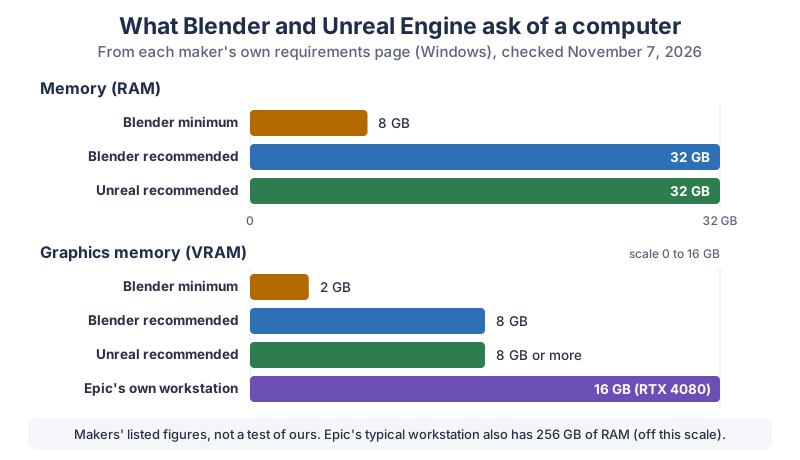
| Part | Blender minimum | Blender recommended | Unreal Engine 5.8 recommended | For both programs (our combination) |
|---|---|---|---|---|
| Operating system | Windows 8.1 (64-bit) | Windows 11 | Windows 11 | Windows 11 |
| Processor | 4 cores with SSE4.2 | 8 cores | Quad-core Intel or AMD, 2.5 GHz or faster | 8 cores (Epic suggests 12 to 16 cores for compiling C++ locally) |
| Memory (RAM) | 8 GB | 32 GB | 32 GB | 32 GB |
| Graphics memory (VRAM) | 2 GB | 8 GB | 8 GB or more | 8 GB or more |
| Graphics card | OpenGL 4.3 or Vulkan 1.3; NVIDIA GeForce 900 and newer, AMD GCN 4th gen and newer, Intel Kaby Lake and newer | Same families, 8 GB | DirectX 12 compatible; for Lumen: NVIDIA RTX 2000 series, AMD RX 6000 series or Intel Arc A-Series or newer | An RTX 2000-series-or-newer class card with 8 GB or more |
| Screen and mouse | At least 1920×1080 recommended; a three-button mouse recommended | Not listed | 1920×1080 or larger, three-button mouse | |
For scale, Epic’s page describes a typical system used at Epic Games: a Lenovo P620 workstation with 256 GB of memory, an AMD Ryzen Threadripper PRO 7985WX and an NVIDIA RTX 4080 with 16 GB. That’s 8 times the recommended 32 GB of memory, by our own division, and far more than a hobby project needs. On a Mac, Blender’s page says Blender 5.0 and later need Apple Silicon and macOS 13 (Ventura) or later, with 32 GB of memory recommended. Epic lists Mac requirements on a separate tab of its page.
Not sure your current computer is up to it? Our guide to speeding up an old PC with ChatGPT shows how to read Task Manager and decide between an upgrade and a new machine.
What do you do when your game breaks?
Copy the exact error message, paste it into ChatGPT with what you changed last, and fix one thing at a time. Guessing at a description of the problem wastes far more time than the real error text.
- Undo first. If the game worked five minutes ago, go back to that version before you ask anything.
- Give context.
Unreal Engine 5.8, Blueprint project, Third Person template. I added this node, and now this error appears: [paste].
- Ask for the why.
Explain what this error means before you suggest a fix.
- Test after every fix. Press Play. One change, one test.
Epic’s Live Coding page notes that Live Coding has its own console with the compile output, separate from the standard Output Log, so check both when a C++ build fails.
Can you sell a game you made with ChatGPT?
Yes, stores like Steam accept games made with AI help, but they ask you to say how you used it. Valve’s AI Content on Steam announcement from January 10, 2024 says the Content Survey has an AI disclosure section where you’ll need to describe how you are using AI in the development and execution of your game.
- Pre-Generated
- Valve’s term for content (art, code, sound and so on) made with AI tools during development. It’s reviewed the same way as everything else in your game.
- Live-Generated
- Content made by AI while the game is running. Valve adds a requirement: you describe the guardrails that stop it from generating illegal content.
Valve says it shows much of your disclosure on your game’s store page, so players can see how the game uses AI. Valve has adjusted the survey since that post, so read the current Content Survey wording when you submit.
What gear helps you make games?
If you’re buying for game making, get the memory and graphics memory right first, because both makers’ pages point there. These are the pieces worth a look:
- A workstation or gaming laptop with an RTX card. Aim for 32 GB of memory and 8 GB or more of video memory, Epic’s and Blender’s recommended figures. Browse RTX workstation laptops on Amazon or RTX desktop PCs on Amazon.
- A large monitor. Blender recommends at least 1920×1080 and supports multiple displays, and Unreal’s editor has many panels. Browse 27-inch 4K monitors on Amazon.
- A three-button mouse and a pen tablet. Blender’s page recommends a three-button mouse and says pen tablets are recommended for sculpting and painting. Browse three-button mice on Amazon, pen tablets on Amazon and, for flying around 3D scenes, 3D mice on Amazon.
What should you try first?
Give yourself one weekend and one tiny goal: write the design doc with ChatGPT on Saturday morning, follow Epic’s launchpad quick start in the afternoon, and on Sunday make one object in Blender with a script and drop it into your level. That’s a real, playable start that’s entirely yours. Already a Blender fan? Our guide to turning a photo of a broken part into a 3D print uses the same script-first idea for real-world objects. We add new ChatGPT tutorials regularly, and the newsletter box below is the easiest way to catch them.
Go build one tiny level this weekend. It doesn’t need to be pretty, it just needs to be yours, and the first time a friend plays it and asks wait, you made this?
, you’ll understand why people get hooked on game-making.
Sources and further reading
- Hardware and Software Specifications for Unreal Engine 5.8 (Epic Games) — 32 GB RAM, 8 GB graphics RAM, Lumen GPUs, Epic’s workstation, checked Nov 7, 2026
- Working with Projects and Templates in Unreal Engine (Epic Games) — First Person, Third Person, Top Down, Vehicle templates
- Blueprints Visual Scripting in Unreal Engine (Epic Games) — node-based gameplay scripting
- Quick Start Guide for Blueprints Visual Scripting (Epic Games) — the launchpad exercise
- Scripting the Unreal Editor Using Python (Epic Games) — editor only, not gameplay; plugin steps
- Importing glTF Files Into Unreal Engine (Epic Games) — .glb, Content Browser import
- Using Live Coding to Recompile Unreal Engine Applications (Epic Games) — Ctrl+Alt+F11, on by default
- System Requirements for Blender (Blender Foundation) — 8 GB / 32 GB RAM, 2 GB / 8 GB VRAM, Apple Silicon for 5.0+, display and mouse
- Blender Python API Quickstart (Blender) — Text Editor, Python Console, Scripting workspace
- Export Scene Operators (Blender Python API) — bpy.ops.export_scene.gltf
- glTF 2.0 (Blender 5.0 Manual) — File > Import/Export > glTF 2.0
- Models (OpenAI) — Astra, GPT-6.1 Sol, Luna, Terra for ChatGPT Work and Codex
- Pricing (OpenAI) — models per plan for Codex; prices deliberately not stated here
- Codex CLI (OpenAI) — inspect files, make edits, run installed tools
- Custom instructions with AGENTS.md (OpenAI) — project rules Codex reads first
- Permissions (OpenAI) — Ask for approval
- Agent approvals and security (OpenAI) — network access off by default
- AI Content on Steam (Valve, January 10, 2024) — Pre-Generated and Live-Generated disclosure
- Copyright and Artificial Intelligence (U.S. Copyright Office) — Part 2 on copyrightability, January 29, 2025
Questions and answers
Can ChatGPT make a full video game?
Not by itself. ChatGPT can plan the game, write Blender Python scripts and C++ code, and explain each Unreal Engine step, but you build and test the game in those programs. Starting with one small level is the most reliable way to finish something.
Can ChatGPT use Unreal Engine?
A normal ChatGPT chat can’t click inside Unreal Engine, but it can explain Blueprint nodes step by step and write Python for the Unreal Editor and C++ for gameplay. Epic’s docs say Unreal’s Python works only in the editor, not as a gameplay language. Codex can edit your project’s C++ files after you approve each change.
Can ChatGPT make 3D models in Blender?
ChatGPT can write Blender Python scripts that build simple models from basic shapes, which you run in Blender’s Text Editor or Python Console. Save your file first and read the script before running it. Export the result as glTF 2.0 (.glb) to use it in a game engine.
Is GPT-6 Astra good for making games?
OpenAI’s Models page says Astra suits the most demanding workflows in ChatGPT Work and Codex, and that GPT-6.1 Sol offers near-Astra performance at a lower cost. A first small game doesn’t need Astra. Which plans include each model has changed since launch, so check your own model picker.
How much RAM do you need for Unreal Engine 5?
Epic’s Hardware and Software Specifications page for Unreal Engine 5.8 recommends 32 GB of RAM and 8 GB or more of graphics memory on Windows. Blender also recommends 32 GB of RAM, though its minimum is 8 GB. Epic’s own typical workstation has 256 GB.