Why Can People Tell You Used ChatGPT, and How Do You Make It Sound Like You?
Disclosure: this page contains Amazon affiliate links. As an Amazon Associate we earn from qualifying purchases, at no extra cost to you.
Oh, busy wordsmith, this one’s for every email you’ve reread and thought hmm, that doesn’t sound like me at all
! Most of us have read a message and thought a chatbot wrote this
before we reached the second line. The good news is that the fix isn’t a trick; it’s your own voice, plus an edit, plus maybe a well-thumbed copy of On Writing Well on Amazon on the desk.
Short answer: People can tell you used ChatGPT when your text carries its habits: puffed-up importance, favorite words like “delve”, tidy lists of three, not just X, but Y
, and chatbot phrases left in. To make it sound like you, give ChatGPT samples of your own writing, then edit the draft yourself, out loud.
The same picture in plain text:
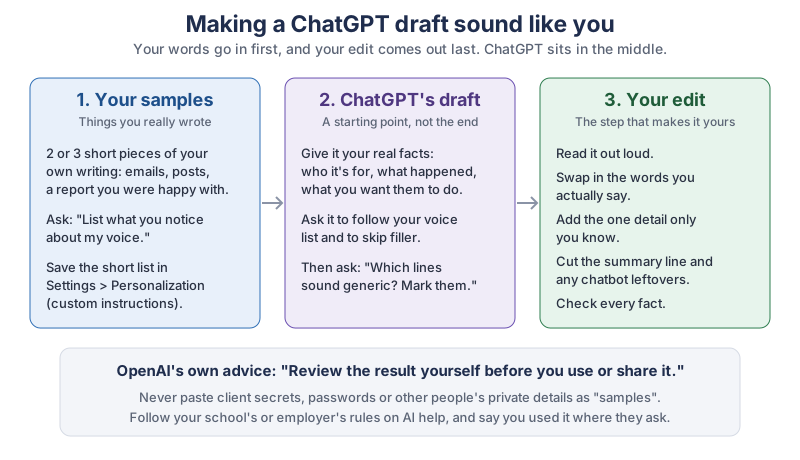
- Your samples: two or three short pieces you really wrote. Ask ChatGPT to list what it notices about your voice, and save that list in Settings > Personalization as custom instructions.
- ChatGPT’s draft: give it your real facts (who it’s for, what happened, what you want them to do), ask it to follow your voice list, then ask it to mark the lines that sound generic.
- Your edit: read it out loud, swap in the words you actually say, add the one detail only you know, cut the summary line and any chatbot leftovers, and check every fact.
Why can people tell when you used ChatGPT?
People can tell because ChatGPT-style text leans on the same patterns again and again, and readers have learned to spot them. Wikipedia’s volunteer editors, who clean up AI-written articles as WikiProject AI Cleanup, keep a public guide called Signs of AI writing
. It lists habits such as undue emphasis on significance and legacy (stands as a testament
), a high density of “AI vocabulary” words like delve, tapestry, pivotal and showcase, “negative parallelisms” such as Not just X, but also Y
, and the “rule of three”.
The word habit shows up in research too. Dmitry Kobak and colleagues looked at more than 15 million biomedical abstracts on PubMed from 2010 to 2024 and found a sudden jump in style words after chatbots arrived. Their 2025 paper in Science Advances, titled Delving into LLM-assisted writing in biomedical publications through excess vocabulary
, estimates that at least 13.5% of 2024 abstracts were processed with a large language model.
None of these patterns proves anything by itself. The Wikipedia guide says so plainly: Not all text featuring these indicators is AI-generated,
and Many elements of AI writing can be found in editorials, blogs, or fan fiction.
Lots of people wrote pivotal
long before ChatGPT existed. What gives writing away is a pile-up of the patterns with no real, specific detail underneath.
Is the em dash a sign of ChatGPT?
The em dash is a weak sign on its own, and a fading one. Wikipedia’s guide files Overuse of em dashes
under a heading dated 2022 to September 2026, and says the newest models have been hard coded to not use em dashes at all
from September 2026 on, while many people still use older models that do. The guide adds that the sign is most useful when taken in combination with other indicators, not by itself.
If you’ve always loved a dash, keep it.
What are the most common AI writing tells, and how do you fix each one?
The most common tells are inflated importance, a small set of overused words, stock sentence shapes, vague sources, chatbot phrases left in, and heavy formatting. Each one has a plain fix, and most fixes come down to saying the specific thing you actually mean.
| Tell | What it looks like | Plain fix |
|---|---|---|
| Puffed-up importance | stands as a testament, a key turning point, left an indelible mark | Say what happened, with the fact: we shipped it two days early. |
| “AI vocabulary” words | delve, tapestry, testament, pivotal, underscore, showcase, crucial, intricate, additionally | Use the word you’d say out loud to a coworker. |
| Dodging a plain “is” | ”serves as”, “boasts”, “features” | Write isor “has”. |
Not just X, but Y | It’s not just a tool, it’s a partner. | Say the one thing you mean. |
| Rule of three | faster, smarter and more efficient | Keep the one item that’s true and specific, with its number. |
| Vague sources | ”Experts argue”, “Observers have cited” | Name the person or the page, or cut the line. |
| Shallow add-on phrases | ”highlighting its importance”, “valuable insights”, “resonates with” | Delete the add-on and let the fact stand. |
| Outline-style ending | Despite its challenges, the future looks bright. | End on the next step or a real detail. |
| Chatbot phrases left in | ”Certainly!”, I hope this helps, Let me know if you’d like any changes. | Delete them before you send. |
| Formatting habits | bold all over the prose, Title Case Headings, emoji at the start of headings or list items | Format the way you usually do. |
| Em dashes everywhere | a dash in every other sentence (listed for 2022 to September 2026) | Use your normal punctuation; one dash proves nothing. |
The same example in plain text (it’s a made-up update, not anyone’s real message):
- Before
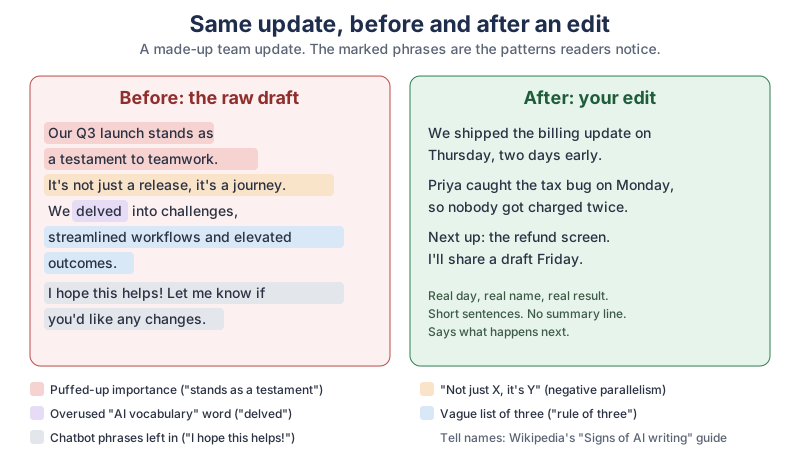
Our Q3 launch stands as a testament to teamwork. It’s not just a release, it’s a journey. We delved into challenges, streamlined workflows and elevated outcomes. I hope this helps! Let me know if you’d like any changes.
- Tells marked
- Puffed-up importance (
stands as a testament
),not just X, it’s Y
, an overused AI word (“delved”), a vague list of three, and chatbot phrases left in. - After
We shipped the billing update on Thursday, two days early. Priya caught the tax bug on Monday, so nobody got charged twice. Next up: the refund screen. I’ll share a draft Friday.
Can AI detectors really tell if ChatGPT wrote something?
No, AI detectors can’t reliably tell whether ChatGPT wrote something, and OpenAI says so itself. OpenAI’s Help Center answers the question Do AI detectors work?
(read through search excerpts) with In short, no. While some (including OpenAI) have released tools that purport to detect AI-generated content, none of these have proven to reliably distinguish between AI-generated and human-generated content.
OpenAI learned this with its own tool. In January 2023 it released an AI classifier, and its own announcement (read through search excerpts) said that on its test set the classifier correctly flagged 26% of AI-written text as “likely AI-written”, while wrongly flagging 9% of human-written text. By our arithmetic, that means about 3 in 4 AI-written texts got past it, and about 1 in 11 human-written texts were wrongly flagged. OpenAI withdrew the classifier on July 20, 2023, citing its low rate of accuracy.
Are AI detectors unfair to some writers?
Yes, a Stanford-led study found that AI detectors wrongly flag non-native English writers far more often. Weixin Liang, James Zou and colleagues ran 91 essays written by non-native English speakers for the TOEFL exam through seven popular detectors. As Cell Press’s July 10, 2023 release on their paper in Patterns puts it, the detectors incorrectly labeled more than half of the essays as AI-generated,
and one flagged nearly 98% of them. The detectors score how surprising the word choice is, so simpler, common words look “machine-like”. Zou’s advice:
Our current recommendation is that we should be extremely careful about and maybe try to avoid using these detectors.
That’s why this guide is about your voice, not about beating a detector. A score from a checker isn’t proof either way, and a message that sounds like you is simply better writing.
How do you teach ChatGPT to write in your voice?
Show ChatGPT two or three short things you wrote yourself, ask it to describe your voice in a short list, and then ask for drafts that follow that list. A description built from your real writing works much better than make it sound human
, because ChatGPT then knows what your human sounds like.
What prompt gets ChatGPT to describe your writing voice?
Ask ChatGPT to study your samples without rewriting them. Here’s a prompt to copy:
Here are three short things I wrote myself. Don't rewrite them. List 6 to 8 short notes about my voice: how long my sentences are, words and phrases I use a lot, how I open and close, how formal I am, and things I never do. Then list 5 phrases you should avoid so a draft still sounds like me.
Paste your samples below the prompt, read the list it gives back, and fix anything it got wrong. You know your voice better than any chatbot does.
How do you make ChatGPT remember your writing style?
Put your voice notes in your custom instructions, which ChatGPT follows across chats. OpenAI’s Personalize ChatGPT page says custom instructions hold preferences you want ChatGPT to follow across chats, such as response style.
You’ll find them in Settings > Personalization, the same place as Base style and tone, where you pick a personality. OpenAI says a personality changes its style and tone; it doesn’t change its capabilities.
A short voice note is enough, for example: Write like me: short sentences, plain words, a little dry humor. Never use "delve", "testament" or "pivotal". No "not just X, but Y". No closing summary, no emoji, no "I hope this helps".
Memory is the other half. OpenAI’s Help Center (read through search excerpts) describes two switches in Settings > Personalization: Reference saved memories and Reference chat history. It says turning off saved memories also turns off chat history, and that deleting a chat doesn’t delete a saved memory. If you’d rather ChatGPT didn’t carry your writing between chats, keep your voice notes in custom instructions and leave memory off.
Can ChatGPT learn your style from your email and documents?
Yes, in ChatGPT Work on the web, the writing style feature learns from the apps you connect. OpenAI’s Personalize page says writing style uses your writing from connected apps to help drafts sound like you.
The steps on that page: open the writing style setup, connect the email, messaging or document apps you want, then select Use writing style. OpenAI notes that Connecting an app alone doesn’t complete setup.
To turn it off, go to Settings > Personalization > Writing and turn off Reference my writing style. The page doesn’t list which plans include it, and it says the available apps depend on your account and workspace.
Only connect accounts that are yours to connect. A work mailbox usually belongs to your employer, so ask before you link it.
What prompt gets a first draft that sounds like you?
Give ChatGPT the real facts, a length, and a boundary against inventing things. OpenAI’s Prompting page builds requests from a goal, context, output and boundaries, and its examples are this plain: Draft a friendly email declining this invitation because I will be traveling.
A version for your own voice:
Using my voice notes, draft a short update to my team about the billing release. Facts: shipped Thursday, two days early; Priya caught a tax bug Monday; next is the refund screen, draft Friday. Under 100 words. Don't add anything I didn't give you. After the draft, list any lines that sound generic.
Why is editing the step that makes it sound like you?
Editing makes it sound like you because only you know the detail, the joke and the exact word you’d use, and ChatGPT can’t guess those. OpenAI’s Prompting page says it directly: Review the result yourself before you use or share it.
A five-minute edit does more for your voice than any prompt.
Honestly, my favorite edit trick is the read-aloud test. If you’d never say a sentence to a coworker’s face, it probably doesn’t belong in the email either. And you get to feel like a radio host for a minute.
- Read it out loud. If you’d never say a sentence to a coworker, rewrite it the way you would.
- Add the detail only you know. A day, a name, a number, what actually went wrong.
- Cut the first and last lines. Chatbot drafts often warm up at the start and sum up at the end; your reader doesn’t need either.
- Delete the leftovers. “Certainly!”,
I hope this helps
andlet me know if you’d like any changes
go. - Check every fact. Names, dates and numbers are yours to get right.
Can ChatGPT point out the lines that sound like AI?
Yes, ChatGPT can flag phrases that sound generic, as long as you make the final call. OpenAI’s Prompting page suggests asking for a final check
before you finish. Try: Here's my edited draft. Don't rewrite it. Point out any phrases that sound generic or overused, and say why, in one line each. Then fix the ones you agree with in your own words.
When should you say you used ChatGPT?
Say you used ChatGPT whenever your school, employer, publisher or platform asks you to, and whenever your reader would expect the words to be yours alone. Making a draft sound like you is good writing; passing off AI work where the rules say not to is a different thing, and this guide doesn’t help with that.
What are the rules for using ChatGPT at school?
Your course rules come first: the syllabus, the honor code, or what your teacher says for that assignment. OpenAI’s own educator FAQ in its Help Center (read through search excerpts) suggests teachers ask students to log and cite sources when they use AI in their work. For papers, the American Psychological Association’s APA Style blog post How to cite ChatGPT
(April 7, 2023, by Timothy McAdoo, read through search excerpts) explains how to cite ChatGPT, and APA’s later guidance says to describe how you used the tool, for example in the method section.
Is it okay to use ChatGPT for work emails and reports?
It’s usually fine where your workplace allows it, as long as you check the facts and keep private data out. Look for your employer’s AI policy first, keep client and customer details out of the chat (see the privacy note above), and say you had AI help when a reader would expect to know, such as on a report with your name on it. The edit steps above are what turn a draft into something you can stand behind.
What helps you write in your own voice?
A good writing guide and a microphone help most, because one sharpens your edit and the other lets you draft the way you talk. None of it is required.
- A plain-writing classic. William Zinsser’s On Writing Well is all about cutting clutter. Browse On Writing Well on Amazon.
- A small style rulebook. Strunk and White’s The Elements of Style is short enough to keep by the keyboard. Browse The Elements of Style on Amazon.
- A style manual for work writing. Newsrooms and many offices follow the AP Stylebook. Browse AP Stylebook editions on Amazon.
- A USB microphone. Talk your rough draft out loud first, then let ChatGPT tidy it. OpenAI’s Prompting page says the desktop app’s Dictate button types what you say. Browse USB microphones on Amazon.
What should you do next?
This week, gather three short things you wrote, get your voice notes from ChatGPT, save them in Settings > Personalization, and edit your next draft out loud. If you’re new to prompts, our guide on asking ChatGPT a good question covers the basics, and if you make videos, the same voice notes help when you write scripts and captions with ChatGPT. The newsletter box below sends you each new tutorial as it comes out.
Go teach ChatGPT your voice this week with three things you’ve already written, then edit the first draft out loud. The first time someone replies this is so you
, you’ll know the robot’s been politely shown the door.
Sources and further reading
- Personalize ChatGPT (OpenAI) — Base style and tone, custom instructions, writing style in Work, Reference my writing style; checked Nov 8, 2026
- Prompting (OpenAI) — goal, context, output, boundaries; review the result yourself; Dictate
- Educator FAQ: Do AI detectors work? (OpenAI Help Center) — "In short, no"; read through search excerpts
- Memory FAQ (OpenAI Help Center) — Reference saved memories and Reference chat history; read through search excerpts
- New AI classifier for indicating AI-written text (OpenAI, January 2023) — 26% and 9%, withdrawn July 20, 2023; read through search excerpts
- Signs of AI writing (Wikipedia, WikiProject AI Cleanup) — the patterns in our tells table and their caveats
- Delving into LLM-assisted writing in biomedical publications through excess vocabulary (Kobak et al., Science Advances, 2025) — at least 13.5% of 2024 PubMed abstracts
- GPT detectors are biased against non-native English writers (Liang et al., Patterns, 2023) — 91 TOEFL essays, seven detectors
- AI detectors biased against non-native English writers (Cell Press via EurekAlert, July 10, 2023) — James Zou quote, nearly 98% for one detector
- How to cite ChatGPT (APA Style blog, April 7, 2023) — read through search excerpts
Questions and answers
Can teachers tell if you use ChatGPT?
Teachers often notice ChatGPT’s habits, such as puffed-up phrasing, overused words and chatbot phrases, but no tool can prove it reliably. OpenAI’s Help Center says AI detectors have not proven to reliably tell AI and human writing apart. The honest route is to follow your class rules and say how you used AI where it’s allowed.
How do I make ChatGPT sound less like AI?
Give ChatGPT two or three samples of your own writing, ask it to list your voice in short notes, and save those notes in Settings > Personalization as custom instructions. Ask for drafts built only from your real facts, then edit out loud: add a specific detail, cut the summary line and delete chatbot phrases.
Do AI detectors actually work?
Not reliably. OpenAI’s own classifier caught 26% of AI-written text and wrongly flagged 9% of human text before OpenAI withdrew it on July 20, 2023. A 2023 Stanford-led study in Patterns found seven detectors labeled more than half of 91 TOEFL essays by non-native English writers as AI-generated.
What words does ChatGPT use too much?
Wikipedia’s Signs of AI writing
guide lists words such as delve, tapestry, testament, pivotal, underscore, showcase, crucial, intricate and additionally. A 2025 Science Advances study of PubMed abstracts found a jump in style words like these after chatbots arrived. Using one of them proves nothing; a pile of them is what stands out.
Can ChatGPT learn my writing style?
Yes. In any chat, you can share your own writing samples and keep a short description of your voice in custom instructions. In ChatGPT Work on the web, the writing style feature learns from email, messaging or document apps you connect; turn it off in Settings > Personalization > Writing with Reference my writing style.