Can You Run Claude Code for Free on Your Own Computer?
Disclosure: this page contains Amazon affiliate links. As an Amazon Associate we earn from qualifying purchases, at no extra cost to you.
Ooh, the “free and unlimited” question — pull up a chair, thrifty code wrangler! Say you’ve seen the videos promising unlimited Claude Code for free, and you’d like to know what’s really true before you spend an evening on it. Here’s the honest picture, straight from Anthropic’s and Ollama’s own pages. If you decide to run AI at home, the part that matters most is a graphics card with plenty of video memory (Amazon search).
Short answer: Not with Claude’s own models: Anthropic’s pricing page lists Claude Code as not included in the Free plan. You can point the Claude Code app at a free open model running on your own computer through Ollama, which documents the setup, but Anthropic doesn’t support that route, and local models are smaller than Claude.
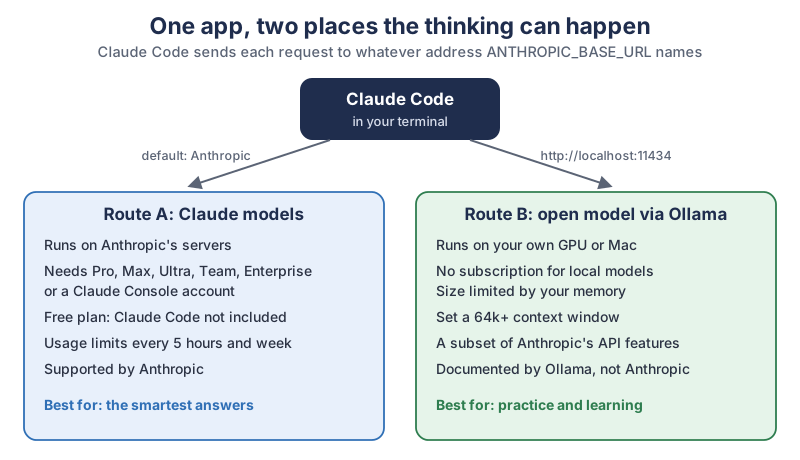
The two routes in plain text:
| Question | Route A: Claude models | Route B: an open model through Ollama |
|---|---|---|
| Where the model runs | Anthropic’s servers | Your own GPU or Mac |
| What you need | A Pro, Max, Ultra, Team or Enterprise plan, or a Claude Console account | Ollama, a downloaded open model and enough memory |
| Free plan | Claude Code not included | No subscription for local models |
| Limits | Usage limits every 5 hours and every week | Your hardware’s memory and speed |
| Who supports it | Anthropic | Ollama’s documentation; Anthropic doesn’t support it |
Is Claude Code free with a Claude account?
Claude Code isn’t included in Claude’s Free plan. The comparison table on claude.com/pricing shows Claude Code as “No” for Free and “Yes” for Pro, Max, Ultra, Team and Enterprise. Anthropic’s Claude Code quickstart agrees, listing A Claude subscription (Pro, Max, Ultra, Team, or Enterprise), Claude Console account, or access through a supported cloud provider.
Paid plans still have limits. The pricing page describes Pro as More usage than Free, every 5 hours and every week
, and Claude Help Center’s Pro and Max article adds: These limits are shared across Claude and Claude Code, meaning all activity in both tools counts against the same limits.
So no Claude plan is “unlimited” in the way the video titles suggest.
What can you do with Claude for free?
The Free Claude plan is a chat, not Claude Code, and the chat can still help with code. The Free plan’s list on claude.com/pricing includes Chat on web, desktop, and mobile
and Search the web, create files, and run code
, with Limited usage every 5 hours and every week
. You can paste a short piece of your own code into the Claude chat, ask what it does or why it breaks, and copy the fix back yourself. What the Free plan doesn’t give you is the Claude Code app working inside your project folder.
What about the Claude Console and the API?
A Claude Console account is the pay-as-you-go way to use Claude Code. The quickstart describes it as API access with pre-paid credits
, and Anthropic’s Claude Code costs page says Claude Code charges by API token consumption.
That suits someone who codes now and then, but it isn’t free: you top up credits before you use them.
What does running Claude Code on your own computer really mean?
Running Claude Code “locally” means the Claude Code app talks to an open-source AI model on your computer instead of to Claude. The Claude Code app always runs on your computer. The model that does the thinking normally runs on Anthropic’s servers. Anthropic’s environment variables page describes the setting that changes this, ANTHROPIC_BASE_URL, as a way to Override the API endpoint to route requests through a proxy or gateway.
Ollama, a free app for running open models, uses exactly that setting. Ollama’s Claude Code page says Ollama connects Claude Code to local and cloud models through its Anthropic-compatible API.
The model answering you is then an open model such as Qwen, OpenAI’s gpt-oss or Mistral’s Devstral, not Claude. Claude Code’s tools, prompts and file editing stay the same; the brain behind them changes.
Does Anthropic support using Claude Code with other models?
No. Anthropic’s LLM gateway page says it plainly:
Any gateway that exposes a supported API format works. Anthropic doesn’t endorse, maintain, or audit third-party gateway products, and doesn’t support routing Claude Code to non-Claude models through any gateway.
In everyday terms, the Ollama route is documented by Ollama, and if something breaks, Ollama’s docs are where you look, not Anthropic’s support team. If you use Claude Code at work, ask whoever looks after your tools before you change where it sends requests.
Are Ollama’s cloud models free and local too?
Ollama’s cloud models run on Ollama’s servers, not on your computer, so only the local models are truly local. A model name ending in :cloud, such as gpt-oss:20b-cloud, is a cloud model. Ollama’s pricing page describes its no-subscription plan as Pay per token for every cloud model
and also says Running models on your own hardware is always unlimited.
So the free, unlimited part is the model you download and run on your own machine.
How much GPU memory does each model size need?
A model runs well when its whole download fits in your graphics card’s memory (VRAM), or in a Mac’s memory, with a few gigabytes to spare for the conversation. A model that doesn’t fit spills into ordinary system memory and slows down a lot. The ladder below matches common memory sizes with models from the Ollama library.
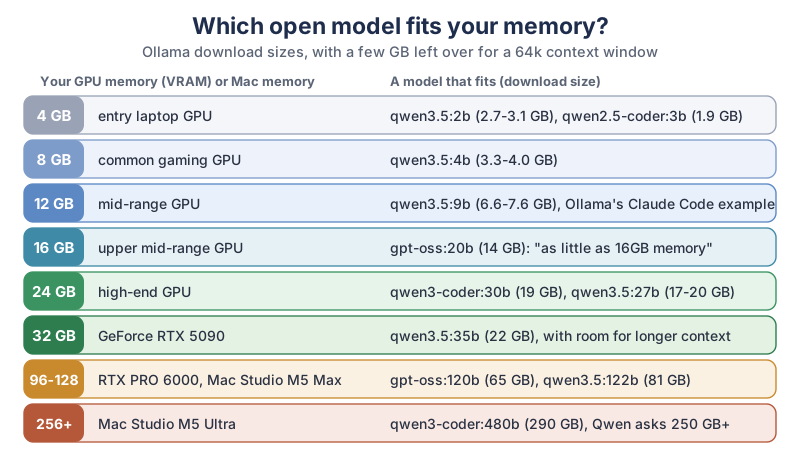
Here’s the full list behind the ladder, with each model’s download size and context window as the Ollama library shows them:
| Model (Ollama tag) | Download size | Context window | Comfortable memory | Maker’s note |
|---|---|---|---|---|
| qwen2.5-coder:3b | 1.9 GB | 32K | 4 GB | Context below the 64k Ollama asks for with Claude Code |
| qwen3.5:4b | 3.3-4.0 GB | 256K | 8 GB | - |
| qwen3.5:9b (qwen3.5) | 6.6-7.6 GB | 256K | 12 GB | The model in Ollama’s Claude Code example |
| qwen2.5-coder:14b | 9.0 GB | 32K | 12 GB | Context below 64k |
| gpt-oss:20b | 14 GB | 128K | 16 GB | Runs on systems with as little as 16GB memory |
| devstral-small-2:24b | 15 GB | 384K | 24 GB | Needs Ollama 0.13.3 or later |
| qwen3.5:27b | 17-20 GB | 256K | 24 GB | - |
| qwen3-coder:30b | 19 GB | 256K | 24 GB | - |
| qwen3.5:35b | 22 GB | 256K | 32 GB | - |
| gpt-oss:120b | 65 GB | 128K | 80-96 GB | Fits on a single 80GB GPU |
| qwen3.5:122b | 81 GB | 256K | 96-128 GB | - |
| qwen3-coder:480b | 290 GB | 256K | 512 GB | a minimum of 250GB of memory or unified memory |
The gpt-oss notes come from OpenAI’s own wording, quoted on Ollama’s gpt-oss page, and the qwen3-coder:480b note is from Ollama’s qwen3-coder page. Two coder models on the list, qwen2.5-coder:3b and qwen2.5-coder:14b, top out at a 32K context window, so they suit chat and small questions better than Claude Code.
Why does the context window need extra memory?
The context window is how much text the model can keep in mind at once, and a bigger window takes more memory on top of the model itself. Ollama’s context length page says Tasks which require large context like web search, agents, and coding tools should be set to at least 64000 tokens.
The same page lists Ollama’s defaults by memory: 4k context below 24 GiB of VRAM, 32k from 24 to 48 GiB, and 256k from 48 GiB up. So on most home graphics cards you have to raise the context yourself, and that’s why we leave a few gigabytes free in the table above. Ollama’s FAQ also notes that memory use grows with the context length.
Does a Mac count its memory differently?
A Mac with Apple silicon shares one pool of unified memory between the processor and the graphics, so its total memory is what counts. Ollama’s macOS page lists Apple M series (CPU and GPU support) or x86 (CPU only)
, so an Intel Mac runs models on the processor alone, which is much slower. macOS and your open apps use part of that unified memory too, so a 16 GB Mac has less than 16 GB free for a model.
How do you find out how much memory your computer has?
On Windows 11, open Task Manager, choose Performance, then GPU, and look at Dedicated GPU memory. On a Mac, open the Apple menu, then About This Mac, and look at Memory. Match the number to a row in the table above.
How do you set up Claude Code with Ollama?
You install Ollama and Claude Code, download a model that fits your memory, raise the context window to 64k, and start Claude Code through Ollama. These steps follow Ollama’s Claude Code page and Anthropic’s quickstart. Do it in a practice folder first, not in your most important project.
I love this bit of the puzzle, I really do. It turns out the whole question of which model can I run?
mostly comes down to one number printed on your graphics card’s box.
How do you install Ollama and Claude Code?
Ollama needs MacOS Sonoma (v14) or newer
on a Mac, per its macOS page, or Windows 10 22H2 or newer, Home or Pro
, per its Windows page, which also asks for NVIDIA driver 551.61 or newer if you have an NVIDIA card. Ollama’s GPU page lists NVIDIA cards with compute capability 5.0 and up, AMD Radeon cards and Apple’s Metal. Install both apps with the commands from their own pages:
# Ollama: macOS or Linux
curl -fsSL https://ollama.com/install.sh | sh

# Ollama: Windows PowerShell
irm https://ollama.com/install.ps1 | iex

# Claude Code: macOS, Linux or WSL
curl -fsSL https://claude.ai/install.sh | bash

# Claude Code: Windows PowerShell
irm https://claude.ai/install.ps1 | iex
Which model should you download first?
Start with the biggest model that fits your memory comfortably, using the table above. Ollama’s own Claude Code example uses qwen3.5, which is the 9b model, a good fit for a 12 GB card. With 16 GB, OpenAI’s gpt-oss:20b is the obvious next step up.
# about 7 GB download, 12 GB comfortable
ollama pull qwen3.5

# about 14 GB download, 16 GB comfortable
ollama pull gpt-oss:20b
How do you set Ollama’s context length to 64k?
Raise the context length before you start Claude Code, because Ollama’s default on cards under 24 GiB is 4k. Ollama’s context length page gives two ways: move the context slider in the Ollama app’s settings, or start the server with a setting:
OLLAMA_CONTEXT_LENGTH=64000 ollama serveHow do you check that the model runs on your GPU?
Run the model once, then run ollama ps and read the Processor column. Ollama’s FAQ explains it: 100% GPU means the model was loaded entirely into the GPU
, while a split such as 48%/52% CPU/GPU means part of it landed in system memory. If you see a split, step down one model size or lower the context.
ollama run qwen3.5 "Say hello in five words."
ollama ps
How do you start Claude Code with a local model?
The simplest way is Ollama’s launcher, which sets everything up for you. Open a terminal in your practice folder and run:
ollama launch claudeOllama’s page also gives the manual way, with three settings and a model name:
export ANTHROPIC_AUTH_TOKEN=ollama
export ANTHROPIC_API_KEY=""
export ANTHROPIC_BASE_URL=http://localhost:11434
claude --model qwen3.5
Ollama’s Anthropic compatibility page says the token is required but ignored
on your own computer, so the word “ollama” is just a placeholder, not a password. Keep Claude Code in Manual mode so it asks before each change; our guide to speeding up an Android TV with Claude Code shows a settings file and house rules you can reuse. And save a copy of your folder, or commit it to Git, before you let any model edit files.
How good is a local model compared with Claude?
A local model is a smaller, simpler helper than Claude, and Ollama’s bridge doesn’t cover every feature Claude Code uses. Ollama’s compatibility page says Ollama supports a subset of the Anthropic Messages API.
The same page lists prompt caching, PDF documents, token counting and the tool_choice option as not supported, and Ollama’s Claude Code page adds that Hosted WebSearch and advanced tool controls are not fully supported.
Anthropic doesn’t publish how big Claude’s models are, so there’s no exact size comparison. Treat a model that fits on one home graphics card as a junior helper and give it small, clear jobs: explain one file, write one function, add comments, draft a test. Read every change before you accept it, and don’t hand it a whole messy project in one go.
When is a paid Claude plan worth it?
A paid Claude plan is worth a look when the jobs grow: changes across many files, hard bugs, or a project you depend on. Pro is the first plan that includes Claude Code, per claude.com/pricing, and Max and Ultra add more usage. You can also keep both: a local model for practice and quick questions, and Claude for the work that really matters.
What hardware runs bigger models at home?
More memory runs bigger models, and faster memory makes them answer quicker. These are the top-tier options, with the figures from each maker’s own spec page:
| Hardware | Memory | Memory bandwidth | Biggest row it reaches |
|---|---|---|---|
| NVIDIA GeForce RTX 5090 | 32 GB GDDR7 | - | qwen3.5:35b |
| NVIDIA RTX PRO 6000 Blackwell | 96 GB GDDR7 with ECC | 1792 GB/sec | gpt-oss:120b, qwen3.5:122b |
| Apple Mac Studio, M5 Max | 36 GB to 128 GB unified | 460 GB/s or 614 GB/s, by configuration | gpt-oss:120b at 128 GB |
| Apple Mac Studio, M5 Ultra | 96 GB to 512 GB unified | 1.2 TB/s | qwen3-coder:480b at 512 GB |
- A big-memory graphics card. Browse GeForce RTX 5090 graphics cards on Amazon, or for a workstation, NVIDIA RTX PRO 6000 Blackwell cards on Amazon. NVIDIA’s RTX PRO 6000 page lists 96 GB of memory, the most of any single card here. Check your power supply and case size first.
- A Mac with lots of unified memory. Browse Mac Studio models on Amazon. Apple’s Mac Studio specs list up to 128 GB with M5 Max and 256 GB or 512 GB with M5 Ultra. Memory can’t be added later, so pick the size you’ll need.
- A middle step. A 16 GB graphics card reaches the gpt-oss:20b row from the table above.
What should you try first?
Check your memory tonight, download the one model that fits it comfortably, and run ollama launch claude in an empty practice folder. Ask it to write a tiny script and explain each line, then watch how it does. That ten-minute test tells you more than any video title. When you’re ready for a real project, try our Claude Code video editing tutorial, and the newsletter box below brings new Claude tutorials as we write them.
Go peek at your memory number, pick the model that fits, and enjoy the little thrill of an AI answering from a box under your own desk. Your fans may get chatty.
Sources and further reading
- Plans and pricing (Claude) — Claude Code by plan, Free plan features; checked Nov 7, 2026
- Using Claude Code with your Pro or Max plan (Claude Help Center) — shared usage limits
- Claude Code quickstart (Anthropic) — accounts and install commands
- LLM gateway configuration (Anthropic) — no support for non-Claude models
- Claude Code environment variables (Anthropic) — ANTHROPIC_BASE_URL and ANTHROPIC_AUTH_TOKEN
- Manage costs effectively (Anthropic) — token-based charges
- Claude Code data usage (Anthropic) — what is sent
- Claude Code (Ollama docs) — ollama launch claude and manual setup
- Anthropic compatibility (Ollama docs) — supported and unsupported features
- Context length (Ollama docs) — 64000 tokens for coding tools; defaults by VRAM
- FAQ (Ollama docs) — ollama ps and the Processor column
- Hardware support (Ollama docs) — NVIDIA, AMD and Apple GPUs
- Ollama on macOS (Ollama docs) — system requirements
- Ollama on Windows (Ollama docs) — system requirements
- Ollama pricing — local models unlimited; cloud models paid per token
- qwen3.5 (Ollama library) — tags and download sizes
- gpt-oss (Ollama library) — sizes and OpenAI’s memory wording
- qwen3-coder (Ollama library) — sizes and memory minimum for 480b
- qwen2.5-coder (Ollama library) — sizes and 32K context
- devstral-small-2 (Ollama library) — size and version requirement
- NVIDIA RTX PRO 6000 Blackwell (NVIDIA) — 96 GB GDDR7
- GeForce RTX 5090 (NVIDIA) — 32 GB GDDR7
- Mac Studio tech specs (Apple) — unified memory and bandwidth
Questions and answers
Is Claude Code free?
No, not with Claude’s own models. Claude’s pricing page shows Claude Code as not included in the Free plan and included in Pro, Max, Ultra, Team and Enterprise. A Claude Console account with pre-paid API credits also works.
Can I use Claude Code with Ollama?
Yes. Ollama documents it: run ollama launch claude, or set ANTHROPIC_BASE_URL to http://localhost:11434 and start claude with a model name. Anthropic’s gateway page says it doesn’t support routing Claude Code to non-Claude models, so Ollama’s docs are your guide.
How much VRAM do I need to run a local LLM for coding?
Enough to hold the model’s download plus a few gigabytes for the context window. From Ollama’s library, qwen3.5 at 9b is about 7 GB and fits a 12 GB card, gpt-oss:20b is 14 GB for 16 GB, and qwen3-coder:30b is 19 GB for 24 GB.
Does Claude Code work offline?
With a local model, the model’s requests go to Ollama on your own computer instead of the internet. You still need the internet to install Claude Code and Ollama and to download the model, and Anthropic doesn’t support this setup, so it may change.
Is the free Claude plan enough for coding?
The Free plan can help with small coding questions in the chat: claude.com/pricing lists searching the web, creating files and running code, with limited usage every 5 hours and every week. It doesn’t include Claude Code working in your project folder.