
Legal Document Indexing and Summarization Tool: How It Works, What to Pick
Hello, and welcome to everyone who has typed one more row into a document index long after the office went quiet.
If a fresh stack of scanned PDFs is waiting and the index is due before the attorney’s call tomorrow, this guide is for you.
In most boutique firms, a paralegal still opens every document, finds its date, types who wrote it and adds one more row to a spreadsheet.
The work is careful and slow, and the document that matters most is always somewhere past row four hundred.
Short answer: A legal document indexing and summarization tool reads scanned PDFs with OCR and AI, splits a packet into separate documents, labels each one by type, date, author, people and page range, and writes a short summary with page citations. Examples include CaseMark, Clio’s built-in AI and Visalaw AI. A paralegal still checks flags, gaps and low-confidence pages.
What is a legal document indexing and summarization tool?
A legal document indexing and summarization tool turns an unsorted pile of pages into a table of every document in the file, with a short cited summary for each one.
The two jobs are different, and it helps to know which one you are buying.
- Indexing answers
what is in this file and where.
Each document gets a row: its type, date, author, the people named and its page or Bates range. - Summarization answers
what does it say.
Each document gets two to four sentences, and each sentence points to the page it came from. - Chronology is the third step that many tools add: the indexed documents sorted into one timeline of the case.
A plain PDF editor does only part of the first job. A real indexing and summarization tool does all three, so the paralegal reviews instead of retyping.
How long does indexing legal documents take by hand?
Indexing legal documents by hand usually runs 300 to 500 documents in an eight hour day, so a large production takes weeks of paralegal time.
Those numbers come from paralegals themselves. Parseur, a company that sells document parsing software, gathered them from public paralegal discussions. One paralegal estimated 500 documents in 8 hours when moving quickly
, and others put 300 to 400 closer to a realistic pace. Parseur notes these are individual estimates, not measured benchmarks.
The same discussions describe a paralegal facing 14,000 pages of discovery, each document to be logged with its date and Bates number in date order. We turned the two paces into hours and wage cost.
| Documents in the set | Fast pace, 500 a day | Realistic pace, 350 a day | Wage cost at the realistic pace |
|---|---|---|---|
| 500 | 8.0 hours | 11.4 hours | $346 |
| 1,000 | 16.0 hours | 22.9 hours | $691 |
| 2,500 | 40.0 hours | 57.1 hours | $1,728 |
| 5,000 | 80.0 hours | 114.3 hours | $3,456 |
Assumptions: an eight hour day, 500 documents a day as the fast pace and 350 as the middle of the realistic 300 to 400 range, and the US median paralegal wage of $30.24 an hour from the Bureau of Labor Statistics (May 2025). That wage leaves out benefits and overhead.
At the realistic pace, a 2,500 document set is about seven working days of one paralegal, before anyone writes a chronology, an exhibit list or a demand.
How does AI index and summarize a scanned document packet?
An AI indexing tool follows the same six steps a careful paralegal follows, except the reading, labeling and first summaries take minutes instead of days.
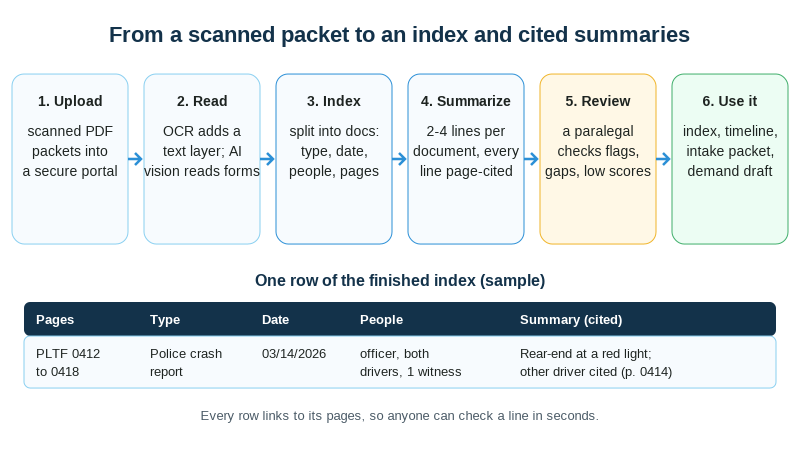
- Upload. The paralegal drops scanned PDF packets into a secure web portal or the case folder. Late documents can be added at any time, and the index updates.
- Read. OCR adds a text layer to every page. Amazon Textract’s document analysis also returns forms, tables and layout, and its Queries feature answers plain questions such as
What is the date of the report?
on each page. - Index. The packet is split where one document ends and the next begins. Each document gets its type, date, author, the people and organizations named, and its page or Bates range.
- Summarize. An AI model writes two to four sentences per document. Anthropic’s Citations feature, for example, returns the exact passage behind each sentence, with page ranges for PDFs.
- Review. The tool flags pages it read with low confidence, undated documents, duplicates and gaps. A paralegal decides what each flag means.
- Use it. The checked index exports to Excel, Word or PDF and feeds the next jobs: the chronology, the exhibit list, the intake packet and the first draft of the demand.
The six steps as text: 1 upload scanned PDFs to a secure portal, 2 OCR and AI vision read every page, 3 split into documents and index type, date, people and pages, 4 summarize each document with page citations, 5 paralegal review of flags, gaps and low scores, 6 index, timeline, intake packet and demand draft.
The sample row in the diagram: pages PLTF 0412 to 0418, police crash report, dated 03/14/2026, naming the officer, both drivers and one witness, summarized as a rear-end collision at a red light with the other driver cited on page 0414. It is an illustration, not a real case.
What columns should a legal document index have?
A legal document index should give every document one row with the same columns each time, and a page or Bates range on every row.
| Column | What goes in it | Why it matters |
|---|---|---|
| Bates or page range | First and last page of the document, with the firm’s prefix | Anyone can find and cite the document in seconds |
| Document type | Police report, ER record, bank statement, birth certificate, deed | Lets the attorney filter the file fast |
| Date | The date the document was made, not the date it was received | Keeps the timeline honest when packets arrive out of order |
| Author or source | Who made it: agency, provider, bank, court, client | Shows where each fact comes from |
| People and entities | Parties, witnesses, providers, insurers, employers named | Finds every page that mentions one person |
| Summary | Two to four sentences, each with its page cite | The attorney reads the file without opening it |
| Flags | Hot document, missing pages, foreign language, low OCR confidence | Sends the right pages to a human first |
| Production or batch | Which packet, request or upload it came in | Answers when did we get this?without digging |
Paralegals in the discussions Parseur collected kept almost the same columns by hand: Bates number, date, sender and recipients, description, document type, notes and hot documents. Good software keeps that habit and fills it in for them.
What does document indexing look like in personal injury, immigration and estate files?
Document indexing follows the same steps in every practice, but each practice sorts different papers and answers to different rules.
- Personal injury. Medical records, imaging, itemized bills, the police crash report, photos and wage letters. The index feeds the medical chronology and then the first draft of the demand letter.
- Immigration. Birth and marriage certificates, passports, tax returns, leases, photos, affidavits and country condition reports. The index becomes the exhibit list and the table of contents of the filing.
- Estate and probate. Wills, trusts, deeds, bank and brokerage statements, beneficiary designations and the death certificate. The index becomes the starting list for the asset inventory.
Immigration filings have the strictest page rules. The EOIR Immigration Court Practice Manual, Chapter 3.3, asks that filings be paginated with consecutive numbers at the bottom center or bottom right of each page, and that proposed exhibits come with a table of contents that lists page numbers.
Foreign language documents need one more flag in the index. Under 8 CFR 103.2(b)(3), Any document containing foreign language submitted to USCIS shall be accompanied by a full English language translation which the translator has certified as complete and accurate
.
A good immigration index marks every foreign language page and tracks whether its certified translation is in the packet yet.
Which tools index and summarize legal documents?
Small firms usually combine Adobe Acrobat Pro for Bates numbering and OCR with an AI tool such as CaseMark, Clio’s built-in AI or Visalaw AI for summaries, and a custom pipeline is the other option.
The nicest thing about a cited index is how it changes the conversation with the attorney. Nobody says I think it was in there somewhere
; they click the row and open the page.
| Option | Indexing | Summaries | Public price |
|---|---|---|---|
| Adobe Acrobat Pro | Bates numbering with prefix, suffix, start number and digit count; OCR for scans | None for legal indexes; you type the description | Acrobat Pro subscription; not in the free Reader |
| CaseMark | Deposition indexes and a key document index linked to exhibits | Deposition, discovery and witness summaries, each finding linked to its page | $25 per deposition summary, no subscription |
| Clio’s built-in AI (launched as Clio Duo) | Works on documents already stored in a Clio Manage matter | Matter, contact and document summaries on request | Depends on your Clio plan |
| Visalaw AI with Docketwise | Classifies and organizes immigration evidence and exhibits | Document analysis and petition drafting from matter documents | Core plan $220 per user a month, billed separately from Docketwise |
| Custom pipeline | Your own secure portal, OCR and AI model, any document type, your column names | Cited summaries, chronology and intake packet in your firm’s format | Depends on page volume and build |
CaseMark states its speed plainly: A 200-page transcript becomes an analysis summary in under two minutes.
Its page also promises Every finding linked to the page it came from.
That is a deposition tool first, so test it on records and correspondence before you rely on it there.
Clio’s help center says its AI builds matter and contact summaries from communications, activities, notes and documents, and only for matters the user has permission to see. If your firm lives in Clio, that is the shortest path for summaries, though it does not Bates stamp a production.
Docketwise’s support center describes Visalaw AI as able to Analyze, classify, and organize stack-heavy supporting evidence and exhibits with the power of automation.
For immigration firms already on Docketwise, it keeps the exhibits tied to the matter record.
Personal injury firms that mainly need medical records sorted should also look at EvenUp, Filevine and Supio, which we compared in our medical chronology software guide.
What does a legal document summarization tool still get wrong?
A legal document summarization tool is fast at reading and labeling, and still needs a person for handwriting, missing pages and anything that changes the case.
- Document breaks. A fax cover sheet or a stapled bill can make the tool split one document in two or merge two into one. Spot check the page ranges.
- Dates. A record can carry a visit date, a print date and a fax date. The index should use the date the event happened, and a person settles the unclear ones.
- Handwriting and poor scans. Low-confidence pages belong in a human queue, not in a summary nobody questions.
- Foreign languages. A machine translation helps the paralegal sort, but USCIS still requires a certified English translation.
- What is missing. Software only reads what it receives. A records request that never came back is invisible until someone notices the gap.
ABA Formal Opinion 512 puts it directly: GAI tools cannot solely substitute for a lawyer’s competent legal work.
An index and its summaries are a draft until a person has checked them.
Is it safe to upload client documents to an AI indexing tool?
Uploading client documents to an AI indexing tool can be safe when the vendor protects the data by contract, does not train on it, and your firm follows ABA guidance on client consent.
The American Bar Association’s Formal Opinion 512 (July 29, 2024) says informed client consent is needed before client information goes into a self-learning tool, and that boilerplate in an engagement letter is not enough. The NCBE’s Bar Examiner summary walks through it, and your state bar may add its own rules.
Ask every vendor in writing where files are stored, who can see them, whether they train models, and whether they will sign a business associate agreement when medical records are involved.
For a custom build, the pieces can be chosen for health data. AWS lists Amazon Textract as HIPAA eligible under a signed AWS business associate agreement, and the files can stay in the firm’s own storage.
Can the same pipeline build a new client’s intake packet?
Yes, the same pipeline that indexes a case file can sort a new client’s first documents into an intake packet before the first meeting.
New clients send photos of letters, insurance cards, notices and IDs, often from a phone and often at night. The portal takes the uploads, the index labels them, and the attorney opens one packet with a summary on top instead of a folder of camera images.
Many firms pair this with a 24/7 phone intake line. The caller’s answers are written down, the upload link goes out by text, and the paralegal starts the morning with an indexed packet and a short note on what is still missing.
The decision to take the case stays with the attorney. The pipeline only makes sure the right papers are already in order when that decision is made.
How do you choose a legal document indexing and summarization tool?
Choose a legal document indexing and summarization tool by running your own messiest closed file through it and checking the index line by line.
- Did it split the packet into the right documents, with the right page ranges?
- Did it pick the event date, not the fax or print date?
- Does every summary sentence link to the right page?
- Did it flag the handwritten, foreign language and low-quality pages?
- Can you rename the columns to match your firm’s index and export to Excel, Word or PDF?
- Does it write back to Clio, MyCase, Filevine, Docketwise or the system you already use?
- Is pricing per page, per case or per seat, and what does your monthly page count cost?
- Does the contract say your files are not used to train models?
A calm first month runs the tool beside your team. In week one, index two closed files and compare. In week two, index every new packet in the background. In week three, let paralegals review only flags and a spot check. In week four, count the hours saved and decide.
If it does not save real hours on your own files in that month, it is not worth keeping. If it does, row four hundred stops being anybody’s evening, and the coffee stays warm a little longer.
Let the software do the first pass through the stack, keep the judgment with your team, and see what the hours you get back turn into.
Sources and further reading
- Adobe: Add Bates numbering in Acrobat Pro
- CaseMark: deposition summaries ($25 per summary)
- CaseMark: discovery document summarization
- Clio Help Center: AI-generated matter and contact summaries
- Docketwise: Visalaw AI integration
- Docketwise Support Center: Visalaw AI (exhibit organization, plans)
- AWS: Amazon Textract, analyzing documents
- AWS: HIPAA eligible services reference
- Anthropic: Citations (page number ranges for PDFs)
- EOIR Immigration Court Practice Manual, Chapter 3.3: documents
- 8 CFR 103.2(b)(3): translations of foreign language documents
- NCBE Bar Examiner: ABA Formal Opinion 512 on generative AI tools
- BLS: paralegals and legal assistants, median pay
- Parseur: paralegal indexing pace and index columns (gathered estimates)
Questions and answers
Can I use AI to index and summarize legal documents?
Yes. AI can read scanned PDFs with OCR, split a packet into separate documents, label each one by type, date, author, people and page range, and write a short summary with page citations. A paralegal still reviews low-confidence pages, unclear dates and gaps before the index is used in the case.
What is the difference between a document index and a document summary?
A document index lists what is in the file and where: one row per document with its type, date, author and page or Bates range. A document summary says what each document contains, in a few sentences tied to its pages. Most firms want both, and a chronology built from them.
Can Adobe Acrobat index and summarize legal documents?
Adobe Acrobat Pro adds Bates numbering with a prefix, suffix and start number, and runs OCR on scanned pages, but it does not build a legal document index with summaries for you. Bates numbering is not in the free Adobe Reader. Firms usually pair Acrobat with an AI summarization tool.
How much does a legal document summarization tool cost?
CaseMark lists deposition summaries at $25 each with no subscription, and Visalaw AI’s Core plan is $220 per user a month alongside Docketwise. Clio’s AI depends on the Clio plan. A custom pipeline depends on page volume. Compare the price with your own indexing hours, using a table like ours.
How accurate are AI legal document summaries?
Accuracy depends on scan quality, handwriting and how varied the documents are. Test any tool on a closed file your team already indexed, click every page citation, and keep low-confidence pages in a human queue. ABA Formal Opinion 512 says AI tools cannot replace a lawyer’s competent review.