
How to Automate Vendor Dispatch for Rentals (and End the Phone Tag)
Hello, and welcome to every coordinator who has passed “Thursday?” and “Friday?” between a plumber and a tenant three times this week.
Picture a leak reported at 9 a.m. that has a plumber, a time and a confirmed tenant by 9:20, without anyone in your office picking up a phone.
Most residential property managers still book every repair by hand, calling the vendor, texting the tenant and passing times back and forth.
The plumber is free Thursday, the tenant only Friday, and the coordinator becomes a very polite answering machine for both.
Short answer: To automate vendor dispatch for rentals, write your approved vendor list as rules by trade, property, order and dollar limit. The software then texts the first vendor one complete job with the photo, lets the tenant pick from the windows that vendor accepts, rolls to the next vendor if nobody answers in time, and escalates anything over your limit.
What does it mean to automate vendor dispatch for rentals?
Automating vendor dispatch for rentals means software does the booking part of a repair: choosing the vendor, sending the job, agreeing a time with the tenant and chasing the finish.
The decision of what is broken comes first, from your triage step. Our guide to automated tenant maintenance triage software covers that part. Dispatch starts the moment a request is confirmed as a job for a vendor.
- Choosing: the right approved vendor for this trade at this property, in the order you set.
- Sending: one text or portal job with the unit, photo, model number and your dollar limit.
- Scheduling: the tenant picks a window the vendor has accepted, and both get reminders.
- Following up: a missed reply moves the job on; a finished photo and invoice close it.
How much time does manual vendor dispatch cost a property manager?
Manual vendor dispatch costs a coordinator roughly 15 to 20 minutes per job, spread across calls, voicemails and relayed texts that nobody counts.
The table below is our own calculation, built on round working numbers you can replace with last month’s work orders.
| Units managed | Vendor jobs a month | Hours by hand (18 min a job) | Hours automated (3 min a job) | Texting cost a month (about $0.17 a job) |
|---|---|---|---|---|
| 100 | 40 | 12 | 2 | about $6.60 |
| 300 | 120 | 36 | 6 | about $19.80 |
| 600 | 240 | 72 | 12 | about $39.60 |
| 1,000 | 400 | 120 | 20 | about $66.00 |
Assumptions: 0.5 repair requests per unit a month, 80% of them needing a vendor, and 18 minutes of hand booking per job (call, voicemail, call back, ask the tenant, relay times, confirm, chase the invoice).
The automated column keeps 3 minutes per job for a person to review exceptions. The texting cost assumes 10 texts and one photo message per job at Twilio’s US prices: $0.0083 per text segment and $0.022 per picture message, plus carrier fees of about half a cent to one cent.
At 1,000 units, 100 hours a month comes back. That is more than half of one coordinator’s working month spent on phone tag instead of on vendors, owners and the jobs that truly need judgment.
How does automated vendor dispatch move one repair from start to finish?
Automated vendor dispatch runs every repair through the same five steps, with three side paths for the moments that go wrong.
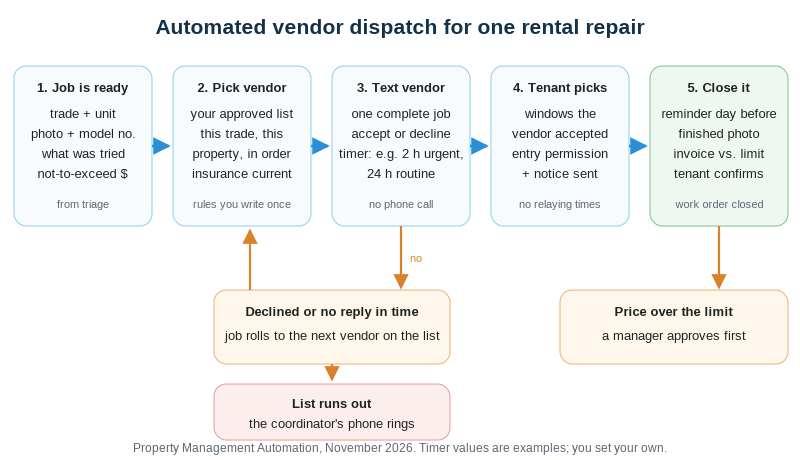
The diagram in words:
- Job is ready. Triage hands over the trade, unit, photo, model number, what the tenant already tried and your not-to-exceed amount.
- Pick the vendor. The software takes the first vendor on your approved list for that trade and property whose insurance is current.
- Text the vendor. The vendor gets one complete job and a timer to accept, for example 2 hours for urgent work and 24 hours for routine work.
- Tenant picks. Once the vendor accepts, the tenant chooses from the windows offered and gives entry permission.
- Close it. A reminder goes out the day before, the vendor uploads a finished photo and invoice, and the work order closes.
The side paths: a decline or a missed timer rolls the job to the next vendor on the list. An empty list rings the coordinator. A price over the not-to-exceed amount waits for a manager.
What vendor rules do you need before dispatch can run on its own?
Automated dispatch needs your approved vendor list written as rules, because software can only follow what is on paper, not what lives in a coordinator’s head.
| Rule | Example | Why the software needs it |
|---|---|---|
| Trade | Plumbing, HVAC, appliance, electrical, locksmith, general handyman | Matches the job from triage to the right kind of vendor |
| Properties or area | Riverside portfolio only; ZIP codes north of the river | Stops a vendor being sent 40 miles out |
| Order | First, second and third choice per trade and property | Decides who is asked next when someone declines |
| Accept timer | 2 hours urgent, 24 hours routine | Tells the software when to stop waiting |
| Not-to-exceed amount | A dollar cap per job type, higher for emergencies | Lets work start without a call, and stops surprises |
| Hours and on-call | Weekdays 7 to 5; on-call nights for emergencies only | Keeps routine jobs out of a vendor’s night |
| Paperwork | Liability insurance date, W-9 on file | Skips vendors whose insurance has run out |
Latchel’s budget approval page describes the not-to-exceed amount as the maximum a vendor can spend during the first visit without getting additional approval. It calls $250 to $500 per incident a common routine standard, depending on property type and labor rates.
Insurance dates matter more once nobody is checking by hand. Buildium’s vendor insurance help article explains how to record a vendor’s policy and expiration date, warn when a vendor without valid insurance is selected, and show a notice starting 90 days before a policy expires.
How does the tenant pick a repair time without the office relaying messages?
The tenant picks a repair time directly from the windows the vendor has accepted, so the coordinator never has to carry times between them.
This is the exact pain landlords describe. In a BiggerPockets thread on tenants contacting vendors directly, the original poster wanted to stop being the middleman because relaying repairs created back and forth with scheduling. A common reply: give the vendor the tenant’s contact details, but keep approving the work yourself.
Automated scheduling does both at once. Property Meld’s vendor scheduling help says that when the resident must be present, the resident has already chosen at least five appointment windows, and the vendor accepts one or sends other times.
AppFolio works the same way from the vendor’s side. Its Vendor Portal help says that when a vendor schedules the job, the customer and the resident are notified, and the resident gets a reminder 24 hours before the scheduled time.
What happens when the vendor doesn’t answer the dispatch?
When the vendor doesn’t answer within your timer, automated dispatch moves the job to the next vendor on your list instead of letting it sit.
The quiet win is not the texting itself; it is a vendor list written down clearly enough that anyone, or anything, can follow it.
Latchel describes this on its dispatch and scheduling page: when a vendor does not respond, the next vendor in your priority list is automatically contacted.
Managers set expiration timers on dispatch requests, and Latchel gives 2 hours for urgent and 24 hours for standard jobs as an example.
Here’s the catch: a rollover only helps if the list is deep enough. Busy seasons, such as the first heat wave or the first freeze, empty a three-name HVAC list fast.
- Two names minimum per trade and property, three for HVAC and plumbing.
- A marketplace fallback if you use one: Latchel can fall back to its own contractor network, and Property Meld’s Vendor Nexus is a pool of pre-screened vendors for coverage gaps.
- A human at the end: when every name has declined, the coordinator’s phone rings, every time.
Which property management software can dispatch vendors automatically?
AppFolio, Property Meld and Latchel automate most of vendor dispatch today, while Buildium and Rent Manager give you the pieces a custom setup can join together.
| Software | How the vendor gets the job | Scheduling with the tenant | If the vendor doesn’t answer | Vendor paperwork |
|---|---|---|---|---|
| AppFolio Vendor Portal | New job in the portal plus an email; vendor accepts or declines | Vendor schedules; resident notified, reminded 24 hours before | Handled by your workflow or the Maintenance Performer | W-9 and liability insurance requests by email |
| Property Meld | Incoming Requests; vendor clicks Accept | Resident offers at least 5 windows; vendor picks or proposes others | Status shows who the job is waiting on | Vendor Nexus for pre-screened coverage |
| Latchel | Your preferred vendors or in-house techs first, with photos and the troubleshooting transcript | Residents kept in the loop automatically | Expiration timers; next vendor contacted automatically | Budget limits enforced; over-budget jobs come back to you |
| Buildium | Work orders assigned to vendors; email from Buildium | Set by your team or an add-on | Set by your team or an add-on | Insurance tracking with a 90-day expiry notice |
| Rent Manager | Two-way texting with any contact, vendors included | From the texting window into the work order | Set by your team or an add-on | Kept on the vendor contact |
On AppFolio, the built-in agent is covered in our guide to AppFolio maintenance request automation. On Buildium or Rent Manager, a small custom layer on Twilio can read vendor replies such as “YES 2” and write the booking back into the work order.
How do you get your vendors to go along with automated dispatch?
Vendors go along with automated dispatch when it sends them better jobs: complete details, a clear dollar limit and a tenant who has already said yes to a time.
Vague requests are what vendors dislike most. In the same BiggerPockets thread, one landlord warned that vendors may walk away if they have to sort through unclear requests, and others noted that tenants often misdiagnose a tripped breaker or a dead bulb as a paid trip.
So the dispatch text should read like a finished job ticket. Unit 4B, kitchen sink, slow leak at the trap, photo attached, shut-off works, tenant home Fri 8 to 12, limit $300, reply YES to accept.
What still needs a person when vendor dispatch is automated?
A person still owns the money, the relationships and every job the rules did not foresee, because automated dispatch only follows the list it is given.
- Over-limit quotes: anything above the not-to-exceed amount waits for a manager or the owner.
- Empty lists: when every vendor declines, a coordinator finds someone new.
- Repeat jobs: the third callback for the same leak is a vendor conversation, not another dispatch.
- Emergencies: automated dispatch can call the on-call vendor, but an unanswered emergency must ring a person.
- Vendor scorecards: once a quarter, look at accept times, no-shows and invoice amounts, and reorder the list.
What should you check before switching automated vendor dispatch on?
Check the vendor list, the limits and the escalation path before automated vendor dispatch books its first real job.
- [ ] Every trade at every property has at least two approved vendors, in order.
- [ ] Every vendor has a mobile number for texts and a current insurance date on file.
- [ ] Accept timers are set for urgent and routine work.
- [ ] Not-to-exceed amounts are set per job type, with an emergency figure.
- [ ] The tenant confirmation text carries the date, window, vendor and entry reason.
- [ ] A named person gets the call when the list runs out or a price goes over.
- [ ] For two weeks, the software proposes each booking and a coordinator approves it.
If those two shadow weeks show real hours saved on your own vendors and tenants, switch on routine jobs first and emergencies last.
And keep one habit from the old way: a short thank-you text to the vendor who took the Friday job nobody else wanted.
Write the list once, let it book two shadow weeks of real jobs, and keep the phone calls for the vendors worth thanking.
Sources and further reading
- AppFolio: Vendor Portal overview (accept or decline, scheduling, 24-hour reminder, compliance documents)
- Property Meld Help Center: How to schedule a Meld (vendor)
- Property Meld: Vendor relationships that help PMCs scale (Vendor Nexus)
- Latchel: Maintenance dispatch and scheduling
- Latchel: Budget approval automation (not-to-exceed limits)
- Buildium Help Center: Tracking vendor insurance
- Buildium: Property management maintenance software
- Rent Manager: two-way texting with tenants, vendors and owners
- Twilio: SMS and MMS pricing in the United States
- BiggerPockets forum: Having tenant contact vendors directly
Questions and answers
Can I use AI to automate vendor dispatch for my rentals?
Yes. AI can read the triaged job, pick the right approved vendor, text the job with the photo, offer the tenant the vendor’s windows and move to the next vendor if nobody answers. Keep your written vendor rules, dollar limits and an emergency phone backup in charge.
Will my vendors actually accept repair jobs by text?
Most will, if the text reads like a complete job: unit, photo, problem, dollar limit and the tenant’s available times, with a one-word reply to accept. Ask your main vendors how they prefer to get jobs, and keep a phone call for those who insist.
What should the not-to-exceed amount be on a rental work order?
It depends on your owners and the job type. Latchel calls about $250 to $500 per incident a common routine standard. Set it per job type, a higher figure for emergencies, and have anything above it wait for a manager or owner approval.
What happens if no vendor accepts the job?
Automated dispatch should try each approved vendor in your order, each with its own accept timer, then ring a named coordinator when the list runs out. Some services, such as Latchel, can also fall back to their own contractor network.
Do I need new software to automate vendor dispatch?
Not always. AppFolio has a Vendor Portal and its Maintenance Performer, Property Meld and Latchel connect to the major platforms, and a custom setup on Twilio can text vendors and write bookings back into Buildium or Rent Manager work orders.