Automated Driver Check Calls Software: Updates Without the 3 a.m. Call
Hello to every dispatcher who has dialed the same driver three times before lunch.
Picture a tracking board where every truck already shows a fresh location and ETA, and nobody on your team dialed a single driver to get it.
Check calls are the oldest chore in freight: call the driver, ask where they are, type the answer into the TMS, and do it again in a few hours.
Drivers dislike them as much as dispatchers do, especially when the phone rings in the middle of a 10-hour break.
Short answer: Automated driver check calls software asks drivers for their location, ETA and status on a schedule, by tracking ping, text or AI voice call, then writes the answer into your TMS through its API. Good setups check the ELD first, skip resting drivers, and alert a dispatcher only when a load is late or silent.
What is automated driver check calls software?
Automated driver check calls software is a program that collects the check-call answers your dispatchers used to collect by phone.
It reads each load’s pickup and delivery times from the TMS, decides when an update is due, asks the driver in the least disruptive way, and saves the reply on the load. A dispatcher only sees the loads that need a person.
- What a check-call bot asks
- Location, ETA at the next stop, loaded or empty, and any issue such as detention, a breakdown or a missed appointment.
- How a check-call bot asks
- A tracking ping first (ELD, Descartes MacroPoint or Trucker Tools), then one short text, then an AI voice call that says it is automated.
- Where the answer goes
- Into the TMS load as a check-call record and status update, written through the TMS API as JSON.
- Who gets told
- The dispatcher on a delay or no answer, the customer on a changed ETA, and billing when the POD arrives.
Why do truck drivers hate check calls?
Truck drivers hate check calls because too many arrive at the wrong time, often while the truck is already being tracked.
Federal hours-of-service rules require a property-carrying driver to take 10 consecutive hours off duty before driving again, under 49 CFR 395.3. A routine check call in the middle of that break costs sleep the driver is legally required to get.
In November 2023, Overdrive columnist Long Haul Paul collected drivers’ stories of broker calls at 2 and 3 a.m. One reader’s comment became the headline of his follow-up column:
Unless it’s about a death in the family, a text will suffice if there is a change in plans.Reader comment quoted in Overdrive, November 17, 2023
Some drivers in that column answer by switching tracking apps off or keeping their cell number off the rate con. That is the opposite of what the broker wanted, and the phone calls start all over again.
Good check-call automation fixes the cause as well as the labor. It asks less often, asks by text first, and never wakes a resting driver for a routine “where are you?”
How much time do manual check calls cost a brokerage?
Manual check calls easily cost a small brokerage two to eight working hours a day.
Descartes describes one customer, Atlantic-Pacific Express, whose 10-person team ran about 1,500 loads a month and was consumed with 3-5 check calls—per load
to carriers and drivers before it moved to automated tracking (Descartes case study).
| Loads a day | Check calls a load | Calls a day | Hours a day (4 min a call) | Hours a month (21 workdays) |
|---|---|---|---|---|
| 10 | 3 | 30 | 2.0 | 42 |
| 20 | 3 | 60 | 4.0 | 84 |
| 40 | 3 | 120 | 8.0 | 168 |
| 40 | 5 | 200 | 13.3 | 280 |
Assumptions: 3 calls a load is the low end of the Descartes case study, and 5 is its high end. Four minutes covers dialing, a voicemail or a redial, the short talk, and typing the note into the TMS. Swap in your own numbers.
At 40 loads a day, three calls a load is already one full-time dispatcher doing nothing but check calls. The cost the table cannot show is the late load you hear about at 4 p.m. because the 1 p.m. call never got made.
How does an automated driver check call work, step by step?
An automated driver check call follows six steps, the same judgment a good dispatcher uses, run on a schedule for every load at once.
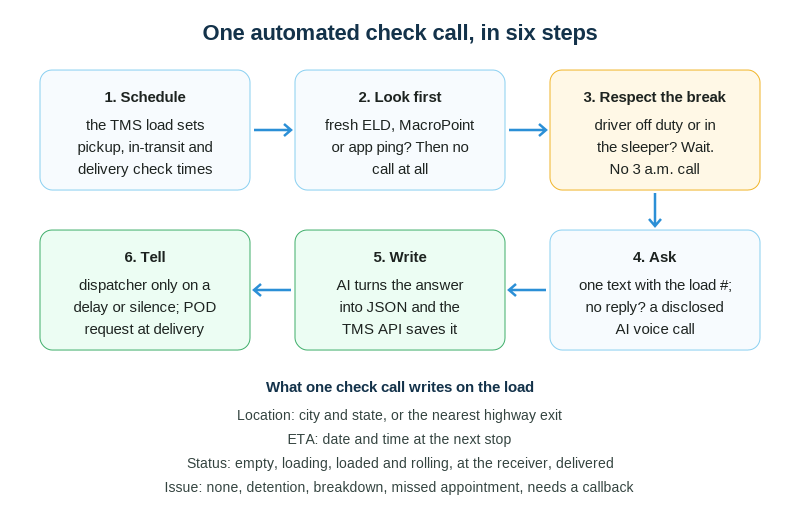
- Schedule. A cloud server reads each dispatched load from the TMS and sets check times: before pickup, every few hours in transit, and before delivery.
- Look first. If the ELD, MacroPoint or Trucker Tools already sent a fresh location, the server uses it and skips the call.
- Respect the break. If the carrier’s quiet hours have started, or the truck has sat parked at a truck stop for hours at night, the server waits. A fleet can also read duty status from its own ELD.
- Ask. It sends one short text with the load number, such as
Load 48213: where are you, and what’s your ETA to Dallas?
With no reply in the set time, it places a voice call that opens by saying it is an automated assistant. - Write. An AI model turns the answer, typed or spoken, into JSON with location, ETA, status and issue, and the TMS API saves it on the load.
- Tell. The dispatcher gets an alert only for a late ETA, a reported problem, or no answer at all. At delivery, the same text thread asks for the POD photo.
The data in the diagram, as text: schedule, look first, respect the break, ask, write, tell. Each check call writes four fields on the load: location (city and state or nearest exit), ETA at the next stop, status (empty, loading, loaded and rolling, at the receiver, delivered) and issue (none, detention, breakdown, missed appointment, needs a callback).
Should check calls be tracking pings, text messages or AI voice calls?
Use tracking pings first, texts second and voice calls last, because each step asks more of the driver and more of your team.
| Method | What the driver does | Best for | Rule to respect |
|---|---|---|---|
| ELD or app tracking (MacroPoint, Trucker Tools) | Nothing after accepting tracking | Most loads, all day | The carrier’s consent to share location |
| Text message (SMS) | Replies in a few words at the next stop | Routine updates, POD requests | No texting while driving (49 CFR 392.80) |
| AI voice call | Answers hands-free and talks | No text reply, urgent changes | Prior express consent for AI voices (FCC 24-17) |
| Dispatcher call | Talks with a person | Breakdowns, claims, upset customers | Costs the most team time |
Two federal rules shape every check-call design. FMCSA bans texting while driving a commercial vehicle under 49 CFR 392.80 and hand-held phone use while driving under 49 CFR 392.82. So a text has to wait for the next stop, and a call has to work on a hands-free headset.
The second rule is about the voice itself. In Declaratory Ruling FCC 24-17, adopted February 2, 2024, the Federal Communications Commission confirmed that AI-generated voices count as “artificial” voices under the Telephone Consumer Protection Act (TCPA).
Under the TCPA, calls with an artificial voice need the called party’s prior express consent unless there is an emergency purpose or an exemption.
In practice, add consent to automated texts and AI calls to the carrier packet, open every call by saying it is automated, and stop at once when a driver says stop. Have your attorney confirm the wording.
What automated driver check calls software can a freight broker use today?
A freight broker can get check-call automation inside a tracking network, from a freight AI voice agent, or from a small custom bot built on the TMS API.
Here’s the part that makes this worth doing: the drivers win too. Fewer calls, at better hours, and nobody gets woken up for a routine “just checking in” after a long day on the road.
| Tool | What the maker says | Fits a broker who |
|---|---|---|
| Descartes MacroPoint | Tracks through ELD, TMS and mobile app connections; when a shipment goes quiet, its OpsForce AI agent picks up the phone, makes the check call; lists “100%” elimination of manual check calls. | Already tracks loads in MacroPoint |
| Trucker Tools | Real-time load tracking from beginning to end, with 2.5M+ app downloads and 350K unique MCs in its network. | Wants drivers on a tracking app |
| Keelway | AI check calls at a cadence you set; writes back to Tai, McLeod LoadMaster, Aljex (Descartes), Revenova, Turvo and Rose Rocket; every call opens with an AI disclosure; its page says the voice agents are in early access. | Wants calls plus TMS write-back |
| HappyRobot | AI workers for logistics, with carrier sales and track and trace among its use cases. | Has many call types to automate |
| Custom bot | Texts and calls through Twilio, an AI model to read replies, and your TMS API to store them. | Has odd rules or a TMS no vendor covers |
The “100%” is MacroPoint’s own marketing figure, and “early access” is Keelway’s own description; neither is an independent test. Run any check-call tool on a week of your own loads before you switch off the human calls.
How much do automated driver check calls cost to run?
The texts and phone minutes behind automated driver check calls cost pennies per load; the software, the AI model and the setup are where the real cost sits.
| Item | What it costs |
|---|---|
| One text check-in (one text sent, one reply) | $0.0083 each way plus carrier fees: about $0.024 (AT&T) to $0.029 (Verizon) |
| Three text check-ins on one load | About $0.07 to $0.09 |
| A month at 20 loads a day (1,260 text check-ins) | About $30 to $36 |
| A 2-minute outbound voice check call | $0.028 in phone minutes ($0.0140 a minute), before speech and AI fees |
| One local phone number | $1.15 a month |
Carrier fees used: AT&T $0.0035 per text each way; Verizon $0.005 sent and $0.007 received, from the same Twilio page. Business texting in the US also needs a one-time sender registration, and the AI model that reads replies adds its own small charge.
Vendor tools usually price per seat, per load or per minute, and few publish it. Ask for a per-load price so you can set it against the dispatcher hours one load’s check calls take today.
Can the same check-call bot chase PODs too?
Yes, and the delivery check call is the best moment to ask for the POD, because the driver is still at the receiver with the signed paper in hand.
When the load turns delivered, the bot texts: Load 48213 delivered? Please text a photo of the signed POD.
On Twilio, a photo texted back reaches your server as a media link, so AI vision can read the signature, the date and any shortage notes, then attach the image to the load.
With no photo after an hour, the bot asks once more, then tells the billing desk. The inbox side of PODs is in our guide to freight broker TMS email integration, and the rate con side in how to automate rate confirmation data entry.
What can go wrong with automated driver check calls?
Four quiet failures cause most check-call bot trouble, and each one has a simple guard.
- Wrong number. The rate con lists the carrier’s office line, not the driver’s cell. Guard: confirm the driver’s number in the first text and store it on the load.
- Asking too often. A bot can annoy a driver faster than any person. Guard: a cap on check calls per load per day, and quiet hours set per carrier.
- Misheard answers. “Twenty minutes out” lands as the wrong ETA. Guard: the bot repeats the ETA back, and a person reviews low-confidence answers.
- Silent failure. The bot stops and nobody notices. Guard: an hourly count of check calls due against answers received.
How do you start automated driver check calls in the first week?
Start with one lane or one customer, run the bot beside your team for a week, and only then let it take routine loads.
- Count one day of check calls: loads, calls made, minutes spent.
- Pick one lane or one customer to start with.
- Add consent wording for automated texts and AI calls to the carrier packet.
- Set the rules: how often to ask, quiet hours, and how long to wait for a reply.
- Run the bot in shadow mode: it asks and writes notes, and your team still calls.
- Compare its answers with your team’s for a week, then hand it the routine loads.
Keep the human calls for the loads that truly need a human: the breakdown, the claim, the customer who wants to hear a voice.
Let the routine “where are you?” run itself, by text first, at a decent hour.
Start with one lane and one week of shadow mode, and let the routine check calls take care of themselves.
Sources and further reading
- Descartes MacroPoint: real-time freight visibility and OpsForce AI for freight brokers and 3PLs
- Descartes: Achieving Real-time Visibility into Expedited Freight with Descartes MacroPoint (Atlantic-Pacific Express)
- Trucker Tools: real-time load tracking
- Keelway: AI Phone Call Agent for Freight Brokers
- HappyRobot: AI workers for logistics
- Twilio: SMS and MMS pricing in the United States
- Twilio: Programmable Voice pricing in the United States
- eCFR: 49 CFR 395.3, maximum driving time for property-carrying vehicles
- eCFR: 49 CFR Part 392 Subpart H, limiting the use of electronic devices (392.80 texting, 392.82 hand-held phones)
- FCC: Declaratory Ruling FCC 24-17 on AI-generated voices under the TCPA (February 2024)
- Overdrive: Brokers’ 3 a.m. calls: Absent a ‘death in the family, a text will suffice’ (Nov 17, 2023)
Questions and answers
Can I use AI to make check calls to my truck drivers?
Yes. An AI system can text or call drivers on a schedule, turn the spoken or typed answer into location, ETA and status, and write it into your TMS through its API. Use a disclosed AI voice, get the carrier’s consent first, and keep a dispatcher on late loads and anything unclear.
Is it legal to text truck drivers for check calls?
Sending the text is legal, but FMCSA bans drivers from texting while driving a commercial vehicle under 49 CFR 392.80, so the reply has to wait for a stop. Automated texts and AI voice calls also need the driver’s or carrier’s prior consent, so put consent wording in the carrier packet.
Does MacroPoint replace manual check calls?
Descartes says MacroPoint tracks loads through ELD, TMS and mobile app connections, and that its OpsForce AI agent makes the check call when a shipment goes quiet. Descartes lists 100% elimination of manual check calls, which is its own marketing figure, not an independent test.
How often should a broker do check calls?
No federal rule sets check-call frequency; your customer’s requirements do. A common-sense pattern is one update before pickup, one at loading, every few hours in transit and one before delivery, skipping any update a fresh tracking ping already answers and any during the driver’s 10-hour off-duty break.
Do automated check calls work with my TMS?
Usually, if your TMS has an API or an approved partner. Keelway lists write-back to Tai, McLeod LoadMaster, Aljex, Revenova, Turvo and Rose Rocket, and MacroPoint data can flow into a TMS through integrations. A custom bot can write to any TMS with a documented API.