Convert PDF Bank Statements to CSV Automatically (and Prove the Rows Add Up)
Hello, and welcome to anyone who has stared at a PDF statement and wished the columns would simply copy.
Every month a client sends the same thing: a bank statement as a PDF, and a quiet hope that it will “just go in”.
I spent November 28, 2026 reading what QuickBooks Online, Xero, Dext and Microsoft’s bank statement model each say they do with that PDF, and then I built a six-line sample statement to test the one check that matters.
Three facts changed how I’d run it. QuickBooks Online accepts a CSV of at most 1,000 lines and 350 KB, not a PDF.
Dext says its statement files can run to 300 pages and must be one account each. And Dext adds that bank statements can’t be published directly to accounting software
, so a CSV still has to be uploaded.
Short answer: To convert PDF bank statements to CSV automatically, have the client upload the PDF to a portal, let AI check every page is sharp, extract each transaction as date, description and amount, confirm opening balance plus the rows equals the closing balance, then import the CSV into QuickBooks or Xero. A person reviews only failures and categories.
Why can’t QuickBooks or Xero just import a PDF bank statement?
QuickBooks Online imports bank transactions from files, not from a PDF’s layout: Intuit’s help page lists .csv, .txt, .qbo and .ofx as the upload types.
A PDF is a picture of a page, with columns that only look like columns. Someone, or something, has to read the rows back out.
| System | Takes a PDF statement? | What it outputs or accepts |
|---|---|---|
| QuickBooks Online | No, in that help page | CSV, TXT, QBO, OFX uploads |
| Xero | Only through Hubdoc (US and Canada) | OFX, QBO, QFX, QIF or CSV files |
| Dext | Yes, PDF and TIFF | A CSV export of the extracted transactions |
| Azure Document Intelligence | Yes, US statements | Structured JSON, which you turn into a CSV |
In short, a PDF always needs a middle step that outputs rows, and that middle step is the part worth automating.
How does the automatic PDF-to-CSV conversion work, step by step?
The conversion works by taking the client’s uploaded PDF, checking that it is complete, extracting one row per transaction, proving the rows add up, and only then writing the CSV.
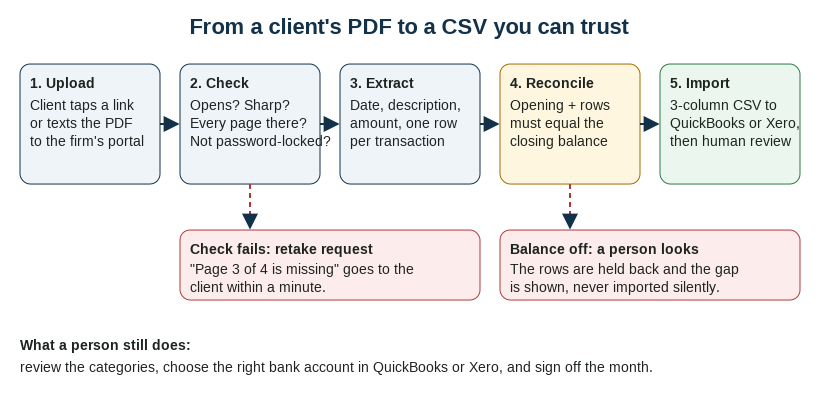
- Trigger: the month closes, and the portal asks each client for that month’s statement through a web link or a text message.
- Upload: the client taps the link and attaches the PDF from their bank app, or photographs a paper statement.
- Check: an AI vision step confirms the file opens, every page is there and the numbers are sharp.
- Extract: each transaction becomes one row of date, description and amount, with the opening and closing balances read separately.
- Reconcile: the script adds the rows to the opening balance and compares the result to the closing balance.
- Write: a passing statement becomes a 3-column CSV, imported to the right bank account in QuickBooks Online or Xero.
- Review: the pre-categorized lines wait for a person to approve; our guide to QuickBooks receipt categorization automation covers that part.
Step 5 is the one most converters leave out, and it is the reason the rest can be trusted.
What CSV format does QuickBooks Online accept for bank transactions?
QuickBooks Online accepts a CSV with either three columns (Date, Description, Amount) or four (Date, Description, Credit, Debit), up to 1,000 lines and 350 KB per upload.
| Rule | What Intuit says | What it means for automation |
|---|---|---|
| Columns | Each file needs either 3 (Date, Description, Amount) or 4 (Date, Description, Credit, and Debit) columns. | Drop running balances and check numbers before writing the file |
| Size | You can include up to 1,000 lines per upload; 350 KB or less | Split a busy account into several files |
| Dates | One format throughout; dd/mm/yyyy recommended | Convert every date to one format, and fix a stray “TUE” after a date |
| Zeros | Leave zero-only cells blank | Write empty, not 0.00, in Credit and Debit |
| Descriptions | Remove numbers from description cells | Strip reference numbers into a separate memo, or clean them |
| Language | Files must be in English | Flag statements in other languages for a person |
One detail is easy to miss: the statement should start at least one day before your oldest QuickBooks transaction for that account, or the import can leave a gap.
For a client with 2,400 transactions a year, the 1,000-line limit means at least three files. Splitting by month is simpler and keeps each file tied to its own statement.
How do I check that a converted bank statement is accurate?
Check a converted bank statement by adding every extracted row to the opening balance and confirming the total equals the closing balance printed on the statement, to the cent.
Here is a made-up May statement, with the arithmetic done by us on November 28, 2026. The statement is illustrative, not a real client.
| Date | Description | Amount | Running total |
|---|---|---|---|
| Opening balance | 4,210.55 | ||
| 05/02 | Deposit Stripe | +1,845.20 | 6,055.75 |
| 05/04 | Staples | -86.43 | 5,969.32 |
| 05/09 | Check 1042 | -1,200.00 | 4,769.32 |
| 05/15 | Shell | -62.18 | 4,707.14 |
| 05/21 | Deposit Square | +932.10 | 5,639.24 |
| 05/28 | Adobe | -59.99 | 5,579.25 |
| Closing balance printed | 5,579.25 |
The rows net to +1,368.70, and 4,210.55 plus 1,368.70 is 5,579.25, which matches. Now misread one digit: if the Staples line comes out as -86.48 instead of -86.43, the total is 5,579.20, five cents off, and the file is held back.
A misplaced decimal, a dropped minus sign or a missing page each break the equation, so no row can slip in unnoticed. The same idea appears in the open-source pdf-bank-statement-parser, which says it reconciles running balances against the statement’s opening and closing balances; it only supports one South African bank’s statements.
What should AI check before it trusts a bank statement PDF?
AI should check that the PDF opens, that every page is present and readable, and that it is the right account and month, before any row is extracted.
- Opens: a password-locked PDF can’t be read; Microsoft’s page says the lock
must
be removed before submission, so the client gets a message asking for an unlocked copy. - Every page:
Page 2 of 4
footers are counted, so a statement that stops at page 3 is caught at once. - Sharp scan: Dext asks for scans of at least 200 dpi; a blurry phone photo gets a retake request.
- One account: Dext’s guidance is one statement for one bank account per file; a combined file is flagged.
- Right period: the dates fall in the month asked for, and a December to January statement gets its year checked.
- Cheque images: pages with images and no transactions are skipped, not guessed at.
Plain upload folders only know a file arrived. The check is what turns “a file arrived” into a complete statement arrived
, which is when the chasing should stop. Our guide to extracting data from scanned receipts and bank statements goes deeper on scans.
Which tools turn a PDF bank statement into a CSV?
Dext and Hubdoc read PDF statements and produce a CSV you upload yourself, while Microsoft’s Azure Document Intelligence returns structured data that a small script turns into the CSV.
Honestly, the balance check is the quiet hero here. It means nobody has to squint at 200 lines hoping a decimal didn’t slip.
| Tool | Input limits | Output | Worth knowing |
|---|---|---|---|
| Dext | PDF or TIFF, 50MB, 300 pages, one account per file | CSV export | Every page counts toward your allowance, even a page with only cheque images; digital PDFs take minutes, scans up to 24 hours |
| Hubdoc with Xero | PDFs from supported banks, US and Canada | A CSV you upload to Xero | Xero’s blog says the extraction takes under three minutes |
| Azure Document Intelligence | PDF or image, up to 2,000 pages, 500 MB on the paid tier | JSON you convert | Prebuilt US model: prebuilt-bankStatement.us; the free tier reads only the first two pages |
In short, none of the three imports straight into the books. The automation that saves the hours is the one that adds the page check, the balance check and the import after the tool.
Where does the advice on PDF statements disagree?
The advice disagrees on whether to convert PDFs at all: the QuickBooks Community thread tells users to look for a bank’s own QBO, OFX or CSV download first, while the converter vendors sell conversion as the main route.
Both are right in different places. A native bank download has no reading step, so it is the more reliable file when the client can log in and get it.
The catch is the client. Many clients send only the PDF their bank emails them, and an Adobe community expert in a related thread said direct PDF-to-Excel conversion usually doesn’t work well on bank statements.
Sources also disagree on Xero’s CSV columns. Some guides we read say only Date and Amount are required, others say a description is also needed. Xero’s own import page would not load for our reader, so we state no Xero column rule; open Xero’s statement import template and match it.
How many hours does converting 40 clients’ statements take by hand?
Converting statements by hand takes about 80 staff hours a year for 40 clients in our model, against about 16 hours when a person only reviews the automated result.
| Item | Assumption | Result |
|---|---|---|
| Statements a year | 40 clients x 12 months | 480 |
| By hand | 10 minutes to copy and fix one statement | 80 hours |
| Automated, review only | 2 minutes to look over one result | 16 hours |
| Hours returned | 80 minus 16 | 64 hours |
The 10 and 2 minute figures are our assumptions, not measured in your firm. Change them to your own clock times; a statement with 300 lines will take far longer than 10 minutes by hand.
The calculator multiplies clients by statements, then by minutes, and shows the gap in hours. It leaves out the cost of the tool and of building the check.
Is it safe to upload clients’ bank statements to a converter?
It is safe only when you know where the file goes, because a bank statement holds an account number, a name and every payee, and many online converters upload it to their own servers.
Ask three things before you pick one: where the PDF is stored and for how long, whether the vendor uses it for anything else, and whether it can delete it on request. Put the answers in your written security plan, as the IRS reminds tax professionals to do for tools that touch client data.
Clients should send files only through the secure portal link, not as a photo texted back into a message thread.
How do I test PDF bank statement automation with one client?
Test it with one client’s last three statements: run them through, compare the CSV to the PDFs line by line, and see whether the balance check catches a row you break on purpose.
- Pick one client with a single checking account and about 50 to 100 transactions a month.
- Convert three months and reconcile each to its closing balance.
- Break one row on purpose, such as changing -86.43 to -86.48, and confirm the file is held back.
- Import one file into a test company or test account, and check the 3-column format and dates.
- Count the minutes your reviewer spent, and use them in the calculator above.
When that works, add the client portal, the page check and the other clients one at a time. Our guide to bookkeeping firm workflow automation shows where this fits in the month-end close.
How we researched this
- Read on November 28, 2026: Intuit’s QuickBooks Online help page on uploading transactions, Dext’s help page on bank statements, Xero’s product blog on getting bank data into Xero, and Microsoft Learn’s bank statement model page (updated October 19, 2026).
- Read a QuickBooks Community thread on PDF statements and the PyPI page for pdf-bank-statement-parser. Several vendor pages appeared in our searches; we treated them as marketing, not evidence.
- Compared: accepted inputs, outputs and limits for four systems, and the QuickBooks CSV rules.
- Built ourselves: the six-line sample statement and its arithmetic, and the 40-client time model, both with assumptions stated.
- Did not do: we have not installed or tested any converter, and Xero’s own CSV import page and r/Bookkeeping threads could not be read, so we make no Xero column claim and no count of forum posts.
Try one client’s last three statements, break a row on purpose, and see the check catch it.
Sources and further reading
- Intuit: manually upload transactions into QuickBooks Online (CSV format rules)
- Dext Help: how to upload bank statements
- Xero blog: get banking data into Xero (file types, Hubdoc)
- Microsoft Learn: bank statement US extraction model
- QuickBooks Community: bank statements PDF to CSV (user discussion)
- PyPI: pdf-bank-statement-parser (balance reconciliation example)
- IRS: Protect your clients, protect yourself (security plans)
Questions and answers
Can I use AI to convert PDF bank statements to CSV automatically?
Yes, for the reading step. AI can read a statement PDF and extract each transaction into rows, as tools like Dext and Microsoft’s bank statement model do. It can misread a digit, so the rows should be added to the opening balance and matched to the closing balance before anything is imported.
What CSV format does QuickBooks Online need?
Intuit’s help page says each file needs either three columns (Date, Description, Amount) or four (Date, Description, Credit, Debit), with up to 1,000 lines per upload and a size of 350 KB or less. Use one date format and leave zero cells blank.
Can Xero import a PDF bank statement?
Not directly. Xero’s blog says it takes OFX, QBO, QFX, QIF or CSV files. In the US and Canada, Hubdoc can read PDF statements from supported banks and produce a CSV that you upload to Xero yourself.
How do I know the converted CSV is correct?
Add every row to the statement’s opening balance. The total must equal the closing balance to the cent. If it is off, a row was missed or misread, so hold the file back and look at the gap.
Is it better to ask the client for a CSV instead of a PDF?
When the client can log in to their bank, a native QBO, OFX or CSV download needs no reading step and is more reliable. Many clients only have the emailed PDF, so a conversion step with a balance check covers them.