
Bookkeeping Firm Workflow Automation: Close Every Client on Time
Hello, and welcome to anyone who keeps a color-coded spreadsheet of which client is waiting on what.
Picture the tenth of the month with every client’s close already moving, and nobody on your team asking where things stand.
In most small bookkeeping firms, that status lives in a spreadsheet, three inboxes and one person’s memory.
The books do get closed, but half the month goes to opening jobs, asking for statements, chasing the reason behind a $612 Zelle payment, and asking each other who has which client.
Short answer: Bookkeeping firm workflow automation means each client’s monthly close opens itself from a template, asks the client for documents and keeps reminding them, checks every upload, pre-categorizes transactions and sends the few unclear ones back as questions. Your team then reconciles, reviews and approves. Karbon, Financial Cents and Intuit’s Books Close run the workflow; AI does the reading.
What is bookkeeping firm workflow automation?
Bookkeeping firm workflow automation is software that runs the repeatable parts of every client’s monthly close: opening the work, asking the client for things, checking what arrives and handing each job to the next person.
It works in three layers, and most firms automate only the first one.
- Workflow layer
- Recurring close jobs, checklists, owners, due dates and one status board for every client. Tools: Karbon, Financial Cents, Jetpack Workflow, Intuit’s Books Close.
- Client layer
- Requests, reminders, uploads and questions the client answers from a phone, without a login to remember.
- Data layer
- Reading statements and receipts, pre-categorizing transactions in QuickBooks Online or Xero, and flagging what looks off before a person sees it.
A practice management tool alone keeps the to-do list tidy. The hours come back when the client and data layers feed it.
Then a job moves to Ready for review because the statements really arrived and the transactions really got coded, not because someone ticked a box.
Which parts of a monthly bookkeeping close can be automated?
Most of a bookkeeping firm’s monthly close can be automated up to the review, and almost none of the review itself should be.
| Step | By hand today | Automated version | Who checks |
|---|---|---|---|
| 1. Open the month | Copy last month’s checklist | Recurring job created from the client’s template on day 1 | Nobody |
| 2. Ask for documents | Email each client, then follow up | One request by text or link, reminders until each item is in | A person only when overdue |
| 3. Check uploads | Open each PDF, count the pages | AI vision checks the month, the pages and the image | A person on a failed check |
| 4. Code transactions | Categorize line by line | Bank rules, past coding, then an AI suggestion | A person approves suggestions |
| 5. Ask about unclear lines | Spreadsheet of questions by email | Client answers in one list; answers sync to the books | A person approves answers |
| 6. Reconcile and review | Preparer and reviewer | Stays human | Preparer and reviewer |
| 7. Send reports | Export and email | Report pack sent once the month is approved | Reviewer approves the send |
How much time does a bookkeeping firm lose to close admin each month?
A bookkeeping firm with 40 monthly clients can spend about 50 staff hours a month on close admin alone, before anyone reconciles a single account.
| Admin task | By hand, per client | Automated, per client |
|---|---|---|
| Open and track the month’s checklist | 10 minutes | 1 minute |
| Request documents and follow up | 20 minutes | 3 minutes |
| Build, send and chase the question list | 30 minutes | 10 minutes |
| Check statements for missing pages | 10 minutes | 3 minutes |
Where are we on this client?check-ins | 5 minutes | 0 minutes |
| Total per client | 75 minutes | 17 minutes |
| 40 monthly clients | 50.0 hours ($1,750) | 11.3 hours ($397) |
Assumptions, compiled by Accounting Firm Automation on November 27, 2026: the minutes per task above, $35 an hour loaded staff cost, and clients who answer within the reminder cycle. That leaves about 38.7 hours, or $1,353, back each month.
Reconciliation and review time is left out on purpose, because that time stays with your team.
The software side has published prices. Three users on Financial Cents Team at $49 each, plus its Month-End Close add-on at $5 per client for 40 clients, comes to $347 a month billed annually. Swap in your own client count and rates.
How does an automated bookkeeping workflow run, step by step?
An automated bookkeeping workflow runs each client’s month in seven steps, and a person only steps in once the job is truly ready for review.
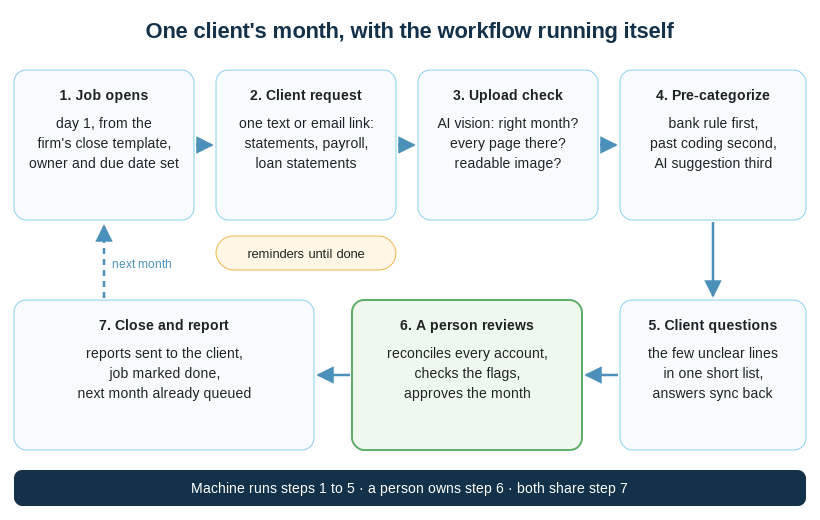
- The job opens. On day 1, the close template for that client type creates the month’s job, with a preparer, a reviewer and a due date.
- The client request goes out. One text or email link lists exactly what this client owes this month: the statement for the account with no bank feed, the payroll report, the loan statement. Reminders repeat until each item is in.
- Every upload gets checked. AI vision confirms the statement covers the right month, every page is there (3 of 3, not 2 of 3) and the image is readable. A failed check goes straight back to the client.
- Transactions get pre-categorized. Bank rules decide repeat spending, the client’s past coding decides familiar vendors, and AI suggests a category for the rest, with a reason.
- Unclear lines become questions. The few transactions nobody can code go to the client in one short list. The answers and any receipts sync back to the books.
- A person reviews. Only now does the job land on the preparer’s list as Ready for review, with every document in and every question answered.
- The month closes. Once the reviewer approves, the report pack goes out, the job closes, and next month’s job is already waiting.
Steps 2 and 3 are the same machinery as automated chasing for tax documents, just on a monthly rhythm. Step 4 is covered in detail in QuickBooks receipt categorization automation.
For clients who still mail paper statements, the guide to extracting data from scanned receipts and bank statements shows how a statement is proven to balance before it reaches the books.
Which workflow software do bookkeeping firms use, and what does it cost?
Bookkeeping firms usually run the workflow layer on a practice management tool such as Karbon, Financial Cents or Jetpack Workflow. QuickBooks firms also now get Intuit’s own Books Close inside Intuit Accountant Suite.
| Tool | Published price | Client requests and reminders | Close features |
|---|---|---|---|
| Karbon | Team $59, Business $89 per user a month, billed annually | Automated client requests on all plans; automatic client reminders on Business and Enterprise | Document requests built into job templates |
| Financial Cents | Solo $19 (one user), Team $49, Scale $69 per user a month, billed annually | Client tasks and requests on all plans; auto-follow-ups for client tasks on Scale | Month-End Close add-on, $5 per client a month, for uncategorized QuickBooks Online transactions |
| Jetpack Workflow | Starter $49, Premium $59 per user a month, billed monthly | Not listed on its pricing page | Unlimited templates and customizable automation |
| Intuit Books Close | Included in Intuit Accountant Suite Core ($0) and Accelerate ($149 a month from January 20, 2027) | Not detailed on the pricing page | Preparer, reviewer and approver per close; status tracking; Agentic Books Close pilot |
Karbon’s client portal page describes the template side well: Document requests are built into your template and send when the job starts, or on a delay you set.
Financial Cents’ Month-End Close add-on is the one that reaches into the books. Its help article works only with QuickBooks Online, so Xero clients need another route, such as Xero bank rules plus your own question list.
Other practice management tools, including TaxDome and Canopy, also serve firms that do both tax and bookkeeping. Compare their current plans on their own pages, since prices change often.
What does Intuit’s switch to Intuit Accountant Suite mean for bookkeeping firms?
Intuit is moving firms from QuickBooks Online Accountant to Intuit Accountant Suite, and its Books Close feature puts a month-end close workflow inside the same place the books live.
Intuit’s accountant page says: QuickBooks Online Accountant is being discontinued on December 31, 2026.
The Core version of the suite stays free, and Intuit’s pricing page lists Books Close in Core and Accelerate at no additional cost
.
Intuit’s November 2026 product update adds an Agentic Books Close pilot, where AI prepares the month to the firm’s standards and logs its actions in an audit log. Intuit says a paid add-on will be required after the pilot.
For a firm whose clients are all on QuickBooks Online, that can cover the workflow layer at no cost. Firms with Xero clients, or with tax work in the same pipeline, often keep a separate practice management tool on top.
Why are clients the bottleneck in a bookkeeping firm’s workflow?
Clients are the bottleneck because almost every close waits on something only the client has: a statement, a payroll report, or the reason behind a transfer.
Honestly, the best part is the quiet. When a job moves to Ready for review on its own, nobody has to ask in the team chat who has the landscaping client this month.
The classic tool is a monthly spreadsheet of questions sent by email. It comes back weeks later, half answered, if it comes back at all, while the Ask My Accountant account quietly grows.
Automation changes how the question reaches the client and where the answer lands. Financial Cents’ help article says approving a client’s answer will update the category, add the client description and documents on the transaction in QuickBooks Online.
So nobody retypes the client’s reply into the books, and nobody has to remember which email thread held it.
What should a client request look like so clients actually answer it?
A client request gets answered when it takes two minutes on a phone and lists only what this client owes this month.
- One link that opens on a phone, with no password to remember.
- Only this client’s items for this month, named in plain words (
your business credit card statement for October
). - A photo check that replies within a minute, while the paper is still in the client’s hand.
- Questions with the date, amount and payee already filled in, so the client only types the reason.
- Reminders every few days that stop the moment an item is done.
- A due date tied to your close date, never
whenever you get a chance
.
Where does AI fit in bookkeeping firm workflow automation?
AI fits wherever a bookkeeping firm’s work is reading and sorting: checking uploads, pulling numbers from statements, suggesting categories and drafting the client’s questions in plain words.
- Reading: statements, receipts and payroll reports turned into fields, each with a confidence score.
- Checking: the wrong month, a missing page, a blurry photo, a statement whose balances don’t tie out.
- Suggesting: a category with a one-line reason, for transactions no bank rule covers.
- Writing: a friendly question such as
What was the $612 Zelle payment on October 14 for?
- Summarizing: a short note for the reviewer listing what changed since last month.
What AI shouldn’t do is approve its own work. Intuit’s bank rules article says this about auto-post rules, which post with no review: Remember to use this with caution.
Keep auto-posting for charges that never change meaning, like rent or a monthly software subscription. Everything else waits on the approval list for a person.
What still needs a person in an automated bookkeeping workflow?
Reconciliation, judgment calls and anything said to the client about taxes still need a person, even when the rest of the bookkeeping workflow runs itself.
- Reconciling each bank, card and loan account and signing off the balance.
- Meals, personal purchases on a business card, and owner draws.
- Loan payments split between principal and interest.
- Large purchases that may need to be capitalized.
- A new client’s first month, before any rules or coding history exist.
- The decision to send the reports, and any tax advice that goes with them.
What can go wrong when a bookkeeping firm automates its workflow?
The usual failures are quiet ones: a wrong rule that posts for months, reminders that wear out a good client, and client files sitting in a tool nobody secured.
A bad close template copies its mistake to every client at once. Review each template once a quarter, and fix it in one place so every client’s next job inherits the fix.
Too many tools split the work up again. If requests live in one app, questions in another and status in a third, the team is back to checking three screens. Decide which one tool holds each job’s status.
Reminders need a sensible rhythm. A client who uploads on day 2 shouldn’t get a nudge on day 4, so make sure every item stops its own reminders the moment it is done.
How should a small bookkeeping firm start automating its workflow?
Start with one close template, ten monthly clients and one month, then count how many jobs reach Ready for review without a single manual email.
- Write the close checklist for your most common client type, with a team side and a client side.
- Load it into your practice management tool as a recurring job for ten monthly clients.
- Turn on client requests and automatic reminders for statements and payroll reports.
- Add the upload check and the uncategorized-question step for your QuickBooks Online clients.
- Keep reconciliation and review exactly as they are today.
- At month end, count manual emails, days spent waiting on clients and hours of close admin, and compare them with the table above.
If those ten clients close with fewer emails and shorter waits, the other thirty follow the same template the next month.
Done well, the who-has-what spreadsheet disappears, and your team spends the month on the part only accountants can do.
Pick one client type, build its close once, and let next month open itself.
Sources and further reading
- Karbon: pricing (Team, Business, Enterprise; automated client requests, automatic client reminders)
- Karbon: client portal (document requests in templates, automatic reminders on Business and Enterprise)
- Financial Cents: pricing plans and Month-End Close add-on
- Financial Cents Help: manage uncategorized transactions (QuickBooks Online sync)
- Financial Cents: accounting workflow software (recurring work, client requests with reminders)
- Jetpack Workflow: pricing
- Intuit Accountant Suite pricing (Core, Accelerate, Books Close)
- Intuit: QuickBooks Online Accountant discontinuation and Intuit Accountant Suite
- Intuit Firm of the Future: November 2026 product updates (Books Close, Agentic Books Close pilot)
- Intuit: using shared documents and client requests in QuickBooks Online Accountant
- Intuit: set up bank rules in QuickBooks Online (auto-post caution)
- IRS: Protect your clients; protect yourself (security plans, Publication 5709)
Questions and answers
Can I use AI to automate my bookkeeping firm’s workflow?
Yes, for the reading and sorting parts. AI can check client uploads, pull figures from statements, suggest categories and draft client questions, while a practice management tool opens each month’s job and sends reminders. Reconciliation, judgment calls and approving the month should stay with a person on your team.
What is the best workflow software for a bookkeeping firm?
It depends on your clients’ books and your size. Financial Cents starts at $19 a month for one user and adds a QuickBooks Online uncategorized-transaction add-on. Karbon starts at $59 per user and adds automatic reminders on Business. All-QuickBooks firms can try Intuit’s Books Close at no extra cost.
Is QuickBooks Online Accountant being discontinued?
Yes. Intuit’s accountant page says QuickBooks Online Accountant is being discontinued on December 31, 2026, as firms move to Intuit Accountant Suite. The Core version stays free, and Intuit’s pricing page says Books Close is included in Core and Accelerate at no additional cost.
How do I get clients to answer uncategorized transaction questions?
Send fewer, easier questions. List only the transactions you can’t code, fill in the date, amount and payee, and let the client reply from a phone link. Automatic reminders every few days, stopping once answered, and answers that sync straight into QuickBooks Online remove most of the chasing.
How much does bookkeeping workflow automation cost?
Published prices start low. Financial Cents Team is $49 per user a month billed annually, its Month-End Close add-on $5 per client a month, and Karbon Team $59 per user. Our example of three users and 40 clients on Financial Cents comes to $347 a month.