How to Reduce Tax Season Client Follow-Up Emails (By Removing Their Causes)
Hello, and welcome to anyone whose inbox fills with did you get my W-2?
before the coffee has cooled.
Picture a March inbox where every email from a client is one only you can answer.
In most small firms, tax season email is a loop of the same few threads: what do you need, did you get it, is it done yet.
Nobody is doing anything wrong, of course; the client means well, and the 1099 really is on its way, probably right behind the corrected one.
Short answer: To reduce tax season client follow-up emails, remove the reasons clients and staff write them: send each client a personal checklist built from last year’s return, time requests to when forms arrive, confirm every upload automatically with what is still missing, check files on arrival, and send status updates before anyone asks.
Why do tax clients need so many follow-up emails?
Tax clients need so many follow-up emails because each step of the document chase leaves a question open, and an open question becomes a thread.
Six questions cause almost all of tax season’s follow-up email, and each one has a different fix:
| Source | What the email says | Who writes it |
|---|---|---|
| Vague first request | Which documents do you need from me? | Client, then staff |
| Asking too early | I don’t have my 1099 yet. | Client, then staff again two weeks later |
| Piecemeal uploads | Did you get it?and Thanks, still need your 1098. | Both, once per upload |
| Bad files found late | Page 3 of your statement is missing. | Staff, often weeks after the upload |
| Portal trouble | I can’t log in, can I just email it? | Client, then staff |
| Waiting in the dark | Is my return done yet? | Client, then staff |
The trade has a name for the third one. A Thomson Reuters blog for tax firms describes clients slow-dripping source documents and content to you, one at a time on a portal or via email
, and quotes Paul Miller, CPA, of Business by Design: We end up starting this, what we call, tax drop process way too prematurely.
Reminders alone don’t touch most of these rows. They fix the first email in the chase, not the five replies that follow it.
How much time do client follow-up emails cost an accounting firm?
Client follow-up emails clearly cost firms a lot of time, but the widely shared numbers measure different things, and some can’t be traced to a study.
| Claim | Who publishes it | What it really measures | What we found |
|---|---|---|---|
Up to 65% of tax work time is spent chasing information from clients | Karbon, crediting Intuit | Share of tax work time | The link goes to a 2017 QBO Show radio episode, not a published study |
| 64% of firm owners named chasing clients for information their biggest challenge | Financial Cents, 2025 report | Share of firms naming it, not hours | A vendor survey with a stated sample: 816 accounting, bookkeeping and tax firm owners |
58% of firm leaders rank document intake as a top-3 bottleneck,credited to an AICPA survey | Repeated across vendor blogs | Share of firms | DokuTrak tried to trace it to AICPA and found no such figure |
Here’s the gap: none of these sources counts emails. A firm can’t manage “65% of time” on Monday morning, but it can count how many threads one client opens, so that is what we did below.
How many follow-up emails does one tax client create?
One tax client can easily create a dozen follow-up emails in a season that a staff member has to read and answer, before counting the client’s own messages.
| Today, by hand | With the six fixes | |
|---|---|---|
| First document request | 1 | 0 (sent from the checklist) |
| Reminders for missing items | 3 | 0 (scheduled) |
| “Which documents?” clarifications | 2 | 1 |
| Replies to each piecemeal upload | 4 | 0 (automatic receipt) |
| Re-requests for bad files (15% of 4 uploads) | 0.6 | 0 (asked on arrival) |
Is my return done?replies | 2 | 0.5 |
| Exceptions a person must handle | included above | 1 |
| Total per client | 12.6 | 2.5 |
Assumptions, compiled by Accounting Firm Automation on November 28, 2026: four uploads per client, 15% of uploads needing a redo, and a clear checklist halving the clarification emails. Status texts are assumed to cut status questions by three quarters. These are estimates for a typical individual return, not survey results.
At the defaults, a 300-client firm writes about 3,780 follow-up emails and spends about 189 staff hours on them. With the fixes, the same firm writes about 750, mostly the exceptions that deserve a person.
The biggest lever is usually not the reminders. It is the replies to piecemeal uploads, because they multiply with every file a client sends.
How do you reduce tax season client follow-up emails, step by step?
You reduce tax season follow-up emails by matching each source of email with one automatic step, so the question is answered before anyone types it.
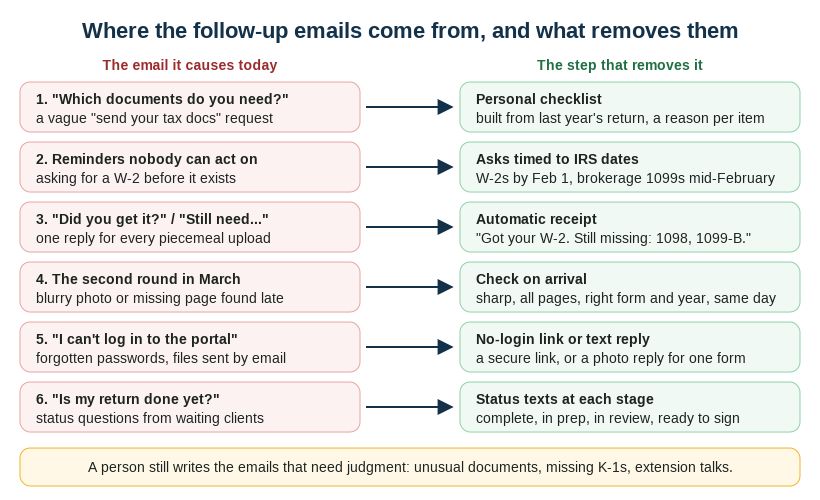
- Personal checklist: build each client’s list from last year’s return, with a one-line reason per item, so nobody has to ask what you need.
- Asks timed to IRS dates: request each form after it should exist, so clients aren’t reminded about paper they can’t have yet.
- Automatic receipt: answer every upload within a minute with what arrived and what is still missing.
- Check on arrival: test each file for blur, missing pages, the right form and the right tax year the moment it lands.
- No-login link or text reply: let clients send files without a password, so
I can’t log in
never gets written. - Status texts: tell the client when the file is complete, in preparation, in review and ready to sign.
The order matters. Steps 1 and 3 remove the most email, and both work in any practice management tool that can send a request and a template.
What should the first tax document request email say?
The first tax document request should list this client’s documents by name, give a reason for each, and say how and by when to send them.
Please send your tax documents
invites a reply. A list made from last year’s return answers it ahead of time:
Hi Dana, here is what we need for your 2026 return, based on last year: W-2s from Lakeside Clinic and Northgate Schools, your Fidelity 1099 (it usually arrives mid-February), the Form 1098 from your mortgage lender, and childcare receipts for Bright Start. Tap the link to snap or upload each one. Reminders stop on their own once everything is in.
That message, with a made-up client for this example, closes the “which documents?” thread before it opens. The last sentence matters too, because clients forgive reminders more easily when they know how to switch them off.
For new clients there is no last year to copy, so the list comes from a short intake instead. Our guide to the accounting client onboarding document checklist shows how to build one by client type.
When should you ask clients for their tax documents?
Ask for each tax document after its issuer must send it, because a reminder for a form that doesn’t exist yet only teaches clients to ignore your reminders.
| Form | Must reach the client by | Sensible first ask |
|---|---|---|
| Form W-2 (tax year 2026) | February 1, 2027 | Early February |
| Most Forms 1099 and 1098 | Generally January 31 (next business day if it falls on a weekend) | Early February |
| Forms 1099-B, 1099-DA, 1099-S and consolidated brokerage statements | February 17, 2026 in the last cycle (tax year 2025) | Late February |
| Schedule K-1 from partnerships | Often later, with the partnership’s own return or extension | Ask the client when the partnership expects it |
One honest limit: brokerages sometimes send corrected 1099s after the first copy. A checklist that marks the brokerage item received, may be corrected
saves an awkward amended-return email in April.
Timing also decides when the first request goes out. A January request for organizers and engagement letters is useful; a January reminder for a W-2 is noise.
How do you stop did you get my documents?
emails?
You stop did you get my documents?
emails by answering every upload automatically, within a minute, with what arrived and what is still missing.
Honestly, the automatic receipt is the quiet kindness here. A client who hears within a minute that their form arrived, and exactly what is left, never has to wonder, and never has to write.
The client who emails did you get it?
is really asking two questions: did it arrive, and am I done? An automatic receipt answers both:
Got your W-2 from Lakeside Clinic. Thank you.
Still missing: your Fidelity 1099 and the Form 1098.
Nothing else is needed from you for those two items.
Intuit’s Tax Pro Center makes the same point for the prep queue: If key documents are missing, the return should not enter the preparation queue.
It adds that an automated notification goes back to the client immediately listing the specific missing items.
After the file is complete, status texts take over: complete, in preparation, in review, ready to sign. A client who already knows where their return stands has no reason to email.
Email attachments are the other half. Once a no-login upload link exists, reply to emailed files with the link and a kind line, so the files land where the checks run.
Which tools send reminders that stop on their own?
TaxDome, Karbon, Canopy and Financial Cents all send automatic client reminders, but they differ on what stops them and whether clients can pause them.
| Tool | Reminder channel | When reminders stop | Worth knowing |
|---|---|---|---|
| TaxDome | When the client completes the action, or the set number of reminders is reached | Covers organizers, client requests, signatures and invoices | |
| Karbon | Sent on the dates you set (Business and Enterprise plans) | Clients can respond without creating an account or password | |
| Canopy | At the end of the chosen window, or when the request is complete, whichever is first | Clients can snooze reminders until the following Monday or pause them | |
| Financial Cents | Text and email | When every task in the section is complete | Auto Reminders require the Scale plan; magic-link access, no password |
Two details decide whether reminders cut email or create it. First, does the reminder list only the missing items? Second, does a half-finished request keep sending the full list? Test both on a staff member’s own return before season.
Some firms assume their tax software already does this. In an August 2026 thread on the Intuit Accountants Community, a solo practitioner said they didn’t think Intuit Link sends automatic reminders for outstanding documents. That is one user’s view, so confirm it with Intuit.
For a deeper look at reminder cadence, see our guide to automating the chase for tax documents.
Where does AI help reduce client follow-up emails?
AI reduces client follow-up emails mainly by reading every upload the moment it arrives, so bad files and missing pages are re-requested that day instead of in March.
Plain reminder software only knows that a file landed. Karbon’s client portal page says of its uploads: It doesn’t read or classify the file itself.
The checking is what the AI step adds.
- Legibility: a vision model or document reader flags a blurry or cut-off photo and asks for a retake while the client still holds the form.
- Completeness:
page 2 of 5
printed on a page with only 2 pages uploaded triggers a request for the rest. - Right document: a 2025 form, a paystub instead of a W-2, or the spouse’s form goes back with a specific note.
- Extraction: amounts and line items are pulled out, and receipts get a suggested category before a person looks.
- Reply drafts: for a client’s free-text question, AI can draft an answer from the file’s status for staff to approve.
The extraction side is covered in our guide to extracting data from scanned receipts and bank statements. That step is also where receipts become categorized entries in QuickBooks Online or Xero.
Clear messages matter as much as clever software. In a 2020 study in Science, Fishbane, Ouss and Shah found that a redesigned court summons form and text reminders reduced missed court dates by 13 to 21% in New York City.
Which client emails should a person still write?
A person should still write every email that needs judgment, bad news or a decision, because automation is for the questions with one right answer.
- A missing K-1 that pushes the return toward an extension.
- An unusual document nobody expected, such as a 1099-C for cancelled debt.
- A client who has ignored every reminder; by then a phone call works better than another email.
- Anything about fees, deadlines the client might miss, or an IRS notice.
- A grieving or struggling client, where a template would feel cold.
The goal is not zero email. It is an inbox where every message from a client is worth your time.
How should a firm set this up before the 2027 tax season?
Set it up in December, test it on a handful of friendly clients, and switch it on for everyone when the first W-2s arrive in early February.
- Count last season’s threads: search your inbox for “did you get” and “still need” to see which source is biggest for your firm.
- Build checklists from last year’s returns, with a reason per item.
- Write five messages once: the request, the upload receipt, two reminders and the status update.
- Set reminder dates from the IRS furnishing dates, not from January 1.
- Turn on a no-login upload link, and decide which clients may reply by text.
- Add the upload check: legibility, page count, form and tax year.
- Try it on 10 clients and read every message they receive.
If the pilot doesn’t cut the inbox in its first two weeks, look at which thread is still growing and fix that one source first.
Done well, February’s email becomes short receipts and status notes, and the conversations left are the ones that need an accountant.
How we researched this
- Read the reminder and client request documentation of TaxDome, Karbon, Canopy and Financial Cents on November 28, 2026, and recorded what each says stops reminders.
- Checked form dates in the IRS instructions for Forms W-2 and W-3 and the General Instructions for Certain Information Returns, the latter still for tax year 2025.
- Traced three widely shared time-lost statistics to their sources (Karbon, Financial Cents, DokuTrak) and noted what each one measures.
- Read practitioner discussion in Intuit’s Accountants Community and Tax Pro Center and a Thomson Reuters blog for tax firms; paraphrased, no private people named.
- Built the email-per-client model and calculator ourselves; its numbers are assumptions, not a survey.
- We did not install or test these tools in a firm.
Count last season’s threads, fix the biggest source first, and let this February’s inbox hold only the emails that need you.
Sources and further reading
- TaxDome Help Center: reminders explained
- Karbon: client portal and client requests
- Karbon: workflow automation and scheduled client reminders
- Karbon: post-tax season insights (Intuit 65% figure)
- Canopy Support: send a client request (reminders, snooze, pause)
- Financial Cents: client tasks with automated text and email reminders
- Financial Cents Help: Auto Reminders on client task sections (Scale plan)
- Financial Cents: 2025 State of Accounting Workflow and Automation Report (816 firm owners)
- Financial Cents: client communication and firm growth (64% figure)
- DokuTrak: client document collection statistics and untraceable claims
- Thomson Reuters: set clear guidelines for tax preparation source document delivery (April 29, 2020)
- Intuit Tax Pro Center: tactical timesaving tips for a terrific tax season
- Intuit Accountants Community: can Lacerte and Intuit Link handle document requests and reminders? (August 2026)
- IRS: General Instructions for Forms W-2 and W-3
- IRS: General Instructions for Certain Information Returns (2025)
- Fishbane, Ouss and Shah, Behavioral nudges reduce failure to appear for court, Science (2020)
- IRS: Protect your clients, protect yourself (security plans)
Questions and answers
Can I use AI to reduce the follow-up emails clients need during tax season?
Yes. AI can check every upload the moment it arrives, ask for a retake or a missing page that day, confirm what arrived and list what is still missing, and draft replies for staff to approve. Reminders and status updates are plain automation. A person should still write emails about extensions, fees and unusual documents.
How many reminder emails should a tax client get?
Two or three reminders over two to three weeks, each listing only the missing items, is a sensible start. After that, a phone call usually works better than another email. Time the first reminder after the form’s IRS furnishing date, such as February 1, 2027 for tax year 2026 W-2s.
Should we stop accepting tax documents by email?
Many firms reply to emailed documents with a no-login upload link and a kind line asking clients to use it next time. That keeps files where the completeness checks and automatic receipts run, and it keeps sensitive attachments out of inboxes.
What should an automatic upload confirmation say?
It should name the document that arrived, list the items still missing, and say plainly when nothing else is needed. For example: Got your W-2 from Lakeside Clinic. Still missing: your Fidelity 1099 and Form 1098.
Do status updates really cut "is my return done" emails?
They remove the reason for most of them. A client who gets a short message at each stage (documents complete, in preparation, in review, ready to sign) already knows the answer. Clients with real questions will still write, and those emails deserve a person.