
Dentrix Automated Recall System: How It Works and What It Misses
Hello, and a warm welcome to every front desk whose Dentrix Continuing Care List is longer than the hygiene schedule has room for.
Picture your Dentrix Continuing Care List on a Monday morning, two hundred names long, and a hygiene column with three open hours on Thursday.
Dentrix already knows who is due, when they were last seen and which visit type they need.
The Dentrix automated recall system is how that knowledge turns into reminders, and this guide shows where it stops and what can run on top of it.
Short answer: The Dentrix automated recall system has two parts. Dentrix Continuing Care tracks each patient’s recall type and due date. Patient Engage’s Personalized Recall texts and emails due, unscheduled patients, by default 2 and 1 weeks before the due date and 1, 2, 4, 13, 26 and 52 weeks after. Replies still need a person or an assistant.
- Where recall lives in Dentrix
- Continuing Care: types and intervals in Office Manager, the Continuing Care List from the Appointment Book
- What sends the reminders
- Patient Engage, Personalized Recall (Dentrix Hub, Settings, Communications, Personalized Recall)
- Default reminder count
- 8 per due date: 2 before it and 6 after it, over about 54 weeks
- Who gets them
- Only patients Dentrix sees as not scheduled for their continuing care appointment
- Status limit
- Dentrix allows at most 10 continuing care statuses (Dentrix Magazine, 2019)
What is the Dentrix automated recall system?
The Dentrix automated recall system is Dentrix Continuing Care, which tracks who is due, paired with Patient Engage, which sends the reminders automatically.
Dentrix calls recall “continuing care.” Each patient can carry one or more continuing care types, such as a 6-month prophy or a 3-month perio maintenance, each with its own interval and due date.
The Continuing Care List opens from the Continuing Care button in the Appointment Book. It shows patients who are due but have no appointment, and you can filter it with saved views.
On its own, that list is a to-do list for a person. The sending part comes from Dentrix Patient Engage, Henry Schein One’s patient communication add-on. Its Personalized Recall feature sends text and email reminders to patients who are due and unscheduled, per Dentrix Magazine (October 8, 2020).
The cloud product, Dentrix Ascend, calls the same idea “Recare” and has its own reminders. More on that below.
Why does the Dentrix Continuing Care List keep piling up?
The Dentrix Continuing Care List piles up because it finds overdue patients perfectly but cannot talk to them, and calling it is the first job a busy front desk drops.
The phone at the window always wins over a cold recall call. And the effect hides for weeks, because hygiene is booked ahead: today’s skipped calls become next month’s open chair.
Dentrix’s own trainers describe a manual routine. In a 2019 Dentrix Magazine article, Certified Dentrix Trainer Charlotte Skaggs lays out four weekly passes: patients due this month, then 30, 60 and 90 days past due, with statuses Call 1, Call 2, Call 3 and Letter Sent.
She also names the owner question plainly: It’s a good idea to have one team member responsible for this.
In many offices, that one person is also answering phones and checking out patients.
Here’s the catch: reminders that do go out create a second pile. Patients answer “next Tuesday?” or is Dr. Patel still there?
, and those replies wait in an inbox until someone has a minute.
How much front desk time does working the Dentrix recall list by hand take?
Working the Dentrix Continuing Care List by hand takes about 19 times more staff time than letting reminders go out automatically and answering the replies, in our example with stated assumptions.
| Patients due and unscheduled each month | Staff hours, manual (3 calls + 1 letter each) | Staff cost, manual at $22/hour | Staff hours on replies, automated | Staff cost on replies |
|---|---|---|---|---|
| 50 | 11.7 | $257 | 0.6 | $14 |
| 100 | 23.3 | $513 | 1.3 | $28 |
| 200 | 46.7 | $1,027 | 2.5 | $55 |
Assumptions: 4 minutes per call attempt (dialing, a voicemail and the Office Journal note), 2 minutes per letter, the four passes from the Skaggs routine, $22 an hour as a rough loaded front desk cost, and 1 patient in 4 replying at 3 minutes each. Swap in your own numbers.
Patient Engage subscription and texting fees sit on top of the automated column. Henry Schein One does not publish them; its product page offers a demo instead of a price.
The 100-patient row is about three working days of calls a month. That is why the 60-day and 90-day passes are the ones most offices quietly skip.
How does Dentrix decide who is due for recall?
Dentrix decides who is due from continuing care types attached to each patient, and the due date moves forward when a linked procedure is set complete.
- Set up the types. In Office Manager, Maintenance, Practice Setup, Continuing Care, Continuing Care Setup, each type gets a name, a description and an interval, such as
4 Months + 1 day
for perio maintenance (Dentrix Magazine, updated 2019). - Link procedure codes. In Procedure Code Setup, the Auto Continuing Care box ties a code to one type. The article’s example links the perio codes D4341 and D4342 to the perio type.
- Complete the visit. When the linked procedure is set complete, Dentrix resets that type’s due date by the interval.
- Adjust per patient. In the Family File, the patient’s Continuing Care window lets you change the interval for one person, for example from 4 months to 3.
- Read the list. The Continuing Care List shows patients past or near their due date with no appointment, filtered by your saved views.
One detail trips many offices: a procedure code can attach to only one continuing care type. If two types share a code, one of them never resets, and its patients look overdue forever.
Every automated reminder downstream reads these due dates. If the types are messy, the automation simply sends messy reminders faster.
When does Dentrix Patient Engage send recall reminders?
Dentrix Patient Engage sends Personalized Recall reminders 2 weeks and 1 week before a patient’s due date, then 1, 2, 4, 13, 26 and 52 weeks after it, as long as the patient stays unscheduled.
That default comes from the Dentrix Blog post Sending Modified Recare Due Reminders with Patient Engage
(May 12, 2020). It says these reminders will send to unscheduled patients 2 weeks and 1 week before their due date
, and that the messages and intervals can be changed.
| Reminder | Timing | Date it would go out |
|---|---|---|
| 1 | 2 weeks before due | |
| 2 | 1 week before due | |
| 3 | 1 week after due | |
| 4 | 2 weeks after due | |
| 5 | 4 weeks after due | |
| 6 | 13 weeks after due | |
| 7 | 26 weeks after due | |
| 8 | 52 weeks after due |
Notice the gap: after week 4, the next touch comes two months later. A patient who meant to book in July and forgot hears nothing until the end of August.
The same blog post notes that a patient overdue by 2 weeks or more receives a message at most every 14 days, so the schedule stays polite even when you add steps.
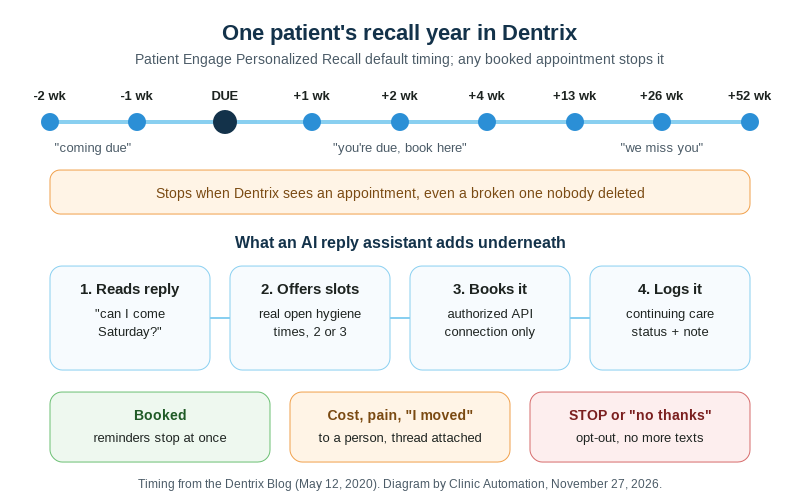
In words, the diagram shows one due date and what happens around it:
- Eight reminders: 2 and 1 weeks before the due date, then 1, 2, 4, 13, 26 and 52 weeks after it.
- A stop rule: reminders end whenever Dentrix sees an appointment, including a forgotten broken one.
- An assistant layer: it reads the reply, offers 2 or 3 real hygiene slots, books through an authorized connection and writes the continuing care status and a note.
- Three reply paths: a booking stops the reminders, cost, pain or “I moved” goes to a person, and STOP ends the texts.
Why are some Dentrix recall reminders not sending?
Dentrix recall reminders usually stop because Dentrix sees an appointment on the schedule, the patient has no continuing care type attached, or the contact details block texting.
The first one is the sneaky one. The 2020 Dentrix Blog post says the reminders are only sent to patients who are detected by the system as not being scheduled for their continuing care appointment.
So a broken appointment nobody deleted, or a placeholder visit set for “sometime next spring,” keeps a patient silent. The patient looks scheduled to Dentrix and unreached to everyone else.
- Ghost appointments: broken or placeholder visits still in the Appointment Book.
- No type attached: a new patient whose first cleaning code was not linked through Auto Continuing Care.
- Shared codes: one code on two types, so one due date never resets.
- Contact gaps: no mobile number, no email, or a “do not contact” flag.
- Stale statuses: patients marked Call 3 months ago and never moved on.
A weekly ten-minute check of these five clears most silent patients. An assistant can run the same check every night and hand the front desk a short list.
What can an AI assistant add to the Dentrix automated recall system?
An AI assistant adds the two things Dentrix recall leaves to people: answering free-text replies with real open times, and calling the patients who never read texts.
Dentrix already remembers who is due. The part worth handing off is the conversation that starts when a patient answers.
Patient Engage already supports two-way texting, so patients can answer. But can I come Saturday?
, “my husband too?” and I have new insurance now
still need someone to read the schedule and write back.
An SMS assistant reads each reply, checks open hygiene slots, offers two or three, books the one the patient picks and confirms it. It writes a note and the new status so the Continuing Care List stays honest.
A voice agent can take the 60-day and 90-day passes from the Skaggs routine: polite calls, a voicemail script and a booking when someone answers. It can also catch the calls patients make back after a reminder.
What stays human: cost questions, anything clinical, pain or swelling, an unhappy patient, and anyone who asks for a person. Those land on a short list with the conversation attached, so nobody asks the patient twice.
How do outside recall tools connect to Dentrix safely?
Outside recall tools connect to Dentrix safely through Henry Schein One’s API Exchange, the authorized integration program for Dentrix and Ascend.
Henry Schein One describes the API Exchange as using SOC 2 Type II compliance and OAuth 2.0
. Vendors apply and sign an agreement before they are listed; there is no public self-serve API key.
Henry Schein One also keeps an authorized vendor list. The same page lists vendors it says may be utilizing an unauthorized connection
and asks practices to confirm a vendor is on the authorized list first.
| Route | What it covers | What to check |
|---|---|---|
| Patient Engage (Henry Schein One) | Personalized Recall, reminders, two-way texting, online booking, campaigns | Pricing through sales; who answers replies |
| Authorized API Exchange vendor | Texting, voice or AI tools that read and write Dentrix data | Name on the authorized list; signed BAA; which data it writes back |
| Custom assistant through an authorized vendor | An AI reply and call layer built for your office’s rules | Same checks, plus a human exception list and a written stop rule |
A custom assistant usually sits on top of Patient Engage rather than replacing it. Dentrix keeps sending the reminders; the assistant handles what happens after the patient answers.
How does recall automation work in Dentrix Ascend?
Dentrix Ascend calls recall “Recare” and attaches it automatically when a completed procedure linked to a recare code is posted.
The Ascend Recare overview says Ascend can send automated reminders and let patients book online once recare types and communications are set up. Intervals can be customized per patient.
Ascend adds a helpful nudge at the desk: the routing panel alerts the team at checkout when a patient leaves without a recare appointment. That is the cheapest recall step there is.
Recare types are global across locations, and managing them needs the “Manage recare setup” user right. Multi-office groups should agree on one set of types before switching reminders on.
How should a cash-pay or out-of-network office set up Dentrix recall?
A cash-pay or out-of-network office should treat Dentrix recall as its main way to keep patients coming back, because no insurance plan is nudging those patients toward their next cleaning.
Insured patients often hear about yearly benefits from their plan or employer. A patient paying cash usually hears only from you, so a gentle reminder at the right time carries more weight.
Check that cash-pay patients carry continuing care types too. Since Dentrix attaches types from completed procedure codes, a patient seen under a custom fee schedule or a membership code may never get a type unless that code is linked.
Keep prices and offers out of the automated text. If the office runs an in-house membership plan, mention what the visit includes when the patient calls or books, not in the reminder itself.
What FCC and HIPAA rules apply to automated recall texts?
Automated recall texts fall under the FCC’s health care rule for automated messages and under HIPAA’s treatment communication rules.
The FCC rule at 47 CFR 64.1200(a)(9)(iv) allows health care texts such as appointment reminders and wellness checkups to the number the patient gave you, if every condition is met:
- At most 1 message a day and 3 a week per patient.
- 160 characters or fewer per text.
- The provider’s name and contact information in each message.
- No advertising, telemarketing, billing or debt collection content.
- An easy opt-out, honored right away.
The default Dentrix timing stays far inside those limits: 8 reminders over about 54 weeks. Extra campaigns stacked on top are where offices can drift over.
On HIPAA, the HHS FAQ for smaller providers says: Yes, appointment reminders are considered part of treatment of an individual and, therefore, can be made without an authorization.
Any vendor that handles the replies still needs a business associate agreement; Twilio, for example, signs one only on qualifying editions.
What should you check before you switch Dentrix recall to automatic?
Check the due dates, the schedule and the contact details first, because automation repeats every mistake in them at scale.
- Continuing Care types are one per purpose, with clear names and intervals.
- Every prophy, perio maintenance and exam code is linked through Auto Continuing Care, and no code sits on two types.
- Broken and placeholder appointments are deleted, so no patient looks scheduled by mistake.
- Your 10 continuing care statuses include the steps the automation will set, such as “Text sent” and “Booked by assistant.”
- Mobile numbers and emails are current; “do not contact” flags are respected.
- The intake form asks for consent to texts about appointments and care.
- Personalized Recall wording is saved in a document before you edit it.
- Any outside tool is on Henry Schein One’s authorized vendor list.
- Every vendor that sees patient data has signed a business associate agreement.
- One named person owns the exception list and clears it every working day.
How do you set up automated recall in Dentrix in the first month?
Set up automated recall in Dentrix by cleaning the data in week 1, switching on the default reminders in week 2, and adding reply handling only after you have seen real replies.
- Week 1: run the checklist above, fix the types and codes, and delete ghost appointments.
- Week 2: turn on Personalized Recall at the default timing and read every reply the same day.
- Week 3: add an SMS assistant or a set reply routine for scheduling answers, and keep cost and clinical replies with a person.
- Week 4: count reminders sent, replies, bookings, opt-outs and staff minutes, then decide whether the 60-day and 90-day passes need calls.
Once the month runs smoothly, the Continuing Care List stops being a guilt pile. It becomes a short list of patients who truly need a human voice.
And the patient who meant to book in July gets a kind reminder, an easy reply, and a cleaning on the calendar before the chair goes empty.
Clean up the ghost appointments first, switch on the reminders, and let the replies come to someone who can book them.
Sources and further reading
- Dentrix Magazine: Establishing an Effective Continuing Care Process (Charlotte Skaggs, March 7, 2019)
- Dentrix Magazine: Customizing Recall for Your Patients in Dentrix (Sean Eyring, 2018, updated 2019)
- Dentrix Magazine: Communicate with Your Patients Using Email and Text Messages (October 8, 2020)
- The Dentrix Blog: Sending Modified Recare Due Reminders with Patient Engage (May 12, 2020, Internet Archive copy)
- Dentrix: Patient Engage Suite
- Dentrix: Patient engagement, automated reminders, two-way texting
- Dentrix Ascend Learning: Recare Overview
- Henry Schein One: API Exchange
- Henry Schein One: Authorized Dentrix and Ascend integrations
- 47 CFR 64.1200: FCC rules for automated calls and texts, health care messages
- HHS HIPAA FAQ: Smaller providers and businesses (appointment reminders)
- Twilio: HIPAA and the Business Associate Addendum
Questions and answers
Can I use AI to automate recall in Dentrix?
Yes. Dentrix Patient Engage already sends recall reminders on its own; an AI assistant can add the part it leaves to people, answering replies with open slots, booking them and calling patients who ignore texts. Connect it only through a Henry Schein One authorized vendor and under a signed business associate agreement.
Does Dentrix send recall reminders automatically?
Dentrix tracks recall due dates in Continuing Care, but the automatic texts and emails come from the Patient Engage add-on. Its Personalized Recall feature messages patients who are due and unscheduled, by default 2 and 1 weeks before the due date and 1, 2, 4, 13, 26 and 52 weeks after.
Why are Dentrix recall reminders not going out to some patients?
Usually Dentrix sees an appointment on the schedule, such as a broken visit nobody deleted, or the patient has no continuing care type attached. Missing mobile numbers, a do-not-contact flag or one procedure code linked to two types can also stop reminders.
Where is the recall list in Dentrix?
Open the Appointment Book and click the Continuing Care button to generate the Continuing Care List. It shows patients who are due for recall but have no appointment, and saved views can filter it by due date range, such as due this month or 30, 60 and 90 days past due.
What is recall called in Dentrix Ascend?
Dentrix Ascend calls it Recare. Ascend attaches a recare automatically when a completed procedure linked to a recare code is posted, can send automated reminders with online booking, and alerts staff at checkout when a patient leaves without a recare appointment.