
Voicemail to Sales Order Software: How Order Voicemails Become Drafts
Good morning, and here’s to every order desk that starts the day pressing play on last night’s voicemails.
Here’s to every chef who reads tomorrow’s order into your voicemail at 11:12 p.m. with the dish machine running in the background.
Voicemail is still one of the most common ways restaurants order from food distributors, and it is the hardest order format to automate.
A text can be copied and a PDF can be read, but a recording has to be heard, understood and typed before it means anything to your ERP.
Short answer: Voicemail to sales order software takes each order voicemail from your phone system, finds the customer by caller ID, transcribes the audio with that customer’s item names as a phrase list, turns the words into exact items, quantities and units, and writes a draft sales order into your ERP with the recording attached for a quick check.
- What goes in
- Order voicemails as MP3 email attachments or recording webhooks from RingCentral, Zoom Phone, Microsoft Teams or Twilio
- What does the listening
- A speech-to-text engine such as Google Cloud, Amazon Transcribe, Azure AI Speech, Deepgram or AssemblyAI
- What does the understanding
- An AI step that maps the words to your SKUs and units using the caller’s order guide
- What comes out
- A draft sales order in your ERP, with the audio file and transcript attached
- What it costs to listen
- About $5 to $25 a month for 1,560 voicemail minutes at the listed rates we checked (table below)
What is voicemail to sales order software?
Voicemail to sales order software is a small service between your phone system and your ERP that listens to order voicemails and types them up as draft orders.
It is not a new phone system and not an ordering app. Your customers keep calling the same number and leaving the same messages.
The software does three jobs your order desk does today: it hears the message, works out what the chef meant, and keys the lines. Your desk keeps the fourth job, deciding anything that is unclear.
It also differs from the voicemail transcription your phone system may already offer. A phone transcript is a paragraph of text. A sales order is a customer, a delivery day and a list of exact items, and that translation is where the time goes.
Why are order voicemails harder to transcribe than other calls?
Order voicemails are hard because phone audio is low quality, kitchens are loud, and an order is mostly numbers and product names that sound like ordinary words.
Google’s model documentation describes its telephony model as built for audio that originates from an audio phone call, typically recorded at an 8 kHz sampling rate
. That is a fraction of the detail in a podcast or a video call, and it is what every order line records.
| What the chef said | What a transcript may show | What fixes it |
|---|---|---|
Four cases of Yukon Gold | for cases of you con gold | A phrase list with “Yukon Gold”; a rule that a number word before a unit is a quantity |
| “Two lemons” | ”too lemons” or “to lemons” | The same quantity rule, plus a flag whenever the word was not a clear number |
Fifteen pounds of sixteen twenty shrimp | fifty pounds of 1620 shrimp | The account’s usual quantity; “fifty” on a 15-pound account is flagged |
| “The burrata, three” | ”the bureau, three” | The caller’s own order guide as the phrase list |
This is Marco at the Olive Room | this is mark at the all of room | Caller ID picks the account before the words matter |
Same as last week but double the romaine | Correct words, no items | The order history in the ERP, copied and changed, then flagged |
None of this means voicemail orders can’t be automated. It means a voicemail order tool is judged by how it handles numbers and item names, not by how pretty its transcript looks.
How do you get order voicemails out of your phone system?
Most business phone systems can already email each voicemail as an audio file, and that email is all the software needs.
Microsoft puts it plainly in its Teams documentation: A voicemail in Exchange is an email message with an audio file attachment.
RingCentral and Zoom Phone work the same way once the attachment setting is on.
| Phone system | How the recording leaves it | Setting or feature to look for |
|---|---|---|
| RingCentral RingEX | Email notification with the voicemail attached as an MP3 | Notifications, Voicemail Messages, Include attachment with email |
| Zoom Phone | Email notification with the MP3, plus Zoom’s own transcript as a TXT file if it has one | ”Include voicemail file” and “Include voicemail transcription” |
| Microsoft Teams Cloud Voicemail | An email in the user’s Exchange mailbox with the audio attached, sent from noreply@skype.voicemail.microsoft.com | Shared voicemail on the call queue or auto attendant that takes orders |
| Twilio Voice | A web request to your server with a link to the recording when it is ready | The Record verb’s recordingStatusCallback |
In practice, the simplest setup sends the voicemail emails to one order inbox, such as orders@ your domain. The software reads that inbox, opens each attachment and starts work, and your phone number never changes.
How does voicemail to sales order software work, step by step?
Voicemail to sales order software follows five steps, and the second one, knowing who called, makes the rest far more accurate.
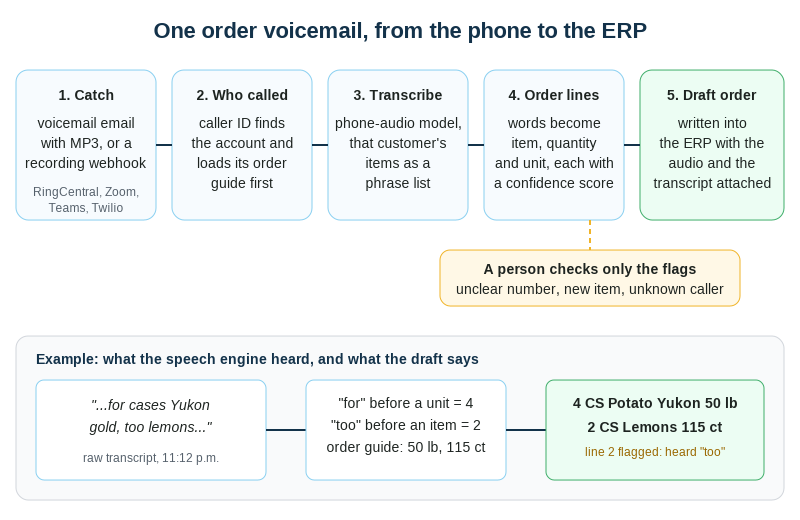
for cases Yukon gold, too lemonsbecoming two clean lines, with the unclear one flagged.
The diagram in words:
- Catch. The voicemail arrives as an email with an MP3 from RingCentral, Zoom Phone or Teams, or as a recording link from Twilio.
- Who called. The caller’s number is looked up in your customer list. A known number loads that account’s order guide, ship-to and usual delivery days.
- Transcribe. The audio goes to a speech engine using a phone-audio model, with that customer’s item names sent along as a phrase list.
- Order lines. An AI step turns the transcript into items, quantities and units, matched to your SKUs, each line with a confidence score.
- Draft order. A draft sales order is created in the ERP with the audio file and transcript attached. Lines that are unclear wait for a person.
Many setups add a sixth step: a short text back to the caller listing what was understood. A chef who reads 4 CS Yukon Gold 50 lb, 2 CS Lemons 115 ct
at 11:20 p.m. can fix a wrong line before the truck is loaded.
Why does the software look up the caller before transcribing?
Looking up the caller first lets the speech engine listen for the 80 or so items that customer actually buys instead of every word in the English language.
A bistro’s order guide might hold burrata, Yukon Gold, micro arugula and 16/20 shrimp. Sent as a phrase list, those words become far more likely to come back spelled right, which is exactly what the vocabulary features in the next section are built for.
An unknown number still gets transcribed. It just goes to a person with the transcript, because the first order from a new phone should never ship on a guess.
Which speech-to-text engine is best for order voicemails?
The best engine for order voicemails is the one that handles phone audio and lets you send your item names with each recording; on price, all five big ones are cheap.
| Engine | How you teach it item names | Limit or note from the docs | Listed price |
|---|---|---|---|
| Google Cloud Speech-to-Text | Model adaptation with phrase sets | A telephony model for 8 kHz phone audio | $0.016 a minute (standard, first 500,000 minutes); $0.003 with dynamic batch |
| Amazon Transcribe | Custom vocabulary tables | Up to 100 vocabulary files per account, 50 KB each | Tiered by volume; Amazon says custom vocabularies are included in the standard price |
| Azure AI Speech | Phrase list, no training needed | Not available with batch transcription; Microsoft suggests no more than 2,000 phrases | See Microsoft’s pricing page |
| Deepgram Nova-3 | Keyterm Prompting | Up to 100 terms, 500 tokens per request | $0.0048 a minute plus $0.0013 for keyterms (pay as you go, listed rates) |
| AssemblyAI | Keyterms Prompting | Up to 1,000 words or phrases, 6 words per phrase at most | $0.21 an hour plus $0.05 an hour for keyterms |
Google’s dynamic batch rate is the cheapest line in the table, but Google’s pricing page says it processes audio at a lower level of urgency
and names no turnaround time. For orders due before a 5 a.m. pick, test it before you rely on it.
Prices on all of these pages change often, and Deepgram showed its rates as a promotion when we read it. Check each page on the day you budget.
How much does it cost to transcribe order voicemails?
Transcribing order voicemails costs a few cents per message; listening to them by hand costs hours.
What we like about this one is how little it asks of anyone. Chefs keep calling the number they know by heart; your team just stops replaying the same message three times to catch one number.
| Engine and option | Cost of one 90-second voicemail | Cost of 1,560 minutes a month |
|---|---|---|
| Google Cloud, standard | $0.024 | $24.96 |
| Google Cloud, dynamic batch | $0.0045 | $4.68 |
| AssemblyAI with keyterms | $0.0065 | $6.76 |
| Deepgram Nova-3 with keyterms | $0.0092 | $9.52 |
| A clerk playing each voicemail once | 1.5 minutes of time | 26 hours, about $572 at $22 an hour |
Assumptions, all ours: 40 order voicemails a night, 90 seconds each on average, 26 delivery nights a month, which makes 1,560 minutes; listed pay-as-you-go rates read November 27, 2026; $22 an hour as a rough loaded cost for an order desk clerk.
The clerk row counts listening once and nothing else. Replays, item lookups and typing come on top, which is why the earlier guide on food distributor order entry automation works out the full desk time before cutoff.
The speech engine is the smallest bill in the whole setup. The AI matching step, the hosting and the ERP connection cost more, and the build work costs the most.
How does the software keep quantities and units straight?
The software keeps quantities straight by never trusting a number word on its own: it checks every quantity against the unit, the item and the account’s usual order.
- Number words next to units (“for cases”, “too lemons”) are read as quantities, and always flagged when the word was not a clear number.
- Teens and tens (“fifteen” and “fifty”) are compared with that account’s usual quantity; a jump of more than double is flagged.
- Units come from your item file, not from the chef. A case-only item ordered as “two” becomes 2 cases.
- Pack sizes like “16/20” shrimp or “115 count” lemons are read as part of the item name, not as quantities.
Same as last week
copies the order history and marks the draft for a glance.
The recording stays attached to the line. When a person checks a flag, one click plays the exact second where the chef said the number.
What should the order line’s voicemail greeting say?
The greeting should ask callers for the details in the order the software needs them: who they are, the delivery day, then each item with its quantity.
Here is a greeting you can copy and adjust:
You’ve reached the order line. Please say your business name, your delivery day, then each item with its quantity, one at a time. Please say numbers clearly, like “four cases.” We’ll text you back with what we heard. Thank you!
Asking for the business name covers chefs calling from a personal cell. Promising a text back gives the caller a reason to check it, which catches mistakes the same night.
Which voicemail to sales order software can you buy?
You can buy a packaged order agent from a food-ordering vendor, use your phone system’s own transcripts as a halfway step, or have a custom order agent built around your ERP.
| Option | What the maker says it covers | What to check |
|---|---|---|
| Choco OrderAgent | Orders from voicemail, WhatsApp, email, text and photos | Whether your ERP is on its supported list |
| Burnt | Orders from email, phone and voicemail; direct ERP connection where an API exists, custom integration where it doesn’t | What your team approves and what runs alone |
| Pepper Order Agent | Ordering by voice, text, image and handwriting; Pepper says it has integrated with 90+ ERP systems | Ask how voicemails reach it from your phone system |
| Your phone system’s transcripts (RingCentral, Zoom Phone, Teams) | Voicemail text in the email or app | Text only: no items, no units, no sales order |
| A custom order agent | Built on a speech engine, an AI model and your ERP’s API or import file | Who maintains it and where audio is stored |
Burnt’s page says 0 replies sent without your team’s approval
, which is the right instinct for any tool in this category. Whatever you choose, your desk should decide what may pass without a check.
If the same customers also text and email, pick a tool that handles all three. Our guide on how to automate phone and text orders in wholesale covers the texts, and emailed order sheets are covered in how to convert emailed PDF purchase orders to QuickBooks.
Which order voicemails should a person still listen to?
A person should still listen to any voicemail the software flags, plus a short list it should never pass alone.
- Calls from a number that isn’t in your customer list.
- Any quantity that came from an unclear word (“for”, “too”, “to”).
- Quantities far from the account’s usual, such as 50 where 15 is normal.
- Items the account has never ordered.
- Voicemails where the speech engine’s confidence is low, often from loud kitchens or bad cell signal.
- Messages that are not orders at all: complaints, credit requests, “call me back.”
- Voicemails left after the cutoff for the next delivery day.
Keep the audio attached to the order for as long as you keep the invoice. When a chef says I said fifteen,
the recording settles it kindly and in seconds.
How do you test voicemail to sales order software before trusting it?
Test it on voicemails you already have: if your phone system has been emailing them, your inbox holds a ready-made test set of real orders.
- Collect: pull two weeks of order voicemail emails, including the noisiest ones, plus the sales orders your desk keyed from them.
- Run: send the recordings through the software in the background, with your item list and order guides loaded.
- Compare: put each draft next to the order your clerk typed and count wrong items, wrong quantities and missed lines.
- Go live gently: let drafts from regular callers flow into the ERP for one-click approval, and keep new callers manual.
The number that matters is how many lines a person still had to fix. If that is not clearly lower than typing from scratch on your own voicemails, the tool isn’t ready for your 4 a.m. desk.
If it is, the order desk gets its mornings back for the calls that need a human voice: the chef who wants a substitute, the new account, the customer about to grow.
Run two weeks of your own saved voicemails through it, and let the fixed lines tell you whether it has earned a place on your desk.
Sources and further reading
- RingCentral: managing messaging notifications (voicemail attachment)
- Zoom: managing voicemail email notifications
- Microsoft Learn: set up Cloud Voicemail in Teams
- Twilio: TwiML Record verb
- Google Cloud: Speech-to-Text transcription models (telephony)
- Google Cloud: Speech-to-Text model adaptation
- Google Cloud: Speech-to-Text pricing (read November 27, 2026)
- Amazon Transcribe: custom vocabularies
- Amazon Transcribe pricing
- Microsoft Learn: Azure AI Speech phrase list
- Deepgram: Keyterm Prompting
- Deepgram pricing (read November 27, 2026)
- AssemblyAI pricing and Keyterms Prompting (read November 27, 2026)
- Choco: OrderAgent
- Burnt: AI order automation for food distributors
- Pepper: Order Agent for food distributors
Questions and answers
Can I use AI to turn voicemail orders into sales orders automatically?
Yes. AI can transcribe each order voicemail, identify the customer by caller ID, match the spoken items and quantities to your SKUs and units, and create a draft sales order in your ERP with the recording attached. Keep a person reviewing unclear numbers, new items and unknown callers before the order ships.
Do I have to change my phone number or phone system?
No. RingCentral, Zoom Phone and Microsoft Teams can all email each voicemail with the audio attached, and Twilio can send a recording link to a web address. The software reads those, so customers keep calling the same number.
How much does it cost to transcribe order voicemails?
Very little. At listed rates read November 27, 2026, a 90-second voicemail costs about $0.024 on Google Cloud’s standard Speech-to-Text and under a cent on AssemblyAI or Deepgram. The AI matching, hosting and ERP connection cost more than the transcription.
What happens if the caller mumbles a quantity?
A good setup flags it. Any quantity that came from an unclear word like “for” or “too”, or that is far from the account’s usual order, waits for a person, who can play the exact second of the recording with one click.
Isn’t my phone system’s voicemail transcription enough?
It helps, but it only gives you text. RingCentral, Zoom Phone and Teams transcripts don’t know your items, units or customers, so someone still has to turn the paragraph into order lines and key them into the ERP.