
GTA 6 Launch Bugs and Fixes: Known Issues and What Rockstar Has Patched
Disclosure: this page contains Amazon affiliate links. As an Amazon Associate we earn from qualifying purchases, at no extra cost to you.
Picture it: you finally reach Leonida, the prologue rolls, and then your console drops you back to the home screen.
Oh no, hello there, crash-weary Vice City survivor, let’s get you back in!
GTA 6 is out, and for most players launch week has gone smoothly.
A few PS5 and Xbox owners are fighting crashes, a sign-in outage and lost progress, though.
Here’s every launch problem named outlets have reported, what Rockstar has actually patched, and the official fixes from Sony, Microsoft and Rockstar Support.
If a power cut or a frozen console is what you’re worried about, a battery backup (UPS) for your console gives it time to shut down properly.
Short answer: Yes, GTA 6 has some launch bugs, but Rockstar hasn’t confirmed any. As of November 20, 2026, players report PS5 crashes with error CE-108255-1, Xbox Series X crashes and lost progress. Rockstar shipped two updates before launch without patch notes and hasn’t posted a known-issues list. Update everything, restart fully, and save manually.
Does GTA 6 have bugs at launch?
Yes, some players have hit GTA 6 bugs since the launch, but Rockstar hasn’t confirmed any of them, and many players report no problems at all. Notebookcheck’s Adam Corsetti wrote that most early players have had a smooth launch, while crashes on PS5 and Xbox Series X have forced some to replay missions.
Here’s every GTA 6 launch issue we could find reported by a named outlet, who reported it, and whether anyone official has said a word about it.
| Issue | Console | Reported by (date) | Official word | Status on Nov 20 |
|---|---|---|---|---|
| PlayStation Network sign-in outage | PS5 | Axios (Nov 18) | Sony confirmed it on its status page, no cause given | Fixed the same afternoon |
| PSN trouble at the midnight unlock | PS5 | WRAL (Nov 18, updated Nov 20) | PlayStation’s status page said services were “up and running” by 4 a.m. | Fixed |
| PS5 system update needed before playing | PS5 | TweakTown (Nov 18) | PlayStation Support: required | Install 26.07-14.23.00 |
| Crashes with error CE-108255-1, often early in the story | PS5 (base and Slim) | GamesRadar (Nov 19) | Sony’s generic advice only | No fix announced |
| Crashes during the prologue | PS5 and Xbox Series X | PC Games Hardware, Notebookcheck (Nov 19) | None | No fix announced |
| Crashes getting more frequent after hours of play | Xbox Series X | PC Games Hardware, Notebookcheck (Nov 19) | None | No fix announced |
| Lost progress after a crash | PS5 and Xbox Series X | Notebookcheck (Nov 19) | None | Save manually (see below) |
| Lucia bank mission cutscene not starting | Not stated | PC Games Hardware (Nov 19) | None | Restarting let players try again |
| Cars driving through buildings, characters falling through the ground | Not stated | PC Games Hardware, citing GameWatcher videos (Nov 19) | None | No fix announced |
PC Games Hardware’s Jacqueline Brosch put it plainly on November 19, 2026: it’s still unclear how widespread the GTA 6 crashes are. A handful of loud threads doesn’t mean every console is affected, and GamesRadar’s Jordan Gerblick said he’d had zero crashes in several hours of play on PS5.
What has Rockstar patched in GTA 6 so far?
Rockstar released two GTA 6 updates before launch, 1.002.000 on November 13 and 01.002.001 on November 16, 2026, and published patch notes for neither. No new GTA 6 patch had arrived by November 20, so nobody outside Rockstar knows what either update fixed.
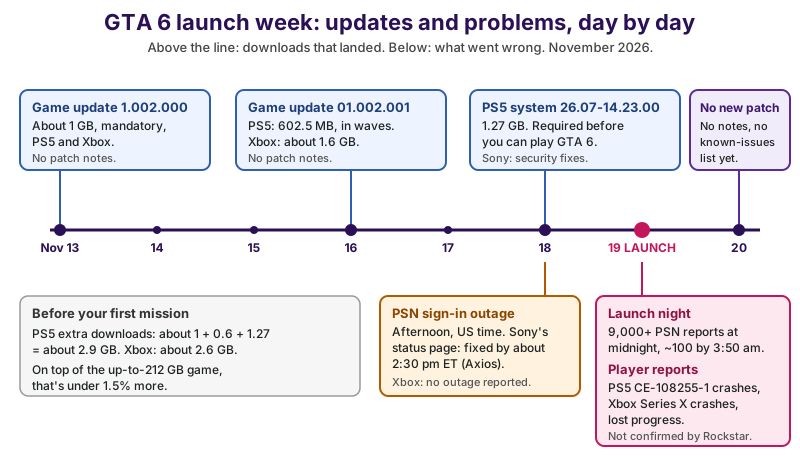
| Download | Date | PS5 | Xbox Series X|S | Patch notes |
|---|---|---|---|---|
| GTA 6 update 1.002.000 (mandatory) | about 1 GB | about 1 GB | None | |
| GTA 6 update 01.002.001 | 602.5 MB | about 1.6 GB | None | |
| PS5 system software 26.07-14.23.00 (required) | announced | 1.27 GB | not needed | ”security fixes” |
| Total on top of the game | - | about 2.9 GB | about 2.6 GB | - |
Our sum: on PS5, about 1 GB + 0.6 GB + 1.27 GB comes to about 2.9 GB; on Xbox, about 1 GB + 1.6 GB is about 2.6 GB. Next to Rockstar’s up-to-212 GB GTA 6 download, that’s less than 1.5% extra, so the updates won’t break your storage plan — here’s how to make room for the 212 GB download if the game itself is the squeeze.
VICE’s Brent Koepp reported on November 16, 2026, that the PS5 update rolled out in waves, and ComicBook.com’s Tyler Fischer said 1.002.000 is mandatory, so GTA 6 won’t start until it’s installed. ComicBook.com cited a third-party breakdown showing the biggest changed files were story and map data, which hints at last-minute fixes but doesn’t tell us which bugs.
Where is Rockstar’s official GTA 6 known-issues list?
There isn’t one yet. As of November 20, 2026, Rockstar hasn’t published a GTA 6 known-issues list or patch notes, and its Grand Theft Auto VI Error Troubleshooting
article on Rockstar Support (updated November 18, per PC Games Hardware) points console errors to Sony’s and Microsoft’s error-code pages.
Rockstar posts patch notes on Rockstar Support, one article per update, and server problems on its Service Status page. Those two pages, plus the Rockstar Newswire, are where an official GTA 6 fix will show up first. Posts promising a patch on a specific date are rumors until one of them says so.
Why was PlayStation Network down before GTA 6 launched?
Sony hasn’t said why. PlayStation Network had a sign-in outage on the afternoon of , US time, hours before GTA 6 unlocked, and Axios reported that Sony’s status page showed the problems resolved by about 2:30 p.m. Eastern. Axios also said Xbox players reported no matching problems.
A second wave came at the GTA 6 launch itself. WRAL reported that more than 9,000 people told Downdetector they couldn’t reach PSN at midnight, that reports fell to just over 100 by 3:50 a.m. on Thursday, November 19, and that PlayStation’s status page said services were “up and running” by 4 a.m. When GTA 6 won’t start on PS5, check PlayStation Network’s status page before you touch your console’s settings.
Do you need a PS5 system update to play GTA 6?
Yes. PS5 owners must install system software 26.07-14.23.00 before GTA 6 will start, even if the game was preloaded, and it applies to every PS5 model. PlayStation Support US posted on November 18, 2026, as reported by TweakTown’s Derek Strickland:
Sony Interactive has issued a PS5 system software update that is required before playing Grand Theft Auto VI.
TweakTown put the PS5 update at 1.27 GB, and Sony’s only note says it has made some security fixes to the system software.
On the PS5, go to Settings, System, System Software, System Software Update and Settings, and update. PlayStation’s GTA VI support page suggests turning on automatic downloads and installs there, and turning on Console Sharing and Offline Play if other accounts on your PS5 play GTA 6.
How do you fix GTA 6 error CE-108255-1 on PS5?
Sony’s official fix for PS5 error CE-108255-1 is to update the game and, if that fails, to contact PlayStation Repairs, which isn’t much help for a GTA 6-specific crash. Sony’s CE-108255-1 page only says An error occurred with the game/application.
GamesRadar’s Jordan Gerblick found more than a dozen Reddit posts on , describing GTA 6 crashing with this code after certain early story moments, on base, digital and Slim PS5 consoles. One post he quoted:
Ive tried everything. Cleared cache, rebuilt database, reinstalled, updated, restored license and it does the same thing.
So the honest picture of GTA 6’s CE-108255-1 crash is this: the general PS5 fixes below are worth trying, because they solve plenty of crashes, but a crash caused by GTA 6 itself needs a patch from Rockstar. GamesRadar said it had asked Sony for comment. Don’t pay for a repair before Rockstar has had its say.
How do you fix GTA 6 crashing on PS5 and Xbox?
Work through the official console fixes in order: check the status pages, update GTA 6 and your console, fully close and restart, then try the deeper PS5 or Xbox fixes, reinstall only as a last resort, and report the crash to Rockstar. Each step comes from PlayStation Support, Xbox Support or Rockstar Support.
Little confession from a fellow fan: there’s a strange comfort in knowing it’s not just you. Half of launch week is people comparing error codes, and the other half is people who haven’t seen one at all.
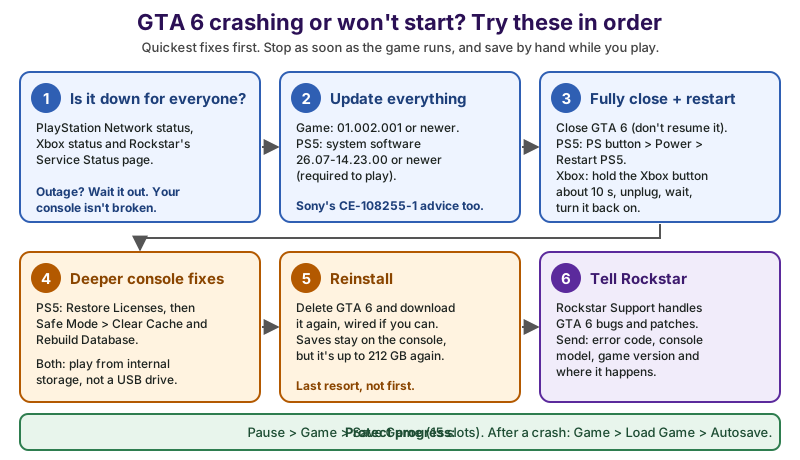
- Is it down for everyone? Check PlayStation Network status, Xbox status and Rockstar’s Service Status. If there’s an outage, wait; nothing on your console needs fixing.
- Update everything: GTA 6 on build 01.002.001 or newer, and on PS5, system software 26.07-14.23.00 or newer.
- Fully close and restart: close GTA 6 instead of resuming it from rest mode. On PS5, press the PS button and select Power, Restart PS5. On Xbox Series X|S, hold the Xbox button on the console for about 10 seconds, unplug it, wait, then turn it back on.
- Deeper console fixes: on PS5, restore licenses, then use Safe Mode’s Clear Cache and Rebuild Database. On both consoles, run GTA 6 from internal storage, not a USB drive.
- Reinstall: delete GTA 6 and download it again, wired if you can. It’s up to 212 GB again, so leave this for last.
- Tell Rockstar: Rockstar Support handles GTA 6 bugs and patches. Send the error code, your console model, the game version and where the crash happens.
That order follows PlayStation Support’s guide for games that won’t start, which lists moving the game off USB extended storage, restarting, restoring licenses, reinstalling, updating the system software and rebuilding the database. If you play a lot of big games, an M.2 SSD for PS5 or a storage expansion card for Xbox Series X|S gives GTA 6 room on fast internal-class storage instead of a USB drive.
How do you rebuild the database on PS5?
Start the PS5 in Safe Mode and choose Clear Cache and Rebuild Database, then Rebuild Database. PlayStation Support’s Safe Mode guide gives the steps:
- Hold the PS5’s power button for three seconds to turn it off, and wait for the light to stop blinking.
- Press and hold the power button again, and let go after the second beep, about seven seconds after the first.
- Connect your DualSense with a USB cable and press the PS button.
- Select Clear Cache and Rebuild Database. Try Clear System Software Cache first, then Rebuild Database, which scans the drive and creates a new database of all content.
Stay away from the two Reset PS5 options in the PS5’s Safe Mode menu for a GTA 6 crash: Sony says both delete all user data.
How do you power cycle an Xbox Series X|S?
Hold the Xbox button on the front of the console for about 10 seconds until it shuts down, unplug the power cable, wait, plug it back in and turn the Xbox on again. Xbox Support’s power cycle guide covers it, and it’s Xbox’s standard first step for a game that misbehaves; a power cycle doesn’t touch your GTA 6 saves.
The Xbox Series X|S crash reports Notebookcheck and PC Games Hardware described (the game running for a while, then crashing more and more often) are the kind of thing a full power cycle is worth a try for, though only a Rockstar patch can fix a bug in GTA 6 itself.
Can GTA 6 crashes delete your progress?
A crash can cost you everything since your last save, and some GTA 6 players have replayed missions after one. Notebookcheck reported on November 19, 2026, that GTA 6’s autosave isn’t proving reliable when consoles freeze or reboot, and that the prologue and some mission checkpoints don’t trigger it.
Before you panic about a missing GTA 6 save, look in the right menu. Notebookcheck and PC Games Hardware both point out that GTA 6’s Save Game menu doesn’t show autosaves; they’re on the separate Load Game screen. The 10 hours a streamer said he lost is disputed: Notebookcheck says it’s unclear whether his PS5 crashed or was switched off.
How do you save manually in GTA 6?
Open the pause menu and choose Game, then Save Game; it works anywhere in free roam, but not during most missions. PowerPyx’s GTA 6 save guide (November 18, 2026) lays out the GTA 6 save system:
- Manual save
- Pause menu (Options on PS5, Menu on Xbox), Game, Save Game, in free roam.
- Save slots
- 15 manual save slots.
- Autosave
- 1 autosave slot, separate from the 15.
- Loading
- Game, Load Game, then the autosave or a manual save.
- Watch out
- Loading an older manual save overwrites the autosave too.
- Mission replay
- Not in GTA 6 at launch, so keep a save at the start and end of each chapter.
A simple GTA 6 habit: save in a new slot after every mission, rotating through two or three slots, so a crash or a corrupted file only costs you one mission. On PS5, PlayStation Plus subscribers can also back up saved data to the cloud.
How do you report a GTA 6 bug to Rockstar?
Report GTA 6 bugs to Rockstar Support, not to Sony or Microsoft. PlayStation’s GTA VI support page says Rockstar Support handles gameplay issues, patches, and bugs
, while PlayStation Support handles accounts, launching, downloads, codes, installing, digital refunds and suspensions.
A GTA 6 bug report that Rockstar can actually use includes:
- the exact error code, such as CE-108255-1 on PS5;
- your console: PS5 (base, Slim or Pro) or Xbox Series X or Series S;
- the GTA 6 version (01.002.001 at launch) and, on PS5, the system software version;
- the mission or place where it happens, and whether it happens every time;
- a short video clip, if you can capture one (our GTA 6 recording guide shows how on PS5 and Xbox).
When will Rockstar release the next GTA 6 patch?
Rockstar hasn’t announced a date for the next GTA 6 patch, and as of November 20, 2026, any specific date you see online is a rumor. When it arrives, it’ll download automatically if automatic updates are on, and Rockstar Support should carry its notes.
Here’s what to keep an eye on while you wait for the first GTA 6 patch notes:
- Rockstar Support: a
Grand Theft Auto VI
title update notes article, and any known-issues article. - Rockstar’s Service Status page: server problems that aren’t your console’s fault.
- Rockstar Newswire: announcements about fixes and what comes next.
- Your console: a new GTA 6 version number above 01.002.001.
Rockstar has patched its big launches before: Notebookcheck recalled that Red Dead Redemption 2’s PC launch was followed by a series of patches. We’ll update this GTA 6 bug list as Rockstar confirms issues and fixes, so check back after the first patch. Meanwhile, here’s how to set up your TV for GTA 6 once it’s running smoothly.
If GTA 6 still won’t behave after every step above, you’re not alone and you didn’t break anything. Save often, report it, and keep the GTA 6 console requirements handy if you’re wondering whether your hardware is the problem (it almost certainly isn’t).
So save often, update everything, and give Rockstar a little time to patch. Leonida isn’t going anywhere, and it’ll be even nicer once the crashes are gone.
Sources and further reading
- Rockstar Support: Grand Theft Auto VI Error Troubleshooting — points console errors to PlayStation and Xbox error-code pages (updated November 18, 2026)
- Rockstar Support: Service Status — Rockstar’s server status
- Rockstar Newswire — official announcements
- PlayStation Support: Grand Theft Auto VI support — who handles what: Rockstar Support for gameplay issues, patches and bugs
- PlayStation Support: PS5 error code CE-108255-1 — update the game, then PlayStation Repairs
- PlayStation Support: How to use Safe Mode on PS5 consoles and PS4 consoles — Clear Cache and Rebuild Database
- PlayStation Support: How to troubleshoot issues when starting a game — restart, restore licenses, reinstall, update, rebuild
- PlayStation Network Service Status — PSN outages
- Xbox Support: How to power cycle your Xbox console — hold the Xbox button about 10 seconds, unplug
- Xbox status — Xbox network outages
- Axios: PlayStation suffers major outage hours before "GTA VI" launch (November 18, 2026) — resolved by about 2:30 p.m. Eastern; no Xbox problems
- WRAL: Outage hits PlayStation Network on eve of Grand Theft Auto VI release (Joseph Ochoa, November 18, updated November 20, 2026) — 9,000+ reports at midnight, just over 100 by 3:50 a.m.
- TweakTown: Gamers can’t play GTA 6 on PS5 without updating system firmware (Derek Strickland, November 18, 2026) — 26.07-14.23.00, 1.27 GB, PlayStation Support quote
- GamesRadar: PS5 error CE-108255-1 is ruining GTA 6 for some players (Jordan Gerblick, November 19, 2026) — crash reports on base, digital and Slim PS5
- Notebookcheck: GTA 6 PS5 and Xbox crashes are losing hours of progress, despite autosave system (Adam Corsetti, November 19, 2026) — autosave gaps, Load Game screen, Xbox Series X reports
- PC Games Hardware: GTA 6 players report crashes and lost progress (Jacqueline Brosch, November 19, 2026) — prologue crashes, Lucia bank mission, clipping
- VICE: GTA 6 gets a second day one patch on PS5 and Xbox (Brent Koepp, November 16, 2026) — 01.002.001: 602.5 MB on PS5, about 1.6 GB on Xbox
- ComicBook.com: GTA 6 first update released ahead of launch (Tyler Fischer, November 13, 2026) — 1.002.000, about 1 GB, mandatory, no patch notes
- PowerPyx: GTA 6 How to Save (November 18, 2026) — 15 manual slots, 1 autosave, no mission replay
Questions and answers
Does GTA 6 have bugs?
Some players have reported GTA 6 bugs since the November 19, 2026 launch, including PS5 crashes with error CE-108255-1, Xbox Series X crashes and lost progress. Rockstar hasn’t confirmed any of them as of November 20, and many players report no problems.
Is there a GTA 6 patch?
Rockstar released two GTA 6 updates before launch, 1.002.000 on November 13 and 01.002.001 on November 16, 2026, both without patch notes. No new patch or release date had been announced by November 20; Rockstar Support is where its notes will appear.
Why does GTA 6 keep crashing on PS5?
Nobody official has said yet. Make sure GTA 6 and the PS5 system software (26.07-14.23.00 or newer) are updated, fully restart the console, restore licenses and rebuild the database in Safe Mode, then report the crash to Rockstar Support if it continues.
What does error CE-108255-1 mean on PS5?
Sony describes CE-108255-1 only as an error with the game or application, and its advice is to update the game, then contact PlayStation Repairs. With GTA 6, GamesRadar found it tied to crashes after early story moments, so a Rockstar patch is the likely real fix.
Did GTA 6 delete my save after a crash?
Probably not all of it. GTA 6’s Save Game menu doesn’t show autosaves, so open Game, then Load Game, and check the autosave there. To lose less next time, save manually in one of the 15 slots after each mission.